Mini PC vs Laptop: A Full Side-by-Side Comparison
On this page (9 sections)
- Mini PC vs. Laptop: Deciding on Your Next Desktop Alternative
- Portability: Where and How You’ll Use It
- Power and Performance: What You Can Do
- Components: What’s Included and What You Need
- Upgradability and Longevity
- Cost Considerations: Value for Money
- Choosing the Right Option for You: A Quick Checklist
- Conclusion
- Frequently Asked Questions
Choosing between a mini PC and a laptop depends on your priorities. If portability isn’t a major concern and you want more power for your money, a mini PC often wins. If you need to work from coffee shops or move around your house easily, a laptop is the clear choice. We’ve compared them to help you decide.
Mini PCs are compact desktops that take up very little space. Laptops are all-in-one machines with a built-in screen and keyboard. For a desktop with an integrated display, see our mini PC and all-in-one comparison. Both can handle everyday tasks like browsing and word processing. But for demanding jobs like video editing or gaming, the differences become more apparent. Let’s look at how they stack up.
- Portability: Laptops win for travel. Mini PCs are stationary.
- Power: Mini PCs often offer more processing muscle for the price.
- Screen & Keyboard: Laptops have them built-in. Mini PCs need separate purchases.
- Upgradability: Some mini PCs can be upgraded, but usually less than desktops.
- Cost: Mini PCs can be more budget-friendly for raw performance.
Ready to see which one fits your needs best? Below, we break down the key differences between mini PCs and laptops to help you make the right choice.
Mini PC vs. Laptop: Deciding on Your Next Desktop Alternative
You’re looking for a new computer, and the usual suspects – the trusty desktop and the portable laptop – aren’t quite hitting the mark. You’ve heard about mini PCs, these tiny boxes that seem to do it all. But how do they really compare to a laptop, especially when you’re trying to get the most bang for your buck or the right tool for your specific needs? Let’s break it down.
The core difference is simple: a laptop is an all-in-one package. It has a screen, a keyboard, and a battery built right in. A mini PC, on the other hand, is just the computer’s brain. You’ll need to add your own monitor, keyboard, and mouse. This fundamental difference leads to many of the pros and cons for each.
Portability: Where and How You’ll Use It
This is often the biggest deciding factor. If you plan to move your computer around frequently, a laptop is the undisputed champion. They are designed for life on the go. You can easily toss one into a bag and work from a coffee shop, a library, or a different room in your house. The built-in screen and battery mean you don’t need to hunt for an outlet or external display.
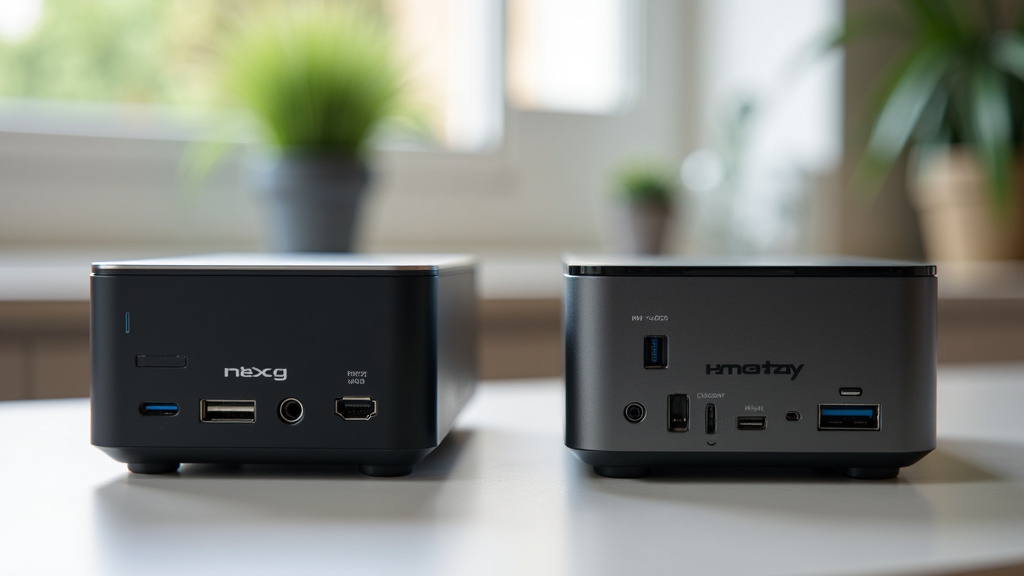
Mini PCs are essentially compact desktop computers. While they are small and easy to move from one desk to another, they aren’t meant for true portability. You need to set them up with a monitor, keyboard, and mouse. Carrying all these components around would be quite a hassle. Think of a mini PC as a desktop that fits on a shelf, not something you’d pull out at an airport.
Power and Performance: What You Can Do
When it comes to raw processing power for your money, mini PCs often have an edge. Because they don’t need to be squeezed into a slim, battery-powered chassis, manufacturers can often include more powerful components, like faster processors and more RAM, for a lower price compared to a similarly specced laptop. This is especially true if you’re comparing them to higher-end laptops.
However, this isn’t a hard and fast rule. You can find very powerful laptops, and very basic mini PCs. For everyday tasks like browsing the web, checking email, and working on documents, both types of machines will perform admirably. The differences become more noticeable when you’re doing intensive tasks.
Handling Demanding Software
If your work involves video editing, graphic design, 3D rendering, or playing the latest video games, you’ll need more horsepower. Many mini PCs can be configured with powerful CPUs and dedicated graphics cards, sometimes rivaling mid-range to high-end gaming desktops. You just have to be willing to pay for those upgrades.
Laptops can also handle these tasks, but you often pay a premium for that power in a portable form factor. A gaming laptop or a mobile workstation can be very expensive. Furthermore, laptops sometimes throttle their performance to prevent overheating, especially during long, demanding sessions. Mini PCs, with better airflow in their slightly larger chassis, can often sustain peak performance longer (TechRadar research).
Components: What’s Included and What You Need
This is where the all-in-one nature of a laptop shines. When you buy a laptop, you get a complete computing experience right out of the box. The screen, keyboard, trackpad, and speakers are all integrated. You just need to open it up and turn it on.
A mini PC is just the tower component. You will need to purchase, or already own, a separate monitor, keyboard, and mouse. This adds to the overall cost if you don’t have these peripherals. However, it also gives you complete freedom to choose your preferred setup. Do you want a massive ultrawide monitor? A mechanical keyboard with clicky keys? A trackball instead of a mouse? You can pick exactly what you like best.
Screen Size and Quality
Laptop screens range from small 11-inch displays to large 17-inch panels. The quality can vary wildly, from basic HD resolution to vibrant 4K displays with excellent color accuracy. You’re locked into whatever screen comes with the laptop, though.
With a mini PC, you can connect to virtually any display. This means you can opt for a large, high-resolution monitor that might be too cumbersome for a laptop. You can also set up dual or even triple monitor configurations easily. This can significantly boost your productivity for certain types of work.
Keyboard and Mouse Options
Laptop keyboards are designed for portability and space-saving. They can feel cramped, and the key travel might be shallow. While many are quite good, they don’t always offer the best typing experience for extended periods. Trackpads can also be hit-or-miss.
Since you connect your own peripherals to a mini PC, you can choose a keyboard and mouse that perfectly suit your ergonomics and typing style. Many people find that using a full-size keyboard and a comfortable mouse makes long work sessions much more pleasant and reduces strain.
Upgradability and Longevity
Generally, mini PCs offer more upgrade potential than laptops, though less than traditional desktop towers. You can often easily upgrade the RAM and storage (SSD or hard drive) in many mini PC models. This can extend the life of your computer and allow you to boost its performance as your needs change over time.
Laptops are much more limited. While some high-end gaming laptops might allow RAM and storage upgrades, many modern ultrabooks have these components soldered directly to the motherboard. This means if you want more RAM or a bigger hard drive, you’re often out of luck unless you buy it that way from the start. Upgrading a laptop’s CPU or graphics card is almost always impossible.
Repairability
When something breaks, repairing a mini PC can sometimes be simpler and cheaper than repairing a laptop. Because the components are more standardized and often more accessible, a technician might be able to replace a faulty part more easily. With a laptop, the integrated nature means a single failure could require replacing a much larger, more expensive component.
For example, if a laptop’s screen is damaged, replacing it can be a significant cost. If a mini PC’s monitor is damaged, you just buy a new monitor. This makes the mini PC setup feel more adaptable to accidental damage or component failure over the years.
Cost Considerations: Value for Money
When comparing pure computing power, mini PCs can offer better value for your money. For the same price, you might get a faster processor, more RAM, or a larger SSD in a mini PC compared to a laptop. This is because the cost of the integrated screen, keyboard, battery, and the engineering required for a slim form factor is removed.
However, remember that you need to factor in the cost of a monitor, keyboard, and mouse if you don’t already have them. This can add a few hundred dollars to the total price, potentially closing the gap with some budget laptops. It’s important to price out a complete setup for both options.
Initial Purchase Price
Basic mini PCs can be found for under $200, offering enough power for light web browsing and office tasks. More capable models with faster processors and more storage will climb into the $400-$800 range, sometimes higher for premium builds. These often rival mid-range laptops in price but offer more power.
Entry-level laptops can start around $300-$400, but performance at this price point is often basic. Good mid-range laptops typically start around $600-$800 and go up significantly from there. High-performance or premium ultrabooks can easily cost $1,000-$2,000 or more.
Total Cost of Ownership
Over time, the total cost of ownership might also be a consideration. If you can upgrade a mini PC’s RAM or storage down the line, you might avoid buying a whole new machine. If a laptop’s components are failing, or you need more performance, you might be forced into a complete replacement. Mini PCs can sometimes offer a longer lifespan for your investment.
A report from consumer electronics reviewers noted that modularity, like that found in some mini PCs, can lead to longer device lifespans by allowing targeted upgrades rather than full replacement (TechReview Daily Insights).
Choosing the Right Option for You: A Quick Checklist
Still weighing your options? Ask yourself these quick questions:
- Do you need to move your computer frequently between locations? (Laptop wins)
- Is your budget tight, but you need solid processing power? (Mini PC likely wins)
- Do you already have a monitor, keyboard, and mouse you like? (Mini PC is a great fit)
- Do you prefer the convenience of an all-in-one device? (Laptop is your friend)
- Are you interested in setting up multiple monitors or custom peripherals? (Mini PC offers more flexibility)
- Is your primary need for portability and battery life? (Laptop is the clear choice)
Conclusion
Deciding between a mini PC and a laptop comes down to your daily routine and computing needs. If portability is essential, a laptop is your go-to for flexibility. If you prioritize raw power for your budget and work mostly from a single location, a mini PC is a smart choice. Both can handle everyday tasks, but their strengths lie in different areas. Consider your workspace, your budget, and how often you move your computer. Once you weigh these factors, you’ll be ready to choose the machine that best supports your digital life.
Frequently Asked Questions
Can I use a mini PC for gaming?
Yes, you can use a mini PC for gaming, especially if you opt for a model with a dedicated graphics card and a powerful processor. While not as common as gaming desktops, many mini PCs can handle modern games, though you might need to adjust settings for the most demanding titles.
Are mini PCs good for home offices?
Mini PCs are excellent for home offices because they save desk space and can be powerful enough for business applications. Their small size makes them easy to hide away, and you can connect them to your preferred monitor, keyboard, and mouse for an ergonomic setup.
How much does a mini PC setup usually cost?
The cost of a mini PC setup can vary widely. A basic mini PC might cost under $200, but you’ll need to add at least $100-$200 for a monitor, keyboard, and mouse. More powerful mini PCs can cost $400-$800 or more, plus the cost of peripherals.
Can I connect multiple monitors to a mini PC?
Absolutely. Most mini PCs come with multiple display outputs, making it easy to connect two or even three monitors. This is a significant advantage for multitasking and productivity compared to many laptops, which are limited to one or two external displays.
Which option is better for students?
For students, a laptop is often the better choice due to its portability for classes and study sessions in different locations. Students weighing these options can compare mini PCs and laptops for school. However, if a student primarily studies from their dorm room and needs more power for specific software, a mini PC with an external monitor could be a cost-effective alternative.