Intel NUC vs ASUS NUC: Which Should You Choose? (October 2026)
For current NUC 13 Pro systems, compare the exact configuration and seller support: Intel NUC and ASUS NUC names can refer to the same family. These examples pair Intel processors with ASUS NUC hardware, while memory, storage and processor models vary.
On this page (7 sections)
- Intel NUC vs ASUS NUC: what does the name mean?
- Which NUC 13 Pro configuration fits your work?
- How do the Core i5 and Core i7 options compare?
- What should you check in ports and displays?
- Does the seller matter when buying an ASUS Intel NUC?
- Is an Intel NUC or ASUS NUC better value?
- Intel NUC vs ASUS NUC: which should you choose?
For current NUC 13 Pro systems, compare the exact configuration and seller support: Intel NUC and ASUS NUC names can refer to the same family. The examples here use Intel processors in ASUS NUC 13 Pro systems, but their processors, memory and storage differ.
The phrase “ASUS Intel NUC” can describe an ASUS NUC built around an Intel processor. It doesn't tell you who sells the configured unit or which parts are included, so compare model numbers and support terms.
If you are choosing between compact computers more broadly, first consider Mini PC vs Desktop Computer: How They Compare and Why Choose a Mini PC Over a Desktop? The Honest Answer.

Intel NUC vs ASUS NUC: what does the name mean?
Intel NUC and ASUS NUC are not necessarily competing designs. ASUS acquired Intel's NUC business, and NUC computers continue under ASUS with Intel processors in many configurations.
That means an “Intel NUC” search can lead to ASUS-branded systems, older Intel-branded models, or third-party configured computers. Read the full model name and processor number rather than assuming the brand phrase identifies a distinct platform.
The examples in this comparison are NUC 13 Pro systems. Three list Core i5 processors, while one is a Core i7 configuration with a larger memory and storage setup.
Is ASUS NUC the same as Intel NUC?
The terms overlap, but they don't guarantee that two products are identical. Model generation, processor, memory, storage, ports and seller support can all vary.
A system may be described as both “ASUS NUC” and “Intel NUC” because its chassis family is a NUC and its processor is made by Intel. Retailer configured units may also include RAM, storage and an operating system.
Before buying, match the complete model code and processor against your needs. If a title and the detailed processor information disagree, get clarification before relying on that configuration.
Which NUC 13 Pro configuration fits your work?
Choose based on the exact processor and included memory and storage, then check the ports you need. A familiar NUC name alone doesn't make one configuration a better fit.
The Geekplus ASUS NUC 13 Pro pairs an Intel Core i5-13420H with 16GB DDR4 RAM and a 512GB NVMe SSD. It is a reasonable comparison point if that H-series processor and included VESA mount match your setup.
The GEEK+ ASUS NUC 13 pro Intel NUC lists a Core i5-1340P, 16GB DDR4-3200 and a 512GB PCIe Gen4 NVMe SSD. Its listed ports include 2 Thunderbolt 4 ports and 2 HDMI 2.1 ports.
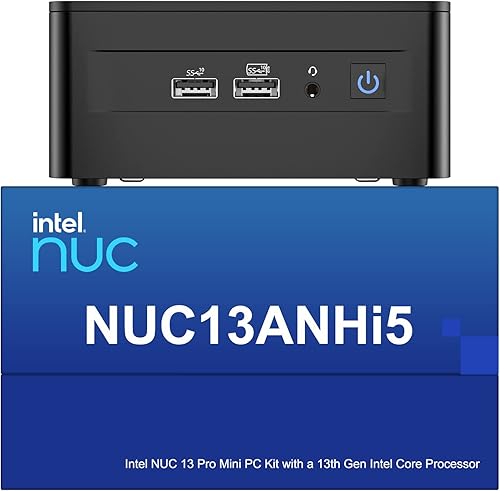
The NENCHIN Intel NUC 13Pro for ASUS NUC13ANHi5 also names a Core i5-1340P, with 16GB RAM and a 512GB SSD. It identifies Intel Iris Xe Graphics, but check its exact port layout if your desk depends on a certain display connection.
The Geekplus ASUS NUC 13 Pro with 32GB RAM and 1TB SSD offers more installed memory and storage. Its title and specs give different Core i7 model numbers, so confirm the processor before choosing it.
How do the Core i5 and Core i7 options compare?
A Core i5 may be enough for everyday work, while extra memory and storage can matter more if you keep many apps and files open. Match the system to your workload rather than buying by processor tier alone.
Two listed options use the Core i5-1340P. One names the Core i5-13420H, and another is presented as a Core i7 system.
These labels describe different processor models; they aren't a direct measure of how a particular app will perform.
For web browsing, documents, video calls and office tasks, compare the full configuration and ports. For heavier creative work or sustained multitasking, consider the processor, memory capacity and graphics needs together.
The Core i7 system includes 32GB RAM and a 1TB SSD, compared with 16GB and 512GB in the other examples. Those differences may help if your workload uses more memory or local storage, but they don't mean every task will run faster.
The Core i7 configuration also has a processor-model mismatch in its details. Treat the exact CPU as an open buying question and confirm it before placing an order.
What should you check in ports and displays?
Count your monitors and peripherals, then confirm the exact NUC's ports support them. Similar family names don't ensure the same connections or display setup.
The GEEK+ Core i5-1340P configuration lists 2 HDMI 2.1 ports and 2 Thunderbolt 4 ports. Another Core i5 configuration names HDMI, DisplayPort and Thunderbolt 4, while the NENCHIN model lists HDMI, mini DisplayPort and Thunderbolt 4.
A port count by itself doesn't guarantee support for a particular resolution or number of screens. Check the exact model's display limits and whether you need adapters, USB hubs or a dock.
If screen selection is still open, see Monitors: The Complete Buying Guide. For sound through a desktop setup, Computer Audio: The Complete Buying Guide covers speakers and other audio choices.
Does the seller matter when buying an ASUS Intel NUC?
Yes, seller support and warranty terms matter because these examples are configured systems with different brands and support statements. Check what covers the barebone computer, memory, storage and operating system, and how service works in your country.
One configuration describes ASUS global warranty coverage for the barebone unit and separate seller coverage for RAM, SSD and operating system. Another describes a 3-year international warranty, while another makes its own support claims.
Those statements are not interchangeable. Confirm the warranty provider, duration, exclusions and service route for the exact configuration you plan to buy.
Also check whether Windows is pre-installed and which version is included. The examples describe Windows 11 Pro, but make sure the system you select matches your software and licensing needs.
Is an Intel NUC or ASUS NUC better value?
Neither name guarantees better value; compare what is included and what you need to add. Memory, SSD size, operating system, ports and support can change the total cost and convenience.
A lower memory or storage configuration may be a sensible choice if you already have compatible parts or don't need more space. A 32GB RAM and 1TB SSD setup may save configuration work if those capacities suit your use.
Consider your display connections and network setup, too. Features you won't use don't add practical value, while a missing port can mean buying an adapter.
For a broader decision process, use How to Choose a Mini PC: A Step-by-Step Guide. If you are also weighing Apple's compact desktops, compare Apple Mac Mini vs Mac Studio: Which Should You Choose?.
Intel NUC vs ASUS NUC: which should you choose?
Choose by model and configuration, not by whether the title says Intel NUC or ASUS NUC. For everyday work, compare the Core i5 systems and choose the one whose ports, RAM and storage fit your setup.
Choose the 32GB RAM and 1TB SSD option if those capacities matter, after confirming its exact Core i7 processor. Check warranty coverage and seller support for any configured system before buying.
If your workload needs desktop-class graphics or upgrade options, a mini PC may not be the right format. Read [Is a Mini PC as Powerful as a Desktop?
What You Need to Know](/is-a-mini-pc-as-powerful-as-a-desktop/) before deciding.
Frequently asked questions
Is an Intel NUC the same as an ASUS NUC?
The names can overlap because ASUS took over Intel's NUC business, and ASUS-branded NUC systems can still use Intel processors. Check the exact model family, processor and configuration instead of treating Intel NUC and ASUS NUC as two fixed sets of computers.
Which ASUS NUC 13 Pro configuration should I choose?
Choose by processor, memory, storage and ports. These examples include Core i5-13420H and Core i5-1340P configurations, plus a Core i7 option with 32GB RAM and a 1TB SSD.
Confirm the processor model because one provided configuration has conflicting processor details.
Can an ASUS NUC run multiple monitors?
Some NUC 13 Pro configurations list HDMI and Thunderbolt 4 display connections, but their port details differ. Count the outputs you need, check the exact model's display limits and make sure your monitors support the connection types before buying.
Should I choose a Core i5 or Core i7 NUC?
A Core i5 configuration can suit everyday office work and multitasking, while a Core i7 option may fit heavier workloads when its exact processor and memory are confirmed. Choose by the apps you use and the full configuration, not the i5 or i7 label alone.