9 Best Logitech Keyboard and Mouse Combos (November 2026)
The best Logitech keyboard and mouse combos include the Logitech MK540 Full Size Advanced Wireless Keyboard for comfortable everyday typing, the Logitech MK470 Slim Wireless Combo Compact Keyboard for a quiet, compact desk, and the Logitech MK270 Full Size Wireless Keyboard for familiar full-size controls.
On this page (5 sections)
The best Logitech keyboard mouse combo for most family desks is the MK540, with a full-size keyboard, integrated palm rest and ambidextrous mouse. Choose the MK470 for a quiet compact desk, the MK120 for a wired connection, or the MK955 if you switch among several devices.
A matching set keeps keyboard and mouse connections together, which can make setup easier on a shared home computer. Logitech's choices range from simple wired input to wireless combos with multi-device switching and shaped keyboards.
If you're starting with a mini PC, first check its open ports and wireless options. Our guide on whether a mini PC comes with a keyboard and mouse explains what may be included and what you may need to add.
Our picks at a glance
-
1
 Best for comfortable everyday typing
Logitech MK540 Full Size Advanced Wireless Keyboard
9.7/10 our score
See it on Amazon -
2
 Best for a quiet, compact desk
Logitech MK470 Slim Wireless Combo Compact Keyboard
9.7/10 our score
See it on Amazon -
3
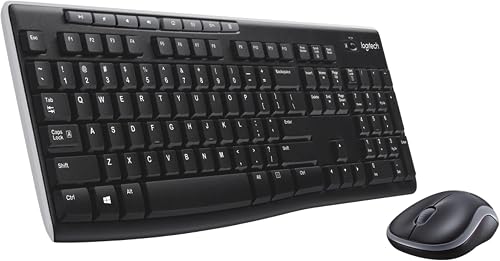 Best for familiar full-size controls
Logitech MK270 Full Size Wireless Keyboard
9.6/10 our score
See it on Amazon
- 4
 Check it
Logitech MK120 Full Size Wired Keyboard
Best for a simple wired setup - 5
 Check it
Logitech Wave Keys MK670 Wireless Ergonomic Keyboard
Best for a wavy key layout - 6
 Check it
Logitech MK955 Signature Slim Wireless Keyboard Mouse
Best for switching among three devices - 7
 Check it
Logitech MK250 Wireless Bluetooth Keyboard and Mouse
Best for saving a USB port - 8
 Check it
Logitech MK850 Performance Wireless Keyboard and Mouse
Best for a multi-device desk - 9
 Check it
Logitech MX Keys Combo for Business Keyboard
Best for a business workspace
Which Logitech keyboard mouse combo is best for each setup?
The MK540 is the best all-around fit here, while other Logitech keyboard and mouse combos suit specific desk constraints and work habits. Match the connection, layout and mouse shape to the people who will use the computer.
For a desk-centered comparison, see our office keyboard and mouse combos.
Logitech MK540 Full Size Advanced Wireless Keyboard: Best for comfortable everyday typing
- Full-size keyboard with number pad
- Integrated palm rest and adjustable tilt legs
- Ambidextrous mouse with soft rubber side grips
- Up to 36 months keyboard and 18 months mouse battery life
The palm rest, adjustable keyboard angle and full-size ambidextrous mouse suit a shared home desk. Its receiver connects the set to a computer without a keyboard or mouse cable.
Pros
- Palm rest and adjustable tilt
- Ambidextrous mouse with rubber side grips
- Media and calculator hotkeys
Cons
- Uses a USB receiver
- Full-size keyboard needs desk space
The MK540 is a comfortable choice for an everyday family computer. Its integrated palm rest and adjustable tilt legs let you set the typing angle, while the full-size layout includes a number pad.
The mouse has an ambidextrous shape and soft rubber side grips, so it can be shared by left- and right-handed users. Logitech says the keyboard battery can last up to 36 months and the mouse up to 18 months.
The small Unifying USB receiver connects the keyboard and mouse wirelessly, with a stated range of up to 33 ft. The keyboard also has media, calculator and battery check hotkeys.
Choose it if you want full-size controls with added palm support and a shared-use mouse. It needs a USB port for the receiver and more desk width than the slim MK470.
Logitech MK470 Slim Wireless Combo Compact Keyboard: Best for a quiet, compact desk
- Slim keyboard with low-profile scissor keys
- Number pad in a compact layout
- Quiet keyboard and noise-reduced mouse
- Up to 36 months keyboard and 18 months mouse battery life
The slim keyboard and quiet mouse help keep a small shared workspace less cluttered and noisy. It retains a number pad while using a compact layout.
Pros
- Compact keyboard with number pad
- Quiet typing and clicking
- Ambidextrous mouse
Cons
- Uses a USB receiver
- Windows-focused layout
The MK470 suits a compact home desk where quiet typing matters. Its slim keyboard retains a number pad while using a compact layout, and the low-profile scissor keys are paired with a noise-reduced mouse.
The mouse is ambidextrous and has three buttons. A USB nano receiver connects the set, with a stated wireless range of up to 33 ft, though room layout and nearby devices can affect range.
Logitech gives battery life of up to 36 months for the keyboard and 18 months for the mouse. The keyboard also supports 12 customizable function keys through Logi Options software.
Choose it when a bulky full-size board would crowd a shared desk. For other lighting-focused options, see our best backlit keyboard and mouse combo guide.
Logitech MK270 Full Size Wireless Keyboard: Best for familiar full-size controls
- Full-size layout with number pad and arrow keys
- Eight multimedia hotkeys
- Spill-resistant keyboard design
- Up to 36 months keyboard and 12 months mouse battery life
The MK270 combines a familiar full-size keyboard with eight media shortcuts and a compact ambidextrous mouse. It suits a family computer where standard keys matter more than a compact footprint.
Pros
- Full-size keys and number pad
- Eight multimedia hotkeys
- Adjustable keyboard height
Cons
- Uses a USB receiver
- Mouse battery life is shorter than keyboard battery life
The MK270 is a straightforward wireless set for a family computer that benefits from standard full-size keys. Its number pad, arrow keys and full-size F-keys make it familiar for schoolwork, forms and everyday browsing.
Eight multimedia hotkeys provide quick access to common controls. The keyboard has a spill-resistant design, adjustable tilt legs and quiet low-profile keys.
The compact mouse is comfortable for either hand. Logitech states up to 36 months of keyboard battery life and up to 12 months for the mouse; both can be switched off when not in use.
Pick it if you want a simple full-size keyboard with media shortcuts. If the receiver goes missing, our Logitech MK270 USB receiver replacement guide covers what to check before choosing a replacement.
Logitech MK120 Full Size Wired Keyboard: Best for a simple wired setup
- USB wired keyboard and mouse
- Full-size layout with number pad
- Spill-resistant keyboard design
- Ambidextrous optical mouse
The MK120 connects its keyboard and mouse to USB ports, so there are no batteries or wireless receiver to manage. Its full-size layout suits a desk that can accommodate two cables.
Pros
- Direct USB connection
- Full-size keyboard and mouse
- Adjustable tilt legs
Cons
- Keyboard and mouse cables cross the desk
- Windows compatibility is specified
The MK120 is the wired Logitech keyboard mouse combo for buyers who prefer a direct USB connection. Both devices plug into the computer, so you don't need batteries or a wireless receiver.
The keyboard has a familiar full-size layout, number pad, deep-profile keys and adjustable tilt legs. Its spill-resistant design is intended to handle limited accidental spills, but it should not be immersed.
The full-size optical mouse is ambidextrous and connects by USB as well. Both cables need room across the desk, and the computer needs two available USB ports.
Choose it for a fixed workstation where wires are acceptable and you want a simple connection. For help comparing cable layouts, start with our wired keyboard buying guide or see the best wired keyboard and mouse combo options.
Logitech Wave Keys MK670 Wireless Ergonomic Keyboard: Best for a wavy key layout
- Wave-shaped keyboard layout
- Cushioned palm rest with memory foam
- Connect keyboard through Bluetooth or Logi Bolt
- Quiet mouse with rubber grip
The Wave Keys layout and cushioned palm rest distinguish it from standard flat keyboards. The keyboard can connect through Bluetooth or Logi Bolt and switch among a PC, tablet and phone.
Pros
- Cushioned palm rest
- Bluetooth or Logi Bolt keyboard connection
- Multi-device keyboard switching
Cons
- Wave shape may take adjustment
- Mouse does not use the keyboard's Easy-Switch feature
The Wave Keys MK670 is for people who prefer a shaped keyboard over a flat, straight row of keys. The wave design and cushioned palm rest with memory foam set it apart from conventional layouts.
Its keyboard connects through Bluetooth or Logi Bolt, and Easy-Switch can move keyboard typing among a PC, tablet and phone. The paired Signature M550 L mouse has a rubber grip and SilentTouch technology, which Logitech says reduces click noise by 90%.
The keyboard is compact, which can bring the mouse closer to your body than a full-size keyboard. The mouse is sized for medium to large hands, so hand size is a useful factor when choosing this set.
Pick it if the wave shape and cushioned rest appeal to your typing position. It may take time to adjust if you're used to straight rows of keys.
Logitech MK955 Signature Slim Wireless Keyboard Mouse: Best for switching among three devices
- Full-size slim keyboard
- Switch typing among three devices
- Bluetooth or Logi Bolt connection
- Customizable keys, buttons and shortcuts
The K950 keyboard lets you switch typing among three devices with one tap. Bluetooth and Logi Bolt support a range of operating systems, while the mouse is shaped for larger hands.
Pros
- Keyboard switches among three devices
- Bluetooth or Logi Bolt
- Customizable shortcuts
Cons
- Mouse is designed for right-handed use
- May offer more features than a single-device desk needs
The MK955 is a useful fit for a desk where one keyboard serves several computers or mobile devices. Its K950 keyboard can switch among three devices with a single tap, and it pairs through Bluetooth or Logi Bolt.
The full-size board has a slim profile and familiar laptop-style typing. Customizable keys and shortcuts are available through Logi Options+, while the M750 L Signature Plus mouse is shaped for larger, right-handed users.
The combo supports Windows, macOS, Chrome OS, Linux, iPadOS, iOS and Android. Logitech says the keyboard battery can last up to 36 months and the mouse up to 24 months.
Choose it if you regularly move between a work laptop, home computer and another device. For one computer and basic tasks, a simpler model may be easier to set up.
Logitech MK250 Wireless Bluetooth Keyboard and Mouse: Best for saving a USB port
- Bluetooth connection without a dongle
- Compact keyboard with number pad and arrow keys
- Spill-resistant keyboard design
- Ambidextrous compact mouse
The MK250 connects over Bluetooth without a USB receiver, leaving a port free on a mini PC or laptop. Its compact keyboard still includes a number pad and arrow keys.
Pros
- No receiver needed
- Compact keyboard retains number pad
- Ambidextrous mouse
Cons
- Bluetooth connection only
- No mouse battery life detail specified
The MK250 is the Logitech combo to consider when you want wireless input without using a USB receiver. It connects by Bluetooth, so it can leave a mini PC's ports free for storage, a webcam or other accessories.
For a different Logitech model, check whether the K400 supports Bluetooth.
Its compact keyboard keeps a number pad, arrow keys and function shortcuts. The mouse is also compact and ambidextrous, and the keyboard has adjustable tilt legs and a spill-resistant design.
The keyboard and mouse are described as having 12-month battery life. Check that your computer supports Bluetooth before choosing this set, because the MK250 does not include a receiver connection as an alternative.
Choose it for a small desk or a computer with limited USB ports. If you'd rather mix connection types, this guide to using a wired keyboard and wireless mouse explains the tradeoffs.
Logitech MK850 Performance Wireless Keyboard and Mouse: Best for a multi-device desk
- Full-size keyboard with cushioned palm rest
- Contoured right-handed mouse with hyper-fast scroll wheel
- Switch between computer, tablet and phone
- Bluetooth or USB receiver connectivity
The MK850 combines a cushioned full-size keyboard with a right-handed mouse designed for fast document and page scrolling. Both devices support multi-device use.
Pros
- Cushioned palm rest
- Hyper-fast mouse scroll wheel
- Keyboard and mouse support multiple devices
Cons
- Right-handed mouse shape
- Larger, more feature-rich set may be unnecessary for basic use
The MK850 fits a desk where you use a keyboard and mouse across a computer, tablet or phone. Both devices support multiple devices, and the keyboard has a cushioned palm rest for longer desk sessions.
Its mouse is contoured for right-handed use and includes a hyper-fast scroll wheel for long documents and web pages. Logitech also describes the keyboard as having a curved keyframe and concave keys, with adjustable tilt legs.
The combo offers dual connectivity, so you can choose Bluetooth or the included USB receiver. The mouse can pair with up to three devices, and Logitech Options software enables DuoLink customization between the mouse and keyboard.
Pick it if you want multi-device use with a full-size board and a scrolling-focused mouse. Its right-handed shape may not suit a shared desk where left-handed users need the mouse.
If you prefer a trackball, compare the Kensington Expert Mouse wired and wireless options.
Logitech MX Keys Combo for Business Keyboard: Best for a business workspace
- Full-size keyboard with scissor keys
- Backlit keys adjust to the environment
- Logi Bolt wireless security
- Quiet Click mouse with 8000 DPI sensor
The MX Keys Combo for Business adds Logi Bolt encrypted wireless connections and a wrist pad for a business desk. Its keyboard adjusts backlighting to the environment, while the mouse tracks on glass.
Pros
- Logi Bolt encrypted wireless
- Backlit keyboard with automatic brightness adjustment
- Wrist pad included
Cons
- Business-focused features may be unnecessary for a family PC
- Right-handed mouse
The MX Keys Combo for Business is aimed at a business-style desk where secure wireless and detailed pointer control matter. The Logi Bolt connection is encrypted, and the bundle includes a wrist pad and USB receiver.
Its full-size keyboard has scissor keys shaped to match fingertips, and backlighting adjusts to the environment. The MX Master 3S mouse has Quiet Click technology and an 8000 DPI sensor that Logitech says can track on glass.
The combo supports Bluetooth as well as Logi Bolt and works with Windows, macOS, ChromeOS and Linux. For more rechargeable sets, see our rechargeable keyboard and mouse combos.
It is rechargeable and includes a USB-C charging cable.
Choose it if those business features solve a real need at home. For a family mini PC used for browsing and schoolwork, the simpler MK540 or MK270 may be a better fit.
Logitech MK540 Full Size Advanced Wireless Keyboard: Best for comfortable everyday typing
- Full-size keyboard with number pad
- Integrated palm rest and adjustable tilt legs
- Ambidextrous mouse with soft rubber side grips
- Up to 36 months keyboard and 18 months mouse battery life
The palm rest, adjustable keyboard angle and full-size ambidextrous mouse suit a shared home desk. Its receiver connects the set to a computer without a keyboard or mouse cable.
Pros
- Palm rest and adjustable tilt
- Ambidextrous mouse with rubber side grips
- Media and calculator hotkeys
Cons
- Uses a USB receiver
- Full-size keyboard needs desk space
Logitech MK470 Slim Wireless Combo Compact Keyboard: Best for a quiet, compact desk
- Slim keyboard with low-profile scissor keys
- Number pad in a compact layout
- Quiet keyboard and noise-reduced mouse
- Up to 36 months keyboard and 18 months mouse battery life
The slim keyboard and quiet mouse help keep a small shared workspace less cluttered and noisy. It retains a number pad while using a compact layout.
Pros
- Compact keyboard with number pad
- Quiet typing and clicking
- Ambidextrous mouse
Cons
- Uses a USB receiver
- Windows-focused layout
Logitech MK270 Full Size Wireless Keyboard: Best for familiar full-size controls
- Full-size layout with number pad and arrow keys
- Eight multimedia hotkeys
- Spill-resistant keyboard design
- Up to 36 months keyboard and 12 months mouse battery life
The MK270 combines a familiar full-size keyboard with eight media shortcuts and a compact ambidextrous mouse. It suits a family computer where standard keys matter more than a compact footprint.
Pros
- Full-size keys and number pad
- Eight multimedia hotkeys
- Adjustable keyboard height
Cons
- Uses a USB receiver
- Mouse battery life is shorter than keyboard battery life
Logitech MK120 Full Size Wired Keyboard: Best for a simple wired setup
- USB wired keyboard and mouse
- Full-size layout with number pad
- Spill-resistant keyboard design
- Ambidextrous optical mouse
The MK120 connects its keyboard and mouse to USB ports, so there are no batteries or wireless receiver to manage. Its full-size layout suits a desk that can accommodate two cables.
Pros
- Direct USB connection
- Full-size keyboard and mouse
- Adjustable tilt legs
Cons
- Keyboard and mouse cables cross the desk
- Windows compatibility is specified
Logitech Wave Keys MK670 Wireless Ergonomic Keyboard: Best for a wavy key layout
- Wave-shaped keyboard layout
- Cushioned palm rest with memory foam
- Connect keyboard through Bluetooth or Logi Bolt
- Quiet mouse with rubber grip
The Wave Keys layout and cushioned palm rest distinguish it from standard flat keyboards. The keyboard can connect through Bluetooth or Logi Bolt and switch among a PC, tablet and phone.
Pros
- Cushioned palm rest
- Bluetooth or Logi Bolt keyboard connection
- Multi-device keyboard switching
Cons
- Wave shape may take adjustment
- Mouse does not use the keyboard's Easy-Switch feature
Logitech MK955 Signature Slim Wireless Keyboard Mouse: Best for switching among three devices
- Full-size slim keyboard
- Switch typing among three devices
- Bluetooth or Logi Bolt connection
- Customizable keys, buttons and shortcuts
The K950 keyboard lets you switch typing among three devices with one tap. Bluetooth and Logi Bolt support a range of operating systems, while the mouse is shaped for larger hands.
Pros
- Keyboard switches among three devices
- Bluetooth or Logi Bolt
- Customizable shortcuts
Cons
- Mouse is designed for right-handed use
- May offer more features than a single-device desk needs
Logitech MK250 Wireless Bluetooth Keyboard and Mouse: Best for saving a USB port
- Bluetooth connection without a dongle
- Compact keyboard with number pad and arrow keys
- Spill-resistant keyboard design
- Ambidextrous compact mouse
The MK250 connects over Bluetooth without a USB receiver, leaving a port free on a mini PC or laptop. Its compact keyboard still includes a number pad and arrow keys.
Pros
- No receiver needed
- Compact keyboard retains number pad
- Ambidextrous mouse
Cons
- Bluetooth connection only
- No mouse battery life detail specified
Logitech MK850 Performance Wireless Keyboard and Mouse: Best for a multi-device desk
- Full-size keyboard with cushioned palm rest
- Contoured right-handed mouse with hyper-fast scroll wheel
- Switch between computer, tablet and phone
- Bluetooth or USB receiver connectivity
The MK850 combines a cushioned full-size keyboard with a right-handed mouse designed for fast document and page scrolling. Both devices support multi-device use.
Pros
- Cushioned palm rest
- Hyper-fast mouse scroll wheel
- Keyboard and mouse support multiple devices
Cons
- Right-handed mouse shape
- Larger, more feature-rich set may be unnecessary for basic use
Logitech MX Keys Combo for Business Keyboard: Best for a business workspace
- Full-size keyboard with scissor keys
- Backlit keys adjust to the environment
- Logi Bolt wireless security
- Quiet Click mouse with 8000 DPI sensor
The MX Keys Combo for Business adds Logi Bolt encrypted wireless connections and a wrist pad for a business desk. Its keyboard adjusts backlighting to the environment, while the mouse tracks on glass.
Pros
- Logi Bolt encrypted wireless
- Backlit keyboard with automatic brightness adjustment
- Wrist pad included
Cons
- Business-focused features may be unnecessary for a family PC
- Right-handed mouse
| Product | Best for | Connection | Keyboard | Mouse | Our score |
|---|---|---|---|---|---|
| Logitech MK540 Full Size Advanced Wireless Keyboard | comfortable everyday typing | Logitech Unifying USB receiver | Full size with number pad and palm rest | Full-size ambidextrous shape | 9.7 |
| Logitech MK470 Slim Wireless Combo Compact Keyboard | a quiet, compact desk | 2.4 GHz USB nano receiver | Slim compact layout with number pad | Ambidextrous, 3-button design | 9.7 |
| Logitech MK270 Full Size Wireless Keyboard | familiar full-size controls | USB receiver, up to 33 ft range | Full size with F-keys and number pad | Compact ambidextrous shape | 9.6 |
| Logitech MK120 Full Size Wired Keyboard | a simple wired setup | USB cables | Full size with F-keys and number pad | Full-size ambidextrous shape | 9.6 |
| Logitech Wave Keys MK670 Wireless Ergonomic Keyboard | a wavy key layout | Bluetooth or Logi Bolt for keyboard | Compact wave-shaped layout | Signature M550 L, for medium to large hands | 9.4 |
| Logitech MK955 Signature Slim Wireless Keyboard Mouse | switching among three devices | Bluetooth or Logi Bolt | Full-size, laptop-style typing | M750 L Signature Plus for larger hands | 9.1 |
| Logitech MK250 Wireless Bluetooth Keyboard and Mouse | saving a USB port | Bluetooth | Compact layout with number pad | Compact ambidextrous shape | 8.8 |
| Logitech MK850 Performance Wireless Keyboard and Mouse | a multi-device desk | Bluetooth or USB receiver | Full size with cushioned palm rest | Right-handed with hyper-fast scroll wheel | 8.3 |
| Logitech MX Keys Combo for Business Keyboard | a business workspace | Bluetooth or Logi Bolt | Full size with backlit scissor keys | MX Master 3S with Quiet Click and 8000 DPI sensor | 8.1 |
How we compared Logitech keyboard and mouse combos
We compared the connection type, keyboard layout, mouse shape and listed comfort or multi-device features for the tasks a family computer may handle. Our score weighs specs, features and buyer feedback against what you're shopping for.
A wired set removes battery changes and receiver pairing, but the cables limit placement. A wireless receiver is convenient when a USB port is available, while Bluetooth can preserve that port if your computer supports it.
Layout and shared use matter too. A number pad helps with number entry, an ambidextrous mouse accommodates different users, and a palm rest or shaped keyboard may suit people who spend long periods typing.
Should you choose a wired or wireless Logitech combo?
Choose wired if the computer stays in one place and you want a direct USB connection without batteries. Choose wireless if you want a clearer desk or may move the keyboard and mouse around.
The MK120 is the only wired option in this group and needs two USB ports. Receiver-based sets need a USB port for their dongle, while the MK250 uses Bluetooth without one.
If you're considering a mixed setup, our best wireless keyboard and mouse combo guide covers more receiver and Bluetooth choices. You can also use a Logitech keyboard with a separate mouse; a matching combo is convenient but not required.
What should you check before buying a Logitech combo?
Check the computer's connection options, available desk space and who will share the mouse. Those three details narrow the choices more quickly than extra shortcuts or customization features.
A receiver-based set such as the MK540 or MK470 needs USB access. Bluetooth options can preserve a port, but the computer must support Bluetooth, while a wired kit needs cable reach and two ports.
Measure the space for a full-size keyboard if your desk is narrow. For an Apple setup, the question of an Apple keyboard with a touchpad may also help you decide whether a separate pointing device fits your needs.
Which Logitech keyboard mouse combo should you pick?
Choose the MK540 for a full-size family desk with palm support, the MK470 for a compact and quiet workspace, or the MK120 when you want a wired Logitech keyboard and mouse combo. The MK250 fits Bluetooth-only setups, while the MK955 and MK850 suit people who switch among devices.
If your priority is a different connection style, compare the best wired keyboard and mouse combo with the best wireless keyboard and mouse combo before deciding. A mini PC's ports and wireless support should guide the final choice.
Our top 3 picks at a glance
-
1
Best for comfortable everyday typing
Logitech MK540 Full Size Advanced Wireless Keyboard
9.7/10 our score
See it on Amazon -
2
Best for a quiet, compact desk
Logitech MK470 Slim Wireless Combo Compact Keyboard
9.7/10 our score
See it on Amazon -
3
Best for familiar full-size controls
Logitech MK270 Full Size Wireless Keyboard
9.6/10 our score
See it on Amazon
Frequently asked questions
What is the best Logitech keyboard and mouse combo for home use?
The Logitech MK540 is a strong home choice if you want a full-size keyboard, number pad, palm rest and an ambidextrous mouse. For a simpler full-size set, consider the MK270.
If your desk is small and shared, the compact MK470 has quieter typing and clicking.
Is a wired Logitech keyboard and mouse combo better?
A wired set like the MK120 avoids batteries and a wireless receiver, and its keyboard and mouse connect directly to USB ports. Wireless combos reduce desk cables and allow more placement freedom.
Choose based on available ports, cable tolerance and how often you move the mouse.
Do Logitech wireless keyboard and mouse combos need a USB receiver?
Many Logitech wireless combos use a small USB receiver, including the MK540, MK470 and MK270. The MK250 uses Bluetooth and does not need a dongle.
Check which connection your computer supports and whether a receiver or Bluetooth pairing suits your setup.
Can you replace a Logitech MK270 USB receiver?
A replacement receiver depends on the receiver type and whether the keyboard and mouse support pairing with it. Before buying a replacement, check Logitech's compatibility guidance for your MK270 model and confirm that the keyboard and mouse can pair with the receiver you choose.
Will these Logitech combos work with a mini PC?
Most can connect to a mini PC through USB, Bluetooth or both, depending on the combo and the computer's ports and wireless support. A wired MK120 needs two USB connections, while a Bluetooth set like the MK250 can leave USB ports free.
Check your mini PC's connections first.


