Kensington Orbit Trackball: Wired or Wireless? (November 2026)
Choose the wired Kensington Orbit for an ambidextrous stationary setup, or a wireless trackball for flexible placement and fewer cables. The standard Orbit is wired only; its Scroll Ring version is also USB wired.
On this page (7 sections)
- Kensington Orbit trackball mouse: wired or wireless?
- When does the wired Orbit make more sense?
- When should you choose a wireless trackball?
- Which model suits your pointing style?
- How much room do these trackballs need?
- What should you check before choosing?
- Which Kensington Orbit connection should you choose?
Choose a wired Kensington Orbit for an ambidextrous desk setup, or a wireless trackball when you want more freedom to place it. The Kensington Orbit trackball mouse is wired only, whether you pick the standard model or the version with a Scroll Ring.
The standard Orbit uses USB and needs no batteries. The Scroll Ring version also uses USB, while the wireless Nulea M501 connects by Bluetooth or USB receiver and can connect to up to 3 devices.
A trackball stays in one place while your thumb or fingers move the ball to control the cursor. Compare that approach with a vertical mouse vs trackball guide.
That can work well when your desk has little open space for a mouse to travel.
 Best for flexible placement
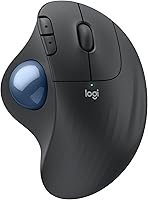
Nulea M501 Wireless Trackball Mouse Ergonomic Thumb

Kensington Orbit trackball mouse: wired or wireless?
The Kensington Orbit is wired, while the Nulea M501 offers wireless connection options. Choose based on whether a cable-free placement matters more to you than an ambidextrous design.
The standard Orbit connects by USB and has a 40 mm ball. It has 2 buttons, no scroll ring, and an ambidextrous design.
The Orbit with Scroll Ring is another wired option. It adds a ring for moving up and down pages or documents, and its wrist rest detaches.
The M501 connects through Bluetooth or a USB receiver, with a button to switch among up to 3 devices. Its thumb control is right-hand oriented, and it has a rechargeable battery.
If you're comparing the Expert Mouse too, see our guide to the Kensington trackball Expert Mouse. It covers the connection choice for that Kensington model.
When does the wired Orbit make more sense?
Choose the wired Orbit if you want a USB connection, an ambidextrous shape and no battery to charge. Its cable keeps the connection simple but ties placement to your computer or a nearby USB connection.
A fixed desk can suit a wired trackball well. Set the Orbit where your hand rests naturally, and the device stays in position while you point with the ball.
The standard model's 40 mm ball and 2-button layout keep the controls straightforward. Kensington's Konnect software lets you assign functions to the 2 buttons and adjust cursor speed.
This model doesn't have a scroll ring. If you often move through long pages or documents, consider the Orbit Trackball with Scroll Ring as part of a broader comparison of Kensington options.
The wired connection also avoids battery upkeep. If you want a wired keyboard nearby, both devices can suit a workstation where you don't mind cables.
Is the Kensington Orbit with Scroll Ring still wired?
Yes, the Orbit with Scroll Ring also connects by USB. The ring adds a physical way to scroll, but it doesn't change the connection type.
The ring can help if you scroll often and want to keep the trackball stationary. The model is ambidextrous and includes a detachable wrist rest.
Choose the standard Orbit if you don't need the ring and prefer its simpler setup. Choose the Scroll Ring version if scrolling by hand is useful enough to justify the extra control.
When should you choose a wireless trackball?
Choose a wireless trackball if you want placement flexibility or need to connect across devices. The M501 offers Bluetooth or a USB receiver and can connect to up to 3 devices.
That can be useful when the computer isn't close to the spot where you want to rest your hand. It also avoids a cable crossing the front of a small desk.
The M501 uses a rechargeable battery. Its receiver stores at the bottom of the mouse, and the brand says to use the included cable, a computer USB port or a 5V charger to charge it, not a fast charger.
The M501 is right-hand oriented, unlike the ambidextrous Kensington models. Its 6 buttons aren't programmable, and the forward and back buttons aren't compatible with macOS.
If you want to compare wireless connection methods across Kensington models, read Kensington trackball mouse wireless options. For a broader look at the tradeoffs, our wired keyboard vs wireless keyboard guide uses the same desk-placement questions.
Which model suits your pointing style?
Pick a Kensington Orbit if you want an ambidextrous trackball, and pick the M501 if right-hand thumb control and wireless connection fit you better. A trackball reduces the need to move the device itself, but its ball and button layout still affect how you use it.
The Kensington Orbit models place the ball at the center and work for either hand. That can make them easier to share between users with different dominant hands.
The M501 uses thumb control and is designed for right-handed use. If that layout appeals to you, compare it with other ergonomic trackball mouse options before choosing.
For a conventional mouse that moves across the desk, see our best silent wireless mouse picks. A wireless mouse can reduce cable clutter, but it still needs clear surface space for movement.
How much room do these trackballs need?
All three trackballs stay stationary while you point, so they need less travel space than a conventional mouse. Leave enough room to rest your hand, reach the controls and move the ball comfortably.
The standard Orbit is described as compact and uses less desk space than a mouse. The Scroll Ring version measures 5.46 x 4.51 in, while the M501 measures 5.51 x 4.37 in.
Those measurements don't include the space your hand needs around the device. Try placing a paper outline on your desk, then check whether you can reach the keyboard and other items without twisting your wrist.
A wired model also needs enough cable slack to reach its USB connection without pulling the trackball out of position. A wireless model removes that cable constraint, but still needs a safe place to rest between uses.
What should you check before choosing?
Check hand orientation, scrolling controls, connection and your computer's available ports before deciding. These details have more effect on fit than the word “wireless” by itself.
The standard Orbit is compatible with Windows, macOS 10.8 and later, and Chrome OS 44 and later. The Scroll Ring model's listed system requirements are macOS 13 Ventura and Windows 11, so check your operating system before choosing it.
The M501 lists Windows and macOS compatibility, plus PC, laptop, iPad and Mac devices. Its forward and back buttons don't work with macOS, so consider that if you use those controls often.
For a wireless setup, check whether you prefer Bluetooth or a USB receiver and whether you have a free port. For a wired setup, make sure the USB cable can reach the computer or a suitable hub.
If keyboard and pointing-device placement are both changing, our large print keyboard Bluetooth guide can help you consider the keyboard side of a cable-light desk.
Which Kensington Orbit connection should you choose?
Pick the standard Orbit for a simple wired setup, the Scroll Ring model for wired scrolling, or the M501 for wireless placement and multi-device switching. The right choice depends on your hand, desk and connection needs.
Choose the standard Kensington Orbit when you want an ambidextrous USB trackball that needs no batteries. Pick the Scroll Ring version if scrolling through pages with a ring matters.
Choose the M501 if you want Bluetooth or receiver connectivity and can use a right-hand thumb layout. For more options, browse our best Kensington trackball mouse guide.
If you're deciding between a cable-free desk and predictable USB connection, start with where the trackball will sit and which hand will use it most. That will narrow the choice before you compare other Kensington trackballs.
Frequently asked questions
Is the Kensington Orbit trackball mouse wireless?
The standard Kensington Orbit Trackball Mouse uses a wired USB connection. The Orbit with Scroll Ring is also USB wired.
If you want a wireless trackball, the Nulea M501 connects by Bluetooth or a USB receiver and can connect to up to 3 devices.
Does the wired Kensington Orbit need batteries?
No. The standard Kensington Orbit connects by USB and doesn't need batteries.
A wired connection also keeps the mouse ready without charging, though the cable limits where you can place it relative to the computer.
What is the difference between the Kensington Orbit and Orbit with Scroll Ring?
The standard Orbit has a 40 mm ball and no scroll ring. The Orbit with Scroll Ring adds a ring for scrolling through web pages and documents, plus a detachable wrist rest.
Both are ambidextrous and use USB.
Can a wireless trackball work on a small desk?
Yes. A trackball stays in place while you move its ball to point, so it doesn't need the open travel area a conventional mouse uses.
A wireless model also gives you more freedom to position it, though you'll still need room for your hand and the device.
Which Kensington Orbit is better for left-handed users?
Both Kensington Orbit models here have an ambidextrous design, so either can suit left- or right-handed use. The Nulea M501 is right-hand oriented, which makes it a less direct fit if you need a trackball designed for either hand.