9 Best Silent Computer Mice (November 2026)
The best silent computer mice include the Logitech M330 Silent Plus Full Size 2.4 for a quiet shared desk, the Logitech M240 Compact Silent Bluetooth Wireless Mouse for dongle-free Bluetooth, and the TECKNET Wireless Mouse for two connection options.
On this page (5 sections)
The Logitech M330 Silent Plus is the best silent computer mouse for most shared desks, with quiet left and right clicks, a contoured right-handed shape and a USB receiver. Choose the M240 if you want Bluetooth without a receiver, or the Censprin if you prefer a wired connection.
A silent computer mouse can reduce the sound of routine clicks in a shared office, library or quiet room. Check what “silent” covers before you choose: some mice quiet only the main buttons, while others also quiet scrolling.
Our picks at a glance
-
1
 Best for a quiet shared desk
Logitech M330 Silent Plus Full Size 2.4
9.7/10 our score
See it on Amazon -
2
 Best for dongle-free Bluetooth
Logitech M240 Compact Silent Bluetooth Wireless Mouse
9.6/10 our score
See it on Amazon -
3
- 4
 Best for right-handed comfortCheck it
- 5
 Check it
TECKNET Wireless Keyboard and Mouse Combo
Best for a quieter compact setup - 6
 Check it
Lenovo 600 Bluetooth Silent Mouse
Best for quiet scrolling - 7
 Check it
Censprin USB Computer Mouse Wired
Best for a wired connection - 8
 Check it
Lenovo WL310 Bluetooth Silent Mouse
Best for a portable Bluetooth mouse - 9
 Check it
PHILIPS Ergonomic Wireless Mouse
Best for side scrolling
How we chose silent computer mice
We compared connection types, stated click-noise features, shape, power and useful controls for quiet computer work. Our score weighs specs, features and buyer feedback against what you’re shopping for.
The picks include Bluetooth mice, receiver-based wireless models, a wired option and a keyboard-and-mouse combo. We also checked whether the quiet claim covers only left and right clicks or extends to the scroll wheel.
A mouse with silent clicks can still make noise when you scroll or press a side button. The TECKNET wireless mouse spells out that distinction, while Lenovo says the 600 has quiet click and scroll buttons.
For more help choosing between desk accessories, see our keyboards and mice complete buying guide, which also covers how a wired keyboard fits into a desktop setup.
| Product | Best for | Connection | Shape | Battery | Our score |
|---|---|---|---|---|---|
| Logitech M330 Silent Plus Full Size 2.4 | a quiet shared desk | 2.4 GHz wireless, USB-A receiver | Full size, right-handed | 1 AA, up to 18 months | 9.7 |
| Logitech M240 Compact Silent Bluetooth Wireless Mouse | dongle-free Bluetooth | Bluetooth | Compact, ambidextrous | 1 AAA, up to 18 months | 9.6 |
| TECKNET Wireless Mouse | two connection options | Bluetooth or USB-A | 9.5 | ||
| HP 280 Silent Wireless Mouse | right-handed comfort | 2.4 GHz wireless, USB-A receiver | 1 AA, up to 18 months | 9.3 | |
| TECKNET Wireless Keyboard and Mouse Combo | a quieter compact setup | 2.4 GHz, shared USB receiver | 9.1 | ||
| Lenovo 600 Bluetooth Silent Mouse | quiet scrolling | Bluetooth 5.0 | Compact, ambidextrous | 9.0 | |
| Censprin USB Computer Mouse Wired | a wired connection | Wired USB | 8.9 | ||
| Lenovo WL310 Bluetooth Silent Mouse | a portable Bluetooth mouse | Bluetooth 5.0 | Compact, right-handed | 8.6 | |
| PHILIPS Ergonomic Wireless Mouse | side scrolling | Bluetooth or USB-A/C receiver | Right-handed ergonomic | 8.0 |
The best silent computer mice for different desks
The M330 is the strongest general pick, while the other mice address specific needs such as Bluetooth, quiet scrolling or a cable connection. Match the shape and connection to your computer before focusing on extra features.
Logitech M330 Silent Plus Full Size 2.4: Best for a quiet shared desk
- SilentTouch reduces clicking sounds by over 90% compared with Logitech M170
- Right-handed contoured grip
- USB-A receiver
- Up to 18-month battery life
Quiet left and right clicks, a contoured grip and a USB-A receiver make this a practical choice for a shared desk with a compatible port.
Pros
- Over 90% click-sound reduction compared with Logitech M170
- Auto-sleep power saving
- Works with Windows, macOS, ChromeOS and Linux
Cons
- Right-handed shape
- Needs a USB-A port for the receiver
The Logitech M330 Silent Plus is a good fit if you want a full-size wireless mouse for a shared desk and your computer has a USB-A port. Logitech says its SilentTouch technology reduces clicking sounds by over 90% compared with the Logitech M170, while keeping the same click feel.
Its right-handed contoured grips give the mouse a shape intended for users who hold it in the right hand. That makes it less flexible for left-handed use than the ambidextrous Logitech M240.
The USB-A receiver supports Windows, macOS, ChromeOS and Linux. Logitech gives a wireless range of up to 33 ft and says its AA battery can last up to 18 months with an auto-sleep mode.
Choose it for quiet main clicks and a familiar receiver setup. If you need to save a port, compare it with the best silent wireless mouse options, including Bluetooth models that connect without a receiver.
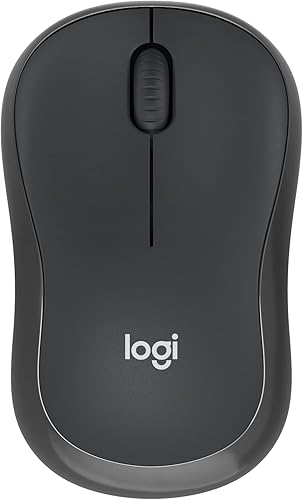
Logitech M240 Compact Silent Bluetooth Wireless Mouse: Best for dongle-free Bluetooth
- 90% reduced click sound
- Bluetooth, no receiver required
- Compact ambidextrous shape
- Up to 18-month battery life
This compact mouse pairs over Bluetooth without using a USB port. Its ambidextrous shape and quiet clicks suit shared workspaces and travel.
Pros
- No USB receiver
- Works with Windows, macOS, Linux, ChromeOS, iPadOS and Android
- Auto-sleep feature
Cons
- Compact body may not suit buyers who prefer a larger mouse
- Requires Bluetooth on the computer
The Logitech M240 is a compact choice when you want silent clicks without using a USB receiver. It connects over Bluetooth, so check that your computer supports Bluetooth before choosing it.
Logitech says the M240 has 90% reduced click sound with the same click feel. Its compact, ambidextrous design can suit either hand and is easy to carry in a bag, though buyers who prefer a larger grip may want a full-size mouse.
The M240 uses one AAA battery and has an auto-sleep feature. Logitech gives battery life of up to 18 months and a wireless range of up to 33 ft.
It works with Windows, macOS, Linux, ChromeOS, iPadOS and Android. For more options from the same brand, compare our best Logitech silent mouse picks before deciding between a compact Bluetooth model and a receiver-based mouse.
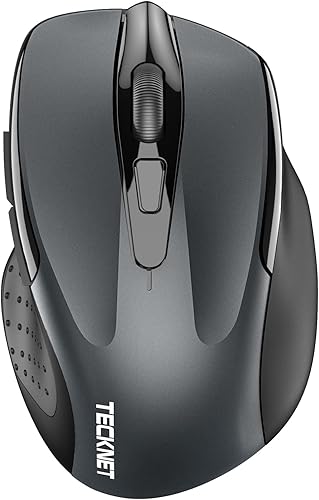
TECKNET Wireless Mouse: Best for two connection options
- Bluetooth 5.0/3.0 and USB-A
- Connects to two devices
- Six DPI settings up to 4800
- Side buttons and scroll wheel are not silent
Bluetooth and USB-A connectivity let you switch between two connected devices. The main clicks are quiet, but the side buttons and scroll wheel are not.
Pros
- Two connection types
- Six sensitivity settings
- Compatible with Windows, macOS, ChromeOS and Linux
Cons
- Side buttons and scroll wheel are not silent
- Side buttons are not compatible with macOS
The TECKNET Wireless Mouse suits a desk where you switch between two devices or want both Bluetooth and USB-A connection options. You can connect to two devices and switch between them with a button.
It has six DPI settings from 800 to 4800, letting you choose slower or faster cursor movement. TECKNET says the main clicks are quiet, but it also makes clear that the side buttons and scroll wheel are not silent.
The shape is intended for small to medium hands, with some larger-handed users preferring its compact feel. The side buttons are not compatible with macOS, so check your operating system if you rely on them.
It needs two AAA batteries, which aren't included. Choose it if connection flexibility matters more than quiet scrolling; for gaming-focused options, see our guide to the best silent mouse for gaming.
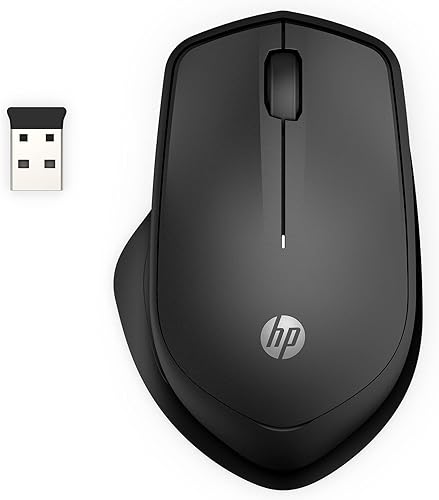
HP 280 Silent Wireless Mouse: Best for right-handed comfort
- Up to 90% noise reduction on left and right buttons
- Right-handed ergonomic shape
- USB-A nano receiver stores inside
- Up to 18-month battery life
The HP 280 pairs quiet main clicks with a right-handed shape and a receiver that stores inside the mouse. Its multi-surface sensor is designed to work without a mouse pad.
Pros
- Receiver storage inside the mouse
- Up to 90% noise reduction on left and right buttons
- 1600 DPI optical sensor
Cons
- Right-handed shape
- Requires a USB-A port
The HP 280 Silent Wireless Mouse fits a right-handed user who wants a receiver-based connection and a shape designed for comfort. HP says its left and right buttons provide up to 90% noise reduction while keeping a satisfying click feel.
Its USB-A nano receiver stores inside the mouse, which helps keep the small receiver with the mouse when you pack it away. HP gives a wireless range of up to 32.8 ft and says the mouse can run for up to 18 months on one AA battery.
The 1600 DPI optical sensor is designed for precision control, and HP says its multi-surface technology works on virtually any surface without a mouse pad. The three-button layout includes an integrated scroll wheel.
This is a practical pick if you want a quiet main click and a receiver you can store. Read our HP 280 Silent Mouse review for a closer look at its shape and connection.
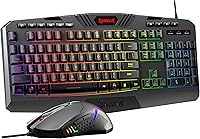
TECKNET Wireless Keyboard and Mouse Combo: Best for a quieter compact setup
- Quiet keyboard keys and silent mouse clicks
- Compact keyboard
- One shared nano USB receiver
- 2.4 GHz connection, no Bluetooth
This combo reduces desk clutter with one receiver for both devices. The compact keyboard and quiet mouse clicks suit a small desk, provided you have a USB-A port.
Pros
- One receiver for keyboard and mouse
- Quiet keyboard keys and mouse clicks
- Receiver stores in the mouse battery compartment
Cons
- Keyboard is not full size
- No Bluetooth connection
The TECKNET Wireless Keyboard and Mouse Combo is for a compact desk where you want quiet typing and mouse clicks from one set. The mouse shares a nano USB receiver with the keyboard, which reduces the number of receiver ports the pair needs.
The keyboard is compact, with 78 keys, and TECKNET describes it as a mini keyboard rather than a full-size model. Its scissor-switch keys are designed for quiet typing, and the mouse has silent clicks.
The connection uses 2.4 GHz wireless and does not support Bluetooth. Check for a USB-A port before choosing it, and keep in mind that the combo needs four AAA batteries total, which aren't included.
Choose this set when both typing and clicking noise matter and your workspace can accommodate a compact keyboard. If your priority is only a quiet mouse with a cable, a standalone wired option may be a better match.
Lenovo 600 Bluetooth Silent Mouse: Best for quiet scrolling
- Silent click and scroll buttons
- Bluetooth 5.0 and Swift Pair
- Pairs with up to two devices
- Three DPI settings
The Lenovo 600 quiets both clicks and scrolling, an advantage if wheel noise stands out in a quiet room. Bluetooth pairing supports up to two devices.
Pros
- Silent click and scroll buttons
- Switches between two paired devices
- Three adjustable DPI settings
Cons
- Bluetooth required
- Battery life is listed as up to 12 months
The Lenovo 600 is a strong choice when the sound of scrolling matters as much as the sound of clicking. Lenovo says its click and scroll buttons are silent, making it a useful fit for late-night work or a shared room.
It connects over Bluetooth 5.0 and supports Microsoft Swift Pair. Lenovo says you can pair it with up to two devices and switch between them with a button.
The mouse has a low-profile, ambidextrous shape and three DPI settings: 800, 1600 and 2400. Lenovo gives battery life of up to 12 months on one AA battery, and says the blue optical sensor tracks on almost any surface.
Choose it if you want Bluetooth and quiet scrolling in a compact shape. If switches and click sound are your main concern, our guide to silent mouse switches explains what to consider when comparing quiet designs.
Censprin USB Computer Mouse Wired: Best for a wired connection
- Near-silent click design
- USB plug and play
- Ergonomic shape with finger rests
- Three buttons
A USB cable avoids batteries and wireless pairing. The Censprin's near-silent click design and palm-shaped body suit a fixed desk where a cable is easy to manage.
Pros
- No batteries or wireless receiver
- Plug and play
- Near-silent click design
Cons
- Cable may limit mouse placement
- Right-handed shape
The Censprin USB Computer Mouse Wired suits a fixed desk where you want quiet clicks without batteries, Bluetooth or a wireless receiver. Compare wired computer mouse options if you want to consider more cable-connected models.
Plug its USB cable into a compatible computer and it works without a driver.
Censprin describes its click design as near-silent. The mouse has three buttons, a 59 in cable and an ergonomic shape with finger rests intended to support the palm.
A wired mouse keeps its connection simple, but the cable can limit where you place it and may add clutter to a small desk. This model is described as compatible with Windows versions from XP through Windows 10, as well as Macs and iPads in its product name, so confirm your device's USB connection and system support before buying.
Choose it when you value a direct cable connection and don't need to move between devices. For more options, compare our best silent wired mouse picks.
Lenovo WL310 Bluetooth Silent Mouse: Best for a portable Bluetooth mouse
- Silent clicks
- Bluetooth 5.0, no receiver
- Three DPI settings
- Compact and lightweight
The WL310 combines silent clicks with Bluetooth and a compact body for carrying with a laptop. Its three DPI settings let you adjust cursor speed for different tasks.
Pros
- No USB receiver required
- Three DPI settings
- Compact for travel
Cons
- Right-handed shape
- Bluetooth required
The Lenovo WL310 is a compact Bluetooth mouse for laptop users who want quiet clicks without carrying a USB receiver. It connects over Bluetooth 5.0 and is described as compatible with Windows, Mac and Chromebook.
Lenovo says its clicks are silent and gives three DPI settings: 1000, 1200 and 1600. These settings let you adjust cursor speed for everyday tasks, with a higher setting moving the pointer farther for the same hand movement.
Its compact, lightweight design is aimed at travel, and the shape is described as ergonomic for extended use. The WL310 has six buttons according to its specs, so it may offer more controls than a basic three-button mouse.
Choose it if a small Bluetooth mouse suits your hand and setup. If you use shortcut buttons often, compare it with the best silent mouse with side buttons.
PHILIPS Ergonomic Wireless Mouse: Best for side scrolling
- Noise-reduced left and right buttons
- Horizontal thumb-side scroll wheel
- Bluetooth and USB-A/C receiver
- Rechargeable battery
A thumb-side scroll wheel helps move through wide spreadsheets, while noise-reduced main buttons suit a quieter desk. It can connect over Bluetooth or its USB-A/C receiver.
Pros
- Horizontal thumb-side scroll wheel
- Five DPI settings
- Rechargeable
Cons
- Right-handed shape
- More controls may be unnecessary for basic pointing
The PHILIPS Ergonomic Wireless Mouse is best suited to desk work where quiet main clicks and horizontal scrolling can help with wide documents. Its thumb-side scroll wheel is designed to move across columns, while the main wheel handles standard scrolling.
For an upright design with scroll control, see vertical mice with infinite scroll.
The mouse connects to as many as three devices using Bluetooth and a receiver with USB-A and USB-C connectors. It has five DPI settings from 800 to 4000 and a right-handed shape with a thumb rest.
PHILIPS describes the left and right buttons as noise-reduced. It is rechargeable, and the included cable is for charging; the mouse also has auto-sleep.
Its extra controls can be useful for spreadsheet work, but may be more than you need for basic browsing.
Choose this if side scrolling and multi-device connections are useful for your routine. If your top priority is quiet main clicks in a simpler design, the M330 or M240 may be easier to match to your desk.
What should you check before buying a silent click mouse?
Check which buttons are quiet, how the mouse connects and whether its shape suits your hand. The word “silent” alone doesn't tell you whether scrolling or side buttons make noise.
Does a silent computer mouse quiet every button?
No, some quiet mice only reduce sound from the left and right buttons. TECKNET says the scroll wheel and side buttons on its wireless mouse are not silent, while Lenovo describes both clicks and scrolling as silent on the 600.
If you work in a very quiet room, think about how you use the mouse. Frequent scrolling or thumb-button presses can matter as much as the main click.
Should you choose Bluetooth, a USB receiver or a cable?
Choose Bluetooth if you want to avoid a USB receiver and your computer supports Bluetooth. A receiver-based mouse like the M330 or HP 280 needs an available USB-A port, while a wired mouse like the Censprin avoids batteries but keeps a cable on your desk.
A combo may share one receiver between the keyboard and mouse. Check ports and connection support before you buy, especially if your computer has only USB-C ports.
Does hand shape matter for a quiet mouse?
Yes, the mouse shape affects how it fits your hand, while quiet clicks address sound. The M240 and Lenovo 600 have ambidextrous shapes, while the M330, HP 280 and PHILIPS are designed for right-handed use.
Compact mice are easier to carry, but may feel small if you prefer a larger grip. If possible, compare the shape with a mouse you already find comfortable.
More guides on this topic
- Best Rapoo Silent Mice
Which silent computer mouse should you choose?
Choose the Logitech M330 for a full-size receiver-based mouse with quiet main clicks, or the M240 for a compact, ambidextrous Bluetooth option. Pick the Lenovo 600 if you want quiet scrolling, and the Censprin if you prefer a wired USB connection.
For a wider mouse with controls for documents, consider the PHILIPS. If you want quiet typing as well as quiet clicks, the TECKNET combo brings both into one compact wireless setup.
Our top 3 picks at a glance
-
1
Best for a quiet shared desk
Logitech M330 Silent Plus Full Size 2.4
9.7/10 our score
See it on Amazon -
2
Best for dongle-free Bluetooth
Logitech M240 Compact Silent Bluetooth Wireless Mouse
9.6/10 our score
See it on Amazon -
3