Keyboards & Mice: The Complete Buying Guide
A wired keyboard is a practical choice when you want a direct USB connection and don't need to move it around. Compare layout, key feel, desk space and device ports, then choose a mouse that fits your work.
On this page (9 sections)
- How do you choose a wired keyboard?
- Should you choose a backlit keyboard?
- Is a wired or wireless keyboard better for your desk?
- Should you buy a keyboard with a USB hub?
- How do you choose an ergonomic keyboard and mouse?
- Which mouse works best with your keyboard?
- How can you match a keyboard to your desk?
- Explore keyboards & mice by topic
- Which keyboard should you choose?
A wired keyboard is a practical choice when you want a direct USB connection and don't need to move it around. Compare its layout, key feel, size and cable reach with your desk and computer before choosing a model.
A keyboard and mouse shape how you use a mini PC, laptop or desktop every day. Start with the connection and work surface, then consider lighting, key size, comfort and the kind of mouse movement that suits your setup.
This guide links to our topic guides for Logitech wired keyboards, wired keyboards for PC and wired keyboards for office work.
How do you choose a wired keyboard?
Choose a wired keyboard by checking its port, layout, size and key feel against how and where you type. A standard full-size model includes function keys and a number pad, while a compact layout saves desk space.
A USB connection can be useful when you want a simple setup at a fixed workstation. Confirm that your computer has a compatible port, and check the cable length if the computer sits under a desk or behind a monitor.
Think about what you type most. Spreadsheets and frequent number entry can make a number pad useful, while writing and browsing may not need one.
Key feel is personal. Low-profile keys sit closer to the keyboard base, while deep-profile keys have a taller shape.
If a product description names its key style, use that detail to narrow your options.
For a one-keyboard setup, check whether you need media controls, shortcut keys or ports for other devices. A built-in hub can reduce the need to reach for the computer, but the keyboard itself may take more desk space.
The Logitech K120 is a straightforward full-size option. Its deep-profile keys, adjustable tilt legs and spill-resistant design are useful details to compare if you want a standard layout for a home or work desk.
For more options in this style, see our best Logitech wired keyboard guide and best wired keyboard for PC guide.
Which wired keyboard layout fits your work?
A full-size keyboard fits work that uses function keys and number entry. A compact model can free space for a mouse, notebook or other desk items.
Check the layout carefully, because compact keyboards can remove or rearrange keys. If you use shortcuts or number entry often, compare the key placement before you trade the familiar layout for a smaller footprint.
A laptop keyboard may be enough when you work on the go. At a permanent desk, a separate keyboard lets you place the screen and keys where they suit your setup.
How do key shape and sound affect daily typing?
Key height, spacing and sound can help you narrow a keyboard choice. A low-profile model has a flatter shape, while deep-profile keys feel taller under your fingers.
Quiet keys can be helpful in a shared room or office. Look for descriptions of key style and sound, then consider whether those details fit your own typing habits.
If a keyboard feels unfamiliar, give yourself time to adjust before deciding whether the layout works for you. A new key shape can change how your fingers travel across the rows.
Should you choose a backlit keyboard?
Choose a backlit keyboard if you often type in a dim room or want illuminated keys. For an HP laptop, see how to turn on its keyboard backlight.
If your desk is bright, a standard keyboard may meet your needs without lighting controls or extra features.
Check whether the lighting covers the keys you use and whether you can adjust or turn it off. Some backlit keyboards offer only one lighting color, so verify the available choices before deciding.
Large-print keys can also make characters easier to see. Our guides compare backlit keyboards for PC, backlit keyboard and mouse combos and large-print keyboards.
This Macally model combines a full-size layout with shortcut keys for Apple devices. Its low-profile, quiet keys may suit a desk where you want a flatter keyboard shape and less typing noise.
Are compact keyboards worth the space savings?
A compact keyboard can free desk space if you rarely use a number pad. Before choosing one, make sure its smaller layout still has the keys and shortcuts you rely on.
Compare the keyboard's outside dimensions with the room available for your mouse. A shorter keyboard only helps if your mouse has enough clear space to move.
If you need a portable wireless model, see our compact wireless keyboard guide. For a keyboard that controls a media PC from a couch, compare keyboards with touchpads and the Logitech K400 Plus keyboard review.
Is a wired or wireless keyboard better for your desk?
A wired keyboard suits a fixed workstation where a USB cable is easy to reach. A wireless model gives you more freedom to position the keyboard and avoids a cable across the desk.
Think about the devices and ports you already have. A wired keyboard needs a compatible connection, while a wireless keyboard may rely on a USB receiver or Bluetooth.
If you use a wired keyboard with a device across the room, the cable may limit where you can sit. Our wired vs wireless keyboard guide compares the trade-offs, and our wired keyboard Bluetooth adapter guide explains what to consider when exploring an adapter.
For a wireless alternative at a computer desk, compare wireless keyboards for PC. If you work with a Mac, our guide to Logitech MX Keys and MX Master together covers using those devices as a set.
Can you use a wired keyboard with a laptop?
Yes, a wired keyboard can work with a laptop when you can connect it to a compatible port. Check the laptop's ports, the keyboard's connector and whether you need an adapter.
A separate keyboard can be convenient when a laptop stays on a stand or connects to an external screen. A full-size layout may be more comfortable for number entry, but it needs room beside the laptop.
Our wired keyboard and laptop guide covers the connection check. If you want a wireless setup instead, compare wireless keyboards for PC.
Should you buy a keyboard with a USB hub?
A keyboard with a USB hub can make device ports easier to reach from your desk. Check whether the keyboard's hub has the ports you need and whether its cable reaches your computer.
A separate hub can be a better fit if you want to keep your existing keyboard. Count the devices you plan to connect, and confirm the hub's connection type and intended use.
The SABRENT hub is a separate accessory rather than a keyboard with built-in ports. Its 2 ft cable, per-port switches and support for USB 2.0 and 1.1 devices may help when a computer's ports are hard to reach.
Compare wired keyboards with USB hubs and keyboards with built-in USB hubs if you want the ports attached to the keyboard itself.
How do you choose an ergonomic keyboard and mouse?
Choose an ergonomic keyboard and mouse by comparing their shape with how your hands rest and move at your desk. Comfort depends on fit and habits, so a product label alone cannot tell you whether a design will suit you.
A split or angled keyboard changes how your hands sit relative to each other. Compare the layout, key reach and width with your normal typing position, and check that you have space for the full keyboard.
A vertical mouse changes the angle of your hand, while a trackball lets you move a ball without sliding the whole mouse across the desk. These designs can take practice if you are used to a standard mouse.
Explore ergonomic keyboard and mouse combos, wireless ergonomic keyboards, vertical ergonomic mice and ergonomic trackball mice.
When is a trackball useful?
A trackball can suit a small desk because the mouse stays in place while you move its ball. Check whether the ball is operated by your thumb or fingers, and compare the shape with your hand.
If a trackball seems like a good fit, our ergonomic trackball mouse guide compares options. For a standard mouse that moves across the desk, see our guide to wired computer mice.
Which mouse works best with your keyboard?
Choose a mouse by its connection, shape, noise and how much room you have to move it. A keyboard and mouse combo can simplify buying, while separate devices let you choose each one for its own job.
A wired mouse avoids a battery but adds a cable across the desk. A wireless mouse offers more placement freedom, but check how it receives power and connects to your computer.
For quieter shared spaces, compare silent computer mice. If you prefer wireless, explore wireless mice for office work and wireless mice for Mac.
A mouse that uses batteries may suit you if you want to replace them quickly. A rechargeable model avoids disposable batteries, but it needs charging.
Our rechargeable mouse vs battery mouse guide explains the choice.
For a matched set, consider a keyboard and mouse combo. Our Logitech MK270 combo review covers a wireless set, while the Logitech MK120 pairs a full-size wired keyboard with an optical wired mouse.
Do you need a gaming keyboard and mouse combo?
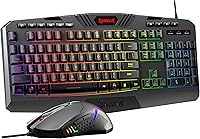
A gaming combo can keep the keyboard and mouse on one buying list, but check that each device suits the games you play. Connection, key layout, lighting and mouse shape all affect how the set fits your desk.
For wired options, see our gaming keyboard and mouse combo guide and wired gaming mouse guide. A general office keyboard may be a better fit if you mainly type and browse.
How can you match a keyboard to your desk?
Match the keyboard's size and cable reach to the space where you plan to use it. Measure the desk area and leave enough room for the mouse, screen controls and items you reach during work.
A full-size model can use much of a narrow desk, especially beside a laptop or monitor stand. A compact model may open up more space, but check that its layout keeps the keys you use.
Consider where the computer's USB ports sit. A rear-facing port can make a keyboard cable awkward to route, while an accessible hub can bring connections closer to you.
If you are choosing a keyboard for a mini PC, check that the computer remains reachable for other accessories. Our best wired keyboard with USB hub guide compares options that combine typing with extra ports.
Explore keyboards & mice by topic
- Best Silent Wired Keyboards
- Best Wired Keyboards with Soft Keys
Which keyboard should you choose?
Choose a wired keyboard if you want a direct USB setup at a desk, a wireless model if you need flexible placement, and a compact layout if desk space is tight. For dim rooms, compare backlighting and large-print keys; for a small work area, consider a trackball mouse.
Start with our best wired keyboards for PC if you want a full-size desk option. If your priority is office typing, compare our wired keyboards for office work and choose by layout, key feel and available space.
Frequently asked questions
Is a wired keyboard better than a wireless keyboard?
A wired keyboard suits a desk where you want a direct USB connection and don't need to move the keyboard freely. A wireless keyboard reduces cable clutter and gives you more placement options, but it needs a compatible receiver or Bluetooth connection and a power source.
Choose based on your desk and devices.
Can you use a wired keyboard with a laptop?
Yes, you can use a wired keyboard with a laptop if it has a compatible USB port or you have the right adapter. Check the keyboard's connection and the laptop's available ports first.
A full-size keyboard can make typing easier at a fixed desk, but it takes more space in a bag.
What should you look for in an ergonomic keyboard?
Look for a layout and shape that let your hands and wrists rest comfortably at your desk. Split or angled designs can change how your hands sit, so compare the shape with your normal typing position and allow time to adjust.
An ergonomic label alone does not guarantee a comfortable fit.
Do you need a backlit keyboard?
A backlit keyboard can make keys easier to see in a dim room, but it is not essential if your workspace is well lit. Check whether the model has the key lighting and controls you want, and consider how much desk space it uses.
Large-print keys are another option for visibility.
Is a trackball mouse useful for a small desk?
A trackball can work well on a small desk because you move the ball with your fingers or thumb instead of pushing the whole mouse across a surface. Compare ball position, hand shape and button layout before choosing.
It takes practice if you are used to a standard mouse.