Logitech MX Master vs MX Vertical: Which Is Better? (November 2026)
Choose an MX Master for thumb controls and scrolling, or an MX Vertical for its upright handshake grip. Your daily tasks and preferred hand position matter more than a longer feature list.
On this page (6 sections)
Choose a Logitech MX Master for thumb controls and scrolling, or an MX Vertical for its upright handshake grip. In this Logitech MX Master vs MX Vertical comparison, the best fit depends on whether you want more productivity controls or a different hand position.
MX Master models use a familiar right-hand mouse shape with 7 buttons. The MX Vertical models use a more upright design and have 4 buttons.
That difference can shape a full workday. Look at your usual tasks, computer setup and grip preference before choosing.
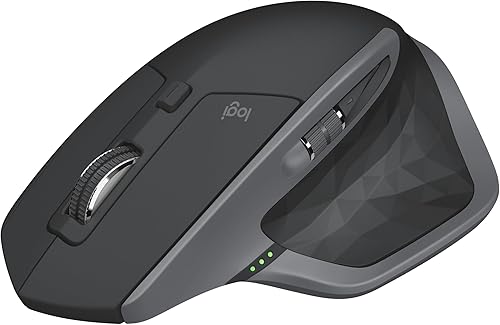 Best for multi-computer work
Logitech MX Master 2S Bluetooth Edition Wireless
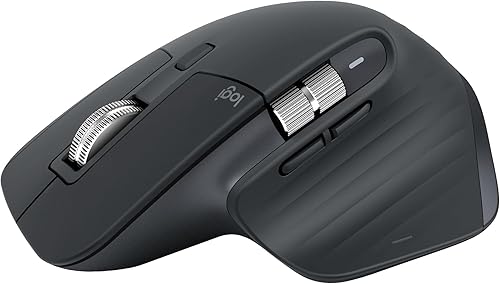 Best for quiet, customizable control
Logitech MX Master 3S Bluetooth Wireless Mouse
Logitech MX Master vs MX Vertical: what is the main difference?
The MX Master prioritizes extra controls, while the MX Vertical changes the angle of your grip. Pick based on which difference would help more in your everyday work.
The MX Master 2S and MX Master 3S both have 7 buttons and are right-hand mice. The MX Vertical options have 4 buttons and a vertical layout.
The MX Master 3S adds Quiet Clicks and MagSpeed scrolling. If you are comparing vertical designs, check whether they offer infinite scrolling too.
The MX Vertical B07FNJB8TT has a 57° angle and a textured thumb rest, while the other MX Vertical option describes an adjustable angle.
These are separate design choices. More buttons can help with repeated computer tasks, while a vertical shape may suit someone who prefers a handshake position.
Which mouse has more controls for productivity?
The MX Master has more controls: 7 buttons compared with 4 on either MX Vertical option. The MX Master 3S also includes a thumbwheel and app-specific button profiles through Logi Options+ on Windows and macOS.
If you move between computer windows, use shortcuts or scroll through long pages, the MX Master layout gives you more controls to consider. Read our Logitech MX Master 3S review for a closer look at that model.
The MX Vertical keeps its layout simpler. Its cursor speed switch lets you adjust DPI, according to Logitech's description of the B07FNJB8TT model.
Does the MX Vertical have a different grip?
Yes. The MX Vertical's upright shape places your hand in a handshake position instead of the flatter position used by a conventional mouse.
For another grip option, see vertical mouse joystick grips.
Its 57° angle is a defining difference from the MX Master shape.
Logitech says the B07FNJB8TT's angle is designed to reduce wrist pressure. That is a design claim, not a promise of a health outcome, and comfort varies from person to person.
If you are considering an ergonomic keyboard and mouse combo, think about keyboard position too. A mouse grip alone does not decide whether your whole workstation feels comfortable.
Is the MX Master better for everyday work?
The MX Master is the stronger match when you want more buttons, scrolling options or multi-device control. It keeps a conventional mouse profile while adding features for frequent computer work.
The MX Master 2S connects to up to 3 Mac or PC computers. The MX Master 3S Bluetooth edition connects to up to 3 Bluetooth devices and includes FLOW cross-computer control for moving text, images and files between Windows and macOS with Logi Options+.
The Logitech MX Keys and MX Master together can make sense if you want a matching keyboard and mouse setup. Check whether your software and computer setup support the features you plan to use.
Should you choose the MX Master 2S or MX Master 3S?
Choose the MX Master 2S if you want a 7-button mouse that connects to up to 3 Mac or PC computers. Choose the MX Master 3S if Quiet Clicks, MagSpeed scrolling and app-specific profiles are more important.
The 3S Bluetooth edition is Bluetooth only and does not include a USB receiver or charging cable. It supports up to 3 devices, and Logi Options+ is required for FLOW and app-specific profiles.
Neither model is a compact travel mouse by design. If you need a smaller setup, compare options in our compact keyboard and mouse combo guide.
Is the MX Master good for gaming?
The MX Master can handle everyday computer use, but it is designed around productivity features such as scrolling and cross-computer control. Your game type and preferred controls matter when deciding if it will suit gaming.
For a more specific breakdown, see whether an MX Master works for gaming. That question may lead you to a different mouse if gaming controls are your main priority.
Is the MX Vertical a better fit for wrist comfort?
The MX Vertical is the better match if you prefer an upright handshake-style grip. For a broader comparison, read vertical mouse vs trackball.
Its shape, rather than a larger button count, is the main reason to consider it over an MX Master.
The B07FNJB8TT model has a 57° angle, a thumb rest and a textured rubber surface. Logitech says its shape is designed to reduce wrist pressure and forearm strain, but individual comfort differs.
Try to assess whether you can use the vertical grip naturally for common tasks like moving a pointer and reaching buttons. A different grip may take time to get used to, and the available details do not say how quickly a particular person will adjust.
The related Logitech MX Master Mac guide can help with compatibility planning if you're comparing both mouse shapes for a Mac setup.
Which MX Vertical option should you compare?
Both MX Vertical options describe 4 buttons, a 4000 DPI sensor and wireless connections. The B07FNJB8TT model specifies a 57° angle, right-hand orientation and Bluetooth or included USB receiver.
The B07FNHV4MW option describes Bluetooth, radio frequency and USB connectivity, a 4000 DPI optical sensor, and an ambidextrous hand orientation. Check the exact model details for the connection and grip you need.
The B07FNJB8TT listing also describes a USB receiver in or with the mouse, while the B07FNHV4MW details describe batteries as included. If receiver use matters, confirm the exact package before ordering.
Which mouse works better with a mini PC?
Either mouse can suit a mini PC if the computer supports its connection method. The MX Master options use Bluetooth, while the MX Vertical options list Bluetooth and receiver connections.
Bluetooth can keep a small desk clear of a receiver. A receiver can be useful if your mini PC's Bluetooth is unavailable or you prefer a dedicated wireless connection.
If you plan to pair a keyboard too, check available ports and connection types before buying. Our keyboards and mice buying guide covers the broader desk setup, and the Logitech MK270 keyboard and mouse guide explains a separate combo's computer and port fit.
What should you check before choosing?
Check hand orientation, connection type and the controls you will use most. Those details can rule out a mouse before you compare smaller features.
All four options here are wireless. Both MX Master products are right-hand oriented and connect over Bluetooth; the B07FNJB8TT MX Vertical is also right-hand oriented, while the B07FNHV4MW details call it ambidextrous.
The MX Master 3S Bluetooth edition does not include a receiver or charging cable. The B07FNJB8TT MX Vertical includes a receiver and USB-C cable, according to its included components.
For daily work, ask yourself whether you'd use 7 buttons and advanced scrolling or prefer a 4-button vertical mouse. If you don't expect to use the extra controls, the MX Vertical's grip may matter more than the MX Master's feature count.
Which Logitech mouse should you choose for work?
Choose the MX Master for productivity controls and the MX Vertical for an upright grip. The right choice is the one that matches your daily tasks and the way you prefer to hold a mouse.
The MX Master 2S fits multi-computer work, while the MX Master 3S adds Quiet Clicks, MagSpeed scrolling and app-specific profiles. The MX Vertical models suit shoppers who want to compare a vertical layout, with the B07FNJB8TT specifying a 57° angle and right-hand orientation.
If you want more model-specific guidance, compare MX Master use with a Mac and the MX Master 3S review. Pick based on the controls or grip you'll reach for throughout the day.
Frequently asked questions
Is the Logitech MX Master or MX Vertical better for work?
The MX Master fits work that benefits from a thumbwheel, extra buttons and fast scrolling. The MX Vertical fits people who prefer a more upright handshake grip.
Compare the controls you will use each day and how each shape feels in your hand before choosing.
Can the MX Master connect to more than one computer?
The MX Master 2S connects to up to 3 Mac or PC computers, and the MX Master 3S Bluetooth edition connects to up to 3 devices. The MX Vertical details here describe Bluetooth or USB receiver connections, but don't specify multi-computer switching.
Does the MX Vertical have more buttons than the MX Master?
No. The MX Vertical options here have 4 buttons, while the MX Master 2S and MX Master 3S have 7.
If you use side buttons, app switching or scrolling controls often, compare those controls with the upright shape before deciding.
Does the MX Master 3S Bluetooth mouse include a USB receiver?
The MX Master 3S Bluetooth edition described here does not include a USB receiver or charging cable. It connects over Bluetooth to up to 3 devices, so check your computer's Bluetooth support and plan how you'll charge it.
Can you use the MX Master with a Mac?
The MX Master 3S Bluetooth edition supports macOS, and the MX Master 2S is described as connecting to Mac or PC computers. For setup details and model-specific guidance, see our guide to using an MX Master with a Mac.