9 Best Mini PCs for Home Use (November 2026)
The best mini PCs for home use include the KAMRUI AK1PLUS Mini PC Computer for shared household tasks, the Beelink SER3 Mini PC for a larger included SSD, and the Getorli Mini PC AMD Ryzen 5 3500U for multitasking with a 512GB SSD.
On this page (3 sections)
The best mini PC for home use for most households is the KAMRUI AK1PLUS, with 16GB RAM, dual HDMI outputs and support for adding internal storage. The Beelink SER3 includes a larger 500GB SSD, while the KAMRUI Pinova P1 adds triple-display support.
These compact computers can serve as a shared family PC for email, homework, streaming and video calls. The right choice depends on how many people may use it, how many apps they keep open, and whether it will connect to one screen or several.
If you're still narrowing down memory, ports or processor needs, start with our How to Choose a Mini PC: A Step-by-Step Guide. We compared the listed configurations and features against common home uses, rather than relying on a single specification.
Our picks at a glance
-
1

-
2

-
3
 Best for multitasking with a 512GB SSD
Getorli Mini PC AMD Ryzen 5 3500U
9.6/10 our score
See it on Amazon
- 4
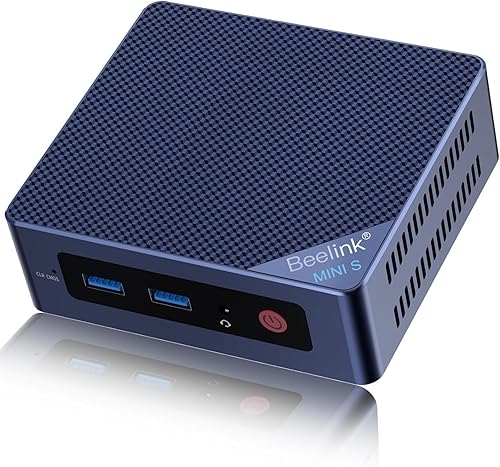 Best for a compact dual-screen setupCheck it
- 5
 Check it
KAMRUI Pinova P1 Mini PC AMD Ryzen
Best for three-display households - 6
 Best for a wired home networkCheck it
- 7
 Best for expandable home storageCheck it
- 8
 Check it
KAMRUI Pinova P2 AMD Ryzen 5425U
Best for a three-screen media setup - 9
 Check it
GMKtec Mini PC Ryzen 5 3500U 16GB
Best for light gaming and media
Which mini PCs work best for different home needs?
The best home mini PC depends on what your household does most often. Use the picks below to match memory, storage and display support to the shared tasks.
KAMRUI AK1PLUS Mini PC Computer: Best for shared household tasks
- Intel Celeron N5095
- 16GB LPDDR4X RAM
- 256GB M.2 SSD
- Dual HDMI 2.0 outputs
16GB RAM and dual HDMI outputs suit a shared home computer for browsing, classes, video calls and streaming. It also supports additional internal storage.
Pros
- 16GB RAM
- Dual HDMI outputs
- Supports M.2 and 2.5-inch storage expansion
Cons
- 256GB SSD in the included configuration
- Intel Celeron processor is aimed at everyday computing
The AK1PLUS is the best all-round fit here for a family computer that will handle browsing, online classes, video calls and email. It has 16GB of LPDDR4X RAM and a 256GB M.2 SSD, which gives everyday apps room to run together.
Its two HDMI 2.0 ports support two 4K displays at 60Hz. That can help when one household member needs a second screen for schoolwork or spreadsheets, while the four USB 3.2 ports can connect accessories such as a keyboard, printer or external drive.
Storage can be expanded with an M.2 SATA or NVMe drive up to 2TB and a 2.5-inch SATA SSD or HDD up to 2TB. The included 256GB drive may be enough for shared apps and documents, but families keeping large photo or video libraries should plan for extra storage.
Pick it for a shared home computer with several everyday users and two-screen flexibility. Its Celeron N5095 is aimed at ordinary computing, so choose a different class of system for demanding games or heavy creative workloads.
Beelink SER3 Mini PC: Best for a larger included SSD
- AMD Ryzen 3 3200U
- 16GB DDR4 RAM
- 500GB M.2 SSD
- Dual HDMI
The 500GB SSD gives a household more room for apps and files than the 256GB options here. Its 16GB RAM and dual HDMI outputs suit everyday multitasking.
Pros
- 500GB SSD
- 16GB RAM
- RAM can be upgraded to 32GB
Cons
- Two-core, four-thread processor
- No display outputs beyond the listed dual HDMI
The Beelink SER3 is a strong alternative when you want more storage included from the start. Its 500GB M.2 SSD offers more room for apps, downloads and family files than the 256GB drives in several other picks.
It pairs that storage with 16GB DDR4 RAM and an AMD Ryzen 3 3200U processor. The RAM can be upgraded to 32GB, which gives you a path to more memory if your household's multitasking needs grow.
Two HDMI ports support a dual-screen setup, and the device includes four USB 3.2 ports for peripherals. Beelink lists dual-band Wi-Fi and Bluetooth, which can suit a desk without a wired network connection.
Choose the SER3 if you want a larger SSD and 16GB RAM in the base configuration. Its processor has two cores and four threads, so it is best matched to everyday work, media and light multitasking.
Getorli Mini PC AMD Ryzen 5 3500U: Best for multitasking with a 512GB SSD
- AMD Ryzen 5 3500U
- 16GB DDR4 RAM
- 512GB NVMe SSD
- Dual HDMI
A 512GB NVMe SSD and 16GB RAM make this a good fit when several household members share apps and files. Wi-Fi 6 and Bluetooth 5.3 are also included.
Pros
- 512GB NVMe SSD
- 16GB RAM, expandable to 32GB
- Wi-Fi 6 and Bluetooth 5.3
Cons
- The stated memory expansion limit is 32GB
- Uses integrated graphics
The Getorli is a good fit for a household that wants 16GB RAM and a 512GB NVMe SSD. Those capacities leave room for several browser tabs, common apps, photos and downloaded media without needing an immediate storage upgrade.
Its AMD Ryzen 5 3500U has four cores and eight threads. Getorli says the memory can be expanded to 32GB, and the dual HDMI ports support 4K output for one or two monitors.
For accessories, it includes USB-A and USB-C ports, Wi-Fi 6 and Bluetooth 5.3. That mix can accommodate a webcam, printer or wireless headset while keeping the monitor connection separate.
Pick it if shared use means several programs open at once or you want more included storage than a 256GB SSD provides. If you need more than 32GB RAM, compare the models with higher stated memory expansion limits.
Beelink Mini PC: Best for a compact dual-screen setup
- Intel 12th Gen Alder Lake N95
- 8GB DDR4 RAM
- 256GB M.2 SSD
- Dual HDMI 2.0
This palm-sized Beelink offers dual HDMI and a 2.5Gbps LAN port for a compact home setup. Its 8GB RAM is less than the 16GB offered by several other picks.
Pros
- Compact 4.5 x 4 x 1.6 in case
- Dual HDMI outputs
- 2.5Gbps Ethernet
Cons
- 8GB RAM
- 256GB SSD
The Beelink Mini PC suits a small desk or a media corner where size and wired network speed matter. Its case measures 4.5 x 4 x 1.6 inches, and it has dual HDMI outputs for two 4K screens.
The system uses an Intel Alder Lake N95 processor with 8GB DDR4 RAM and a 256GB SSD. That configuration can handle basic home computing, but the smaller memory capacity makes it less suited to a crowded app workload than the 16GB options above.
A 2.5Gbps LAN port supports a wired connection, while Wi-Fi 5 and Bluetooth 4.2 cover wireless network and accessory needs. The VESA mount offers another placement option if you want to clear desk space.
Choose it for a compact dual-screen setup with wired Ethernet. If your household expects many browser tabs or frequent app switching, consider a 16GB model.
KAMRUI Pinova P1 Mini PC AMD Ryzen: Best for three-display households
- AMD Ryzen 3 Pro 7330U
- 16GB DDR4 RAM
- 256GB M.2 SSD
- Triple 4K display support
Choose the P1 if your household needs three screens for work, study or media. Its 16GB RAM and extra M.2 slot also leave room to expand memory and storage.
Pros
- Triple 4K display support
- 16GB RAM, expandable to 64GB
- Extra M.2 storage slot
Cons
- 256GB included SSD
- Wi-Fi 5 rather than Wi-Fi 6
The KAMRUI Pinova P1 stands out for a household that needs three displays. It supports triple 4K output and has 16GB DDR4 RAM, so it can serve a family desk that combines school, work and reference screens.
Its AMD Ryzen 3 Pro 7330U processor has four cores and eight threads. The memory can be expanded up to 64GB, and an extra M.2 slot can be used to add storage beyond the included 256GB SSD.
Wi-Fi 5 and Bluetooth 4.2 support wireless connections, while its LAN port offers wired networking. The triple-display capability is useful only if you already have, or plan to add, three compatible displays and the needed cables.
Pick the P1 when multi-screen use and future expansion matter more than starting with a large SSD. It is more than most households need for a single-screen browsing and streaming setup.
BOSGAME E5 Plus Mini PC: Best for a wired home network
- AMD Ryzen 3 5400U
- 8GB DDR4 RAM
- 256GB SATA SSD
- Dual 2.5GbE LAN
Two 2.5GbE LAN ports make the E5 Plus stand out for a home wired network or NAS setup. It also supports three 4K displays through HDMI, DisplayPort and USB-C.
Pros
- Two 2.5GbE LAN ports
- Three 4K display outputs
- RAM can be upgraded to 64GB
Cons
- 8GB RAM in the included configuration
- 256GB SATA SSD
The BOSGAME E5 Plus is suited to a home where the mini PC will connect to wired network storage or other Ethernet equipment. Its two 2.5GbE LAN ports set it apart from the other everyday computing picks.
It comes with an AMD Ryzen 3 5400U, 8GB DDR4 RAM and a 256GB SATA SSD. The RAM can be upgraded up to 64GB through two SODIMM slots, and an additional M.2 NVMe slot can add storage.
The E5 Plus can drive three 4K displays through HDMI, DisplayPort and full-function USB-C. That makes it flexible for a home theater or multi-screen desk, though most households may find dual display support is enough.
Choose it for wired network flexibility and expansion options. Its 8GB starting memory is a limitation if several people regularly run many apps at once, so account for a possible RAM upgrade.
BOSGAME E5 11 Pro Mini PC: Best for expandable home storage
- AMD Ryzen 3 5300U
- 8GB DDR4 RAM
- 256GB NVMe SSD
- Second M.2 slot
A second M.2 slot allows storage expansion without replacing the system drive. Triple-display output and dual 2.5GbE ports make it useful for a home workstation or network project.
Pros
- Second M.2 storage slot
- RAM can be expanded to 64GB
- Triple 4K display output
Cons
- 8GB RAM included
- Expansion drives and memory are additional purchases
The BOSGAME E5 11 Pro is a fit for a home workstation, small server project or growing local file collection. It includes a second M.2 slot for an additional SSD and has dual 2.5GbE LAN ports.
The AMD Ryzen 3 5300U processor is paired with 8GB DDR4 RAM and a 256GB NVMe SSD. Two SODIMM slots allow memory expansion up to 64GB, so the configuration can grow if you later need more room for active apps or virtual machines.
Its HDMI, DisplayPort and full-function USB-C ports support triple 4K displays. The extra display and networking features make sense for a household using the machine beyond basic browsing and streaming.
Pick this model if you expect to add storage or memory over time. For a simple shared computer, the 8GB starting memory and upgrade path may be more than you need to manage.
KAMRUI Pinova P2 AMD Ryzen 5425U: Best for a three-screen media setup
- AMD Ryzen 3 5425U
- 16GB LPDDR4 RAM
- 256GB M.2 SSD
- Triple 4K display support
The P2 supports three 4K displays and includes 16GB RAM, which suits a home setup built around several screens. Its two storage slots allow up to 4TB total when drives are added.
Pros
- Triple 4K at 60Hz support
- 16GB RAM
- Two storage slots
Cons
- 256GB included SSD
- Extra storage is not included
The KAMRUI Pinova P2 is another triple-display option, with 16GB RAM and a Ryzen 3 5425U processor. It can connect through HDMI, DisplayPort and USB-C, each supporting a part of its triple 4K output setup.
Its 256GB SSD is modest for a household storing years of photos or video locally. The two M.2 slots support up to 4TB total storage when additional drives are installed, so you can add capacity later.
The P2 also has six USB-A ports across USB 3.2 Gen 1 and Gen 2, plus Gigabit Ethernet, Wi-Fi and Bluetooth. That gives you several ways to connect peripherals, wired internet or external storage.
Choose it for a multi-monitor home setup with room to add internal storage. For a one-screen family PC, the simpler dual-HDMI picks may be easier to match to your needs.
GMKtec Mini PC Ryzen 5 3500U 16GB: Best for light gaming and media
- AMD Ryzen 5 3500U
- 16GB dual-channel DDR4 RAM
- 512GB PCIe SSD
- Radeon Vega 8 graphics
The GMKtec combines 16GB RAM and a 512GB SSD with Radeon Vega 8 graphics. It is a fit for light gaming and media alongside ordinary home computing.
Pros
- 512GB SSD
- 16GB dual-channel RAM
- Triple-display support
Cons
- 1-year warranty
- Integrated graphics rather than a dedicated graphics card
The GMKtec is a home media and light gaming option with Radeon Vega 8 integrated graphics. It combines an AMD Ryzen 5 3500U processor with 16GB dual-channel DDR4 RAM and a 512GB PCIe SSD.
It supports triple 4K output through HDMI, DisplayPort and USB-C. The listed connections also include Wi-Fi 5, Bluetooth and 2.5GbE Ethernet, making it flexible for a media desk or a home network project.
The memory can be upgraded to 32GB, and the system has two M.2 slots for additional storage. Those upgrade options can help if the computer grows from a shared browsing machine into a larger media or work setup.
Pick it for light gaming, media and a 512GB starting drive. Integrated graphics are not a substitute for a dedicated graphics card, so demanding modern games are outside its stated use.
What should you compare before choosing a home mini PC?
Compare the tasks, RAM, storage and monitor connections first. Extra ports matter only when they match the devices your household plans to connect.
| Product | Best for | Processor | Memory and storage | Displays | Our score |
|---|---|---|---|---|---|
| KAMRUI AK1PLUS Mini PC Computer | shared household tasks | Intel Celeron N5095 | 16GB RAM, 256GB SSD | Dual HDMI 2.0, up to 4K at 60Hz | 9.7 |
| Beelink SER3 Mini PC | a larger included SSD | AMD Ryzen 3 3200U | 16GB RAM, 500GB SSD | Dual HDMI, up to 4K at 60Hz | 9.7 |
| Getorli Mini PC AMD Ryzen 5 3500U | multitasking with a 512GB SSD | AMD Ryzen 5 3500U, 4 cores and 8 threads | 16GB RAM, 512GB NVMe SSD | Dual HDMI, 4K support | 9.6 |
| Beelink Mini PC | a compact dual-screen setup | Intel Alder Lake N95 | 8GB RAM, 256GB SSD | Dual HDMI, up to 4K at 60Hz | 9.4 |
| KAMRUI Pinova P1 Mini PC AMD Ryzen | three-display households | AMD Ryzen 3 Pro 7330U | 16GB RAM, 256GB SSD | Triple 4K output support | 9.4 |
| BOSGAME E5 Plus Mini PC | a wired home network | AMD Ryzen 3 5400U | 8GB RAM, 256GB SATA SSD | 9.3 | |
| BOSGAME E5 11 Pro Mini PC | expandable home storage | AMD Ryzen 3 5300U | 8GB RAM, 256GB SSD | 9.1 | |
| KAMRUI Pinova P2 AMD Ryzen 5425U | a three-screen media setup | AMD Ryzen 3 5425U | 16GB RAM, 256GB SSD | Triple 4K at 60Hz | 8.9 |
| GMKtec Mini PC Ryzen 5 3500U 16GB | light gaming and media | AMD Ryzen 5 3500U | 16GB RAM, 512GB SSD | Triple 4K at 60Hz support | 8.5 |
How much memory does a mini PC for home use need?
For basic browsing, streaming and school tasks, 8GB can be enough if you keep the number of open apps modest. Choose 16GB when several people may use the computer for video calls, schoolwork and browsing at the same time.
Some models here support RAM upgrades, but the limits differ. Check our guide to choosing a mini PC step by step if you need help weighing memory against processor and port needs.
How much storage should a shared household computer have?
A 256GB SSD suits apps and a modest collection of documents, while 500GB or 512GB leaves more space for downloaded media and family files. If you keep large photo or video libraries locally, look for a model with expansion slots or plan to use an external drive.
The SER3, Getorli and GMKtec start with at least 500GB in the configurations listed here. See how much storage to get in a mini PC for a more detailed sizing method.
How many monitor ports should a home PC have?
One HDMI output is enough for a single monitor or TV, while dual HDMI makes a two-screen setup simpler. Triple-display models can help for a work area, but check whether their HDMI, DisplayPort and USB-C outputs match the screens you own.
For connection-focused options, compare our guide to the best mini PC with HDMI. It can help you narrow models by display ports before choosing the rest of the system.
Should a family buy a mini PC or a full desktop?
A mini PC is a sensible choice when the main goal is compact everyday computing and the household does not need a large graphics card or frequent internal upgrades. A tower desktop can offer more room for components, while a mini PC can keep a desk or media area less crowded.
Our mini PC vs desktop for home office guide explains the space and expansion tradeoffs. For a computer mainly used for remote work, see best mini PC for office work as well.
Which mini PC should you choose for your home?
Choose the KAMRUI AK1PLUS for a shared household PC with 16GB RAM and dual HDMI, or the Beelink SER3 if a 500GB SSD matters more. The Getorli and GMKtec offer 512GB storage, while the P1 and P2 suit homes that need three displays.
If the computer will be used mostly for browsing and homework, avoid paying for features your family will not use. For a Windows-focused shortlist, see best mini PCs with Windows 11, then match the system to your preferred screen, storage plan and app workload.
Our top 3 picks at a glance
-
1
-
2
-
3
Best for multitasking with a 512GB SSD
Getorli Mini PC AMD Ryzen 5 3500U
9.6/10 our score
See it on Amazon
Frequently asked questions
What should you look for in a mini PC for home use?
Start with the tasks the household will share, then choose enough memory, storage and display connections for them. For browsing, video calls and schoolwork, 8GB RAM can work, while 16GB gives more room for several apps at once.
Check the ports against your monitor and accessories, and think about whether files will stay on the PC or use external storage.
Is 8GB RAM enough for a home mini PC?
8GB RAM can suit basic browsing, streaming and document work, especially when you keep only a few apps open. Choose 16GB if several people may use the computer for video calls, schoolwork and browser tabs at the same time.
Memory expansion varies by model, so check whether the installed RAM can be upgraded before you buy.
How much storage does a family mini PC need?
A 256GB SSD can hold the operating system, common apps and a modest set of files. A 512GB SSD gives more space for downloaded media, photos and documents, while expansion slots or external drives can add capacity later.
Estimate what you plan to keep on the computer and see our guide to how much storage a mini PC needs.
Can a mini PC connect to two monitors?
Yes, several picks here support two displays through dual HDMI ports, while some support three through a mix of HDMI, DisplayPort and USB-C. Confirm the exact ports and resolution support against your monitors before setting up the desk.
Our guide to the best mini PCs with HDMI compares models for that connection.
Can a mini PC replace a desktop computer at home?
A mini PC can handle many shared household tasks, including browsing, streaming, schoolwork and video calls, while taking up less desk space than many towers. It may be less suitable if you need a dedicated graphics card or frequent internal upgrades.
Compare the tradeoffs in our mini PC versus desktop guide for home offices.


