9 Best Mini PCs with HDMI (November 2026)
The best mini PCs with HDMI include the KAMRUI AK1PLUS Mini PC Computer for everyday dual-screen work, the Getorli Mini PC AMD Ryzen 5 3500U for a Ryzen dual-screen setup, and the Beelink Mini PC for HDMI and monitor mounting.
On this page (4 sections)
The best mini PC with HDMI for most everyday setups is the KAMRUI AK1PLUS, with two HDMI 2.0 ports that support dual 4K displays at 60Hz. The Getorli brings a Ryzen 5 processor and 512GB SSD, while the Beelink combines dual HDMI 4K output with an included VESA mount.
A direct HDMI connection keeps a compact computer simple to pair with a monitor or TV. If you want two screens, look beyond the word HDMI and check how many ports the PC has, what resolution each supports, and whether the displays can run together.
Our picks at a glance
-
1
 Best for everyday dual-screen work
KAMRUI AK1PLUS Mini PC Computer
9.7/10 our score
See it on Amazon -
2
 Best for a Ryzen dual-screen setup
Getorli Mini PC AMD Ryzen 5 3500U
9.6/10 our score
See it on Amazon -
3
- 4
 Check it
Bmax Mini PC Computers Intel N4500 Max
Best for budget dual 4K displays - 5
 Best for dual HDMI and storage expansionCheck it
 - 6
 Check it
BOSGAME E5 Plus Mini PC Ryzen 5400U
Best for HDMI plus DisplayPort - 7
 Best for a three-screen workstationCheck it
 - 8
 Check it
GMKtec G3S Mini PC Computers Intel N95
Best for a compact dual HDMI setup - 9
 Best for basic HDMI-connected tasksCheck it
How we chose these mini PCs with HDMI
We compared the HDMI port count, stated display support, memory and storage for each mini PC. Our score weighs specs and features against what you need when shopping for HDMI-connected displays.
Dual HDMI is useful when you want to connect two monitors directly. Other models have one HDMI output plus DisplayPort or USB-C video, which may fit a mixed-output workstation better.
For a dock-based setup, compare mini PCs with Thunderbolt 4.
| Product | Best for | HDMI | Display support | Memory and storage | Our score |
|---|---|---|---|---|---|
| KAMRUI AK1PLUS Mini PC Computer | everyday dual-screen work | 2 x HDMI 2.0 | Two 4K displays at 60Hz | 16GB LPDDR4X, 256GB M.2 SSD | 9.7 |
| Getorli Mini PC AMD Ryzen 5 3500U | a Ryzen dual-screen setup | 2 ports | One or two 4K monitors | 16GB DDR4, 512GB NVMe SSD | 9.6 |
| Beelink Mini PC | HDMI and monitor mounting | 2 ports | Two 4K displays at 60Hz | 8GB DDR4, 256GB SSD | 9.5 |
| Bmax Mini PC Computers Intel N4500 Max | budget dual 4K displays | 2 x HDMI 2.0 | Two 4K displays at 60Hz | 8GB DDR4, 256GB M.2 SSD | 9.4 |
| GMKtec Mini PC | dual HDMI and storage expansion | 2 x HDMI 2.0 | Two 4K displays at 60Hz | 16GB LPDDR4, 512GB | 9.3 |
| BOSGAME E5 Plus Mini PC Ryzen 5400U | HDMI plus DisplayPort | 1 x HDMI 2.0 | Up to three 4K displays at 60Hz | 8GB DDR4, 256GB SATA SSD | 9.2 |
| BOSGAME E5 11 Pro Mini PC | a three-screen workstation | 1 x HDMI 2.0 | Three 4K displays at 60Hz | 8GB DDR4, 256GB SSD | 9.1 |
| GMKtec G3S Mini PC Computers Intel N95 | a compact dual HDMI setup | 2 x HDMI 2.0 | Two 4K displays at 60Hz | 8GB DDR4, 256GB SSD | 9.0 |
| Bmax Mini PC B1 Plus | basic HDMI-connected tasks | 2 ports | Dual display, up to 4K at 60Hz per product title | 6GB LPDDR3, 128GB onboard storage | 8.6 |
Which mini PC with HDMI fits your setup?
The KAMRUI AK1PLUS is the top pick for a straightforward dual-screen setup, while the other options make different tradeoffs in memory, storage and video outputs. Choose based on your display connections and the work you expect the computer to handle.
KAMRUI AK1PLUS Mini PC Computer: Best for everyday dual-screen work
- Two HDMI 2.0 outputs
- Dual 4K at 60Hz
- 16GB LPDDR4X memory
- 256GB M.2 SSD
Two HDMI 2.0 ports make it easy to connect a pair of compatible 4K displays. The 16GB memory and 256GB SSD suit everyday browsing, classes and office tasks.
Pros
- Dual HDMI 2.0 outputs
- Supports two 4K displays at 60Hz
- Can expand storage
Cons
- No DisplayPort output is specified
- The included SSD is 256GB
Two HDMI 2.0 ports let the KAMRUI AK1PLUS connect directly to a pair of compatible displays. It supports two 4K screens at 60Hz, so you can keep documents on one monitor and a browser or meeting on the other.
The 16GB LPDDR4X memory and 256GB M.2 SSD give it a practical configuration for web browsing, online classes, video calls and office tasks. KAMRUI says the computer supports expansion with an additional M.2 drive and a 2.5-inch SATA drive.
Four USB 3.2 ports, Gigabit Ethernet and a 3.5mm audio jack give you room for common desk accessories. It also includes a VESA mount with screws, which can help free up desk space behind a compatible display.
Choose it if two HDMI displays are central to your setup and 256GB of initial storage is enough. Check that your monitors accept HDMI and support the resolution you plan to use.
Getorli Mini PC AMD Ryzen 5 3500U: Best for a Ryzen dual-screen setup
- Two HDMI ports
- Dual 4K display support
- Ryzen 5 3500U
- 16GB DDR4 and 512GB NVMe SSD
The Ryzen 5 3500U, 16GB memory and 512GB NVMe SSD give this compact PC a stronger everyday-work configuration. Its two HDMI ports support one or two 4K screens.
Pros
- Dual HDMI ports
- 512GB NVMe SSD
- Wi-Fi 6 and Bluetooth 5.3
Cons
- The Type-C ports have different listed functions
- No HDMI refresh rate is specified
The Getorli Mini PC pairs two HDMI ports with a Ryzen 5 3500U, 16GB DDR4 memory and a 512GB NVMe SSD. That combination is a strong fit for buyers who want dual displays and more initial storage than the 256GB options here.
The PC supports one or two 4K monitors over HDMI. Its port selection also includes USB 2.0, USB 3.0 and two Type-C ports, though the Type-C ports have different stated capabilities, so check your accessory needs before relying on them.
Wi-Fi 6 and Bluetooth 5.3 provide wireless connections for network access and peripherals. The product details describe a fan-cooled system and include an HDMI cable and VESA mounting bracket.
Choose this model if you want a Ryzen-based mini PC with two direct HDMI connections and 512GB of storage. The supported HDMI refresh rate is not specified, so confirm it if 4K at a particular refresh rate matters to you.
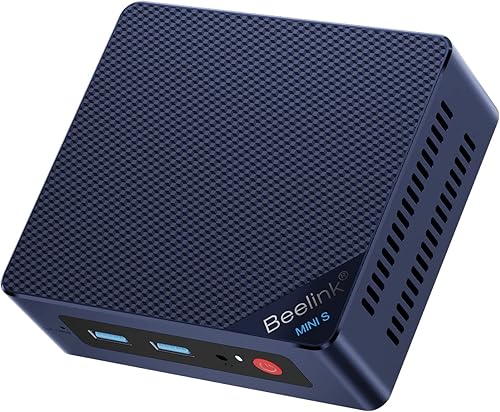
Beelink Mini PC: Best for HDMI and monitor mounting
- Two HDMI ports
- Dual 4K at 60Hz
- 8GB DDR4 memory
- VESA mount included
Two HDMI ports support dual 4K displays at 60Hz, and the included VESA bracket can mount the computer behind a monitor. Its 8GB memory and 256GB SSD are a more modest starting configuration.
Pros
- Dual HDMI 4K at 60Hz
- VESA mounting bracket included
- Four USB 3.2 Gen 2 ports
Cons
- 8GB memory is the listed configuration
- No DisplayPort output is specified
The Beelink Mini PC has two HDMI ports, each part of a dual-display setup rated for 4K at 60Hz. Its included VESA bracket also gives you the option to attach the compact computer behind a monitor.
The listed configuration has 8GB DDR4 memory and a 256GB SSD. Beelink describes the MINI S12 as suitable for video calls, office apps, browsing and streaming, which makes it a fit for a basic shared home or office workstation.
Four USB 3.2 Gen 2 ports provide options for accessories and external storage. The computer also includes Wi-Fi 6, Bluetooth 5.2 and a 2.5G LAN port.
Choose it if you value dual HDMI and monitor mounting in a compact setup. If you want to run demanding apps or keep many programs open, compare its 8GB memory with the larger-memory options above.
Bmax Mini PC Computers Intel N4500 Max: Best for budget dual 4K displays
- Two HDMI 2.0 outputs
- Dual 4K at 60Hz
- 8GB DDR4 memory
- 256GB M.2 SSD
The Bmax provides two HDMI 2.0 outputs for dual 4K displays at 60Hz. Its 8GB memory and 256GB SSD target routine computing and home entertainment.
Pros
- Dual HDMI 2.0 outputs
- Dual 4K at 60Hz
- Storage expansion is supported
Cons
- 8GB memory is the listed configuration
- No DisplayPort output is specified
The Bmax Mini PC Computers Intel N4500 Max has two HDMI 2.0 outputs and supports two 4K displays at 60Hz. It’s a budget-oriented choice for routine work and home entertainment where dual-screen HDMI matters.
Its configuration includes 8GB DDR4 memory and a 256GB M.2 SSD. Bmax says the computer supports storage expansion through two M.2 slots, one SATA and one NVMe, giving you a path to add capacity later.
Wi-Fi 5, Bluetooth 5.0 and Gigabit Ethernet cover common network and peripheral connections. The package includes an HDMI cable and a VESA mount with screws.
Choose it if you want dual 4K HDMI output and storage expansion for everyday tasks. The 8GB memory is a modest starting point, so consider a higher-memory model if your work involves heavier multitasking.
GMKtec Mini PC: Best for dual HDMI and storage expansion
- Two HDMI 2.0 ports
- Dual 4K at 60Hz
- 16GB LPDDR4 memory
- 512GB storage
Two HDMI 2.0 ports support two 4K displays at 60Hz, while 16GB memory and 512GB storage fit a fuller desktop setup. The computer also has a primary and secondary M.2 storage slot.
Pros
- Dual HDMI 2.0 with 4K at 60Hz
- 16GB memory and 512GB storage
- Two M.2 storage slots
Cons
- No DisplayPort output is specified
- Fan cooling is used
The GMKtec Mini PC offers two HDMI 2.0 ports for dual 4K displays at 60Hz, along with 16GB LPDDR4 memory and 512GB storage. It’s a useful fit for a desk setup that needs two screens and more room for files.
The system has three USB 3.2 Gen 2 ports, one USB 2.0 port, Wi-Fi 6, Bluetooth 5.2 and Ethernet. It also includes two M.2 storage slots, with a primary PCIe slot and a secondary SATA slot.
GMKtec describes the computer as suitable for office work, home theater and digital signage. It uses fan cooling, which is worth considering if you plan to place the mini PC close to where you work or watch video.
Choose this model if you want dual HDMI and 16GB memory with a 512GB drive. If you need a different video connection for a third display, consider one of the BOSGAME options with DisplayPort and USB-C video.
BOSGAME E5 Plus Mini PC Ryzen 5400U: Best for HDMI plus DisplayPort
- HDMI 2.0, DisplayPort and USB-C video
- Up to three 4K displays at 60Hz
- 8GB DDR4 memory
- 256GB SATA SSD
This pick offers one HDMI output alongside DisplayPort and USB-C video, with support for up to three 4K displays at 60Hz. Its memory and storage can be expanded.
Pros
- HDMI plus DisplayPort and USB-C video
- Triple 4K at 60Hz display support
- Two 2.5GbE LAN ports
Cons
- Only one HDMI output
- Starts with 8GB memory
The BOSGAME E5 Plus has one HDMI 2.0 output, plus DisplayPort and USB-C video output. It supports up to three 4K displays at 60Hz, making it the clearest fit here for a multi-screen setup that uses more than HDMI alone.
Its included configuration has 8GB DDR4 memory and a 256GB SATA SSD. Two SODIMM slots support memory expansion, and a second M.2 slot provides a way to add storage.
The E5 Plus also has two 2.5GbE LAN ports, Wi-Fi 5 and Bluetooth 5.0. Those network options can be useful in a home office or a setup that needs wired connections.
Choose it if you want HDMI alongside other video outputs and may build a three-screen desk. If both monitors use HDMI, plan to connect one through HDMI and confirm the right adapter or cable for the other output.
BOSGAME E5 11 Pro Mini PC: Best for a three-screen workstation
- HDMI 2.0, DisplayPort and full-function USB-C
- Triple 4K at 60Hz
- 8GB DDR4 memory
- 256GB SSD
The E5 11 Pro combines HDMI with DisplayPort and USB-C video for a three-screen setup. It also has an extra M.2 slot for adding storage.
Pros
- Supports three 4K displays at 60Hz
- HDMI, DisplayPort and USB-C video
- Dual 2.5GbE LAN ports
Cons
- Only one HDMI output
- Starts with 8GB memory
The BOSGAME E5 11 Pro pairs one HDMI 2.0 port with DisplayPort and full-function USB-C video. It supports three 4K displays at 60Hz, so it suits a workstation where HDMI is one part of a broader multi-monitor setup.
The standard configuration has 8GB DDR4 memory and a 256GB SSD. It also has dual SODIMM slots for memory expansion and an additional M.2 NVMe slot for a second drive.
Two 2.5GbE LAN ports support wired networking, and the USB-C port also supports data and PD 3.0. BOSGAME says the system supports Ubuntu as well as Windows 11 Pro.
Choose this model if you want multiple display options and room to expand memory or storage. Since it has only one HDMI port, a second HDMI-only monitor will need a compatible adapter for DisplayPort or USB-C video.
GMKtec G3S Mini PC Computers Intel N95: Best for a compact dual HDMI setup
- Two HDMI 2.0 ports
- Dual 4K at 60Hz
- 8GB DDR4 memory
- 256GB SSD
The G3S offers dual HDMI 2.0 for two 4K displays at 60Hz in a compact desktop. Its 8GB memory and 256GB SSD cover a basic everyday setup.
Pros
- Two HDMI 2.0 ports
- Dual 4K at 60Hz
- VESA mount included
Cons
- 8GB memory is the listed configuration
- No DisplayPort output is specified
The GMKtec G3S has two HDMI 2.0 ports and supports dual 4K displays at 60Hz. Its 8GB DDR4 memory and 256GB SSD make it a compact option for routine computing, office work and home entertainment.
The computer also includes USB 3.2, Wi-Fi 5, Bluetooth 5.0 and Gigabit Ethernet. A VESA mount is included for placing it behind a compatible monitor.
GMKtec lists features such as Wake on LAN, PXE boot, RTC wake and auto power on. These can matter for a small always-available setup, though they aren’t necessary for a basic home desk.
Choose the G3S if you want two HDMI connections and a compact computer for everyday use. For more memory or storage out of the box, compare it with the KAMRUI or GMKtec Mini PC above.
Bmax Mini PC B1 Plus: Best for basic HDMI-connected tasks
- Two HDMI ports
- Dual 4K display support
- 6GB LPDDR3 memory
- 128GB onboard storage
Two HDMI ports provide a direct connection to one or two displays, and the compact unit includes a VESA bracket. The 6GB memory and 128GB onboard storage are best suited to basic browsing and document work.
Pros
- Two HDMI ports
- VESA bracket included
- M.2 storage expansion supported
Cons
- 6GB memory
- 128GB onboard storage
The Bmax Mini PC B1 Plus includes two HDMI ports and supports dual-display output. Its compact body and included bracket make it easy to tuck behind a compatible screen.
This model has 6GB LPDDR3 memory and 128GB onboard storage. It’s the most basic configuration in this group, though the product description says an M.2 SSD can be added for more capacity.
The B1 Plus also includes dual-band Wi-Fi and Bluetooth 5.0, plus a Gigabit Ethernet connection. Bmax describes it for web browsing, document editing and daily office tasks.
Choose it for a simple HDMI-connected setup with light computing needs. If you plan to run several apps or store a large media library, the 8GB or 16GB options with larger SSDs are better aligned.
What should you check before buying a mini PC with HDMI?
Check the HDMI count, supported resolution and refresh rate, then match those details to your display. Two HDMI sockets are helpful for dual monitors, but the exact display support still matters.
Do you need one or two HDMI ports?
One HDMI port is enough for a single monitor or TV. If you want two displays, look for two HDMI ports or a second supported video output such as DisplayPort or USB-C.
The KAMRUI, Getorli, Beelink, Bmax N4500, GMKtec Mini PC, GMKtec G3S and Bmax B1 Plus have two HDMI ports. The BOSGAME models pair one HDMI port with DisplayPort and USB-C video.
Is 4K at 60Hz important?
A 4K display has a higher resolution than a standard Full HD screen, while 60Hz describes how often the image refreshes. If you use a 4K monitor and care about smooth movement, check that the PC supports both the resolution and refresh rate you want.
Several products here explicitly support dual 4K at 60Hz. Where the exact refresh rate isn’t specified, verify it for your intended display before buying.
What memory and storage fit your work?
Memory helps when you keep multiple apps and browser tabs open, while storage holds your operating system, apps and files. The models in this roundup range from 6GB to 16GB of memory and from 128GB to 512GB of listed storage.
For a closer look at capacity planning, read How Much Storage Do I Need in a Mini PC?. If you expect to add drives later, check which models have an extra slot and whether it supports SATA or NVMe.
Will the computer fit your desk and cooling needs?
A small PC can sit on a desk or mount behind a display if its bracket and your monitor support that arrangement. Check the body dimensions, cable clearance and access to the ports you plan to use.
Some models use a fan, and the Bmax B1 Plus describes a smart fan and heat sink. Our guide to choosing a fan or fanless mini PC explains the tradeoffs.
Do you need a USB hub?
A mini PC’s HDMI ports handle video, while USB ports connect accessories such as a keyboard, mouse, webcam or external drive. If you’ll use many devices, count the available USB ports before you set up the desk.
A desktop hub can add convenient ports without changing your display connection. See our guide to the best Anker USB hubs for desktop setups if you need more USB connections.
Which mini PC with HDMI should you choose?
Choose the KAMRUI AK1PLUS if you want two HDMI 2.0 ports, dual 4K at 60Hz and 16GB memory for general work. Pick the Getorli for its Ryzen 5 processor and 512GB SSD, or the BOSGAME E5 Plus if you want HDMI plus DisplayPort and USB-C video.
For a desk-focused shortlist, see our picks for the best mini PC for office work and the best mini PC for home use. If Linux compatibility is part of your decision, compare the best mini PCs for Linux.
HDMI should be the first compatibility check, but it isn’t the only one. Match the ports and display support to your screens, then choose enough memory and storage for the work you do.
For an upgrade path after setup, explore the best 2TB NVMe SSDs. For broader selection criteria, use our How to Choose a Mini PC: A Step-by-Step Guide.
Sources:
Our top 3 picks at a glance
-
1
Best for everyday dual-screen work
KAMRUI AK1PLUS Mini PC Computer
9.7/10 our score
See it on Amazon -
2
Best for a Ryzen dual-screen setup
Getorli Mini PC AMD Ryzen 5 3500U
9.6/10 our score
See it on Amazon -
3
Frequently asked questions
Do mini PCs have HDMI ports?
Many mini PCs include HDMI, but the number and version vary by model. The picks here have either one or two HDMI outputs, and several support two 4K displays.
Check the port count and display support before buying, especially if you want to connect two monitors without an adapter.
Can a mini PC with HDMI run two monitors?
Yes, if it has two video outputs and supports your displays at the resolution and refresh rate you want. Several options here support dual 4K screens at 60Hz through HDMI.
A PC with one HDMI port may support more screens through DisplayPort or USB-C video, but confirm which outputs can run at the same time.
Does HDMI 2.0 support 4K?
Yes. The models in this guide that specify HDMI 2.0 support 4K output, and several state support for 4K at 60Hz.
The PC, cable and display all need to support the target resolution and refresh rate.
Check those details together before choosing a setup.
Should I choose a mini PC with one or two HDMI ports?
Choose two HDMI ports if you plan to connect two displays directly and want to avoid relying on another video output. One HDMI port can be enough for a single display or a setup that uses DisplayPort or USB-C for a second screen.
Also check how many displays the computer supports at once.
What else should I check besides HDMI?
Check the display’s HDMI input, the computer’s supported resolution and refresh rate, and whether you need a second screen. Then compare memory, storage, USB ports and network options with your everyday tasks.
Our mini PC selection guide walks through those decisions.


