Vertical Mouse vs Trackball: Which Should You Choose? (November 2026)
Choose a vertical mouse for a handshake-style grip, or choose a trackball for cursor control with less desk movement. Your hand posture, workspace and tolerance for a learning curve should decide.
On this page (9 sections)
- Vertical mouse vs trackball: what is the main difference?
- Which grip feels more natural?
- Which gives better cursor control?
- Which needs less desk movement?
- Which option has the shorter learning curve?
- Which products fit each choice?
- What should you check before buying?
- Can a vertical mouse or trackball help with a mini PC desk?
- Vertical mouse vs trackball: which should you choose?
Choose a vertical mouse for a handshake-style grip, or choose a trackball for cursor control with less desk movement.
The right choice in a vertical mouse vs trackball comparison depends on posture, control style, desk space and how much practice you want to allow.
It also depends on the size of your hand, the surface under your mouse and how long you spend at the screen each day.
For parents working from home, those daily details can matter more than a general preference for one category over the other.
A vertical mouse still moves across the desk, but its taller shape turns your hand into a more upright position.
Your palm rests against a raised body instead of lying flatter over a low mouse shell.
That change can feel more relaxed for some users, especially during long sessions spent reading, writing or browsing.
A trackball stays mostly in place while your thumb or fingers roll the ball to move the pointer.
Your hand can remain in one position while small rolling movements send the cursor across the screen.
That can suit a crowded desk, although the thumb must learn how much pressure and rotation to use.
This comparison covers grip posture, cursor control, desk movement and learning curves.
We checked the features of 4 options, including both simple vertical designs and adjustable trackballs.
The Anker 2.4G Wireless Ergonomic Mouse represents a straightforward vertical approach for right-handed users.
The Logitech Lift Vertical Ergonomic Wireless Mouse uses a 57-degree shape and is aimed at small to medium right hands.
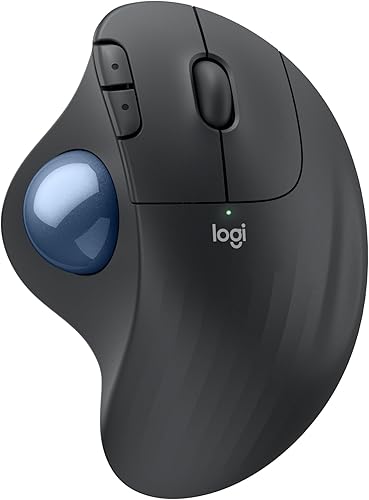
The Logitech ERGO M575S Wireless Bluetooth Trackball Mouse uses thumb control for tight desks and quieter all-day use.
The ProtoArc EM02 Wireless Trackball Mouse adds a flat or tilted angle, so its hand position can be adjusted.
A vertical mouse keeps pointer movement familiar because you still push and pull the whole device.
That familiarity can make it easier to start, even when the upright grip itself needs some adjustment.
A trackball asks for a bigger change because cursor movement comes from the ball rather than the shell.
It may take more practice, but it can reduce how often you lift or reposition the mouse.
Neither style solves every layout problem on its own.
Desk depth, keyboard placement, monitor distance and your preferred pace all shape the final result.
Parents Mini PC has compared these options with daily use in mind, rather than lab-style claims alone.
The sections ahead explain who each approach suits, what the main trade-offs are and which details to check first.
Use them to match the mouse to your hand and workspace instead of following a single winner for every desk.

 Best for tight desks
Logitech Ergo M575S Wireless Bluetooth Trackball Mouse
Vertical mouse vs trackball: what is the main difference?
A vertical mouse changes how you hold the device, while a trackball changes how you move the cursor.
That difference affects nearly every part of daily use.
A vertical mouse lets you guide the pointer by moving the whole device.
The Logitech Lift uses a 57-degree vertical shape, while the Anker model uses a right-hand vertical design with 800, 1200 and 1600 DPI settings.
Those DPI choices change how far the pointer travels for a given hand movement.
A lower setting can make careful pointing easier, while a higher setting suits faster travel across a large screen.
A trackball keeps the device in one spot.
The Logitech ERGO M575S uses thumb control, and the ProtoArc EM02 lets you use a flat 0-degree or tilted 15-degree position while rolling the ball.
The EM02 also offers several DPI settings, so you can start slowly and raise sensitivity later.
Neither category is automatically right for every hand.
Some people prefer the familiar movement of a mouse, while others prefer keeping the wrist and forearm more stable as the cursor moves.
That stability can help on a narrow desk, but it does not remove the need to learn thumb control.
A vertical mouse may feel easier at first, while a trackball may reward patience after the adjustment period.
Which grip feels more natural?
Choose a vertical mouse if your priority is an upright handshake-style grip. Choose a trackball if you want your hand supported while your thumb controls the pointer.
Vertical designs can feel unfamiliar at first because the buttons and wheel sit on a taller body. The Logitech Lift is made for small to medium right hands, with a textured grip and thumb rest.
The Anker mouse is also right-handed and vertical. Its 120 x 62.8 x 74.8 mm dimensions give it a taller profile than a flat mouse, and its 3.4 oz product weight keeps the basic design relatively light.
A trackball has a different adjustment point. You don't push the device to move the pointer, so your thumb must learn how far to roll the ball for short and long cursor movements.
The Logitech ERGO M575S has a sculpted right-hand shape and thumb control. Logitech says its design supports a more natural forearm posture, but that claim doesn't mean it will fit every hand equally well.
For more background on hand position and mouse shape, our guide to the best ergonomic trackball mouse explains what to compare before you choose.
Which gives better cursor control?
A vertical mouse keeps cursor control familiar, while a trackball can give precise movement without pushing the device. The better choice depends on whether you prefer arm movement or thumb movement.
The Anker offers 800, 1200 and 1600 DPI optical tracking settings. Lower sensitivity can make small movements easier to control, while a higher setting can move the pointer farther with less physical travel.
The Logitech Lift has adjustable tracking up to 4000 DPI according to its product description. Its SmartWheel supports both smooth scrolling and faster scrolling, which can help when you move through long pages.
A trackball's control comes from rolling the ball. The ERGO M575S supports cursor speed adjustment through the Logi Options+ app, and the ProtoArc EM02 offers 200, 400, 800, 1200 and 1600 DPI settings.
Trackball control can feel less precise during the first part of the adjustment period. ProtoArc says new users may need 1–2 weeks to become familiar with the EM02, especially if they start with a higher sensitivity.
If you want a ball-based design that also changes hand angle, compare the best vertical mouse with ball options before making a final choice.
Which needs less desk movement?
A trackball needs less desk movement because the cursor moves while the mouse stays in place. A vertical mouse still needs clear space for pushing, pulling and repositioning the device.
This makes a trackball useful on a narrow desk, a crowded work surface or a mini PC setup with limited depth. The ERGO M575S is designed around thumb control and can be used on any surface because the mouse itself doesn't need to slide.
The ProtoArc EM02 also targets tight or cluttered workspaces. Its adjustable hinge lets you choose a flat or tilted posture without changing the basic trackball method.
A vertical mouse needs more open desk space, but it may be easier to move quickly across a large monitor. The Anker includes next and previous buttons for web browsing, while the Lift includes customizable buttons and a SmartWheel.
Measure the space beside your keyboard before choosing. Our Keyboards & Mice: The Complete Buying Guide covers how the mouse, keyboard and available desk area work together.
Which option has the shorter learning curve?
A vertical mouse usually has the shorter learning curve because its pointer movement works like a standard mouse. A trackball may take longer because you must learn thumb control and ball momentum.
Start with a vertical mouse if you want to change your grip without changing your basic pointing habit. The Anker gives you 3 DPI choices, while the Lift adds a 57-degree angle, quiet clicks and a SmartWheel.
A trackball asks you to separate cursor motion from device motion. Your hand can stay still while your thumb rolls the ball, but small corrections may feel unusual during the first few sessions.
The EM02 offers 5 DPI settings, so you can begin at 200 or 400 DPI and increase sensitivity as your control improves. ProtoArc also recommends cleaning the ball and its 3 white rollers if the motion becomes sticky or uneven.
The ERGO M575S lets you eject the ball from its cage for cleaning. That maintenance is simple, but it is still another routine step to consider when comparing a trackball mouse or vertical mouse.
Which products fit each choice?
The Anker and Logitech Lift are the clearest vertical mouse choices, while the Logitech ERGO M575S and ProtoArc EM02 suit buyers who want a trackball. The details below show where each one fits.
The Anker connects through a 2.4 GHz USB receiver rather than Bluetooth. It uses 2 AAA batteries, which aren't included, and enters a power-saving mode after 8 minutes of inactivity.
Its right-hand shape is a good match for someone who wants the vertical posture without learning trackball control. The trade-off is that key click sounds are unavoidable, so it may be a poor fit for a quiet shared room.
The ERGO M575S supports up to 18 months of battery life and has a right-hand sculpted shape. Logitech also identifies 3 customizable buttons and cursor speed adjustment through Logi Options+.
Choose it when keeping the mouse in one place matters more than familiar push-and-slide movement. Its graphite body and blue ball make the control surface easy to identify, but the thumb-based method still needs practice.
For a closer look at this model's connection choices, read Kensington trackball expert mouse. The comparison can help you decide whether wired or wireless operation suits your desk.
Lift uses 1 AA battery with up to 24 months of battery life. It works with Windows, macOS, iPadOS, Chrome OS and Linux, and its product data lists 6 buttons.
The upright shape may feel more natural than a flat mouse for someone who wants a different forearm position without changing pointer movement. It remains a sliding mouse, so it won't solve a desk-space problem as directly as a trackball.
The EM02 offers 5 DPI settings from 200 to 1600 and up to 90 days of standby on a full charge. It can switch between devices with one button, and its buttons are designed for quiet clicks.
The right-hand EM02 is the most adjustable option here because you can change the angle as your hand position changes. Forward and backward buttons are not compatible with Mac OS, so Mac users should check whether those controls matter.
What should you check before buying?
Check hand orientation, connection type and desk space before comparing comfort claims. Those details can rule out a mouse even when its general design sounds right.
First, confirm whether you need a right-hand or left-hand model. All 4 products here are described for right-hand use, so a left-handed buyer needs a different shortlist.
Next, decide between Bluetooth, a USB receiver or both. The Anker uses a 2.4 GHz USB receiver, the ERGO M575S supports Bluetooth and Logi Bolt USB, the Lift supports Bluetooth and Logi Bolt USB, and the EM02 supports 2.4 GHz wireless and Bluetooth.
Power also affects your routine. The Anker needs 2 AAA batteries that aren't included, the ERGO M575S includes 1 AA battery, the Lift uses 1 AA battery and the EM02 uses USB-C charging.
If you are comparing a rechargeable mouse with a battery mouse, our rechargeable mouse vs battery mouse guide explains the daily trade-off.
Finally, consider the rest of your input setup. A ergonomic large print keyboard may pair well with either mouse if clear key labels and a comfortable hand position are also priorities.
Can a vertical mouse or trackball help with a mini PC desk?
Choose the device that matches your available movement, not the size of the computer. A mini PC can sit out of the way, but the mouse still needs a practical control area.
A vertical mouse works well when you have enough desk depth to slide it and you prefer a familiar pointer method. A trackball makes more sense when the keyboard, monitor stand or other items leave little room for mouse travel.
If your mini PC is part of a compact living-room or bedroom setup, Bluetooth can reduce receiver clutter. If you want a receiver-based connection, check which USB ports are easy to reach before you position the computer.
Our How to Choose a Mini PC: A Step-by-Step Guide covers the broader setup, including how the computer's location affects your accessories.
Vertical mouse vs trackball: which should you choose?
Pick a vertical mouse if you want an upright grip and familiar desk movement. Pick a trackball if you want the cursor to move while the mouse stays still.
Choose the Anker for a simple right-hand vertical shape and 3 DPI settings. Choose the Logitech Lift for small to medium right hands, quiet clicks and a 57-degree angle.
Choose the Logitech ERGO M575S for a tight desk and thumb control with Bluetooth or Logi Bolt USB. Choose the ProtoArc EM02 if you want trackball control plus a flat or tilted angle and USB-C charging.
The best vertical mouse vs trackball choice is the one that matches your preferred motion. If you want to compare more trackball layouts, see the Kensington Orbit trackball mouse guide before you decide.
Frequently asked questions
Is a vertical mouse better than a trackball?
A vertical mouse is better when your main goal is a more upright handshake-style grip, while a trackball is better when you want cursor control without moving the mouse across the desk. Your hand position, available desk space and comfort with thumb control matter more than the category name.
Is a trackball easier to use than a vertical mouse?
A vertical mouse usually feels more familiar because you still move the whole mouse, although the grip is different. A trackball keeps the mouse in place and uses a thumb or finger to move the cursor, so it can take several days or longer to feel natural.
Does a vertical mouse reduce wrist movement?
A vertical mouse changes the angle of your hand and forearm, but you still move the mouse across the desk. A trackball reduces desk movement because the cursor responds to the ball, while the best choice depends on which motion feels more comfortable for your hand.
Can a trackball work on a small desk?
Yes. A trackball can work well on a small desk because you roll the ball instead of pushing the mouse across a wide surface.
The Logitech ERGO M575S and ProtoArc EM02 are designed around thumb control, but you still need room to rest your hand and press the buttons.
Which should you choose for a mini PC setup?
Choose a vertical mouse when you want familiar pointer movement with a more upright grip. Choose a trackball when your mini PC setup has limited desk depth or you want the mouse to stay in one place.
Check connection type, hand orientation and battery needs before buying.