Is a Fanless Mini PC Reliable? The Short Answer
On this page (5 sections)
A fanless mini PC can be reliable when its cooling design suits your workload and room temperature. Removing the fan eliminates one moving component, but it does not guarantee that the whole computer will last longer than a fan-cooled model.
Many people worry about computers without fans overheating. However, fanless designs are engineered to manage heat effectively. They often use a metal casing as a heatsink. This allows them to dissipate heat quietly and efficiently. You get a quieter workspace and potentially a longer-lasting machine.
- Fanless mini PCs are generally reliable.
- They use passive cooling instead of a cooling fan.
- Fewer parts mean less chance of mechanical failure.
- They also run much quieter than fan-cooled PCs.
- Cooling capacity, workload and room temperature still matter.
For background on the components involved, see what is inside a mini PC.
Considering a Fanless Mini PC for Reliability
So, you’re curious about how reliable these fanless mini PCs really are. It’s a fair question. When we think of computers, we often picture fans whirring away. But what happens when those fans are gone? You might be surprised to learn that removing fans can actually boost reliability.
The core idea is simple: fewer moving parts mean fewer things to break. This is a principle that applies to many machines, not just computers. Think about a bicycle with a chain versus a car. The bicycle has fewer components that can wear out or fail unexpectedly. Fanless PCs operate on this same philosophy.
The Engineering Behind Fanless Cooling
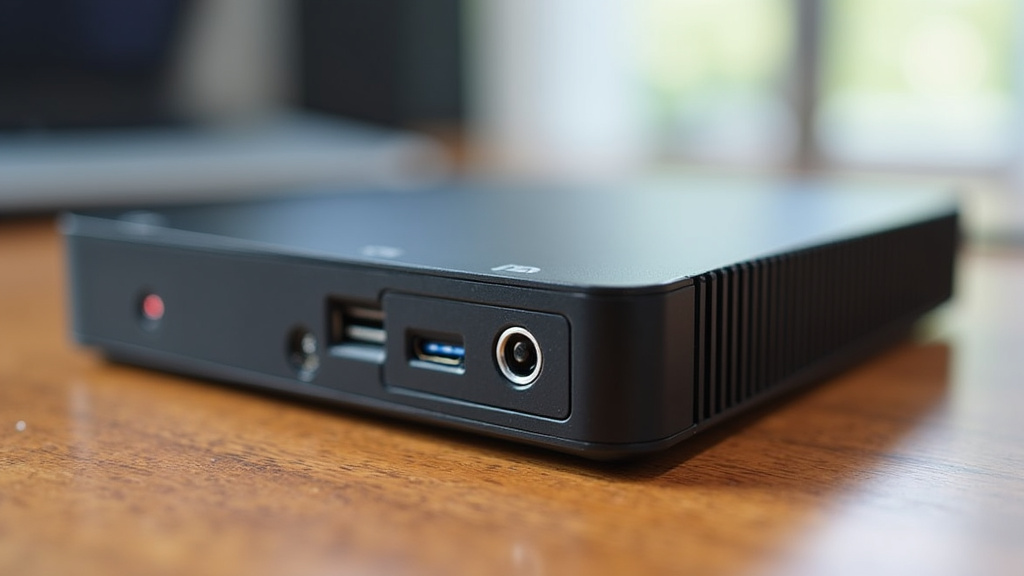
Fanless designs don’t just remove fans; they replace them with smart heat management. The most common method is passive cooling. This usually involves using the PC’s metal casing as a large heatsink. The case absorbs heat from the internal components and then radiates it out into the surrounding air.
Imagine a hot pan cooling down on your stovetop. It slowly releases its heat into the air without any extra help. Fanless PCs do something similar, but on a much smaller and more controlled scale. The materials used for the casing are chosen for their excellent heat conductivity.
How Passive Cooling Works
Heat naturally moves from hotter areas to cooler areas. In a fanless PC, the processor and other heat-generating parts are in direct or near-direct contact with a heatsink. This heatsink is often an extension of the PC’s outer shell. Heat transfers from the chip to the heatsink, and then from the heatsink to the air. It’s a silent and steady process.
The shape and material of the casing are carefully designed. They maximize the surface area available for heat dissipation. Think of it like a radiator in a car, but instead of a fan blowing air through it, the entire exterior surface is doing the work of cooling.
Advantages of a Fanless Design for Longevity
The absence of fans is a major benefit for long-term reliability. Fans are mechanical components. They have bearings that can wear out over time. Dust and debris can also get into fan blades, causing them to slow down, make noise, or stop working altogether.
A failed cooling fan can cause a computer to overheat. A fanless design removes that failure point, but it still needs enough cooling capacity and an installation environment within its rated limits.
Reduced Dust Buildup
Fans actively pull air into the computer. Unfortunately, they also pull in dust, pet hair, and other airborne particles. This debris can accumulate inside the PC over time. It coats components and blocks airflow, further contributing to overheating.
A sealed fanless enclosure can reduce dust entering the computer. Not every fanless PC is sealed, so check the enclosure design and keep its cooling surfaces clear.
Quieter Operation
While not directly a reliability factor, the quietness of fanless PCs is a significant advantage for users. Who enjoys a loud computer? The constant hum or whir of fans can be distracting. This is especially true if your PC is in your main living area or office.
Fanless PCs offer a virtually silent computing experience. This makes them ideal for environments where noise is a concern, such as bedrooms, libraries, or quiet offices. You can focus on your work or enjoy your media without the distraction of fan noise. It contributes to a more pleasant user experience.
Factors Affecting Fanless Mini PC Reliability
While fanless is generally good, reliability isn’t guaranteed just by the absence of fans. The quality of the design and components plays a huge role. Just like any product, there are good ones and less-than-good ones.
A poorly designed fanless PC might still struggle with heat. This could happen if the heatsink is too small or made of the wrong material. It’s important to consider the specific model and its thermal management capabilities.
The Importance of Thermal Design
A well-designed fanless PC has an effective thermal solution. This means the heatsink is appropriately sized for the processor’s heat output. It needs to be able to dissipate the heat efficiently under typical load conditions.
A cooling system must carry heat from internal components into the surrounding air. OnLogic explains how fanless cooling works, including why heat transfer and the system’s operating limits matter.
Understanding CPU Power and Heat
Processors generate heat based on their power consumption and workload. A high-performance CPU will generate more heat than a low-power one. Fanless PCs are often designed with processors that are energy-efficient by nature. This helps keep heat generation manageable.
Do not choose cooling from a generic wattage range alone. Check the exact processor, the computer’s rated ambient-temperature range and the manufacturer’s installation instructions for your intended workload.
Build Quality and Component Selection
Beyond the cooling system, the overall build quality matters. This includes the materials used for the chassis, the quality of the internal components like the motherboard, RAM, and storage. High-quality components are more robust and less prone to failure.
Compare the warranty, available support and published operating specifications before buying. These are useful purchasing checks, but a longer warranty alone does not prove that one computer will last longer.
When Does a Fanless Mini PC Make Sense?
Fanless mini PCs excel in specific use cases. They are not always the best choice for every single task. Think about where quiet operation and reliability are top priorities.
For many everyday computing needs, they are an excellent fit. This includes tasks like web browsing, email, document editing, and media playback. Their silent nature makes them perfect for home theaters or as a quiet office companion.
Ideal Use Cases for Fanless Mini PCs
A suitable fanless mini PC can be considered for:
- Home Theater PCs (HTPCs): You want to enjoy movies and music without distracting fan noise.
- Office Desktops: A quiet workspace improves focus and productivity.
- Digital Signage: Choose a model rated for the expected operating hours and installation environment.
- Point-of-Sale (POS) Systems: Check software compatibility, support and operating requirements.
- Server Applications: For small home or office servers where silence and stability are needed.
- General Computing Tasks: If your daily tasks are not extremely demanding.
Potential Limitations to Consider
However, if you are a power user who needs to run demanding applications like high-end video editing or intense gaming, a fanless mini PC might not be enough. These tasks generate a lot of heat. A fanless design might not be able to keep up.
In such scenarios, a traditional PC with active cooling (fans) might be necessary. This ensures that the components can be cooled effectively under extreme load. It’s about matching the PC to your workload.
Here’s a quick checklist to help you decide if a fanless mini PC is right for you:
- Do you need a quiet computer?
- Is reliability a top concern?
- Are your computing tasks generally light to moderate?
- Do you want to minimize dust inside your PC?
- Are you looking for a compact, space-saving solution?
- Do you want to avoid the potential failure of moving parts?
Conclusion
Fanless mini PCs can be a reliable choice for suitable workloads. They remove the cooling fan as a failure point, but good thermal design, appropriate placement and the right operating temperature remain essential. Choose a model for your actual tasks and check its specifications rather than assuming fanless always means more durable.
Frequently Asked Questions
Can a fanless mini PC really handle everyday tasks without overheating?
A suitable model can handle browsing, email and document work, provided the workload and room temperature stay within its design limits. Check the manufacturer’s operating-temperature range and installation requirements; fanless does not mean overheating is impossible.
Are fanless mini PCs more durable than regular PCs?
Not necessarily. A fanless PC has no cooling fan to wear out, but durability also depends on its thermal design, power supply, other components and operating conditions.
How do I know if a fanless mini PC’s cooling is good enough for me?
Look for a published operating-temperature range, installation clearances and thermal testing for the exact model and workload. Follow the manufacturer’s placement instructions and do not cover heat-dissipating surfaces.
Will a fanless mini PC be completely silent?
Fanless mini PCs are designed to be virtually silent. While there are no fans to create noise, other components like storage drives might produce minimal sound. However, compared to a traditional PC with fans, the experience is overwhelmingly quiet and distraction-free.
Are fanless mini PCs suitable for demanding applications like video editing?
For highly demanding tasks such as intensive video editing or professional-grade gaming, a fanless mini PC might not be sufficient. These activities generate significant heat, and a fanless design may struggle to dissipate it effectively. In such cases, a system with active cooling is often a better choice.


