8 Best Beelink Mini PCs (October 2026)
The best Beelink mini PCs include the Beelink SER3 Mini PC for a compact office setup, the Beelink SER5 MAX Mini PC for demanding daily workloads, and the Beelink Mini PC for basic home computing.
On this page (9 sections)
- Which Beelink mini PC fits each desktop workload?
- How did we compare these Beelink mini PCs?
- Which Beelink models suit light home and office use?
- Which Beelink SER3 should you choose?
- Which Beelink mini PC gives you more room to expand?
- Is the SER9 PRO worth considering for heavier work?
- What else should you check before choosing a Beelink?
- More guides on this topic
- Which Beelink mini PC should you choose?
The best Beelink mini PC for most demanding daily work is the SER5 MAX, with a Ryzen 7 7735U, 24GB LPDDR5 RAM and three display outputs. If you are comparing brands, browse our best GMKtec mini PCs.
For a lighter desktop, pick a Mini S12; for a larger built-in SSD and newer Ryzen 7 processor, consider the SER9 PRO.
These picks span basic web and office use through heavier multitasking and creative workloads. For another brand lineup to compare, see our best GEEKOM mini PCs.
The SER5 MAX options lead on processor and memory, while the Mini S12 costs less in capability and includes a smaller processor and memory configuration.
For a broader selection process, start with how to choose a mini PC. The guide explains how to match processor, memory, storage and display needs to the work you plan to do.
Our picks at a glance
-
1

-
2

-
3
Which Beelink mini PC fits each desktop workload?
The right Beelink mini PC depends on whether you need simple home computing, general multitasking or more demanding workloads. For another brand lineup, compare KAMRUI mini PCs.
Compare the processor, RAM and screen outputs before focusing on other features.
| Product | Best for | Processor | Memory and storage | Displays | Our score |
|---|---|---|---|---|---|
| Beelink SER3 Mini PC | a compact office setup | AMD Ryzen 3 3200U, up to 3.5GHz | 16GB DDR4 RAM, 500GB SSD | 2 HDMI displays | 9.7 |
| Beelink SER5 MAX Mini PC | demanding daily workloads | AMD Ryzen 7 7735U, up to 4.75GHz | 24GB LPDDR5 RAM, 500GB SSD | HDMI, DisplayPort and USB-C video output | 9.6 |
| Beelink Mini PC | basic home computing | Intel N95, up to 3.4GHz | 8GB RAM, 256GB SSD | 2 HDMI displays | 9.5 |
| Beelink Mini PC | a larger basic-task drive | Intel N95, up to 3.4GHz | 8GB RAM, 480GB SSD | 2 HDMI displays | 9.4 |
| Beelink SER3 Mini PC | multitasking on a budget | AMD Ryzen 5 3500U, up to 3.7GHz | 16GB DDR4 RAM, 500GB SSD | 2 HDMI displays | 9.3 |
| Beelink EQR5 Mini PC Ryzen 3 7330U | storage expansion | AMD Ryzen 3 7330U, up to 4.3GHz | 16GB DDR4 RAM, 500GB SSD | 2 HDMI displays | 9.1 |
| Beelink SER5 MAX Mini Pc | a three-screen desk | AMD Ryzen 7 7735U, up to 4.75GHz | 24GB LPDDR5 RAM, 500GB SSD | Triple 4K display support | 8.3 |
| Beelink SER9 PRO Mini PC | a larger SSD and high-end work | AMD Ryzen 7 H 255, up to 4.9GHz | 24GB LPDDR5X RAM, 1TB SSD | HDMI, DisplayPort and USB4 video output | 8.0 |
How did we compare these Beelink mini PCs?
We compared the processor, memory, included storage, display connections and expansion details described for each configuration. The scores reflect how well each set of features fits the range of desktop workloads in this guide.
The SER5 MAX scores highest for heavier daily work because its Ryzen 7 7735U has 8 cores and 16 threads, and its 24GB LPDDR5 memory supports multitasking. The SER9 PRO adds a 1TB SSD and USB4 display output, while the Mini S12 models are aimed at lighter tasks.
We don't have confirmed configuration details for a Beelink N150 mini PC in this comparison. Search terms such as Beelink mini PC N150 and N150 mini PC Beelink may refer to a different or newer configuration, so verify the processor and included memory before deciding.
Which Beelink models suit light home and office use?
The Mini S12 models suit basic desktop tasks such as web browsing, office work, video streaming and online meetings. Choose between them by included SSD size, or step up to a SER3 if you want more RAM and an AMD Ryzen processor.
Is the Beelink Mini S12 enough for everyday use?
The Beelink Mini S12 is enough for basic work if your routine centers on browsing, documents, video calls and streaming. For other low-cost options, compare mini PCs under 200 dollars.
Its Intel N95 processor has 4 cores and 4 threads, and the two options here pair it with 8GB RAM.
Beelink Mini PC: Best for basic home computing
- Intel N95, 4 cores and 4 threads
- 8GB DDR4 RAM
- 256GB SSD
- Dual HDMI display
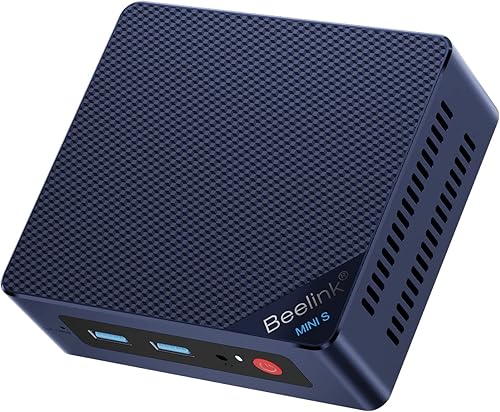
This Mini S12 configuration pairs an Intel N95 with 8GB RAM and a 256GB SSD. It fits browsing, office work and video streaming on a small desktop.
Pros
- Dual HDMI outputs
- Wi-Fi 6 and Bluetooth
- Compact 115 x 102 x 41 mm dimensions
Cons
- 8GB RAM
- 256GB SSD
This Mini S12 configuration includes an Intel N95, 8GB DDR4 RAM and a 256GB SSD. Dual HDMI ports support two displays, and Wi-Fi 6 and Bluetooth are included.
That mix fits a shared home computer or a compact office desk where you mostly use browser tabs, documents and video calls. The 256GB drive leaves less space for large local media collections than the 480GB option below.
A VESA mount is included, so you can attach the unit behind a compatible monitor to free desk space. The compact case measures 115 x 102 x 41 mm.
Pick this version if the lower storage capacity matches your apps and files. If you're comparing it with a Beelink Mini S12 Pro, the Beelink Mini S12 Pro mini PC review covers that separate model.
Is the 480GB Mini S12 a better fit for local files?
The 480GB Mini S12 is a better fit when you want more included SSD space for apps and files but still need only an Intel N95 and 8GB RAM. Its display connections and basic-task focus are similar to the 256GB configuration.
Beelink Mini PC: Best for a larger basic-task drive

- Intel N95, 4 cores and 4 threads
- 8GB DDR4 RAM
- 480GB SSD
- Dual HDMI display
This Mini S12 pairs the Intel N95 and 8GB RAM with a 480GB SSD. It offers more included storage than the 256GB version for local files and apps.
Pros
- 480GB SSD
- Dual HDMI outputs
- VESA mounting bracket included
Cons
- 8GB RAM
- Wi-Fi 5 support
This Mini S12 version keeps the Intel N95 and 8GB RAM but increases the SSD to 480GB. It also includes dual HDMI outputs and a VESA mounting bracket.
The extra space can help if you keep more documents, downloads and media on the computer instead of relying on cloud storage. It does not add more memory, so heavy multitasking remains a reason to consider a higher-tier model.
Wi-Fi uses 802.11ac, while the 256GB configuration lists Wi-Fi 6. If wireless networking matters, compare the exact configuration before choosing.
Which Beelink SER3 should you choose?
Choose the Ryzen 5 SER3 for more processor threads and keep the Ryzen 3 version in mind for a straightforward office setup with a 500GB SSD. Both include 16GB RAM and dual HDMI display output.
Does the Ryzen 5 SER3 fit everyday multitasking?
The Ryzen 5 SER3 fits everyday multitasking better than the Ryzen 3 version because its processor has 4 cores and 8 threads. It includes 16GB DDR4 RAM, a 500GB SSD and dual HDMI outputs.
Beelink SER3 Mini PC: Best for multitasking on a budget
- AMD Ryzen 5 3500U, 4 cores and 8 threads
- 16GB DDR4 RAM
- 500GB M.2 PCIe 3.0 x4 SSD
- Dual HDMI display
The Ryzen 5 3500U adds 4 cores and 8 threads alongside 16GB RAM and a 500GB SSD. That makes this SER3 configuration a step up for multitasking from the Ryzen 3 version.
Pros
- 4-core, 8-thread processor
- 16GB RAM and 500GB SSD
- RAM can be upgraded to 32GB
Cons
- Older Wi-Fi 5 support
- Dual display output only
The Ryzen 5 3500U runs at up to 3.7GHz and works alongside 16GB DDR4 RAM. The 500GB M.2 PCIe 3.0 x4 SSD gives you room for common apps and local files.
This SER3 can connect two screens through HDMI. Beelink says its RAM can be upgraded to 32GB, which may help if you later need more memory for a larger set of open apps.
For more configurations with that capacity, see mini PCs with 32GB RAM.
The Ryzen 5 configuration is a sensible middle step if an N95 mini PC feels too limited, but a Ryzen 7 SER5 MAX offers a more capable processor and 24GB of LPDDR5 memory. For another generation of SER5 configurations, read our Beelink SER5 mini PC review.
When does the Ryzen 3 SER3 make sense?
The Ryzen 3 SER3 makes sense for a basic office or home desktop if you want 16GB RAM and 500GB storage in the package. Its Ryzen 3 3200U has 2 cores and 4 threads, so it sits below the Ryzen 5 option for multitasking.
Beelink SER3 Mini PC: Best for a compact office setup
- AMD Ryzen 3 3200U, 2 cores and 4 threads
- 16GB DDR4 RAM
- 500GB M.2 PCIe 3.0 x4 SSD
- Dual HDMI display
The 16GB of RAM and 500GB SSD suit an everyday desktop setup. Dual HDMI outputs let you connect two screens.
Pros
- 16GB RAM and 500GB SSD
- Dual HDMI outputs
- RAM can be upgraded to 32GB
Cons
- 2-core processor
- Older Wi-Fi 5 support
The Ryzen 3 3200U SER3 pairs 16GB DDR4 RAM with a 500GB SSD. It supports two HDMI screens and has four USB 3.2 ports.
This configuration can suit documents, browsing and video playback. Its processor has fewer cores and threads than the Ryzen 5 SER3, making it a less suitable choice for a workload that regularly keeps many demanding apps open.
Beelink says the memory can be upgraded to 32GB. Consider that only if you are comfortable checking upgrade compatibility and installing memory yourself.
Which Beelink mini PC gives you more room to expand?
The EQR5 offers the clearest stated memory and storage upgrades, while the SER5 MAX models provide triple-screen output with a stronger processor. Pick based on whether expansion or display capacity matters more to your setup.
Is the Beelink EQR5 a good fit for upgrades?
The EQR5 is a good fit if you want an included 500GB SSD now and a stated path to larger memory and storage later. It has a Ryzen 3 7330U, 16GB DDR4 RAM and dual HDMI ports.
Beelink EQR5 Mini PC Ryzen 3 7330U: Best for storage expansion

- AMD Ryzen 3 7330U, 4 cores and 8 threads
- 16GB DDR4 RAM
- 500GB NVMe SSD
- Dual HDMI display
The EQR5 combines a Ryzen 3 7330U with 16GB RAM and a 500GB SSD. Its memory can be upgraded to 64GB and its M.2 storage to 4TB.
Pros
- RAM upgrade support up to 64GB
- M.2 storage upgrade support up to 4TB
- Wi-Fi 6 and dual Gigabit Ethernet
Cons
- Dual HDMI display output
- No triple-display setup
The EQR5's Ryzen 3 7330U has 4 cores and 8 threads and runs at up to 4.3GHz. It comes with 16GB DDR4 RAM and a 500GB NVMe SSD.
Beelink says its two SO-DIMM slots support up to 64GB RAM, and its M.2 interface supports storage up to 4TB. Dual Gigabit Ethernet ports, Wi-Fi 6 and Bluetooth 5.2 give it several connection options.
This model is a practical choice when storage and memory upgrades matter more than three-screen output. If gaming is part of your plan, see our guide to the best Beelink mini PC for gaming for models and workload tradeoffs focused on that use.
Which SER5 MAX configuration fits a three-screen desk?
Either SER5 MAX configuration fits a three-screen desk, with an HDMI port, DisplayPort and USB-C video output. Both are listed with a Ryzen 7 7735U, 24GB LPDDR5 RAM and a 500GB SSD.
Beelink SER5 MAX Mini PC: Best for demanding daily workloads
- AMD Ryzen 7 7735U, 8 cores and 16 threads
- 24GB LPDDR5 RAM
- 500GB SSD
- Triple display output
A Ryzen 7 processor and 24GB of LPDDR5 RAM fit heavier multitasking and creative work. HDMI, DisplayPort and USB-C support a three-screen setup.
Pros
- 8-core, 16-thread processor
- Triple display output
- Wi-Fi 6 and 2.5G LAN
Cons
- Memory is LPDDR5
- Auto power-on setup requires contacting Beelink
The SER5 MAX leads this roundup for demanding daily workloads with its 8-core, 16-thread Ryzen 7 7735U. The 24GB LPDDR5 memory and 500GB SSD suit multiple open apps, while three display outputs can support a broad work area.
The memory is LPDDR5, so don't assume it can be replaced like a removable desktop memory kit. The built-in SSD can be expanded according to Beelink, but check the exact drive arrangement and compatibility before planning an upgrade.
Wi-Fi 6, Bluetooth 5.4 and 2.5G LAN cover wired and wireless connections. For a gaming-specific comparison, use the guide to the best Beelink mini PC for gaming and check the games and settings you care about.
How does the other SER5 MAX compare?
The other SER5 MAX configuration has the same listed processor, memory and storage class, plus the same three-display connections. The key differences in these details are wording and listed cooling design, so compare the exact configuration you plan to buy.
Beelink SER5 MAX Mini Pc: Best for a three-screen desk

- AMD Ryzen 7 7735U, 8 cores and 16 threads
- 24GB LPDDR5 RAM
- 500GB M.2 SSD
- HDMI, DisplayPort and USB-C video output
This SER5 MAX configuration has the same Ryzen 7 7735U and 24GB LPDDR5 memory class as the other SER5 MAX pick. HDMI, DisplayPort and USB-C video output support a three-monitor arrangement.
Pros
- Triple display output
- 24GB LPDDR5 RAM
- Wi-Fi 6 and 2.5G Ethernet
Cons
- Memory is LPDDR5
- Auto startup requires contacting Beelink
This SER5 MAX also pairs a Ryzen 7 7735U with 24GB LPDDR5 RAM and a 500GB SSD. Its HDMI, DisplayPort and USB-C outputs support triple 4K monitors.
Its description identifies a dual cooling system with a heatsink and fan. If fan noise matters, compare quiet mini PC options.
The stated wireless connections include Wi-Fi 6 and Bluetooth 5.4, with a 2.5G Ethernet port for wired networking.
Both SER5 MAX picks fit users whose workloads need more processor and memory than the N95 or SER3 options provide. The distinction between configurations is small in the core specs, so verify the specific ports and included accessories before choosing.
Is the SER9 PRO worth considering for heavier work?
The SER9 PRO is worth considering if you need a 1TB SSD, USB4 and a higher-tier processor in a compact desktop. For a competing high-capacity system, read our GEEKOM A9 Max review.
Its Ryzen 7 H 255 and 24GB LPDDR5X memory also support a three-display setup.
Beelink SER9 PRO Mini PC: Best for a larger SSD and high-end work
- AMD Ryzen 7 H 255, 8 cores and 16 threads
- 24GB LPDDR5X RAM
- 1TB PCIe 4.0 x4 SSD
- Triple display output
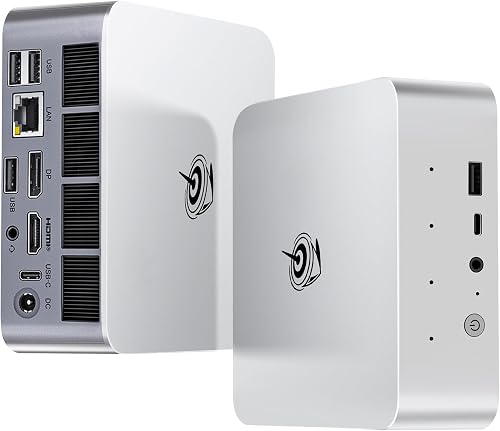
The SER9 PRO pairs a Ryzen 7 H 255 with 24GB LPDDR5X RAM and a 1TB SSD. Its HDMI, DisplayPort and USB4 outputs support three displays.
Pros
- 1TB SSD
- Triple display output
- USB4 port
Cons
- Highest-tier option in this group
- Auto power-on setup requires contacting Beelink
The SER9 PRO combines an AMD Ryzen 7 H 255, 24GB LPDDR5X RAM and a 1TB PCIe 4.0 x4 SSD. Its processor has 8 cores and 16 threads, with a maximum boost speed of 4.9GHz.
HDMI, DisplayPort and USB4 provide video output for up to three displays. USB4 also supports data and power delivery, while Wi-Fi 6, Bluetooth 5.2 and 2.5G LAN cover network connections.
This is the premium pick for a workload that benefits from more built-in storage and the listed higher processor speed. See our Beelink SER9 Pro review for more details, and compare it with ASUS NUC Pro if you're deciding between mini PC lines.
What else should you check before choosing a Beelink?
Check the exact processor, memory, storage and display ports for the configuration you plan to buy. Product names can cover multiple configurations, and the details here include both older and newer processors.
A search for Beelink N150 mini PC or N150 mini PC from Beelink may surface a configuration that isn't among these picks. Confirm the full processor name and compare it with the N95 and Ryzen systems here rather than assuming they are interchangeable.
Storage needs also depend on whether you save large files locally or use external drives and cloud services. Use our guide to how much storage you need in a mini PC to estimate a useful capacity.
Your keyboard and mouse affect daily comfort, especially if this mini PC will be your main desktop. Our wired keyboard guide and roundup of the best backlit keyboard and mouse combo can help finish the setup.
More guides on this topic
- Beelink Mini S12 Review
- Beelink Mini S13 Review
- Beelink EQR6 Review
- Beelink SER5 Pro Review
- Beelink SER5 Max Review
- Beelink SER8 Review
Which Beelink mini PC should you choose?
Choose the SER5 MAX if your daily work benefits from a Ryzen 7 processor, 24GB LPDDR5 RAM and three displays. Choose the Mini S12 for basic office and home tasks, the EQR5 for stated memory and storage expansion, or the SER9 PRO for a 1TB SSD and USB4.
If Linux is part of your setup, check hardware support for the exact configuration before buying. Our guide to the best Beelink mini PC for Linux focuses on that choice.
Scores weigh specs, features and buyer feedback against the desktop workloads this guide covers.
Our top 3 picks at a glance
-
1
-
2
-
3
Frequently asked questions
Which Beelink mini PC is best for everyday work?
The SER5 MAX with a Ryzen 7 7735U and 24GB LPDDR5 RAM is the strongest fit here for heavier multitasking and creative work. For basic office tasks, web browsing and streaming, a Mini S12 with an Intel N95 and 8GB RAM may be enough.
Choose based on the apps you run and how much storage you need.
Is a Beelink N150 mini PC included here?
No. The models compared here include Intel N95 and AMD Ryzen processors, but no N150 configuration.
If you search for a Beelink N150 mini PC, check the processor name on the exact configuration before comparing it with these picks.
The N95 Mini S12 models here come with either a 256GB or 480GB SSD.
Can these Beelink mini PCs use two or three monitors?
The Mini S12 and SER3 configurations here support two displays through dual HDMI ports. The SER5 MAX options support HDMI, DisplayPort and USB-C video output, while the SER9 PRO offers HDMI, DisplayPort and USB4 video output for three screens.
Check that your monitors have matching inputs or the right cables.
How should I choose SSD capacity?
Start with the files and apps you expect to keep on the computer. The options here range from a 256GB SSD to a 1TB SSD, and some configurations support storage expansion.
Our storage guide explains how to estimate space for your own use.
Are Beelink mini PCs good for Linux?
The product details here don't confirm Linux compatibility for these configurations. Before choosing a model, check the exact hardware and Linux support information for the setup you plan to use.
See our guide to the best Beelink mini PC for Linux for more focused considerations.