8 Best Wireless Keyboards for PC (November 2026)
The best wireless keyboards for PC include the Logitech K400 Plus Wireless Touch TV Keyboard for PC-to-TV control, the Logitech MK270 Full Size Wireless Keyboard for a keyboard and mouse combo, and the AULA F75 Pro Wireless Mechanical Keyboard for wireless mechanical typing.
On this page (5 sections)
The best wireless keyboard for PC for most people is the Logitech K400 Plus, because its built-in touchpad handles both typing and pointer control. Choose the Logitech MK270 for a complete keyboard and mouse set, or the AULA F75 Pro if you want a compact mechanical keyboard.
This list covers cordless keyboards for desktop computers, laptops, media setups and quiet workspaces. We compared connection types, layouts, power systems, key designs and useful extras against common PC typing needs.
If you're comparing a keyboard with a cable, our wired keyboard buying guide explains the trade-offs. For a laptop decision, read [Is a Mini PC Better Than a Laptop?
A Clear Guide](/is-a-mini-pc-better-than-a-laptop/) and Can a Mini PC Do Everything a Laptop Can?.
Our picks at a glance
-
1
 Best for PC-to-TV control
Logitech K400 Plus Wireless Touch TV Keyboard
9.7/10 our score
See it on Amazon -
2
 Best for a keyboard and mouse combo
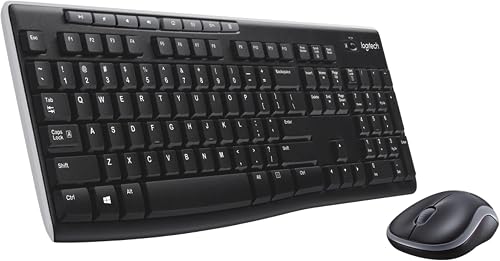
Logitech MK270 Full Size Wireless Keyboard
9.6/10 our score
See it on Amazon -
3
 Best for wireless mechanical typing
AULA F75 Pro Wireless Mechanical Keyboard
9.5/10 our score
See it on Amazon
- 4
 Check it
Arteck 2.4G USB Wireless Keyboard Full Size
Best for a slim full-size keyboard - 5
 Check it
TECKNET 2.4G Wireless Keyboard
Best for compact quiet typing - 6
 Best for quiet number-pad workCheck it
- 7
 Check it
Soueto Wireless Keyboard with RGB Backlit
Best for backlit desktop typing - 8
 Check it
Harburfine USB Silent Wireless Keyboard for Laptop
Best for simple silent laptop typing
Which wireless keyboard is best for PC use?
The Logitech K400 Plus is the best wireless keyboard for PC-to-TV use, while the MK270 is the stronger general desktop choice because it includes a full-size keyboard and mouse. The AULA F75 Pro is the best fit for users who want mechanical keys and several connection modes.
Our score weighs specs, features and buyer feedback against what you're shopping for. The picks appear from highest score to lowest, and each one has a different best-use badge.
How we chose the best wireless keyboards for PC
The best wireless keyboard for PC should match your computer's available ports, your preferred layout and how much movement you need around the desk. A USB receiver is easy to use, but it takes a port.
Bluetooth can reduce receiver clutter, while a wired USB-C mode can help when you want a direct connection.
We also looked at keyboard size. Full-size models include a number pad and familiar navigation keys, while compact designs leave more room for a mouse or other desk items.
The TECKNET is smaller, and the AULA F75 Pro keeps an 81-key 75% layout.
Power is another key difference. Replaceable batteries are easy to swap, while rechargeable models need a charging routine.
Stated battery life also depends on use, settings and the environment, so treat long battery claims as usage guidance rather than a guarantee.
The right keyboard may also depend on your setup. Our best Logitech wireless keyboard guide focuses on Logitech options, while the best wireless keyboard for office work guide is useful when quiet typing and daily productivity matter most.
| Product | Best for | Connection | Size | Power | Our score |
|---|---|---|---|---|---|
| Logitech K400 Plus Wireless Touch TV Keyboard | PC-to-TV control | RF via Unifying receiver | 13.95 x 5.5 x 0.93 in | 2 pre-installed AA batteries | 9.7 |
| Logitech MK270 Full Size Wireless Keyboard | a keyboard and mouse combo | Wireless via USB receiver | 9.6 | ||
| AULA F75 Pro Wireless Mechanical Keyboard | wireless mechanical typing | Bluetooth 5.0, 2.4GHz wireless or USB-C | 9.5 | ||
| Arteck 2.4G USB Wireless Keyboard Full Size | a slim full-size keyboard | 2.4G USB receiver | 16.9 x 4.9 x 0.6 in | 9.4 | |
| TECKNET 2.4G Wireless Keyboard | compact quiet typing | 2.4GHz USB receiver | 2 AAA batteries, not included | 9.3 | |
| HP 230 Wireless Keyboard | quiet number-pad work | 17.32 x 5.76 x 1.09 in | 9.1 | ||
| Soueto Wireless Keyboard with RGB Backlit | backlit desktop typing | 2.4G wireless via USB receiver | 8.6 | ||
| Harburfine USB Silent Wireless Keyboard for Laptop | simple silent laptop typing | 2.4G RF via USB receiver | 16.89 x 4.96 x 0.91 in | 1 AAA battery, not included | 8.3 |
The best wireless keyboards for PC in detail
The best pick depends on the way you type. If gaming is the priority, compare our wireless gaming keyboards.
A touchpad helps with a TV setup, a number pad helps with data entry, and a mechanical or backlit design may suit gaming or late-night work.
Logitech K400 Plus Wireless Touch TV Keyboard: Best for PC-to-TV control
- Built-in touchpad
- Up to 33 ft wireless range
- Up to 18 months of battery life
- Spill-resistant design
The built-in touchpad combines cursor control and typing in one device. It suits a PC connected to a TV, especially when you want to type and control media from a sofa.
Pros
- Built-in touchpad
- Quiet keys
- Long stated battery life
Cons
- Not a full-size number-pad keyboard
- Uses a USB receiver
The Logitech K400 Plus is the strongest choice when your PC is connected to a TV. Its built-in touchpad removes the need for a separate mouse, so you can type searches and move the pointer from one device.
The keyboard uses a Unifying receiver and has a stated wireless range of up to 33 ft. That distance fits a living-room arrangement, although the useful range can change with the room and computer setup.
Its quiet keys and large touchpad support media browsing, chats and general control. The 13.95 x 5.5 x 0.93 in body is wider than a compact travel keyboard but still easier to manage than a keyboard and mouse together.
Logitech lists up to 18 months of battery life from the 2 pre-installed AA batteries when used under its stated conditions. The on/off button can help conserve power between sessions, and the spill-resistant design adds practical protection around drinks.
Choose it for a PC-connected TV or a desk where pointer control matters. If you need a number pad for spreadsheets, choose a full-size model instead.
Logitech MK270 Full Size Wireless Keyboard: Best for a keyboard and mouse combo
- Full-size layout
- Number pad
- 8 multimedia hotkeys
- Keyboard and mouse included
The MK270 gives you a full-size keyboard and a compact ambidextrous mouse through one included USB receiver. It fits everyday PC users who need both input devices.
Pros
- Full-size layout
- Mouse included
- Spill-resistant design
Cons
- Windows-focused compatibility
- Takes a USB port
The Logitech MK270 is the best wireless keyboard for PC users who need a mouse as well. One USB receiver connects the full-size keyboard and compact ambidextrous mouse, reducing the need to manage separate receivers.
The keyboard has a standard layout with full-size F-keys, arrow keys and a number pad. Its low-profile quiet keys suit everyday writing, browsing and office tasks, while 8 multimedia hotkeys provide quick access to internet, email, playback and volume functions.
Logitech states up to 36 months of keyboard battery life and up to 12 months for the mouse. Separate on/off switches help reduce battery use when the set is stored or not needed.
The keyboard has a spill-resistant design and adjustable-height tilt legs. Windows is the specified operating system family, with Windows 10 listed as the minimum required version.
Pick the MK270 when a complete input set matters more than backlighting or Bluetooth. It is also a practical choice for a desktop PC with one available USB-A port.
AULA F75 Pro Wireless Mechanical Keyboard: Best for wireless mechanical typing
- 81-key 75% layout
- Hot-swappable 3-pin and 5-pin switches
- RGB backlighting
- Multi-function knob
The F75 Pro brings a compact mechanical layout, switch replacement and three connection modes to PC typing. Its knob controls lighting or media depending on the selected mode.
Pros
- Three connection modes
- Hot-swappable switches
- Rechargeable battery
Cons
- Compact layout takes adjustment
- Mechanical keys may sound louder than quiet scissor keys
The AULA F75 Pro is the best wireless keyboard for PC users who want mechanical typing in a smaller layout. Its 81-key 75% design keeps arrow keys while using less desk space than a full-size number-pad keyboard.
This model supports Bluetooth 5.0, 2.4GHz wireless and USB-C, with the ability to connect up to 5 devices. That gives you more ways to use it with a PC, laptop, tablet, smartphone or gaming console.
Its hot-swappable base supports 3-pin and 5-pin switch replacement without soldering. The pre-lubricated Reaper switches, PBT keycaps and five layers of filling are aimed at a smoother, quieter mechanical feel than an unfilled board, although mechanical typing can still be more noticeable than scissor keys.
The multi-function knob adjusts lighting in gaming mode and volume in office mode. RGB backlighting includes 16.8 million colors, 16 preset effects and 10 music rhythm effects through the driver.
A rechargeable 4000mAh battery avoids regular battery replacement. Choose it for customization and mechanical features, but check that its compact layout suits your usual shortcuts.
Arteck 2.4G USB Wireless Keyboard Full Size: Best for a slim full-size keyboard
- Stainless steel construction
- Numeric keypad
- Rechargeable battery
- Low-profile keys
The Arteck combines full-size keys and a number pad with a slim stainless steel body. Its rechargeable battery reduces the need to keep replacement batteries nearby.
Pros
- Full-size layout
- Rechargeable battery
- Low-profile quiet keys
Cons
- USB receiver required
- Windows compatibility is specified
The Arteck 2.4G USB Wireless Keyboard is the best wireless keyboard for PC users who want a slim full-size layout. Its stainless steel body, low-profile keys and numeric keypad combine desktop functionality with a 0.6 in thickness.
The keyboard measures 16.9 x 4.9 x 0.6 in and includes arrow keys, shortcuts and a number pad. That makes it useful for spreadsheets, forms and number entry without moving to a separate compact keypad.
A nano USB receiver handles the 2.4G connection, with a stated range of up to 33 ft. The included USB cable is for charging, not for the wireless connection.
Its rechargeable lithium battery is rated for up to 6 months on one charge under the stated usage pattern. The box includes the keyboard, USB receiver, USB charging cable and welcome guide.
Choose the Arteck if you want a clean, thin keyboard with a number pad and rechargeable power. It is less suitable if your PC has no free USB port or if you prefer Bluetooth.
TECKNET 2.4G Wireless Keyboard: Best for compact quiet typing
- 11.5 x 4.9 in compact body
- Noise-reduced keys
- Media hotkeys
- Smart sleep mode
The TECKNET saves desk space with a compact body and quiet scissor-switch X structure. It works across several computer operating systems, but it does not support Bluetooth.
Pros
- Compact size
- Quiet key design
- Broad OS compatibility
Cons
- Different Enter key layout
- Needs a USB-A port
The TECKNET 2.4G Wireless Keyboard is the best wireless keyboard for PC users who want compact, quiet typing. Its 11.5 x 4.9 in body and 10.4 oz weight make it easier to move between a home desk, office or travel bag.
The keyboard uses a USB receiver and supports Windows, MacOS, ChromeOS and Linux. It does not support Bluetooth, and your computer needs a USB-A port for the receiver.
Noise-reduced scissor-switch X keys are designed for quieter typing. The keyboard also includes media hotkeys and a smart sleep mode that wakes when you press a key after inactivity.
The compact layout has a different Enter key arrangement from a standard full-size keyboard. Give yourself time to adjust if you rely on a familiar full-size layout.
Two AAA batteries are required and are not included. Choose this model for portability and quiet key presses, not for a full-size number pad.
HP 230 Wireless Keyboard: Best for quiet number-pad work
- Low-profile chiclet keys
- Integrated number pad
- 12 shortcut keys
- 2 included AAA batteries
The HP 230 is a full-size wireless keyboard with a number pad and low-profile keys. It suits quiet desk work where quick access to 12 shortcut functions matters.
Pros
- Number pad
- Quiet chiclet keys
- Batteries included
Cons
- Full-size body needs desk space
- Uses a receiver
The HP 230 is the best wireless keyboard for PC users who want quiet full-size work with a number pad. Its low-profile chiclet keys are designed for accurate typing with less keystroke noise.
The 17.32 x 5.76 x 1.09 in body includes an integrated number pad and 12 shortcut keys. Those shortcuts give quick access to common functions without requiring a compact layout.
The keyboard uses wireless connectivity through its receiver and works with laptops and PCs using Windows or MacOS. HP lists up to 16 months of use from the 2 included AAA batteries, although actual life changes with use and conditions.
Its full-size design suits a permanent desk better than a small laptop bag. The receiver, batteries, quick-start guide and warranty card are included with the keyboard.
Choose the HP 230 for quiet office-style typing and number entry. For a smaller desk, the TECKNET takes up less room, while the Arteck offers rechargeable power.
Soueto Wireless Keyboard with RGB Backlit: Best for backlit desktop typing
- 7-color RGB backlighting
- Phone or tablet holder
- 116 keys
- 1500mAh rechargeable battery
The Soueto adds adjustable RGB lighting and an 8.7 in device holder to a full-size keyboard. It suits desktop users who want visible keys and a place for a phone or tablet.
Pros
- Adjustable RGB lighting
- Built-in device holder
- Rechargeable battery
Cons
- USB-A receiver required
- Backlight turns off after inactivity
The Soueto wireless keyboard is the best wireless keyboard for PC users who want RGB lighting and a device holder. Its 8.7 in holder can keep a phone or tablet upright while the full-size keyboard handles typing.
The keyboard offers 7 backlight colors, 4 lighting modes and adjustable brightness. The backlight turns off after 120 seconds of inactivity to conserve its rechargeable 1500mAh battery.
A 2.4G USB receiver connects it to a PC, laptop, gaming console or Smart TV. The keyboard is specified for Windows and uses a USB-A connection, so a compatible port is part of the setup.
The layout has 116 keys, shortcut and media keys, and quiet tactile keystrokes. The receiver should be connected before testing the backlight because the lighting can shut off quickly when no connection signal is detected.
Pick it if visible keys and a built-in holder matter more than Bluetooth. It is also a good match for a desk where you want lighting without adding a separate lamp.
Harburfine USB Silent Wireless Keyboard for Laptop: Best for simple silent laptop typing
- Full-size QWERTY layout
- Numeric keypad
- 12 multimedia shortcuts
- Automatic sleep mode
The Harburfine provides a full-size layout, quiet keys and a number pad for laptop or desktop use. Its receiver stores in the battery compartment when you carry it.
Pros
- Quiet key design
- Full-size number pad
- Receiver storage
Cons
- Mac shortcut support is limited
- Battery not included
The Harburfine USB Silent Wireless Keyboard is the best wireless keyboard for PC users who want a simple full-size layout with quiet keys. It includes a number pad, 12 multimedia shortcuts and a tilt angle for a familiar desktop position.
The keyboard uses a 2.4G USB receiver with a stated range of up to 33 ft. The receiver is stored inside the battery compartment, which helps keep it with the keyboard when you move it between a laptop and desktop.
Automatic sleep mode begins after more than 15 minutes without use. Pressing a key wakes the keyboard, and the power system uses 1 AAA battery that is not included.
Harburfine specifies compatibility with Windows, Chrome OS, Linux and Mac OS, but notes that the 12 shortcuts are not fully compatible with Mac. Its full-size 16.89 x 4.96 x 0.91 in body needs more desk space than the TECKNET.
Choose it for quiet full-size typing and easy receiver storage. If you want a rechargeable keyboard, consider the Arteck or Soueto instead.
How do you choose a wireless keyboard for a PC?
Choose a wireless keyboard for PC use by checking the connection first, then the layout, power type and desk size. A keyboard that fits your hands but needs a port you don't have will be less useful than a slightly simpler model with the right connection.
Wireless keyboard vs Bluetooth keyboard
A USB receiver is often the easiest option for a desktop PC. You plug the receiver into a compatible port and use the keyboard through that connection.
The TECKNET, Arteck, HP 230, Soueto and Harburfine all use receiver-based wireless connections.
Bluetooth avoids a dedicated receiver, but your PC needs Bluetooth support and the pairing process may differ by computer. The AULA F75 Pro gives you Bluetooth, 2.4GHz wireless and USB-C, so it is the most flexible connection choice in this group.
Read our guide to wireless keyboard vs Bluetooth keyboard before deciding. It explains when a receiver or Bluetooth connection makes more sense for your setup.
Full-size or compact layout?
Pick a full-size keyboard if you use a number pad, arrow keys or familiar F-key spacing every day. The MK270, Arteck, HP 230, Soueto and Harburfine all target that style of desktop typing.
Choose a compact keyboard if desk space or portability matters more than dedicated number entry. The TECKNET measures 11.5 x 4.9 in, while the AULA F75 Pro uses an 81-key 75% layout with arrow keys.
A compact layout can need adjustment. The TECKNET has a different Enter key layout, and the AULA F75 Pro does not include the full-size number-pad arrangement.
Do you need a number pad?
A number pad helps with spreadsheets, accounting, forms and repeated number entry. The MK270, Arteck, HP 230, Soueto and Harburfine include full-size designs with number pads.
If you mainly write, browse or control media, a number pad may take up desk space without adding much value. The K400 Plus uses that space for a large touchpad, while the TECKNET keeps its body compact.
Our best wireless keyboard with number pad guide covers full-size choices in more detail.
Do you need a volume knob?
A volume knob gives quick physical control without using keyboard shortcuts or opening an on-screen control. The AULA F75 Pro includes a multi-function knob that adjusts lighting in gaming mode and volume in office mode.
The other keyboards here use media keys or shortcut keys instead. Those can still handle common controls, but they require pressing a key rather than turning a knob.
See the best wireless keyboard with a volume knob guide if this control is central to your setup.
What if you need a USB dongle?
A USB dongle, also called a receiver, is useful when you want a quick connection without Bluetooth pairing. Check the number and type of free ports on your PC before choosing one.
The K400 Plus uses a Logitech Unifying receiver, while the other receiver-based models use their included wireless receiver. The TECKNET needs USB-A, and the Soueto also uses a USB-A receiver.
Our guide to the best wireless keyboard with a dongle focuses on receiver-based setups. Keep the receiver in a safe place when transporting the keyboard.
Which wireless keyboard features matter for special setups?
Choose features based on the way you use the keyboard. A touchpad helps with a PC connected to a TV, RGB lighting helps in dim rooms, and a rechargeable battery reduces the need for replacement cells.
The K400 Plus is the most practical media keyboard here because it combines typing and pointer control. The Soueto adds RGB lighting and a device holder, while the AULA F75 Pro focuses on mechanical switches, customization and multi-device connections.
For a Mac computer, check shortcut behavior and operating-system support before buying. Our best wireless keyboard for Mac guide is a better starting point for Apple-focused use.
If you need a yellow design, see the best yellow wireless keyboards guide, and for longer nails, compare the best wireless keyboards for long nails options.
Final choice: which wireless keyboard for PC should you buy?
The Logitech K400 Plus is the best wireless keyboard for PC-to-TV control, thanks to its built-in touchpad and long stated battery life. Pick the MK270 for a full-size keyboard and mouse, the AULA F75 Pro for wireless mechanical typing, or the Arteck for a slim rechargeable number-pad layout.
For quiet compact typing, choose the TECKNET. For quiet full-size office work, choose the HP 230 or Harburfine.
The Soueto fits a desk where RGB lighting and a phone holder matter.
The best wireless keyboard for PC is the one that matches your connection, layout and power needs before extra features enter the decision.
Our top 3 picks at a glance
-
1
Best for PC-to-TV control
Logitech K400 Plus Wireless Touch TV Keyboard
9.7/10 our score
See it on Amazon -
2
Best for a keyboard and mouse combo
Logitech MK270 Full Size Wireless Keyboard
9.6/10 our score
See it on Amazon -
3
Best for wireless mechanical typing
AULA F75 Pro Wireless Mechanical Keyboard
9.5/10 our score
See it on Amazon
Frequently asked questions
What is the best wireless keyboard for PC use?
The Logitech K400 Plus is the best wireless keyboard for PC-to-TV control because it combines typing with a built-in touchpad. For desk work, choose the Logitech MK270 if you also need a mouse, or the HP 230 if you want a quiet full-size keyboard with a number pad.
Is a wireless keyboard good for a desktop PC?
Yes. A wireless keyboard reduces cable clutter and lets you move the keyboard away from the desktop.
Most picks here use a USB receiver, so check that your PC has a free compatible port.
The AULA F75 Pro also supports Bluetooth and USB-C.
What is the difference between a wireless keyboard and a Bluetooth keyboard?
A wireless keyboard may use a dedicated USB receiver, while Bluetooth connects directly through the computer's Bluetooth settings. Receiver models can be simple to set up, but they use a port.
Bluetooth models can be more flexible when your PC has limited USB ports.
Do wireless keyboards need batteries?
Some use replaceable AA or AAA batteries, while others have rechargeable batteries. The Logitech K400 Plus uses 2 AA batteries, the HP 230 includes 2 AAA batteries, and the AULA F75 Pro has a rechargeable 4000mAh battery.
Check the power type before buying.
What is the best wireless keyboard for a laptop?
The best wireless keyboard for a laptop depends on the connection and layout you need. The TECKNET is compact and works with Windows, MacOS, ChromeOS and Linux through USB, while the AULA F75 Pro supports Bluetooth, 2.4GHz wireless and USB-C.


