9 Best Wired Keyboards for PC (November 2026)
The best wired keyboards for PC include the Logitech K120 Full Size Wired Keyboard USB for everyday desktop typing, the KOPJIPPOM Large Print Backlit Keyboard for large-print typing, and the Logitech MK120 Full Size Wired Keyboard for a keyboard and mouse bundle.
On this page (7 sections)
- Which wired keyboards for PC are best for different users?
- How do you choose a wired keyboard for PC?
- Are mechanical or membrane wired keyboards better?
- Do you need backlighting on a USB wired keyboard?
- How do you set up and care for a wired keyboard?
- Wired keyboard or Bluetooth keyboard for a mini PC?
- Which is the best wired keyboard for PC?
The Logitech K120 is the best wired keyboard for PC use for most people, with a familiar full-size layout, number pad, deep-profile keys and simple USB plug-and-play setup. The KOPJIPPOM large-print models suit clearer typing, while Redragon and TECKNET offer gaming controls and lighting.
A wired keyboard for PC connects directly to the computer, so you don't need batteries, charging or wireless pairing. Some models add ports too; see our keyboards with built-in USB hubs.
The trade-off is a cable running from the keyboard to your desktop, laptop or hub.
For a broader look at layouts, connections and desk fit, read our wired keyboard buying guide. If you need a wireless option instead, compare these picks with the best wireless keyboard for PC.
Our picks at a glance
-
1
 Best for everyday desktop typing
Logitech K120 Full Size Wired Keyboard USB
9.7/10 our score
See it on Amazon -
2
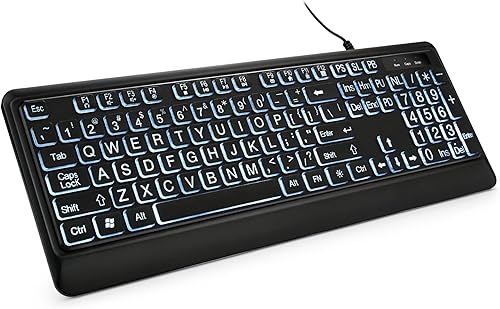 Best for large-print typing
KOPJIPPOM Large Print Backlit Keyboard
9.7/10 our score
See it on Amazon -
3
 Best for a keyboard and mouse bundle
Logitech MK120 Full Size Wired Keyboard
9.6/10 our score
See it on Amazon
- 4
 Check it
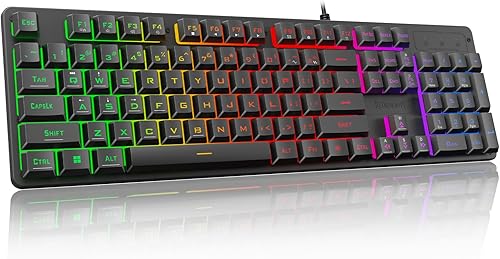
Redragon K521 Upgrade Rainbow LED Gaming Keyboard
Best for affordable gaming controls - 5
 Check it
Redragon K580 Wired RGB Mechanical Gaming Keyboard
Best for macros and mechanical feedback - 6
 Best for quiet RGB gamingCheck it
- 7
 Check it
KOPJIPPOM Large Print Keyboard
Best for colorful large-print lighting - 8
 Best for wrist-rest supportCheck it
- 9
 Best for quiet office workCheck it
Which wired keyboards for PC are best for different users?
The Logitech K120 is the strongest everyday pick, while the other wired keyboards for PC solve more specific needs such as large print, gaming controls, wrist support or quiet office use. Our score weighs specs, features and buyer feedback against what you're shopping for.
Logitech K120 Full Size Wired Keyboard USB: Best for everyday desktop typing
- Full-size 104-key layout
- USB plug-and-play setup
- Spill-resistant design
- Adjustable tilt legs
The K120 keeps the setup simple with a familiar full-size layout, deep-profile keys and a USB connection.
Pros
- Number pad and F-keys
- No software installation
- Spill-resistant design
Cons
- No backlight
- Windows-focused compatibility
The Logitech K120 is the simplest choice for a standard desktop computer. Its full-size 104-key layout includes F-keys and a number pad, so it fits office work, school tasks and data entry without asking you to learn a smaller layout.
The deep-profile keys and curved space bar create a familiar typing shape. Adjustable tilt legs let you change the keyboard angle, while the spill-resistant design adds practical protection for everyday desk use.
Setup is direct. Connect the corded keyboard through USB and start using it without software installation.
Logitech lists compatibility with Windows 7, 8, 10 or later, and the keyboard also works with a laptop.
Choose the K120 when you want a reliable basic board with no lighting or gaming controls to manage. Its full-size footprint measures 17.7 in long by 6.1 in wide, so check your desk depth before placing it.
KOPJIPPOM Large Print Backlit Keyboard: Best for large-print typing
- 4X larger key fonts
- White adjustable backlight
- 104-key full-size layout
- USB plug-and-play setup
Large fonts and a white backlight make this KOPJIPPOM a practical choice for lower-light typing or readers who want clearer key labels.
Pros
- Large-print keys
- Adjustable white backlight
- Windows and Mac compatibility
Cons
- No color choices for the backlight
- Multimedia keys may not fully work on Mac
The KOPJIPPOM Large Print Backlit Keyboard is the better fit when key labels need to be easy to see. Its fonts are 4X larger than standard keyboard fonts, and the 104-key layout keeps the number pad and familiar QWERTY arrangement.
The white LED backlight can turn on or off and has adjustable brightness. That helps when your room is dim, while the large print remains useful in normal light.
This is a USB plug-and-play keyboard with no driver requirement. It works with Windows and MacOS, plus the product information identifies PC use and a Samsung Galaxy Tab S7 FE 12.4 in model among compatible devices.
Multimedia keys may not fully work on Mac.
Choose it for a home office, school or shared desk where readable labels matter more than colorful lighting. Its 17.7 in by 6.3 in footprint is close to the K120, so it still needs a full-size keyboard area.
Logitech MK120 Full Size Wired Keyboard: Best for a keyboard and mouse bundle
- Full-size keyboard and optical mouse
- USB plug-and-play setup
- Spill-resistant keyboard
- Adjustable tilt legs
The MK120 adds an ambidextrous optical mouse to a familiar full-size keyboard, making it useful when you need both desktop controls.
Pros
- Keyboard and mouse together
- Easy USB setup
- Durable keys
Cons
- Windows-focused compatibility
- No backlight
The Logitech MK120 is the practical pick when you need a keyboard and mouse together. The set includes a full-size USB keyboard and an ambidextrous high-definition optical USB mouse.
The keyboard has a standard layout with F-keys and a number pad, plus deep-profile keys, a curved space bar and adjustable tilt legs. Its spill-resistant design and durable keys suit a shared family desk or work area.
The ambidextrous mouse shape matters for left and right handed users who switch sides during long sessions. Smooth optical tracking keeps cursor movement predictable on a desk or a simple mousepad.
Connect the keyboard and mouse to USB ports on a desktop, laptop or netbook. Logitech lists Windows 7, 8, 10 or later compatibility, with a Windows-focused setup.
Keep both cables short enough to avoid tangles behind the monitor, then test the number pad and mouse buttons before settling the layout. Choose this combo when replacing both input devices at once.
If you already have a mouse you like, the K120 gives you a simpler single-keyboard purchase.
Redragon K521 Upgrade Rainbow LED Gaming Keyboard: Best for affordable gaming controls
- 104 mechanical-feeling keys
- Rainbow LED backlight
- 19-key anti-ghosting
- 12 multimedia key combinations
The K521 adds gaming-focused anti-ghosting, multimedia controls and adjustable rainbow lighting while keeping a standard full-size layout.
Pros
- Anti-ghosting for key combinations
- One-touch lighting control
- Wide device compatibility
Cons
- Mechanical-feeling design is not the same as a confirmed mechanical switch
- Rainbow lighting is less subdued than office keyboards
The Redragon K521 is best for a PC gamer who wants gaming controls without leaving the full-size layout. It has 104 mechanical-feeling keys, 19-key anti-ghosting and 12 multimedia key combinations.
Its rainbow LED lighting includes a one-touch on/off button, 3 breathing modes and 4 brightness settings. Anti-ghosting helps register key combinations during games, while the multimedia controls can also help with general desktop use.
The full-size layout keeps familiar positions for movement, skills and inventory keys. That familiarity reduces relearning when you move between games or use the same board for work.
The K521 uses a USB-A connection and requires no driver for plug-and-play setup. Compatibility includes Windows, MacOS, PS4/5 and Xbox, so it can suit more than one gaming device.
Set the lighting before a session in a dim room, then check each shortcut you rely on during play. Choose it when lighting and key-combination support matter.
The mechanical-feeling design is aimed at gaming, so a quiet office buyer may prefer the HP 150 or TECKNET.
Redragon K580 Wired RGB Mechanical Gaming Keyboard: Best for macros and mechanical feedback
- 5 onboard macro keys
- RGB lighting
- Hot-swappable switches
- Dedicated media controls and volume roller
The K580 fits gamers and power users who want onboard macros, a volume roller, RGB controls and a tactile Blue-switch feel.
Pros
- Onboard macro recording
- Hot-swappable switch socket
- Full anti-ghosting
Cons
- Blue switches are clicky
- More features than a basic office setup needs
The Redragon K580 is the strongest choice for macros and tactile mechanical feedback. Its 5 G1-G5 macro keys can record combos directly on the keyboard, and dedicated media controls include a volume roller.
The 104-key board uses Outemu Blue switches with a tactile bump and audible click. It also has full anti-ghosting, RGB lighting and a hot-swappable socket that accepts switches without soldering.
Hot-swappable sockets give you a path to change switch feel later without soldering skills. That access suits buyers who want to compare tactile, linear or silent options over time.
Everyday use needs no software, while optional companion software supports deeper macro profiles and RGB effects. The USB-C wired connection and support for Windows, MacOS and Linux give it broader computer compatibility than some basic boards.
Use the volume roller to adjust sound without leaving the game or video. Choose the K580 for gaming, shortcuts or mechanical customization.
Avoid it for a quiet shared room if the clicky Blue-switch sound would bother others.
TECKNET Wired Gaming Keyboard: Best for quiet RGB gaming
- 15-zone RGB illumination
- Whisper-quiet membrane design
- IP32 spill resistance
- 25 anti-ghosting keys
The TECKNET combines a quiet membrane design with RGB lighting, a metal base, wrist rest and gaming controls for shared spaces.
Pros
- Quieter than clicky mechanical options
- 15-zone RGB lighting
- Integrated wrist rest
Cons
- Multimedia keys are not compatible with Mac
- Backlight enters sleep mode after inactivity
The TECKNET Wired Gaming Keyboard is the better gaming choice when quiet operation and wrist support matter. It uses a membrane design with a 7-degree input angle, integrated wrist rest and metal base.
Its 15-zone RGB system offers 7 illumination modes and 4 brightness levels. The keyboard also has 25 anti-ghosting keys and 12 multimedia keys for game and media controls.
The 7-degree angle and wrist rest help keep hands in a more natural position during long sessions. The metal base adds a stable feel so the board sits firmly while you switch between typing and gaming.
The IP32 spill-resistant design includes 4 drainage holes in the wrist rest. The backlight enters sleep mode after inactivity, then wakes when you press a key or use Fn+PgDn.
This Windows keyboard uses USB-A and has a 104-key QWERTY layout. Multimedia keys are not compatible with Mac, so check your operating system before choosing it.
KOPJIPPOM Large Print Keyboard: Best for colorful large-print lighting
- 4X larger fonts
- 7 backlight colors
- 3 brightness levels
- 104-key USB full-size layout
This KOPJIPPOM keeps the large-print design but adds 7 backlight colors and 3 brightness levels for a more personalized desk.
Pros
- Large readable fonts
- 7 color choices
- Foldable stands
Cons
- Full-size footprint
- Multimedia keys may not fully work on Mac
The second KOPJIPPOM is best for large print with colorful backlighting. Its fonts are 4 times larger than standard keyboards, and you can choose from 7 backlight colors with 3 brightness levels.
The USB-powered, 104-key keyboard works with Windows and MacOS and needs no driver. Foldable stands let you adjust the rear angle, while the full-size layout keeps the number pad and familiar QWERTY key positions.
The cable connects through USB-A and the product description gives a cable length of about 4 to 4.7 ft. A longer cable helps when the desktop tower sits on the floor or the laptop is placed to one side.
Multimedia keys may not fully work on Mac, so Mac users should confirm which shortcuts they need. Test volume and playback controls soon after setup so there are no surprises later.
Choose this model over the white-backlight KOPJIPPOM when color choices matter. Choose the white model when a simpler light and slightly less visual distraction suit your desk.
X9 Wired Ergonomic Keyboard: Best for wrist-rest support
- Integrated wrist rest
- 114 keys
- 10 multimedia keys
- 5-ft USB-A cable
The X9 adds a wrist rest, adjustable kickstand and dedicated media controls for long office, school or multimedia sessions.
Pros
- Integrated wrist rest
- 114 keys with shortcut keys
- Plug-and-play setup
Cons
- Wider than some standard keyboards
- No backlight
The X9 Wired Ergonomic Keyboard is the best fit for long typing sessions that benefit from wrist support. Its integrated wrist rest, adjustable kickstand and 7.25 in width give your hands more built-in desk support.
It has 114 quiet keys, including 10 multimedia keys and 14 shortcut keys. The 5-ft USB-A cable supports plug-and-play use without additional software, and compatibility includes Windows and ChromeOS.
The extra shortcut keys suit office work where volume, playback and system controls are used often. Dedicated keys reduce menu hunting when you switch between documents, video and calls.
The X9 keeps a full-size layout with a number pad. Its 17.25 in length and wider body need more desk room than a narrow keyboard, so measure the space between your monitor and desk edge.
Raise the kickstand gradually until wrists stay comfortable without reaching upward. Choose it for office, education, business or multimedia use.
If you need backlighting or gaming anti-ghosting, another pick in this roundup is a closer match.
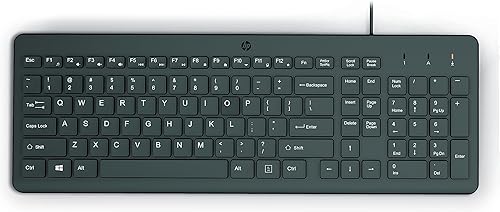
HP 150 Wired Keyboard: Best for quiet office work
- Full-size 104-key layout
- Numeric keypad
- Silent-touch chiclet keys
- LED lock indicators
The HP 150 suits an office desk where low-profile chiclet keys, quiet typing and clear lock indicators matter.
Pros
- Quiet-touch key design
- Works with Windows, Mac and Chrome OS
- F1-F12 shortcuts
Cons
- No backlight
- Fewer gaming features
The HP 150 is the strongest pick for quiet office typing across several operating systems. Its full-size 104-key layout includes a numeric keypad, low-profile chiclet keys and LED indicators for Num Lock, Caps Lock and Scroll Lock.
The ergonomic design and silent-touch key style suit an office or family workspace where loud clicks are distracting. Dedicated F1-F12 shortcuts provide quick access to common functions.
Low-profile keys have a shorter travel than deep-profile boards, so some typists prefer a softer touch. The flat shape also slips easily under a monitor arm or into a slim desk tray.
It uses USB plug-and-play connectivity and works with Windows, macOS and Chrome OS. The product data identifies it as a black keyboard with a USB cable and a 440 g weight.
Check at a glance whether caps or num lock is active before entering passwords or numbers. Choose the HP 150 for a simple, low-profile office board.
It does not add backlighting, macros or gaming anti-ghosting, so it is less suited to dark rooms or competitive gaming.
How do you choose a wired keyboard for PC?
Start with the layout because it affects both desk space and daily work. A full-size keyboard gives you a number pad and F-keys, while a keyboard with 114 keys may add media and shortcut controls.
Connection type matters next. Most picks here use USB-A, while the Redragon K580 uses USB-C.
Check the ports on your PC, laptop or dock before ordering, especially if your computer has limited USB connections. A USB-C board may need an adapter for an older desktop.
If you need extra ports for a mouse or storage drive, compare our guide to the best wired keyboard with USB hub. A keyboard without a hub may still be the better choice when you already have enough ports.
Are mechanical or membrane wired keyboards better?
A membrane keyboard is usually the safer choice for a quiet office because the key design is intended for lower-noise typing. The HP 150, KOPJIPPOM models and TECKNET use designs suited to general or quiet work.
Membrane boards often feel softer under the fingers, which can suit long writing sessions. They also tend to need less force, so light typists may find them comfortable.
Mechanical keyboards can offer more distinct feedback and gaming controls. The Redragon K580 uses Outemu Blue switches with a tactile bump and audible click, while the K521 is described as mechanical feeling.
That clicky feedback helps some gamers confirm each press without looking down. It can also carry across a shared room, so roommates and coworkers deserve a thought before you choose.
Switch type matters as much as the keyboard name on the box. Tactile switches signal a press, linear switches move more smoothly, and silent options reduce noise.
Choose by the sound and controls you want, not by the word gaming alone. The K580 adds hot-swapping and macros, but those features have little value if you mainly write email or schoolwork.
A quiet board with a number pad will serve email and spreadsheets well. A mechanical board will serve macros and games well when the room can handle the sound.
Care also differs by design, since removable keycaps and swappable switches invite cleaning and changes. Follow the care notes for your model so extra features do not become extra work.
Weight and build can affect how a board feels on a desk during fast typing. A heavier board stays put, while a lighter board moves more easily between rooms.
Think about where each keyboard will live most of the time. A gaming board that stays at one desk can justify more features than a travel board.
Your typing style should guide the final call more than any single label. Test if you can, then match the sound, feel and controls to your daily tasks.
Do you need backlighting on a USB wired keyboard?
Backlighting helps when you type in a dim room, but it is not required for every desk. The KOPJIPPOM Large Print Backlit Keyboard has adjustable white lighting, while the other KOPJIPPOM offers 7 colors and 3 brightness levels.
White light often reads more clearly than bright colors when you need to find a small symbol. It also looks more subdued on a shared desk, where rainbow effects may distract others.
Gaming models add more lighting choices. The K521 has rainbow lighting, and the TECKNET has 15-zone RGB illumination with multiple modes.
Zone lighting can highlight groups of keys, which helps when you rely on a few game controls. It adds a more personal look, yet it may offer little help during bright daytime use.
For a bright office, key contrast and layout may matter more than lighting. Large print, bold characters and a familiar layout help you type accurately without squinting.
A backlit keyboard also gives you another control to adjust, so choose it when you will use the feature. Turn it off during the day if the glow adds glare on the screen.
Dim rooms change the balance, since lit keys can speed up typing and reduce errors. Lower brightness settings often work best because they light the labels without washing out the display.
Sleep mode can save distraction when you step away from the desk. Pressing a key to wake the lights is simple once you learn the shortcut for your model.
Consider pets, children and guests before choosing vivid colors for a shared space. A calm white light may fit a family desk better than a bright rainbow pattern.
Cost and complexity rise with more lighting zones and color options, so match the feature to real use. If your room stays bright, skip the glow and spend your attention on layout and comfort instead.
Your screen brightness also matters, because a lit keyboard cannot fix a display that is too dim or too bright. Set both to a level that lets you read keys and text with ease.
How do you set up and care for a wired keyboard?
Place the keyboard where the cable can reach the computer without pulling across the desk. Connect the USB plug, wait for the computer to recognize it, and test the number pad, function keys and media controls you plan to use.
Route the cable along the back of the desk so it does not snag on papers or other gear. A loose cable can pull the keyboard out of position, while a tight cable can make a port feel strained over time.
Keep drinks away from the board even when a model has spill resistance. Logitech describes limited spill testing for the K120 and MK120, while TECKNET identifies IP32 spill resistance, but none of these designs should be immersed in liquid.
Spill resistance is a safety net, not a reason to place a mug beside the keys. Wiping a small splash quickly works far better than hoping drainage holes will handle every spill.
Unplug the keyboard before cleaning. Use a soft, dry cloth around the keycaps and follow the product instructions for deeper cleaning.
Compressed air can loosen crumbs between keys when used in short bursts. Hold the board at an angle so debris falls out instead of settling deeper inside.
Avoid forcing keycaps unless the keyboard specifically supports removal. Pulled caps can crack or lose their fit, especially on membrane boards that were not made for removal.
Wash hands before long sessions to reduce oils on the key surfaces. Less grime means cleaner keys and a nicer feel during daily typing.
Store the keyboard away from direct heat and prolonged sun when it is not in use. Heat can warp plastic over time, and fading light can dull labels that you rely on.
Check the cable and plug now and then for bends or loose contacts. A damaged cable deserves replacement before it causes connection problems during important work.
Wired keyboard or Bluetooth keyboard for a mini PC?
A wired keyboard is often the easiest match for a mini PC when you have an open USB port and want a direct connection. A wireless keyboard reduces cable clutter, but it adds batteries, charging or pairing to your setup.
If you want to use a wired keyboard without a cable running to the computer, read how to choose a Bluetooth adapter for a wired keyboard. For a complete mini PC setup, see does a mini PC come with a keyboard and mouse.
Also check your storage plans before adding a hub or other desk accessories. Our guide to how much storage you need in a mini PC covers the computer side of that setup.
Which is the best wired keyboard for PC?
Pick the Logitech K120 if you want a straightforward full-size keyboard for everyday Windows desktop work. Pick the KOPJIPPOM Large Print Backlit Keyboard for larger labels and white lighting, or choose the colorful KOPJIPPOM for 7 backlight colors.
Each pick suits a different desk, so start with the task you do most. Office typing benefits from a number pad, clear labels and quiet keys.
For gaming, the Redragon K521 keeps the layout familiar, the Redragon K580 adds macros and clicky mechanical switches, and the TECKNET offers quieter RGB gaming with a wrist rest. Choose the X9 for built-in wrist support, or the HP 150 for quiet multi-platform office typing.
Long sessions deserve extra thought about hands and wrists. A wrist rest, a low-profile shape or an adjustable angle can make hours of typing feel easier.
Dim-room typing calls for a different choice than bright office work. Backlit models help at night, while plain models keep a bright desk looking clean and simple.
Shared spaces also change the answer, since clicky switches and vivid lights may bother others nearby. Quiet membrane or chiclet designs fit those rooms better.
Measure your desk and check your USB ports before you order any model. A full-size board needs room, and a wired board needs a cable path that works in your setup.
Our top 3 picks at a glance
-
1
Best for everyday desktop typing
Logitech K120 Full Size Wired Keyboard USB
9.7/10 our score
See it on Amazon -
2
Best for large-print typing
KOPJIPPOM Large Print Backlit Keyboard
9.7/10 our score
See it on Amazon -
3
Best for a keyboard and mouse bundle
Logitech MK120 Full Size Wired Keyboard
9.6/10 our score
See it on Amazon
Frequently asked questions
What is the best wired keyboard for PC use?
The Logitech K120 is the best wired keyboard for PC use for most everyday desks because it has a full-size layout, number pad, F-keys and USB plug-and-play setup.
Choose the KOPJIPPOM Large Print Backlit Keyboard if readable keys and adjustable white lighting matter more than a basic design.
Are wired keyboards better for a desktop PC?
A wired keyboard can be a good desktop choice because it connects directly by USB and does not need battery charging or wireless pairing.
It does limit where you can place the keyboard because the cable must reach the PC. Measure the desk distance and check the available USB port before setup.
What should I look for in a USB wired keyboard?
Check the layout, cable connection, operating system support and desk space first. A number pad helps with data entry, while backlighting helps in dim rooms.
For gaming, look for anti-ghosting and media controls.
For shared rooms, a quiet membrane or chiclet design may be a better fit than clicky switches.
Can I use a wired keyboard with a laptop?
Yes, you can use a wired keyboard with a laptop when the laptop has a compatible USB port or adapter. Plug-and-play models can start working without separate software.
Our guide explains can wired keyboards be used on laptops and the port checks to make before you buy.


