8 Best Wired Gaming Mouse (November 2026)
The best wired gaming mice include the Redragon M602 Gaming Mouse for flexible everyday gaming, the Logitech G502 Hero Wired Gaming Mouse for adjustable weight and control, and the Logitech G305 Lightspeed Wireless Gaming Mouse for players open to wireless.
On this page (3 sections)
The best wired gaming mouse for most players is the Redragon M602, with adjustable 7200 DPI, programmable buttons and a right-hand ergonomic shape. That mix suits people who alternate between games, office work and general desktop tasks without wanting to learn a specialist control layout.
The Logitech G502 Hero is a stronger fit for adjustable weight, while the Razer Basilisk V3 adds extensive RGB and scroll controls. Neither choice is automatically better, because the right mouse depends on how your hand rests, how many buttons you will actually use and how much setup you want to do.
A wired connection keeps the mouse powered through USB and removes battery charging from your routine. You also avoid the small uncertainty of a battery running low during a long session or a wireless receiver being left in another bag.
The trade-off is a cable on the desk, so leave enough slack for your normal arm movement and keep the cable away from sharp desk edges. A cable that pulls can change how the mouse feels, even when the sensor itself is working well.
Think about your grip before you compare headline numbers. A shape that supports your palm or fingers will matter more during a long evening than a higher maximum DPI figure that you may never use.
Think about desk space next, because a wired mouse needs a clear path from the mouse to a USB port. If your computer sits behind a display or tuck under a desk, check the route before you settle on a model.
If you want the basics of choosing both input devices, our wired keyboard buying guide covers switch feel, layouts and matching a keyboard with your mouse. Reading that guide first can help you plan a setup where both devices feel balanced.
For a broader gaming setup question, see [Is a Mini PC Good for Gaming?
A Solid Answer](/is-a-mini-pc-good-for-gaming/). That article can help you decide whether your computer, desk and peripherals work together comfortably before you spend more on controls.
Start with the M602 if you want balanced everyday gaming and office use. Move toward the G502 Hero if weight tuning matters, or toward the Basilisk V3 if RGB and scroll control matter more.
Our picks at a glance
-
1

-
2
 Best for adjustable weight and control
Logitech G502 Hero Wired Gaming Mouse
9.6/10 our score
See it on Amazon -
3
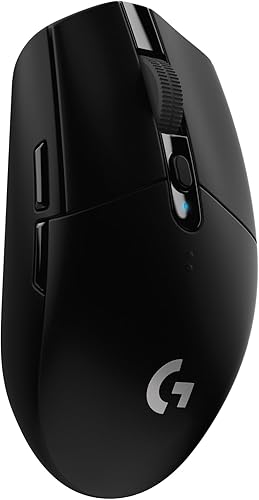 Best for players open to wireless
Logitech G305 Lightspeed Wireless Gaming Mouse
9.5/10 our score
See it on Amazon
- 4
 Check it
Redragon M612 Wired RGB Optical Gaming Mouse
Best for programmable controls on a budget - 5
 Check it
Razer DeathAdder Essential Ergonomic Wired Gaming Mouse
Best for a simple ergonomic shape - 6
 Check it
Razer Basilisk V3 Customizable RGB Wired Ergonomic
Best for RGB and scroll control - 7
 Check it
Corsair M65 RGB Ultra Wired Adjustable Weight
Best for FPS aim and low lift-off - 8
 Check it
Corsair Scimitar RGB Elite Wired MMO MOBA
Best for MMO and MOBA shortcuts
Which wired gaming mouse is best for each player?
The Redragon M602 is the most balanced choice here because it combines comfort, sensitivity control, programmable buttons and RGB. The other picks make more sense when you have a clear preference for weight adjustment, a simpler shape, FPS features or MMO shortcuts.
We compared the stated sensors, controls, shapes, connection types and software features against common wired mouse needs. We did not directly test these mice, so the scores reflect the available specifications, listed features and buyer feedback.
Redragon M602 Gaming Mouse: Best for flexible everyday gaming
- 7200 adjustable DPI
- 9 programmable buttons
- 7 RGB modes and effects
- Right-hand ergonomic shape
The M602 combines adjustable sensitivity, programmable controls and RGB lighting in a right-hand ergonomic shape. It fits players who want one wired mouse for gaming and office work.
Pros
- Adjustable DPI
- Programmable buttons and macros
- RGB can be turned off
Cons
- Right-hand design
- More basic control layout than MMO mice
The Redragon M602 is the strongest all-around pick for a player who wants one mouse for gaming and everyday computer work. Its 7200 adjustable DPI lets you change pointer speed for different games or desktop tasks.
The right-hand ergonomic shape has dedicated finger positions, which can make long sessions easier to manage than a flat basic mouse. Redragon also describes the shape as suitable for different hand sizes and grips.
You get 9 programmable buttons, macro editing and software controls for button functions, speed and lighting. The 7 RGB modes can use a single color, RGB effects or no light, so the design does not force illumination on you.
The USB connection keeps the mouse ready without a battery. The black plastic body has a glossy finish, weighs 0.27 kg and measures 5 in long by 3.2 in wide.
Choose the M602 if you want broad control at a sensible level of complexity. Its right-hand shape makes it less suitable for left-handed users or anyone who wants to switch hands regularly.
Logitech G502 Hero Wired Gaming Mouse: Best for adjustable weight and control
- 25600 DPI HERO sensor
- 11 programmable buttons
- Up to five 3.6 g weights
- Dual-mode hyper-fast scroll wheel
The G502 Hero gives right-handed players many controls and a weight system that can be arranged around their preferred balance. Its sensor and scroll wheel suit gaming plus general desktop use.
Pros
- Adjustable weight system
- 11 programmable buttons
- High maximum DPI
Cons
- Right-hand design
- More involved setup than a simple mouse
The Logitech G502 Hero is best for a right-handed player who wants to tune both buttons and balance. Its 11 programmable buttons give you more command options than the M602 or DeathAdder Essential.
The standout feature is the adjustable weight system. You can arrange up to five 3.6 g weights, which lets you change how the mouse feels during broad arm movement or smaller wrist movement.
Its HERO sensor reaches 25600 DPI and is designed for tracking without smoothing, filtering or acceleration. You can still choose a lower setting for normal use, because maximum DPI is an option rather than a required setting.
The dual-mode hyper-fast scroll wheel supports quick movement through long pages and a more controlled feel when you need precise scrolling. LIGHTSYNC RGB can be customized through Logitech Gaming Software.
The G502 Hero suits players who enjoy adjusting a mouse around their preferences. It is less appealing if you want the lightest possible shape or a minimal button layout.
Logitech G305 Lightspeed Wireless Gaming Mouse: Best for players open to wireless
- 12000 DPI HERO sensor
- 1 ms LIGHTSPEED wireless
- 250-hour battery life
- 3.36 oz weight
The G305 is included as a useful wireless comparison for shoppers deciding if a direct cable is essential. Its light 3.36 oz design and 250-hour battery life make it a different kind of gaming mouse.
Pros
- Lightweight design
- Long stated battery life
- Ambidextrous shape
Cons
- Not wired
- Uses a battery
The Logitech G305 is the wireless comparison pick for shoppers who are unsure whether a cable is necessary. Its 3.36 oz weight, ambidextrous shape and built-in receiver storage make it easy to move between a desktop and laptop.
The HERO sensor reaches 12000 DPI, and LIGHTSPEED wireless uses a stated 1 ms report rate. That gives the G305 a useful benchmark against wired models when the real question is whether wireless convenience is worth choosing.
One AA battery provides a stated 250 hours of continuous gameplay. Endurance mode can extend battery life up to 9 months, according to Logitech's product information.
The six-button layout is simpler than the 11-button and 17-button options here. Choose it if a clean desk and low weight matter more than a direct connection.
This isn't a wired gaming mouse, so it does not meet the main preference of this roundup. It belongs in the comparison because many buyers search for a wired model while deciding between cable simplicity and wireless movement.
For more cable-free options, compare our best rechargeable gaming mouse guide with the best wireless mouse for gaming. Logitech fans can also review the best wireless mouse gaming Logitech picks.
Redragon M612 Wired RGB Optical Gaming Mouse: Best for programmable controls on a budget
- 8000 DPI optical sensor
- 11 programmable buttons
- 5 DPI levels
- Frosted comfort grip
The M612 gives you 11 editable buttons, five DPI levels and RGB lighting. Its right-hand claw-grip shape and frosted surface suit players who want extra controls without moving to an MMO layout.
Pros
- 11 programmable buttons
- Five quick DPI levels
- Matte frosted surface
Cons
- Right-hand design
- More buttons need setup time
The Redragon M612 is a good fit for players who want many editable controls without moving to a dedicated MMO mouse. It has 11 programmable buttons, including a rapid-fire button and 2 side macro buttons.
Its optical sensor supports five default DPI levels from 500 to 4000, while software can process settings up to 8000 DPI. That gives you quick changes during play and more detailed control when you are ready to set a personal range.
The frosted surface is designed for a fingerprint-free feel, and rubber texture on the left side adds friction for the right hand. Its general claw-grip design is aimed at reducing fatigue during long sessions.
Five backlit modes add visual customization. The USB mouse works with personal computers and gaming consoles, while its stated operating systems include Windows 10 and Mac OS 10.15 Catalina.
Pick the M612 if programmable controls matter more than a simple shell. Its 11 buttons may feel crowded until you assign only the commands you actually use.
Razer DeathAdder Essential Ergonomic Wired Gaming Mouse: Best for a simple ergonomic shape
- 6400 DPI optical sensor
- 5 programmable buttons
- Right-hand ergonomic design
- Ridged rubberized scroll wheel
The DeathAdder Essential focuses on a familiar right-hand ergonomic form, five programmable buttons and direct wired control. It fits players who want fewer controls to manage.
Pros
- Straightforward button layout
- Ergonomic right-hand form
- Rubberized scroll wheel
Cons
- Lower maximum DPI than several picks
- Right-hand design
The Razer DeathAdder Essential is the simple ergonomic choice. Its right-hand design, five programmable buttons and 6400 DPI optical sensor cover the needs of players who want useful controls without a large side-button panel.
The classic DeathAdder shape gives your palm a defined place to rest. That familiar form can suit players who prefer a mouse that feels shaped around the hand rather than flat and low.
The ridged rubberized scroll wheel adds grip and tactile bumps for more controlled scrolling. Those small bumps can help when you move through pages or menus and want feedback instead of a free-spinning wheel.
Razer rates its mechanical switches for up to 10 million clicks. That is a durability rating from the brand, not a promise about how every individual mouse will perform over time.
Dedicated DPI buttons can change sensitivity during play and can be reprogrammed. That lets you make a quick adjustment without opening software in the middle of a game.
Razer Synapse also supports button remapping and complex macro functions. Keep the setup simple at first, and add only the shortcuts that match the games or work you do most often.
Choose this mouse when comfort and a familiar layout matter more than extra commands or very high DPI. It is less flexible for MMO players who need many actions under one thumb.
If you prefer to stay with Razer, compare this straightforward model with our best Razer wired mouse guide. Players who want a lighter visual style can also see the best wireless mice that light up roundup.
Razer Basilisk V3 Customizable RGB Wired Ergonomic: Best for RGB and scroll control
- 11 programmable buttons
- 11 Chroma RGB lighting zones
- 26K DPI optical sensor
- Dual-mode tilt scroll wheel
The Basilisk V3 is built for right-handed players who want many controls, deep RGB customization and a scroll wheel that can switch between free-spinning and tactile modes.
Pros
- 11 programmable buttons
- Many RGB zones
- Dual-mode scroll wheel
Cons
- Right-hand design
- Feature setup takes more time
The Razer Basilisk V3 is for right-handed players who want a highly configurable mouse with strong RGB control. Its 11 programmable buttons support macros and secondary functions, while the thumb rest supports the hand during use.
The Hyperscroll tilt wheel can free-spin through long content or switch to tactile mode for controlled scrolling. That makes it useful beyond games, especially if you move through documents or long web pages.
Razer includes 11 Chroma RGB lighting zones with more than 16.8 million colors and effects. The lighting can react with more than 150 integrated games, according to Razer's product information.
Its Focus Plus optical sensor reaches 26K DPI and is designed for movement tracking without smoothing. The USB connection keeps the mouse powered, while the rubberized finish adds a grippy surface.
Choose the Basilisk V3 if you want lighting and controls you can shape around several games. The number of options adds setup work, and the right-hand shape will not suit every user.
For lighting-focused alternatives, compare it with our best wired RGB mouse guide. If you are comparing brands, our best Corsair wired mouse and best HyperX wired mouse guides cover other wired options.
Corsair M65 RGB Ultra Wired Adjustable Weight: Best for FPS aim and low lift-off
- 26000 DPI MARKSMAN sensor
- 97 g weight
- Adjustable weight design
- Six-axis gyro and accelerometer
The M65 RGB Ultra targets FPS players who want a right-hand mouse with an aluminum frame, adjustable weight and sensor features designed around precise repositioning.
Pros
- Aluminum frame
- High maximum DPI
- Adjustable weight
Cons
- Right-hand design
- Specialized FPS features may be unnecessary for casual play
The Corsair M65 RGB Ultra is the specialist choice for FPS players who want adjustable weight and precise repositioning. Its anodized aluminum frame gives the right-hand mouse a different feel from the plastic-bodied picks.
The MARKSMAN optical sensor reaches 26000 DPI and has a stated tracking speed of 650 IPS. The mouse also uses a six-axis gyro and accelerometer for sensor fusion control and low lift-off distance.
That low lift-off focus matters when you raise the mouse to reposition it. The goal is to reduce unwanted tracking during that short movement, which can matter more in FPS play than a long list of extra buttons.
The M65 RGB Ultra has a native 8000 Hz polling rate through Corsair AXON technology, according to Corsair. It weighs 97 g and connects through USB.
Choose it when FPS movement and adjustable balance are central to your decision. The specialized sensor and lift-off features may offer little value if you mostly play slower games or use the mouse for office work.
Corsair Scimitar RGB Elite Wired MMO MOBA: Best for MMO and MOBA shortcuts
- 17 programmable buttons
- 12-position side-button slider
- 18000 DPI optical sensor
- Right-side finger rest
The Scimitar RGB Elite is the specialist pick for MMO and MOBA players who need many keyboard actions close to the thumb. Its side-button slider helps position the 12-button panel.
Pros
- 17 programmable buttons
- Adjustable side-button position
- Contoured palm shape
Cons
- More controls than many games need
- Right-hand design
The Corsair Scimitar RGB Elite is the MMO and MOBA specialist. Its 17 programmable buttons put frequent actions and complex macros close to your thumb.
The key layout includes 12 side buttons on a slider system. You can reposition that panel to fit your grip, which matters because a fixed side-button block may sit too far forward or too far back for your hand.
Its optical sensor reaches 18000 DPI and adjusts in 1 DPI steps. The contoured right-hand shape includes a finger rest, while the scroll wheel and switches are built for extended use.
The mouse has a wired connection and supports Windows, macOS and Linux. Corsair describes the Omron switches as rated for 50 million clicks, and the cable is braided.
Choose the Scimitar if your games use many hotkeys and you want them under your thumb. For shooters, casual games or simple desktop use, 17 buttons can create more setup work than benefit.
How should you choose a wired gaming mouse?
Choose by grip, button count and cable movement first, then use DPI and lighting as tie-breakers. A high DPI number cannot compensate for a shape that makes your hand tense or buttons that are hard to reach.
Which grip shape fits your hand?
A right-hand ergonomic mouse is the main pattern in this group. The M602, G502 Hero, DeathAdder Essential, Basilisk V3, M65 RGB Ultra and Scimitar RGB Elite all place their controls around right-hand use.
An ambidextrous shape gives you more flexibility. The G305 is the ambidextrous option here, so it may suit a shared desk or a player who sometimes changes hands.
Palm, claw and fingertip grips change how much of your hand rests on the shell. The M612 is described around a claw-grip shape, while the Scimitar uses a contoured palm shape and finger rest.
How many buttons do you need?
Five or 6 buttons are enough for many players. The DeathAdder Essential stays simple with 5 programmable buttons, while the G305 has 6 buttons.
Choose 9 to 11 buttons when you want game actions, push-to-talk, media controls or work shortcuts close to your thumb. The M602, G502 Hero, M612 and Basilisk V3 all sit in this range, with different layouts.
MMO and MOBA players may benefit from 17 buttons. The Scimitar's 12-button side panel is useful only if you have enough actions to assign and can remember where each one sits.
Does DPI matter more than polling speed?
DPI controls sensitivity, or how far the pointer moves for a given hand movement. A mouse with adjustable DPI gives you room to find a comfortable setting, but the highest maximum does not automatically make aiming better.
The M602 reaches 7200 DPI, the M612 reaches 8000 DPI and the G305 reaches 12000 DPI. The G502 Hero, Basilisk V3 and M65 RGB Ultra offer higher maximum figures, while the Scimitar reaches 18000 DPI.
For normal gaming, prioritize consistent control, a comfortable grip and a sensor setting you can manage. Treat extra DPI as flexibility rather than a target.
What should you check about the cable?
A wired mouse needs a clear path from the mouse to a USB port. Leave slack near the mouse so your arm can move without pulling the cable, and avoid routing it across a sharp desk corner.
A small cable guide or a position near the monitor can keep the cord from crossing your keyboard area. That small bit of planning can stop the cable from catching on a keyboard, a notebook or the edge of a wrist rest.
If your mini PC sits behind the display, check that the cable can reach without a tight bend. A tight bend can make the cord feel stiff and can pull the mouse back toward the desk edge.
Check where the USB port sits before you choose a mouse length or cable route. A port on the front of the computer may work better than one hidden at the back when the mouse moves across a wide mat.
Keep the cable free from other objects where it rests on the desk. A cable trapped under a keyboard or pressed against a sharp corner can become harder to move and less pleasant to use.
A direct connection also means no battery routine. You do not need to keep spare batteries nearby or remember to charge the mouse before a session.
That simplicity can suit a fixed desktop setup where the mouse stays in one place. It is less handy if you carry a laptop between rooms or travel with your computer often.
If you prefer a clean desk or frequently move the mouse between devices, compare the wired picks with rechargeable models before deciding. Weigh the freedom of no cable against the ease of a direct USB connection.
Test the reach with your normal seating position, not with the chair pushed far back. Your arm movement in real use will show whether the cable has enough room to move naturally.
Do you need mouse software?
Software is most useful when you want to remap buttons, create macros, adjust DPI or set RGB behavior. The M602 uses Redragon software, while the G502 Hero uses Logitech Gaming Software and the Razer models use Synapse.
Start with only the changes you need. Set one DPI level, assign familiar functions and save a basic profile before adding macros or lighting effects.
Keep the mouse surface clean and make sure the sensor area stays free of dust. Disconnect the USB cable before cleaning, use a soft dry cloth for the shell and follow the brand's care instructions for any deeper cleaning.
Which wired gaming mouse should you buy?
The Redragon M602 is the best wired gaming mouse for a broad mix of gaming and office use because its ergonomic shape, 7200 DPI, programmable controls and RGB cover many needs. It gives new buyers a sensible starting point without forcing them into a very simple or very specialist mouse.
Pick the Logitech G502 Hero if adjustable weights and 11 buttons matter most. That choice suits players who like to tune balance and who have enough games or shortcuts to make the extra controls worthwhile.
Choose the Razer DeathAdder Essential for a simpler ergonomic mouse. Its five-button layout and familiar right-hand shape can be a calmer pick when you do not want a large side panel to learn.
Pick the Corsair M65 RGB Ultra for FPS-focused repositioning. Its adjustable weight and sensor features are aimed at players who care about precise mouse movement and low lift-off behavior.
Choose the Corsair Scimitar RGB Elite for MMO and MOBA shortcuts. The 17-button layout and movable side panel make sense when your games demand many actions close to your thumb.
Look again at the Redragon M612 if 11 buttons and five DPI levels appeal to you. It offers another route to programmable control without moving all the way to a dedicated MMO mouse.
Look at the Razer Basilisk V3 if RGB zones and scroll behavior are a priority. Its options suit players who enjoy shaping lighting and controls around several games.
If your main goal is a clean desk, low weight or easy travel, the G305 shows what you give up and gain by moving to wireless. You trade a direct cable for a battery and a receiver, so consider how often you move the mouse.
The right choice is the one whose shape and controls match how you actually play. Buy for your grip, your games and your desk first, and treat extra features as useful only when they fit that daily routine.
Our top 3 picks at a glance
-
1
-
2
Best for adjustable weight and control
Logitech G502 Hero Wired Gaming Mouse
9.6/10 our score
See it on Amazon -
3
Best for players open to wireless
Logitech G305 Lightspeed Wireless Gaming Mouse
9.5/10 our score
See it on Amazon
Frequently asked questions
What is the best wired gaming mouse for most people?
The Redragon M602 is the best wired gaming mouse for most people in this group because it combines a right-hand ergonomic shape, adjustable 7200 DPI, programmable buttons and RGB lighting. Choose the Razer DeathAdder Essential if you prefer a simpler five-button layout.
Is a wired mouse better for gaming?
A wired mouse gives you a direct USB connection without battery charging. That can simplify setup and keep the mouse ready whenever the computer is on.
Wireless models can be lighter or easier to move, so the better choice depends on your tolerance for cables and batteries.
How much DPI do you need for gaming?
Most players should choose a mouse with adjustable DPI rather than chase the highest number. DPI changes how far the pointer moves for the same physical hand movement.
A wide adjustment range helps you find a setting that suits your game, screen and desk space.
What mouse shape is best for gaming?
The best shape is the one that keeps your hand relaxed while giving your fingers clear access to the main buttons. Right-hand ergonomic mice suit many palm and claw grips, while an ambidextrous shape can make sharing a mouse easier.
Button placement matters as much as shell shape.
Do RGB lights improve gaming performance?
RGB lights do not by themselves improve tracking or aim. They can help match a desk setup or show a preferred lighting layout, but sensor quality, grip comfort, button placement and a stable connection matter more for control.


