9 Best Windows Mini PCs (November 2026)
The best Windows mini PCs include the KAMRUI AK1PLUS Mini PC Computer for everyday home and office tasks, the Beelink SER3 Mini PC for a larger starting SSD, and the ACEMAGIC K1 Mini PC AMD Ryzen 7330U for three-display work.
On this page (4 sections)
The best Windows mini PC for most everyday tasks is the KAMRUI AK1PLUS, with 16GB memory and dual 4K HDMI outputs. Choose the HP for demanding office work, or the GMKtec M6 Ultra for a stronger processor, larger memory and three displays.
A Windows mini PC can save desk space while keeping familiar desktop software and monitor connections. The key checks are the Windows edition, processor, memory, storage and ports you need.
For a broader checklist, see our How to Choose a Mini PC: A Step-by-Step Guide. If Windows 11 Pro is essential, compare these choices with our guide to the best mini PC Windows 11 Pro options.
Our picks at a glance
-
1
 Best for everyday home and office tasks
KAMRUI AK1PLUS Mini PC Computer
9.7/10 our score
See it on Amazon -
2

-
3

- 4
 Check it
GMKtec M6 Ultra Gaming Mini PC Ryzen
Best for demanding work and gaming - 5
 Best for Windows 11 Pro on a compact budgetCheck it
- 6
 Best for wired networking and expansionCheck it
- 7
 Check it
GMKtec G3S Mini PC Computers Intel N95
Best for basic dual-screen computing - 8
 Check it
KAMRUI Pinova P2 AMD Ryzen 5425U
Best for three displays with storage growth - 9
 Check it
HP Mini Desktop PC Computer for Office
Best for heavier office workloads
Which Windows mini PCs fit different needs?
The KAMRUI AK1PLUS is the best everyday starting point here, while the HP and GMKtec M6 Ultra suit more demanding workloads. These picks are ordered by their assigned scores, with each one matched to a distinct use.
KAMRUI AK1PLUS Mini PC Computer: Best for everyday home and office tasks
- Intel Celeron N5095
- 16GB LPDDR4X memory
- 256GB M.2 SSD
- Dual HDMI 2.0 outputs
A sensible everyday setup pairs 16GB memory with a 256GB SSD and dual HDMI outputs. It also supports added M.2 and 2.5-inch storage.
Pros
- 16GB memory
- Dual 4K display support
- Storage expansion options
Cons
- Entry-level Celeron processor
- Windows edition not specified
The AK1PLUS pairs an Intel Celeron N5095 with 16GB LPDDR4X memory and a 256GB M.2 SSD. That gives everyday browsing, email, online classes and video calls a useful amount of memory without moving into a higher performance tier.
Two HDMI 2.0 ports support dual 4K displays at 60Hz. For storage growth, it supports an additional M.2 drive and a 2.5-inch SATA drive, with the stated combined expansion capacity reaching 4TB.
Windows edition isn't specified, so confirm that detail if you need a particular version. Choose this model for a compact home or office setup centered on common desktop work.
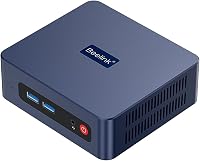
Beelink SER3 Mini PC: Best for a larger starting SSD
- AMD Ryzen 3 3200U
- 16GB DDR4 memory
- 500GB SSD
- Two HDMI outputs
The 500GB SSD provides more starting space than the 256GB drives in several picks here. Its processor and dual HDMI outputs suit general desktop tasks.
Pros
- 500GB SSD
- Memory upgrade support up to 32GB
- Dual-screen support
Cons
- Windows edition not specified
- Older 2-core, 4-thread processor
The Beelink SER3 stands out for its 500GB SSD, which offers more starting space than a 256GB drive. It combines that storage with 16GB DDR4 memory and an AMD Ryzen 3 3200U processor.
Its two HDMI ports support a dual-screen desk, and the memory can be upgraded to 32GB. That flexibility may help if your workload grows, though the processor is a 2-core, 4-thread design.
Windows edition isn't specified. Consider the SER3 when you want more built-in storage for files and applications without relying on an expansion drive.
ACEMAGIC K1 Mini PC AMD Ryzen 7330U: Best for three-display work
- AMD Ryzen 7330U Pro
- 16GB non-expandable memory
- 256GB SSD
- HDMI, DisplayPort and USB-C video
HDMI, DisplayPort and USB-C video connections support a three-display setup. It comes with Windows 11 Pro and allows storage expansion, while its memory is fixed.
Pros
- Windows 11 Pro included
- Three video connection types
- Storage expansion support
Cons
- Memory is not expandable
- Wi-Fi 5 and Bluetooth 4.2
The ACEMAGIC K1 uses an AMD Ryzen 7330U Pro and includes Windows 11 Pro. HDMI, DisplayPort and USB-C video connections support up to three displays, which can make it easier to keep documents, calls and reference material visible.
Its 16GB LPDDR4 memory is non-expandable, so think about your likely workload before choosing it. The 256GB SSD can be expanded with another M.2 drive.
Wi-Fi 5 and Bluetooth 4.2 cover wireless connections, while the built-in power supply keeps the setup to one power cable. This is a good fit if Windows 11 Pro and three-screen support matter more than memory upgrades.
GMKtec M6 Ultra Gaming Mini PC Ryzen: Best for demanding work and gaming
- AMD Ryzen 5 7640HS
- 32GB DDR5 memory
- 1TB SSD
- USB4, HDMI and DisplayPort
A Ryzen 5 7640HS, 32GB DDR5 and 1TB SSD give this system the largest ready-to-use memory and storage setup among these picks. Its USB4, HDMI and DisplayPort connections support three displays.
Pros
- 32GB DDR5 memory
- 1TB SSD
- Three-display support
Cons
- Windows edition not specified
- Larger performance profile may be more than basic tasks need
The GMKtec M6 Ultra brings the strongest ready-to-use hardware mix in this group: a Ryzen 5 7640HS, 32GB DDR5 memory and 1TB SSD. It targets heavier workloads and moderate gaming rather than basic browsing alone.
USB4, HDMI 2.0 and DisplayPort support three displays, and the system includes dual 2.5GbE network ports. GMKtec also describes Wi-Fi 6 and Bluetooth 5.2 connectivity.
Windows edition isn't specified, so verify it before purchase if Windows is required. Choose this model when processor capacity, memory, storage and display support all matter in one compact computer.
KAMRUI Pinova P1 Mini PC: Best for Windows 11 Pro on a compact budget
- AMD Ryzen 3 Pro 7330U
- 8GB memory
- 256GB SSD
- Windows 11 Pro
Windows 11 Pro comes preinstalled, and the Ryzen 3 Pro 7330U supports everyday work. Its 8GB memory is the main constraint to consider for heavier multitasking.
Pros
- Windows 11 Pro included
- Three video connection types
- VESA mount included
Cons
- 8GB memory
- Windows edition differs from standard Windows Home systems
The KAMRUI Pinova P1 comes with Windows 11 Pro and an AMD Ryzen 3 Pro 7330U. Its HDMI, DisplayPort and USB-C video connections support a multi-display setup, and a VESA mount is included for attaching it behind a monitor.
The main tradeoff is its 8GB memory, which may limit busy workloads with many apps open. It has a 256GB SSD and supports storage expansion.
Choose it when you want Windows 11 Pro and a compact office PC for lighter tasks. For more memory at setup, consider one of the 16GB options above.
BOSGAME E5 11 Pro Mini PC: Best for wired networking and expansion
- AMD Ryzen 3 5300U
- 8GB DDR4 memory
- 256GB SSD
- Dual 2.5GbE ports
Windows 11 Pro is preinstalled, and dual 2.5GbE ports suit wired networking needs. The two memory slots and second M.2 slot leave room to expand later.
Pros
- Windows 11 Pro included
- Dual 2.5GbE ports
- Memory and storage expansion
Cons
- 8GB memory to start
- Wi-Fi 5
The BOSGAME E5 combines an AMD Ryzen 3 5300U with Windows 11 Pro and dual 2.5GbE ports. Its HDMI, DisplayPort and full-function USB-C connections support up to three 4K displays.
It starts with 8GB DDR4 memory and a 256GB SSD, but the design supports memory expansion up to 64GB and a second M.2 drive. That makes it a practical option if you want to start with a basic configuration and upgrade later.
The E5 is aimed at office work and wired network setups. Its Wi-Fi is version 5, so check whether that meets your wireless needs.
GMKtec G3S Mini PC Computers Intel N95: Best for basic dual-screen computing
- Intel N95 processor
- 8GB DDR4 memory
- 256GB SSD
- Two HDMI 2.0 outputs
The N95, 8GB memory and 256GB SSD make a straightforward setup for routine computing. Dual HDMI outputs support two 4K displays.
Pros
- Dual 4K HDMI support
- Wake-on-LAN and PXE boot
- 3-year warranty stated by GMKtec
Cons
- 8GB memory
- Windows edition not specified
The GMKtec G3S is a straightforward pick for routine tasks and two displays. Its Intel N95 processor, 8GB DDR4 memory and 256GB SSD cover a basic setup, while two HDMI 2.0 ports support dual 4K screens.
It also includes Wi-Fi 5, Bluetooth 5.0 and Gigabit Ethernet. Wake-on-LAN, PXE boot and RTC wake add options for remote or scheduled use.
Windows edition isn't specified. Choose it if your priority is a compact computer for everyday use and two HDMI monitors, rather than a high-performance workload.
KAMRUI Pinova P2 AMD Ryzen 5425U: Best for three displays with storage growth
- AMD Ryzen 3 5425U
- 16GB LPDDR4 memory
- 256GB SSD
- Triple 4K display support
The P2 pairs 16GB memory with three display connections and two M.2 storage slots. Its operating system edition isn't specified, so confirm it suits your software needs.
Pros
- 16GB memory
- Three 4K display support
- Two M.2 storage slots
Cons
- Windows edition not specified
- Memory expansion isn't specified
The KAMRUI Pinova P2 pairs an AMD Ryzen 3 5425U with 16GB LPDDR4 memory and three display connections: HDMI, DisplayPort and USB-C. It supports three 4K displays and includes two M.2 storage slots.
Its 256GB SSD gives you a starting point, with the two slots supporting additional storage. The Windows edition isn't specified, so check the operating system before buying if your work depends on Windows software.
This pick makes sense when you want three displays and an expansion path in a compact home or business PC. Compare its connections with your monitor inputs before deciding.
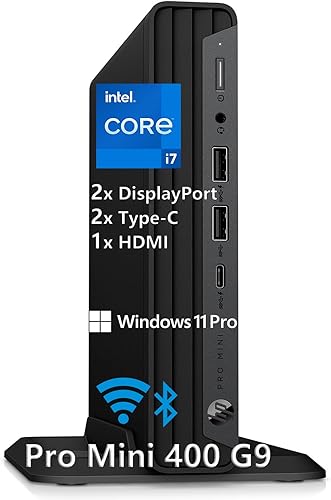
HP Mini Desktop PC Computer for Office: Best for heavier office workloads
- Intel Core i7-12700T
- 32GB DDR4 memory
- 1TB SSD
- Windows 11 Pro
The Core i7, 32GB memory and 1TB SSD target heavier office work, with Windows 11 Pro included. Its three video outputs support up to three 4K displays.
Pros
- Windows 11 Pro included
- 32GB memory and 1TB SSD
- Keyboard and mouse included
Cons
- Larger and heavier than many mini PCs
- Wi-Fi 5
The HP mini desktop is the strongest fit here for heavier office workloads. It combines an Intel Core i7-12700T with 32GB DDR4 memory, a 1TB SSD and Windows 11 Pro.
Two DisplayPort 1.4 connections and HDMI 2.1 support up to three 4K monitors. The included wired keyboard and mouse make it a ready-to-use desktop bundle, and it has seven USB ports including two USB-C ports.
This configuration suits work involving several apps, large files or multiple screens. It is larger and heavier than many mini PCs, so check your desk or mounting space before choosing it.
What should you check before choosing a Windows mini PC?
Start with the edition of Windows included, then match processor, memory and ports to your work. A model that has enough memory and the right display outputs can be a better fit than one with a faster processor you won't use.
Does the mini PC include Windows 11 Pro?
Some models here specify Windows 11 Pro, including the ACEMAGIC K1, KAMRUI Pinova P1, BOSGAME E5 and HP mini desktop. Other picks don't specify an edition, so confirm before buying if a particular Windows version is required.
Windows 11 Pro can matter for work or device management features. For everyday home use, compare the edition with your software needs and avoid paying extra for functions you won't use.
How much memory and storage do you need?
For everyday browsing and documents, 8GB may be enough, while 16GB gives more room for multitasking. For heavier workloads, the 32GB configurations from GMKtec and HP offer more headroom.
Storage needs depend on your apps and files. The Beelink has a 500GB SSD, while the GMKtec M6 Ultra and HP each have 1TB; several other options start at 256GB.
See How Much Storage Do I Need in a Mini PC? for a closer comparison.
Which ports and screens should you plan for?
Count your monitors and check their inputs before you buy. Dual HDMI models are simple for two-screen setups, while triple-display picks use a mix of HDMI, DisplayPort and USB-C.
Also consider wired networking and accessories. The BOSGAME E5 and GMKtec M6 Ultra have dual 2.5GbE ports, while USB port types and counts vary across the group.
Do you need a fan in a Windows mini PC?
Most compact computers use a fan to cool their components, and these picks include fan-based cooling where specified. Noise can vary with workload and room conditions, so read our guide on whether a mini PC needs a fan or can be fanless if quiet operation is a priority.
How we compared these Windows mini PCs
We compared the processor, memory, storage, operating system details, display connections and network ports against common home and office needs. We gave more weight to useful configurations, such as 16GB memory, Windows 11 Pro when specified, storage expansion and support for multiple displays.
Our score weighs specs and features against what you're shopping for.
Which Windows mini PC should you choose?
Choose the KAMRUI AK1PLUS for everyday tasks and dual displays, the HP for heavier office work, or the GMKtec M6 Ultra for a high-memory setup with three displays. If Windows 11 Pro is the deciding factor, compare the included editions in our guide to best mini PC for home use and best mini PC with Thunderbolt 4.
Our top 3 picks at a glance
-
1
Best for everyday home and office tasks
KAMRUI AK1PLUS Mini PC Computer
9.7/10 our score
See it on Amazon -
2
-
3
Frequently asked questions
Do mini PCs come with Windows installed?
Some do, but the Windows edition varies. The ACEMAGIC K1, KAMRUI Pinova P1, BOSGAME E5 and HP mini desktop in this roundup specify Windows 11 Pro, while several other models don't name an edition.
Check the operating system details before buying if Windows is a must-have.
Is Windows 11 Pro better for a home mini PC?
Windows 11 Pro can be useful if you need Pro features for work or device management. For everyday browsing, email, streaming and documents, compare the software you use with the edition included on the PC.
Don't pay for features you won't use.
How much memory should a Windows mini PC have?
For routine browsing, documents and video calls, 8GB can work, while 16GB gives more room for several apps and tabs at once. Buyers with heavier multitasking or demanding applications may want 32GB.
Check whether memory is upgradeable before choosing a lower-memory model.
Can a mini PC run two or three monitors?
Many can, but the number and type of video outputs vary. The KAMRUI AK1PLUS and GMKtec G3S have dual HDMI outputs, while the ACEMAGIC K1, GMKtec M6 Ultra and HP model support three displays through their listed connections.
Match each output to your monitors and cables.
How much storage should I get in a Windows mini PC?
A 256GB SSD can suit Windows, common apps and a modest file collection, while 500GB or 1TB leaves more room for games, media and work files. Expansion options can help if your needs grow.
Our guide explains how much storage to choose for a mini PC.