8 Best Mini PCs with Windows 11 Pro (October 2026)
The best mini PCs with Windows 11 Pro include the Beelink SER3 Mini PC for dual HDMI at home, the ACEMAGICIAN ACEMAGIC K1 Gaming Mini PC Ryzen for demanding multitasking, and the KAMRUI Pinova P1 Mini PC for compact business setups.
On this page (4 sections)
The best mini PCs with Windows 11 Pro pair the business edition of Windows with enough memory, storage and display connections for your work. If quiet operation is a priority, compare fanless Windows 11 mini PCs.
The BOSGAME E5 11 Pro is the most flexible pick for wired networking and multi-monitor use, while the HP Pro 400 G9 is a familiar business desktop with keyboard and mouse included.
Windows 11 Pro is useful when you need features such as BitLocker, Remote Desktop hosting or organization-managed accounts. For everyday home use, the processor and memory may matter more than the edition, so match the PC to your apps and setup.
Use our How to Choose a Mini PC: A Step-by-Step Guide to compare processor, memory and ports before settling on a configuration.
Our picks at a glance
-
1
-
2
 Best for demanding multitasking
ACEMAGICIAN ACEMAGIC K1 Gaming Mini PC Ryzen
9.7/10 our score
See it on Amazon -
3

- 4
 Best for two 4K HDMI screensCheck it
 - 5
 Best for wired office networksCheck it
 - 6
 Check it
ACEMAGICIAN K1 Mini PC Win 11 Pro
Best for Wi-Fi 6 and three displays - 7
 Best for a familiar business brandCheck it
 - 8
 Check it
ACEMAGIC K1 Mini PC Win 11 Pro
Best for expandable memory
Which mini PC Windows 11 Pro models stand out?
The Beelink SER3 and ACEMAGICIAN Ryzen 7 model score highest for different reasons: one offers a straightforward dual-HDMI setup, while the other has more memory and triple display outputs. Check the connection and upgrade details against your desk before choosing.
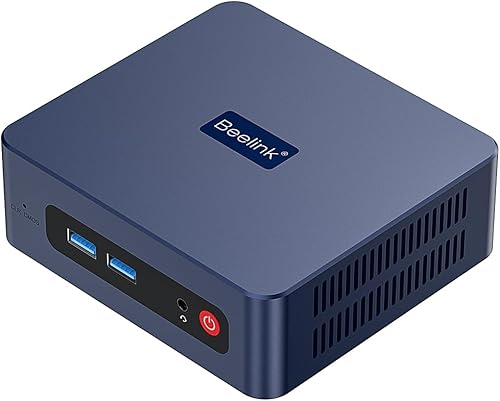
Beelink SER3 Mini PC: Best for dual HDMI at home
- Windows 11 Pro
- AMD Ryzen 3 3200U
- 16GB DDR4 memory
- 500GB NVMe SSD
- Two HDMI outputs
A useful fit for a home office that needs Windows 11 Pro and two HDMI screens. Its 16GB memory and 500GB SSD give it a solid starting configuration for everyday work.
Pros
- Two HDMI outputs
- 500GB NVMe SSD
- Memory and storage can be expanded
Cons
- Older Ryzen 3 3200U processor
- No DisplayPort output is specified
The Beelink SER3 is a straightforward option for a home or small office desk that uses two HDMI displays. Its 16GB DDR4 memory and 500GB NVMe SSD provide a useful starting point for documents, browser work and media.
The AMD Ryzen 3 3200U has 2 cores and 4 threads, with speeds up to 3.5GHz. The compact system supports 4K playback and has Wi-Fi 5, Bluetooth 5.0 and Gigabit Ethernet.
Storage can expand with an NVMe M.2 drive or a 2.5-inch SATA drive. Beelink also describes the memory as expandable up to 32GB, so it offers more room to grow than a fixed-memory mini PC.
Choose it if two HDMI outputs and a larger starting SSD matter more than a newer processor. It is less suitable if your work depends on DisplayPort, USB-C video or higher-end computing.
ACEMAGICIAN ACEMAGIC K1 Gaming Mini PC Ryzen: Best for demanding multitasking
- Windows 11 Pro
- AMD Ryzen 7 7735HS
- 24GB LPDDR5 memory
- 512GB SSD
- HDMI, DisplayPort and Type-C display outputs
A strong match for office users who keep many apps open or want several displays. Its 24GB of onboard LPDDR5 memory and Ryzen 7 processor stand out in this group.
Pros
- 24GB LPDDR5 memory
- Triple display outputs
- Two M.2 slots support storage expansion
Cons
- Onboard memory is not described as upgradeable
- The name includes Gaming, but the focus here is office work
The ACEMAGICIAN ACEMAGIC K1 Gaming Mini PC Ryzen is built around an AMD Ryzen 7 7735HS, with 8 cores and 16 threads. Its 24GB LPDDR5 memory and 512GB SSD make it a strong fit for running several office apps and browser tabs together.
HDMI, DisplayPort and Type-C provide triple-display output. The Type-C video capability can help keep a desk setup flexible, though you should match each output to your monitors and cables.
The mini PC also has two M.2 2280 slots, with storage expansion support up to 4TB. Its memory is onboard, so choose the 24GB configuration you need at the start.
The word “Gaming” appears in its name, but its listed graphics are integrated Radeon graphics. Consider it for multitasking and light gaming rather than assuming it replaces a dedicated gaming desktop.
KAMRUI Pinova P1 Mini PC: Best for compact business setups
- Windows 11 Pro
- AMD Ryzen 3 Pro 7330U
- 8GB RAM
- 256GB SSD
- HDMI, DisplayPort and Type-C
This small PC suits a business desk that values display flexibility and compact placement. It comes with a VESA bracket and includes Windows 11 Pro.
Pros
- Triple-screen support
- VESA bracket included
- Wake on LAN and PXE support
Cons
- 8GB memory is a modest starting amount
- Wi-Fi 5 and Bluetooth 4.2
KAMRUI’s Pinova P1 combines Windows 11 Pro with an AMD Ryzen 3 Pro 7330U processor and three display connection types: HDMI, DisplayPort and Type-C. It is a compact choice for a business desk where several spreadsheets, documents and messages need to stay visible.
It starts with 8GB RAM and a 256GB SSD, so check whether that capacity fits your usual applications and files. The product supports PXE, Wake on LAN and automatic power-on, features that can be useful in managed or unattended setups.
A VESA bracket is included for mounting behind a compatible monitor. Wireless connections use Wi-Fi 5 and Bluetooth 4.2, with Gigabit Ethernet available for a wired network.
Choose this model for its compact placement and display flexibility. If you keep many apps open at once, compare its 8GB starting memory with the larger-memory alternatives below.
Bmax Mini PC: Best for two 4K HDMI screens
- Windows 11 Pro
- Intel N4500
- 8GB DDR4 memory
- 256GB M.2 SSD
- Two HDMI 2.0 outputs
The Bmax fits routine office tasks and home entertainment when two HDMI screens are enough. Its dual M.2 design supports storage expansion.
Pros
- Two HDMI outputs
- Wi-Fi 5, Bluetooth 5.0 and Gigabit Ethernet
- Storage can expand up to 4TB
Cons
- Two-core, two-thread processor
- 8GB memory
The Bmax Mini PC suits a routine office setup with two HDMI monitors. Its Intel N4500 processor has 2 cores and 2 threads, so it is best matched with everyday tasks rather than demanding workloads.
It includes 8GB DDR4 memory and a 256GB M.2 SSD. Dual HDMI 2.0 outputs support two 4K displays at 60Hz, while Wi-Fi 5, Bluetooth 5.0 and Gigabit Ethernet cover common network connections.
The dual M.2 design supports storage expansion up to 4TB. This gives you a path to add space for files without relying only on external drives.
Pick it when dual HDMI and storage flexibility are priorities for a basic office or home media PC. If you need heavier multitasking, choose a model with a higher-core processor and more memory.
BOSGAME E5 11 Pro Mini PC: Best for wired office networks
- Windows 11 Pro
- AMD Ryzen 3 5300U
- 8GB DDR4 memory
- 256GB NVMe SSD
- Dual 2.5GbE Ethernet
This business-focused mini PC combines Windows 11 Pro with triple-display outputs and two 2.5GbE network ports. Memory is upgradeable through its two SODIMM slots.
Pros
- Dual 2.5GbE Ethernet ports
- Three display outputs
- Memory supports expansion up to 64GB
Cons
- Starts with 8GB memory
- The 256GB SSD may be tight for large files
The BOSGAME E5 11 Pro Mini PC is the most versatile pick for a wired office network and a multi-screen desk. It combines a Ryzen 3 5300U, triple display outputs and dual 2.5GbE Ethernet ports.
The front Type-C port supports data, video output and power delivery, and the system has HDMI and DisplayPort as well. Two SODIMM slots let you expand memory up to 64GB, while a second M.2 slot can add storage.
Its base configuration has 8GB DDR4 memory and a 256GB NVMe SSD. That is a modest starting amount for a business PC, but its upgrade options give you flexibility if your workload grows.
Choose it if your setup uses several screens or faster wired networking, or if you may upgrade memory later. Compare the starting memory and storage with the ACEMAGICIAN models if you want more capacity without upgrades.
ACEMAGICIAN K1 Mini PC Win 11 Pro: Best for Wi-Fi 6 and three displays
- Windows 11 Pro
- AMD Ryzen 7 7730U
- 16GB RAM
- 512GB SSD
- Wi-Fi 6 and triple display output
A good fit for users who want Windows 11 Pro, three display connections and Wi-Fi 6 in a compact case. Its 16GB memory and 512GB SSD form a practical office configuration.
Pros
- Wi-Fi 6 and Bluetooth 5.2
- Triple-display output
- Storage expansion support
Cons
- Memory is onboard and cannot be upgraded
- Only one Gigabit Ethernet port
This ACEMAGICIAN K1 uses an AMD Ryzen 7 7730U, 16GB RAM and a 512GB SSD. It is a good match for an office that needs Wi-Fi 6 and three display outputs in a compact PC.
The HDMI, DisplayPort and Type-C ports support triple displays. Five USB 3.2 ports and an additional Gen 2 Type-C connection provide room for peripherals and fast external storage.
The 16GB memory is onboard and cannot be upgraded, while the SSD can be expanded with an additional M.2 drive. That makes the initial memory choice important, but gives you a storage path as your files grow.
Choose this K1 for its wireless standard, display options and ready-to-use memory capacity. If you expect to increase RAM later, compare the KAMRUI or BOSGAME, which describe upgradeable memory.
HP Pro 400 G9 Mini PC Desktop: Best for a familiar business brand
- Windows 11 Pro
- Intel Core i3-13100T
- 16GB DDR5 memory
- 256GB PCIe SSD
- Keyboard and mouse included
The HP pairs Windows 11 Pro with an Intel Core i3-13100T and includes a keyboard and mouse. It suits buyers who want a compact business desktop from a familiar PC brand.
Pros
- 16GB DDR5 memory
- Keyboard and mouse included
- HDMI and two DisplayPort outputs
Cons
- 256GB SSD is the smallest listed capacity here
- The provided processor details do not guarantee an upgrade path
The HP Pro 400 G9 Mini PC Desktop combines Windows 11 Pro with an Intel Core i3-13100T and 16GB DDR5 memory. It includes a keyboard and mouse, which can simplify setup if you do not already have those accessories.
Its ports include HDMI, two DisplayPort 1.4 outputs, USB-C and Ethernet. The listed configuration has a 256GB PCIe SSD, so consider whether you keep most work files locally or use external or network storage.
HP positions the Pro 400 G9 for compact business use. Its combination of a business-focused model name, Windows 11 Pro and included input devices makes it a natural option for a small office.
Choose it if you prefer HP and want the keyboard and mouse in the box. Confirm the exact memory and storage configuration before buying, especially if you expect to keep large files on the PC.
ACEMAGIC K1 Mini PC Win 11 Pro: Best for expandable memory
- Windows 11 Pro
- AMD Ryzen 5 7430U
- 16GB DDR4 memory
- 512GB SSD
- Memory and storage expansion
This K1 configuration has Windows 11 Pro, 16GB of memory and a 512GB SSD, with expansion options for both memory and storage. It is aimed at everyday office work and multitasking.
Pros
- Memory can be upgraded to 64GB
- Two M.2 slots support storage expansion
- Triple 4K display support
Cons
- The supplied description names a different Ryzen 5 model in one answer
- The exact expansion configuration should be confirmed before buying
This ACEMAGIC K1 configuration includes an AMD Ryzen 5 7430U, 16GB DDR4 memory and a 512GB SSD. It supports memory upgrades to 64GB and storage expansion through two M.2 slots, making it a flexible choice for a growing workstation.
The PC can connect up to three 4K displays through HDMI, DisplayPort and USB-C. Windows 11 Pro is pre-installed, and Linux is also supported if your work later calls for a different operating system.
The supplied product description has inconsistent processor references, including a separate FAQ response that names a Ryzen 5 7530U. Confirm the exact processor in the configuration you intend to buy.
Choose this model if upgradeable memory and storage are priorities. If you want to avoid that configuration check, the BOSGAME E5 also describes upgradeable memory and storage while adding dual 2.5GbE network ports.
How do Windows 11 Pro features help a mini PC?
Windows 11 Pro adds business-focused tools that can help with device security and remote or organization-managed work. The edition alone does not improve a mini PC’s processor speed or memory capacity.
BitLocker can encrypt a drive, while Remote Desktop lets a PC host a remote connection. Domain join and Microsoft Entra ID join support managed work accounts and devices, depending on how an organization is set up.
If you only use a computer for web browsing, streaming and basic documents, Windows Home may cover your needs. Compare the edition you need with the computer’s hardware before paying more for business features.
For a broader look at Windows options and compact PCs, see our best mini pc windows 11 guide and best windows mini pc roundup.
What should you check before choosing a Windows 11 Pro mini PC?
Start with the apps and screens you use, then confirm the PC has enough memory, storage and matching ports. A small chassis can still differ widely in upgrade options and network connections.
How much memory and storage do you need?
For basic office work, 8GB RAM can be a starting point; 16GB gives more headroom for multiple apps and browser tabs. If your workload involves many open tools or virtual machines, consider a model with more memory or a clear upgrade path.
Storage needs depend on whether your work files live on the PC, in cloud storage or on an external drive. Our guide to How Much Storage Do I Need in a Mini PC? helps you estimate capacity from your files and apps.
Which ports should you match to your desk?
Count the displays you plan to use and check their inputs before choosing a PC. HDMI is common, while DisplayPort and USB-C video can give you more ways to connect multiple screens.
The Beelink offers two HDMI outputs, while the KAMRUI, BOSGAME and ACEMAGICIAN models include a mix of HDMI, DisplayPort and Type-C. See our best mini pc with hdmi guide if HDMI connections are central to your setup.
Also check your wired network needs. The BOSGAME E5 has dual 2.5GbE ports, while several other picks offer Gigabit Ethernet; wireless standards vary from Wi-Fi 5 to Wi-Fi 6.
Should you choose a fan-cooled mini PC?
A fan-cooled mini PC can move heat away during sustained work, while fan noise may matter in a quiet office or bedroom. The products here describe active cooling, so consider placement and your tolerance for fan sound.
For more on cooling trade-offs, read Do I Need a Mini PC with a Fan or Fanless?. A fanless design is not automatically the right fit for every workload, so compare the system’s intended use and cooling details.
Which Windows 11 Pro mini PC should you choose?
Choose the BOSGAME E5 11 Pro if dual 2.5GbE networking, triple display outputs and future memory upgrades matter most. Pick the HP Pro 400 G9 if you want a business-branded desktop with 16GB DDR5 and keyboard and mouse included.
For higher listed memory, consider the ACEMAGICIAN Ryzen 7 7735HS model. If your setup depends on dual HDMI, choose the Beelink SER3, and if storage and memory expansion matter, compare the KAMRUI Pinova P1 or ACEMAGIC K1.
If you're comparing a business mini PC with an Intel NUC, our asus nuc 14 pro review can help you evaluate another compact workstation option.
Our score weighs specs, features and buyer feedback against what you’re shopping for.
Our top 3 picks at a glance
-
1
-
2
Best for demanding multitasking
ACEMAGICIAN ACEMAGIC K1 Gaming Mini PC Ryzen
9.7/10 our score
See it on Amazon -
3
Frequently asked questions
What does Windows 11 Pro add to a mini PC?
Windows 11 Pro includes business features such as BitLocker drive encryption, Remote Desktop hosting and domain or Microsoft Entra ID join. Whether you need them depends on how your organization manages devices and accounts.
For a personal PC used for browsing, streaming and basic office tasks, compare the features you will use with the cost of the Pro edition.
Is a mini PC with Windows 11 Pro good for office work?
Yes. A mini PC with Windows 11 Pro can suit email, documents, browser work and video meetings when its processor, memory and ports match your workload.
Check the amount of RAM, storage capacity, display outputs and network connections.
Pro features help with management and security, but they do not make a low-powered processor faster.
How much memory should I choose for a Windows 11 Pro mini PC?
For basic office tasks, 8GB can be a starting point, while 16GB gives more room for browser tabs and several apps. A heavier multitasking setup can benefit from more memory, especially if you use large spreadsheets or virtual machines.
Check whether memory is upgradeable before buying.
Some compact PCs use onboard memory that cannot be changed.
Can a Windows 11 Pro mini PC run multiple monitors?
Many can, but the number and type of displays depend on the ports and graphics support of each model. Check for HDMI, DisplayPort or USB-C video output and confirm the supported resolution and refresh rate for your screen setup.
A USB-C connector does not always carry video, so verify that feature before planning a dock or monitor connection.
Should I choose a mini PC or a small business desktop?
Choose a mini PC when desk space and a small footprint matter most. A small business desktop may offer more room for internal upgrades, while a mini PC can still provide useful memory, storage and display options in a compact case.
Compare the exact dimensions, ports, upgrade limits and warranty for the configuration you plan to buy.


