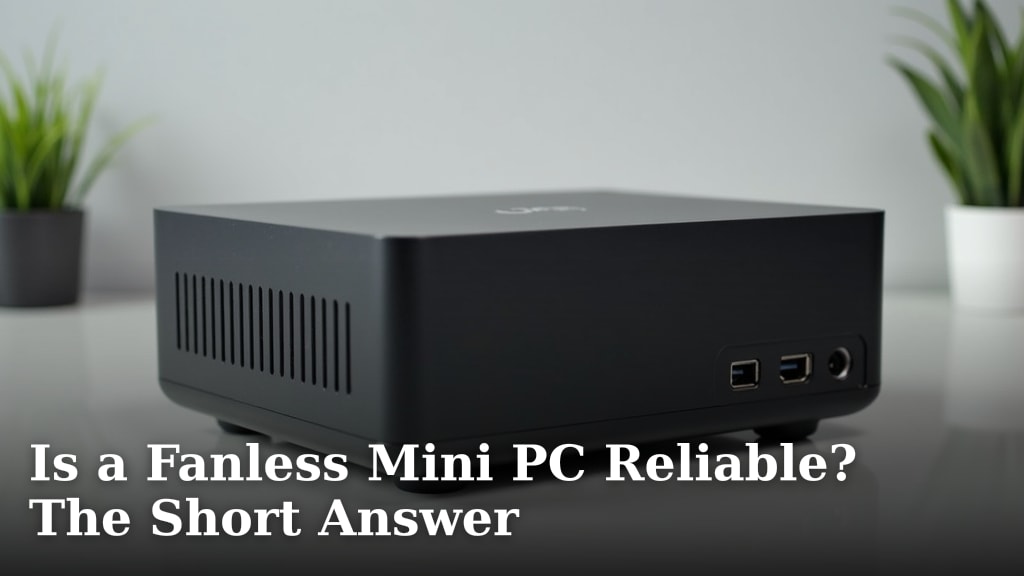
7 Best Fanless Mini PCs with Windows 11 (October 2026)
The best fanless Windows 11 mini PCs include the KAMRUI AK1PLUS Mini PC Computer for quiet everyday desk work, the MeLE Quieter4C N150 Fanless Mini PC for a silent home study, and the MINIX NEO Z300-0dB Fanless Mini PC Intel for fanless multitasking.
On this page (5 sections)
The best fanless mini PC with Windows 11 for most quiet workspaces is the MeLE Quieter4C N150. It includes Windows 11 Pro, 16GB RAM, a 512GB SSD and support for 3 independent 4K displays.
A fully fanless PC avoids cooling-fan noise, but it still needs room to shed heat through its case. For a silent study or shared room, start with MeLE or MINIX; choose an industrial model when you need serial ports or multiple network connections.
This roundup includes two quiet KAMRUI options that are not specified as fanless. They may suit buyers who want low noise and extra storage flexibility, but the fanless models are the direct fit for a no-fan requirement.
Our picks at a glance
-
1

-
2

-
3
 Best for fanless multitasking
MINIX NEO Z300-0dB Fanless Mini PC Intel
9.4/10 our score
See it on Amazon
- 4
 Best for a compact dual-screen setupCheck it
 - 5
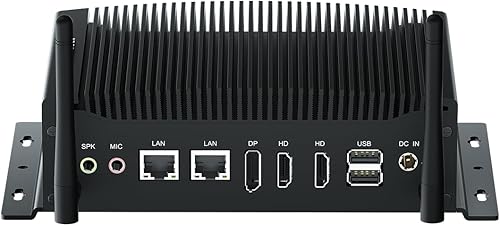 Best for serial and network connectionsCheck it
 - 6
 Check it
HISTTON Fanless Mini Industrial PC Core i5-8265U
Best for dual-screen office connections - 7
 Check it
KINGDEL Fanless Industrial Computer
Best for VGA and serial equipment
Which fanless mini PCs with Windows 11 stand out?
The MeLE Quieter4C is the easiest fit for a quiet home workspace, while MINIX adds an eight-core processor and the industrial models offer extra ports. You can compare another brand’s models in our MINISFORUM mini PC guide.
We compared the stated cooling designs, Windows editions, processors, memory, storage and display connections.
Our scores weigh specs and features against the needs of someone shopping for a fanless Windows 11 desktop. KAMRUI's high scores reflect its everyday configuration and display options, although its cooling is not described as fanless.
| Product | Best for | Processor | Memory and storage | Cooling | Our score |
|---|---|---|---|---|---|
| KAMRUI AK1PLUS Mini PC Computer | quiet everyday desk work | Intel Celeron N5095 | 16GB RAM, 256GB SSD | Efficient cooling system; described as low noise | 9.7 |
| MeLE Quieter4C N150 Fanless Mini PC | a silent home study | Intel N150, 4 cores | 16GB DDR4, 512GB SSD | Fanless | 9.6 |
| MINIX NEO Z300-0dB Fanless Mini PC Intel | fanless multitasking | Intel N300, 8 cores | 16GB DDR4, 512GB SSD | Fanless passive cooling | 9.4 |
| KAMRUI Mini PC | a compact dual-screen setup | Intel N5030 | 12GB RAM, 256GB SSD | Air cooling; fan described as rarely spinning up | 8.8 |
| WEIDIAN Fanless PC | serial and network connections | Intel Core i7-10510U, 4 cores | 32GB RAM, 1TB SSD | Fanless | 8.7 |
| HISTTON Fanless Mini Industrial PC Core i5-8265U | dual-screen office connections | Intel Core i5-8265U | 16GB RAM, 512GB SSD | Fanless design with aluminum shell | 8.6 |
| KINGDEL Fanless Industrial Computer | VGA and serial equipment | Intel Core i7-8565U or i7-8559U | 16GB RAM, 512GB NVMe SSD | Fanless metal case | 8.3 |
KAMRUI AK1PLUS Mini PC Computer: Best for quiet everyday desk work
- Intel Celeron N5095
- 16GB LPDDR4X RAM
- 256GB M.2 SSD
- Dual HDMI 4K at 60Hz
A compact everyday PC with Windows 11, dual 4K display support and storage expansion options. Its cooling is described as quiet, but it is not specified as fanless.
Pros
- 16GB RAM and 256GB SSD
- Dual HDMI 4K at 60Hz
- Supports added M.2 and 2.5-inch storage
Cons
- Not specified as fanless
- Windows edition is not stated
The KAMRUI AK1PLUS is a compact everyday desktop with an Intel Celeron N5095, 16GB LPDDR4X RAM and a 256GB M.2 SSD. It supports browsing, online classes, video calls and office tasks, with dual HDMI 4K output at 60Hz for a two-screen desk.
This model is not described as fanless. KAMRUI says its cooling system keeps noise low during daily operation, so consider it if quiet computing matters more than removing the fan entirely.
Storage expansion is a strong point: add an M.2 SATA or NVMe drive up to 2TB and a 2.5-inch SATA drive up to 2TB. It also has four USB 3.2 ports, Gigabit Ethernet and a 3.5mm audio jack.
Choose it for a quiet everyday PC with two displays and room for more storage. Skip it if your room requires a truly fanless computer.
MeLE Quieter4C N150 Fanless Mini PC: Best for a silent home study
- Fanless N150 processor
- Windows 11 Pro
- 16GB DDR4 and 512GB SSD
- Three independent 4K displays
This compact fanless PC pairs Windows 11 Pro with 16GB RAM and a 512GB SSD. Its USB-C and 2 HDMI outputs support up to 3 independent 4K displays.
Pros
- Windows 11 Pro included
- Fanless design
- Three 4K display outputs
Cons
- N150 is a lower-power processor
- RAM is described as upgradeable, but capacity limits are unclear
The MeLE Quieter4C N150 is the most direct match for a silent Windows 11 desk. Its fanless design, Windows 11 Pro, 16GB DDR4 RAM and 512GB SSD form a useful combination for everyday office, study and media tasks.
The N150 has 4 cores and a stated maximum speed of 3.6GHz. MeLE also describes the device for continuous operation, but actual performance depends on the workload and setup.
For a multi-screen desk, it supports 3 independent 4K displays through 2 HDMI 2.0 outputs and USB-C. An empty M.2 2280 NVMe slot and a Micro SD card slot provide ways to add storage.
The included VESA mount can attach the small computer behind a monitor or TV. Wi-Fi 5, Bluetooth 5.1 and Gigabit Ethernet cover common home and office connections.
Choose it for a fanless study or shared room where display flexibility matters. Check the number and type of ports your monitors use before planning a three-screen setup.
MINIX NEO Z300-0dB Fanless Mini PC Intel: Best for fanless multitasking
- Intel N300 octa-core processor
- Windows 11 Pro
- 16GB DDR4 and 512GB PCIe SSD
- M.2 storage expansion up to 4TB
The N300 processor, Windows 11 Pro and 16GB of RAM suit everyday work and multitasking in a quiet room. Its top cover acts as a heat-dissipating surface and can become warm.
Pros
- Fanless cooling
- Windows 11 Pro included
- Expandable RAM and M.2 storage
Cons
- Top surface can become warm
- Only one M.2 storage slot is described
The MINIX NEO Z300-0dB combines a fanless design with an Intel N300 octa-core processor, 16GB DDR4 RAM, a 512GB PCIe SSD and Windows 11 Pro. It is aimed at daily office work, web browsing and multitasking.
Its M.2 2280 PCIe slot supports storage expansion up to 4TB, and memory can be upgraded up to 32GB. The stated display resolution reaches 4K UHD, though the product details here don't specify the number of simultaneous displays.
Passive cooling means heat leaves through the case. MINIX notes that the top cover may become warm during operation, so give the computer open space and keep it out of children's reach.
Choose it if you want a fanless PC with an eight-core processor and Windows 11 Pro. If a cool-to-touch case is a priority, remember that this model uses its surface to dissipate heat.
KAMRUI Mini PC: Best for a compact dual-screen setup
- Intel N5030
- 12GB onboard RAM
- 256GB SSD
- Dual HDMI 4K output
This Windows 11 mini PC has 12GB onboard RAM, dual HDMI and room to add storage. Its cooling is described as quiet, but it is not a fanless model.
Pros
- 12GB RAM
- Dual HDMI outputs
- M.2 and 2.5-inch storage expansion
Cons
- Not specified as fanless
- Onboard RAM is not upgradeable
The KAMRUI Mini PC pairs an Intel N5030 with 12GB onboard RAM and a 256GB SSD. Its dual HDMI ports support two 4K displays, and it comes with Windows 11 according to its title.
The cooling design is described as air cooling, not fanless. KAMRUI says the fan rarely spins up, which makes it a possible choice for a quiet room where a fully fanless design is not essential.
Storage can grow through an M.2 2280 slot and a 2.5-inch SATA bay. The RAM is onboard and cannot be upgraded, so choose it based on your expected workload rather than plans to add memory later.
Choose it for a two-screen setup with expandable storage and 12GB RAM. Pick one of the fanless models if avoiding a cooling fan is a firm requirement.
WEIDIAN Fanless PC: Best for serial and network connections
- Intel Core i7-10510U
- Windows 11 Pro
- Two COM ports and dual Gigabit Ethernet
- Three display outputs
This industrial-style fanless PC combines Windows 11 Pro with two COM ports, dual Gigabit Ethernet and three display outputs. It fits specialized setups better than a basic home desk.
Pros
- Two COM ports and GPIO
- Dual Gigabit Ethernet
- Three display outputs
Cons
- Large and heavy compared with compact models
- 4G module is not included
The WEIDIAN Fanless PC targets industrial and specialized desks that need more than standard USB connections. It pairs an Intel Core i7-10510U with Windows 11 Pro, 32GB RAM and a 1TB SSD.
Its port selection includes two COM ports, two Gigabit Ethernet ports and GPIO. The computer also supports three displays through two HD ports and DisplayPort, making it useful for a control station or desk with several screens.
This is a larger unit than the study-focused picks, measuring about 8 x 5 x 2 inches and weighing 1.2kg. A Nano-SIM slot is present, but the 4G module is not included.
Choose it for serial devices, multiple network links or a three-display workspace. For a basic home desk, its industrial connections may be more than you need.
HISTTON Fanless Mini Industrial PC Core i5-8265U: Best for dual-screen office connections
- Intel Core i5-8265U
- Windows 11 Pro
- Dual 4K display support
- Two COM ports
A fanless Windows 11 Pro option with dual displays, two COM ports and room to expand memory and storage. Its 8-inch case is larger than the tiny study-focused PCs.
Pros
- Windows 11 Pro included
- Two display outputs
- Memory and storage expansion
Cons
- No triple-display support described
- Larger case than the compact picks
The HISTTON fanless mini PC has a Core i5-8265U, 16GB RAM, a 512GB SSD and Windows 11 Pro. Its aluminum shell supports passive cooling, and the case measures about 8 x 5 x 2 inches.
Two display outputs support 4K UHD playback, while two RS232 COM ports connect serial equipment. Memory can expand up to 64GB, and the M.2 and 2.5-inch bays each support added storage.
The computer is described for office, training center and industrial use. Its size and COM connections make it less suited to buyers who only need the smallest possible quiet desktop.
Choose it for fanless Windows 11 Pro with dual displays and serial ports. Check that your monitor connections match its available outputs before buying.
KINGDEL Fanless Industrial Computer: Best for VGA and serial equipment
- 8th-generation Intel Core i7 processor
- 16GB RAM and 512GB NVMe SSD
- HDMI and VGA outputs
- Two RS232 COM ports
This fanless industrial computer pairs HDMI and VGA with two RS232 ports for older displays or serial equipment. Its Windows edition is not specified.
Pros
- HDMI and VGA display outputs
- Two RS232 ports
- Fanless metal case
Cons
- Windows 11 is not confirmed
- Processor model varies between two options
The KINGDEL Fanless Industrial Computer is the best fit here for equipment that still uses VGA or RS232. It has an all-metal fanless case, 16GB RAM, a 512GB NVMe SSD and a stated 8th-generation Intel Core i7 processor.
The display connections include HDMI and VGA for dual-monitor use. Two RS232 COM ports and four USB 3.0 ports add options for older peripherals or equipment.
Its Windows edition is not specified, so don't assume it includes Windows 11. The processor model can also vary between the i7-8565U and i7-8559U.
Choose it when VGA and serial connections matter more than a confirmed Windows 11 installation. Confirm the operating system and exact processor configuration before you buy.
How should you choose a fanless Windows 11 mini PC?
Choose based on the Windows edition, workload and connections first, then check how the case needs to shed heat. A fanless design removes the cooling fan, but it does not remove the need for airflow around the computer.
For a quiet home study, MeLE offers Windows 11 Pro and a compact case with support for 3 displays. MINIX also includes Windows 11 Pro and uses an N300 processor, with a surface that can become warm during use.
If you need serial equipment, look at WEIDIAN, HISTTON or KINGDEL. Their COM ports and industrial connections solve specific setup needs, while the KINGDEL Windows edition is not confirmed.
Buy a quiet but not necessarily fanless system only when that tradeoff works for you. The KAMRUI models are described as quiet, but both use air cooling.
For a closer look at the design, read what a fanless mini PC is. If you're weighing fan noise against cooling, our guide on whether you need a mini PC with a fan or fanless explains the tradeoffs.
What should you check before buying a fanless mini PC?
Check the exact Windows edition, processor, memory and ports against the apps and devices you plan to use. A product described as Windows 11 may not specify whether it includes Home or Pro.
Next, compare display outputs with your monitors. MeLE names its three-output setup, while the industrial models list HDMI, DisplayPort, VGA or HD ports; similar port names do not guarantee the same number of supported displays.
A fanless case sheds heat passively, so leave space around it and follow the manufacturer's placement instructions. The MINIX top cover may become warm, and the other models can also require room for heat to escape.
Storage needs can change after setup. Use our mini PC storage size guide to estimate capacity, and see whether to buy a SATA SSD with Windows 11 preinstalled if you're considering a separate system drive.
For another processor-specific comparison, browse the best fanless N100 mini PCs. If quiet operation is enough and fanless cooling is optional, compare the best quiet mini PCs.
Is a fanless mini PC reliable?
A fanless design removes the cooling fan as a moving part, but that alone does not prove how long the whole computer will last. Reliability also depends on the processor's workload, heat, components and operating conditions.
The MINIX and MeLE models are described for continuous operation. Treat that as a design claim, and place each computer where its case can release heat.
Read our guide to fanless mini PC reliability for more on the tradeoffs. For a fanless unit, avoid enclosing it tightly unless the manufacturer approves that placement.
Which fanless mini PC should you choose?
Choose the MeLE Quieter4C N150 for a compact, fanless Windows 11 Pro desktop with 3-display support. Pick the MINIX NEO Z300-0dB if you want its N300 processor and accept a warm top cover.
For COM ports and extra network connections, choose WEIDIAN or HISTTON. Consider KINGDEL when VGA and RS232 matter, after confirming its Windows edition; choose KAMRUI only when low noise is enough and fanless cooling is not required.
If you want to compare by processor, start with our fanless mini PC N100 picks. For a broader noise-focused shortlist, see the best quiet mini PCs.
Our top 3 picks at a glance
-
1
-
2
-
3
Best for fanless multitasking
MINIX NEO Z300-0dB Fanless Mini PC Intel
9.4/10 our score
See it on Amazon
Frequently asked questions
Are fanless mini PCs silent?
Fanless models have no cooling fan, so they avoid fan noise. MeLE and MINIX describe their picks as fanless, while KAMRUI's models here have air cooling and are described as quiet.
A fanless PC can still produce sound from connected devices, such as a monitor or external drive.
Does fanless mean a mini PC stays cool?
No. Fanless computers move heat through their case or other passive cooling parts, so the surface can feel warm during use.
MINIX notes that the top cover on its NEO Z300-0dB can become warm.
Give the case room and follow the maker's placement guidance.
Which fanless mini PC here includes Windows 11 Pro?
The MeLE Quieter4C N150, MINIX NEO Z300-0dB, WEIDIAN and HISTTON models are described with Windows 11 Pro. The KAMRUI AK1PLUS has Windows 11 in its title, but its edition is not specified.
The KINGDEL model's Windows edition is also not confirmed.
Is a fanless mini PC good for everyday work?
Yes, a fanless mini PC can suit browsing, email, office work and video calls if its processor, memory and ports fit your needs. The MeLE and MINIX picks are described for everyday tasks, and both have 16GB RAM.
For heavier work, check the software requirements before choosing a low-power processor.
Should I choose a fanless N100 mini PC?
An N100 model may suit basic desktop tasks, but this roundup's fanless Windows 11 options use N150, N300 or older Core processors. Compare memory, storage, ports and Windows edition as well as the processor.
Our fanless N100 mini PC picks focus on that processor family.