9 Best Mini PCs for Gaming Under $500 (October 2026)
The best budget mini PCs for gaming under 500 dollars include the ACEMAGICIAN S3A Gaming Mini PC for stronger integrated graphics, the Getorli Mini PC AMD Ryzen 5 3500U for a low power budget, and the GMKtec M6 Ultra Gaming Mini PC Ryzen for a faster Ryzen 5.
On this page (7 sections)
- Which mini PC for gaming under 500 dollars fits your needs?
- How we compared budget mini PCs for gaming
- What matters most in a mini gaming PC under 500 dollars?
- Can integrated graphics handle your games?
- How much memory and storage should you choose?
- How do you keep the total under 500 dollars?
- Which budget gaming mini PC should you choose?
The ACEMAGICIAN S3A Gaming Mini PC is the strongest gaming-focused option in this group, with a Ryzen 7 H 255 and Radeon 780M integrated graphics. If you want a lower-cost style of setup, compare the Ryzen 5 and Ryzen 3 models, then verify that the current price stays under 500 dollars.
Mini PCs at this budget use integrated graphics, so match your choice to the games you actually play. For older, casual or less demanding games, these compact systems may fit; demanding new games can call for a desktop with a dedicated graphics card.
Our picks at a glance
-
1
 Best for stronger integrated graphics
ACEMAGICIAN S3A Gaming Mini PC
9.6/10 our score
See it on Amazon -
2

-
3

- 4
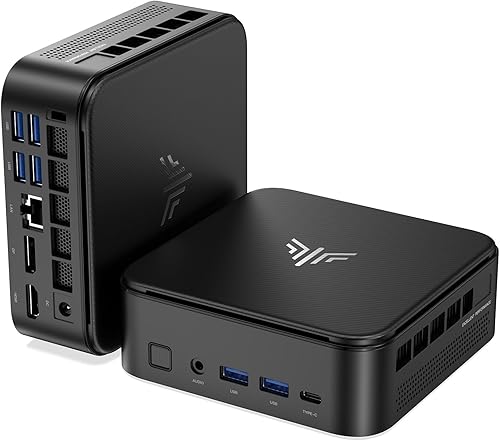 Best for three-screen setupsCheck it
 - 5
 Check it
GMKtec M5 Ultra Gaming Mini PC Computer
Best for expandable storage - 6
 Check it
BOSGAME E5 Plus Mini PC Ryzen 5400U
Best for later memory upgrades - 7
 Best for casual gaming and multitaskingCheck it
 - 8
 Best for Ryzen 7 valueCheck it
 - 9
 Best for dual 4K monitorsCheck it
Which mini PC for gaming under 500 dollars fits your needs?
The ACEMAGICIAN S3A leads this group on its listed graphics hardware, while other picks trade graphics capability for storage, memory flexibility or a lower-power design. All nine options use integrated graphics, so none should be treated as a substitute for a dedicated gaming GPU.
ACEMAGICIAN S3A Gaming Mini PC: Best for stronger integrated graphics
- Ryzen 7 H 255, 8 cores and 16 threads
- Radeon 780M graphics
- 16GB LPDDR5 RAM
- 512GB PCIe 4.0 SSD
Its Ryzen 7 H 255 and Radeon 780M make it the most graphics-focused pick here. The 16GB memory and 512GB SSD give you a ready starting point for games and everyday tasks.
Pros
- Radeon 780M graphics
- Three performance modes
- Triple 4K display support
Cons
- Integrated graphics are not a dedicated gaming card
- LPDDR5 memory is not described as upgradeable
The ACEMAGICIAN S3A pairs an 8-core, 16-thread Ryzen 7 H 255 with Radeon 780M graphics. Its 16GB LPDDR5 memory and 512GB PCIe 4.0 SSD give you a balanced base for games, everyday apps and multitasking.
Three performance modes let you choose between silent, auto and performance settings. The computer also supports up to three 4K displays through HDMI, DisplayPort and USB-C, which may suit a desk used for gaming and other work.
The graphics are integrated, so set expectations around the specific games and quality settings you want. Check game requirements before buying, and compare current pricing with your 500 dollars limit.
Getorli Mini PC AMD Ryzen 5 3500U: Best for a low power budget
- Ryzen 5 3500U, 4 cores and 8 threads
- 16GB DDR4 RAM
- 512GB NVMe SSD
- Dual HDMI display output
A modest Ryzen 5 setup for casual play and everyday computing. Its memory can expand to 32GB, though the available details don't identify its graphics model.
Pros
- 16GB memory and 512GB NVMe storage
- Memory can expand to 32GB
- Wi-Fi 6 and Bluetooth 5.3
Cons
- Graphics model is not specified
- Older Ryzen 5 3500U processor
The Getorli Mini PC uses a Ryzen 5 3500U with 16GB DDR4 memory and a 512GB NVMe SSD. It is a straightforward option for lighter games alongside browsing and media streaming.
Its memory can expand to 32GB, and two HDMI ports support up to two 4K displays. The graphics model isn't identified in the available specifications, so check that it meets the requirements for your games before choosing it for gaming.
GMKtec M6 Ultra Gaming Mini PC Ryzen: Best for a faster Ryzen 5
- Ryzen 5 7640HS, 6 cores and 12 threads
- Radeon 760M graphics
- 32GB DDR5 RAM
- 1TB SSD
This model pairs a Ryzen 5 7640HS with Radeon 760M graphics and ample included memory and storage. The combination makes it a strong option for buyers who want more headroom for games and multitasking.
Pros
- 32GB DDR5 memory
- 1TB SSD
- Radeon 760M graphics
Cons
- Integrated graphics share the system's compact-PC limits
- Confirm its current price against your cap
The GMKtec M6 Ultra combines a Ryzen 5 7640HS with Radeon 760M graphics, 32GB DDR5 memory and a 1TB SSD. Those components make it a strong pick for someone who wants room for games and multitasking without an immediate storage upgrade.
Its graphics remain integrated, so results vary by game and settings. The system also supports three displays, including USB4, HDMI and DisplayPort output.
KAMRUI E3B Mini PC: Best for three-screen setups
- Ryzen 5 7530U, 6 cores and 12 threads
- Radeon RX Vega 7 graphics
- 16GB LPDDR4X memory
- Two M.2 SSD slots
The E3B balances a six-core Ryzen 5 with Radeon RX Vega 7 graphics and three display outputs. Its 16GB memory is not upgradeable, but its two M.2 slots allow storage expansion.
Pros
- Three display outputs
- Two M.2 storage slots
- Wi-Fi 6
Cons
- Memory is non-upgradeable
- Graphics are integrated
KAMRUI's E3B has a Ryzen 5 7530U and Radeon RX Vega 7 graphics. It includes 16GB LPDDR4X memory, which can't be upgraded, plus two M.2 slots for storage expansion.
HDMI, DisplayPort and USB-C can drive three displays. Wi-Fi 6 and Bluetooth 5.2 cover wireless networking and peripherals, while the integrated graphics make this best suited to casual gaming rather than demanding new titles.
GMKtec M5 Ultra Gaming Mini PC Computer: Best for expandable storage
- Ryzen 7 7730U, 8 cores and 16 threads
- Integrated Radeon graphics with 8 cores
- 16GB DDR4 RAM
- 256GB SSD with dual-slot expansion
The Ryzen 7 7730U provides eight cores and integrated Radeon graphics. Its starting SSD is small for a game library, but dual storage slots give you room to add capacity.
Pros
- Eight-core Ryzen 7
- Memory expandable to 64GB
- Dual SSD slots
Cons
- 256GB included storage is limited for games
- Integrated graphics
The GMKtec M5 Ultra uses a Ryzen 7 7730U with integrated Radeon graphics and 16GB DDR4 memory. The memory can expand to 64GB, and the dual M.2 slots support up to 4TB of SSD storage.
The included 256GB SSD is the main compromise for a gaming setup, since a few large games can take up much of that space. Consider it if you're comfortable adding storage later and the current price fits your budget.
BOSGAME E5 Plus Mini PC Ryzen 5400U: Best for later memory upgrades
- Ryzen 3 5400U, 4 cores and 8 threads
- Integrated Radeon graphics
- 8GB DDR4 RAM, expandable to 64GB
- 256GB SATA SSD
This is a simpler starting point for casual gaming, with a four-core Ryzen 3 and integrated Radeon graphics. The dual memory slots and extra NVMe slot make future upgrades possible.
Pros
- Memory can expand to 64GB
- Extra M.2 NVMe slot
- Triple 4K display outputs
Cons
- Starts with 8GB RAM
- 256GB SATA SSD
BOSGAME's E5 Plus pairs a Ryzen 3 5400U with integrated Radeon graphics. It starts with 8GB DDR4 memory and a 256GB SATA SSD, but two SODIMM slots support a memory upgrade and an extra M.2 NVMe slot can add storage.
That flexibility may appeal if you want a basic system to upgrade over time. For games, the starting memory and integrated graphics point toward casual play, so check requirements before choosing it.
BOSGAME E5 11 Pro Mini PC: Best for casual gaming and multitasking
- Ryzen 3 5300U, 4 cores and 8 threads
- Integrated Radeon graphics with 6 cores
- 8GB DDR4 memory, expandable to 64GB
- 256GB NVMe SSD
The E5 11 Pro is aimed at everyday computing and casual gaming. Its six-core Radeon graphics and upgradeable memory give it a flexible base, while 8GB RAM and 256GB storage are modest starting amounts.
Pros
- Memory can expand to 64GB
- Open M.2 slot for added storage
- Triple 4K display support
Cons
- Starts with 8GB RAM
- Integrated graphics
The BOSGAME E5 11 Pro has a Ryzen 3 5300U and integrated Radeon graphics with six graphics cores. It starts with 8GB DDR4 memory and a 256GB NVMe SSD, with memory expandable to 64GB and an open M.2 slot for another drive.
This is a practical choice for everyday work with occasional casual gaming. Its starting RAM and storage are limited for a larger game collection, so account for possible upgrades when comparing it with other budget mini PCs.
KAMRUI Gaming Mini PC: Best for Ryzen 7 value
- Ryzen 7 7730U, 8 cores and 16 threads
- Integrated Radeon graphics
- 16GB LPDDR4X memory
- 512GB NVMe SSD
This KAMRUI brings an eight-core Ryzen 7 and 512GB NVMe storage in a compact setup. Its integrated graphics suit casual play, and the three display outputs also support a multi-screen desk.
Pros
- Eight-core Ryzen 7
- 512GB NVMe storage
- Wi-Fi 6 and three display outputs
Cons
- Integrated Radeon graphics
- Memory upgradeability is not specified
KAMRUI's Gaming Mini PC stands out for its Ryzen 7 7730U, 16GB LPDDR4X memory and 512GB NVMe SSD. The integrated Radeon graphics are described for easy gaming, while HDMI, DisplayPort and USB-C support up to three monitors.
The memory's upgrade path isn't specified, so choose it based on the included 16GB configuration. It may suit casual games and a work setup that benefits from extra display outputs.
Beelink EQR5 Mini Pc: Best for dual 4K monitors
- Ryzen 3 7330U, 4 cores and 8 threads
- Integrated Radeon graphics with 6 cores
- 16GB DDR4 RAM
- 500GB SSD
The Beelink EQR5 is a general-purpose mini PC with integrated Radeon graphics and dual 4K display support. It fits lighter gaming alongside work and media use.
Pros
- 16GB DDR4 memory
- 500GB SSD
- Dual 4K HDMI outputs
Cons
- Integrated graphics are aimed at casual gaming
- Four-core Ryzen 3 processor
The Beelink EQR5 combines a Ryzen 3 7330U with integrated Radeon graphics, 16GB DDR4 memory and a 500GB SSD. Its dual HDMI ports support two 4K displays, and the memory can expand to 64GB.
The graphics are positioned for casual gaming, so this is a better fit for lighter titles than demanding releases. The 500GB drive gives you more room than the 256GB options here, though game sizes still matter.
How we compared budget mini PCs for gaming
We compared processor and graphics details, included memory and storage, and the upgrade options that matter if you want to keep a game library on the system. The score weighs those specs and features against the needs of someone shopping for gaming under 500 dollars.
A stronger integrated GPU is a useful starting point, but it doesn't guarantee a particular frame rate. Game requirements, resolution, graphics settings and cooling can all affect what you see, so look for information about the exact games you plan to play.
What matters most in a mini gaming PC under 500 dollars?
Graphics capability matters most for gaming, followed by enough memory and storage for your games. Integrated graphics share system resources, so compare graphics models first and look for at least 16GB RAM where your budget allows.
Storage affects how many games you can keep installed. The options here range from 256GB to 1TB, and several models support adding an SSD later.
For a broader look at the tradeoffs, read whether a mini PC is good for gaming. If you're considering a larger compact desktop, compare these picks with small form factor PCs for gaming.
Can integrated graphics handle your games?
Integrated graphics can suit casual and less demanding games, but they have less graphics capacity than a dedicated gaming card. The S3A's Radeon 780M and the M6 Ultra's Radeon 760M are the more graphics-focused options in this group.
For older games, indie titles and less demanding multiplayer games, a mini PC may be enough. For a graphically intensive new release, check the developer's system requirements and seek performance results for that model before you buy.
If you want a stronger processor and graphics tier, see our guide to the best Ryzen 7 mini PCs for gaming or compare the best Ryzen 9 mini gaming PCs.
How much memory and storage should you choose?
Start with 16GB of memory and at least 512GB of storage if you want a flexible gaming setup. The Getorli, S3A, M6 Ultra, KAMRUI Gaming Mini PC and Beelink EQR5 all meet those starting points, while the smaller drives may need an early upgrade.
Some memory is upgradeable, but the KAMRUI E3B's 16GB LPDDR4X is non-upgradeable. Storage expansion varies by model, so check slot type and supported capacity before choosing a future drive.
Our guide explains how much storage you need in a mini PC if you want to estimate space based on your installed games and other files.
How do you keep the total under 500 dollars?
Check the final price before you buy, since prices change and the spending limit applies to the configuration you choose. Include any planned memory or SSD upgrade in your total, along with peripherals if you don't already own them.
Compare the included configuration rather than assuming every version has the same parts. If your budget is tighter, see mini PCs for gaming under 200 dollars for more entry-level options.
Which budget gaming mini PC should you choose?
Choose the ACEMAGICIAN S3A if you want the strongest graphics hardware in this group, or the GMKtec M6 Ultra if 32GB memory and a 1TB SSD matter more. Pick the GMKtec M5 Ultra for its storage expansion options, and verify the price and game requirements before settling on any model.
FAQ
Can a mini PC run games under 500 dollars?
Yes, a mini PC under 500 dollars can run some games, especially less demanding titles and older games. These picks use integrated graphics, so performance depends on the game and its settings.
Check the requirements for the games you play, and confirm the current price before buying.
What should I prioritize in a budget gaming mini PC?
Prioritize the graphics processor, then check the CPU, memory and storage. Integrated graphics use system memory, so 16GB RAM is a more useful starting point than 8GB for many games.
Also check whether storage or memory can be expanded if your game library grows.
Are mini PCs under 500 dollars good for demanding games?
Most budget mini PCs rely on integrated graphics rather than a dedicated graphics card. That makes them better suited to casual or less demanding games than graphically intensive new releases.
Check game requirements and look for performance information for the specific model and title before you decide.
How much storage do I need for a gaming mini PC?
Storage needs depend on the size and number of games you keep installed. A 256GB drive can fill quickly once you add the operating system and other apps, while 512GB or 1TB gives you more room.
For a closer look, see our guide to how much storage a mini PC needs.
Our top 3 picks at a glance
-
1
Best for stronger integrated graphics
ACEMAGICIAN S3A Gaming Mini PC
9.6/10 our score
See it on Amazon -
2
-
3
Frequently asked questions
Can a mini PC run games under 500 dollars?
Yes, a mini PC under 500 dollars can run some games, especially less demanding titles and older games. These picks use integrated graphics, so performance depends on the game and its settings.
Check the requirements for the games you play, and confirm the current price before buying.
What should I prioritize in a budget gaming mini PC?
Prioritize the graphics processor, then check the CPU, memory and storage. Integrated graphics use system memory, so 16GB RAM is a more useful starting point than 8GB for many games.
Also check whether storage or memory can be expanded if your game library grows.
Are mini PCs under 500 dollars good for demanding games?
Most budget mini PCs rely on integrated graphics rather than a dedicated graphics card. That makes them better suited to casual or less demanding games than graphically intensive new releases.
Check game requirements and look for performance information for the specific model and title before you decide.
How much storage do I need for a gaming mini PC?
Storage needs depend on the size and number of games you keep installed. A 256GB drive can fill quickly once you add the operating system and other apps, while 512GB or 1TB gives you more room.
For a closer look, see our guide to how much storage a mini PC needs.


