9 Best Mini PCs with 8GB RAM (October 2026)
The best mini PCs with 8GB RAM include the GMKtec G3S Mini PC Intel N95 Processor for everyday browsing, the Beelink Mini PC for wired networking, and the Bmax Mini PC for storage expansion.
On this page (7 sections)
The best mini PC with 8GB RAM for most basic home and office use is the GMKtec G3S, which pairs an Intel N95 processor with a 256GB SSD. The Beelink Mini PC adds 2.5Gbps LAN, while the BOSGAME E5 Plus is a fit if you want the option to expand RAM later.
An 8GB mini PC can handle everyday work such as browsing, email, documents and video streaming. It has less headroom for large workloads, so think about how many apps and tabs you keep open before choosing.
Our picks at a glance
-
1

-
2
-
3

- 4
 Check it
BOSGAME E5 Plus Mini PC Ryzen 5400U
Best for future RAM upgrades - 5
 Check it
BOSGAME E2 Plus Mini PC AMD Ryzen
Best for three-screen work - 6
 Check it
GMKtec G5S Mini PC Intel N5095 8GB
Best for a tiny desk setup - 7
 Best for larger included SSDCheck it
 - 8
 Check it
ACEMAGIC Mini PC Windows 11 Pro Ryzen
Best for a newer Ryzen processor - 9
 Check it
Getorli Mini PC Ryzen 5 3500U 8GB
Best for Wi-Fi 6
How we chose mini PCs with 8GB RAM
The best mini PCs with 8GB RAM pair that memory capacity with a clear fit for everyday tasks and useful configuration details. We compared processor, storage, display connections, networking and any stated upgrade options.
These are modest-memory configurations for basic browsing and light office tasks. An 8GB setup may feel constrained if you run many apps at once, work with large files or keep numerous browser tabs open.
The score weighs specs, features and buyer feedback against what you're shopping for. We did not treat a higher processor tier as a substitute for memory capacity, and ranked the picks by their fit for this use.
Compare these 8GB mini PCs
The main differences are processor, storage size, display outputs and upgrade options. Use this table to narrow your choice, then check the individual sections for details that matter to your setup.
| Product | Best for | Processor | Memory | Storage | Our score |
|---|---|---|---|---|---|
| GMKtec G3S Mini PC Intel N95 Processor | everyday browsing | Intel N95, up to 3.4GHz | 8GB DDR4 | 256GB M.2 SSD | 9.6 |
| Beelink Mini PC | wired networking | Intel N95, up to 3.4GHz | 8GB DDR4 | 256GB M.2 SSD | 9.4 |
| Bmax Mini PC | storage expansion | Intel N4500, up to 2.8GHz | 8GB DDR4 | 256GB M.2 SSD | 9.3 |
| BOSGAME E5 Plus Mini PC Ryzen 5400U | future RAM upgrades | Ryzen 3 5400U, up to 4.0GHz | 8GB DDR4, expandable to 64GB | 256GB M.2 SATA SSD | 9.2 |
| BOSGAME E2 Plus Mini PC AMD Ryzen | three-screen work | Ryzen 5 3501U, up to 3.7GHz | 8GB DDR4, upgradeable to 32GB | 256GB SATA SSD | 9.1 |
| GMKtec G5S Mini PC Intel N5095 8GB | a tiny desk setup | Intel Celeron N5095 | 8GB LPDDR4 | 128GB M.2 SSD | 8.9 |
| Beelink Mini S12 Mini PC | larger included SSD | Intel N95, up to 3.4GHz | 8GB DDR4 | 480GB SATA3 SSD | 8.9 |
| ACEMAGIC Mini PC Windows 11 Pro Ryzen | a newer Ryzen processor | Ryzen 3 PRO 7330U, up to 4.3GHz | 8GB RAM, dual memory slots | 256GB SSD | 8.8 |
| Getorli Mini PC Ryzen 5 3500U 8GB | Wi-Fi 6 | Ryzen 5 3500U, up to 3.7GHz | 8GB DDR4 | 256GB M.2 SSD | 7.9 |
The best mini PCs with 8GB RAM
These nine mini PCs offer different ways to handle basic computing with 8GB of memory. Start with the GMKtec G3S for a balanced everyday configuration, then compare the alternatives for networking, storage or upgrades.
GMKtec G3S Mini PC Intel N95 Processor: Best for everyday browsing
- Intel N95 processor
- 8GB DDR4 RAM
- 256GB M.2 SSD
- Dual HDMI 4K@60Hz
An N95 processor and 256GB SSD make this a straightforward fit for routine browsing and office tasks. Dual HDMI outputs support two 4K@60Hz displays.
Pros
- Dual HDMI outputs
- Gigabit Ethernet
- 256GB SSD
Cons
- 8GB RAM may limit heavier multitasking
- Wi-Fi 5 rather than Wi-Fi 6
The GMKtec G3S pairs an Intel N95 processor with 8GB DDR4 memory and a 256GB M.2 SSD. That combination fits a basic desktop for browsing, documents and routine office apps.
Two HDMI 2.0 outputs support dual displays at up to 4K@60Hz. The computer also has USB 3.2, Wi-Fi 5, Bluetooth 5.0 and Gigabit Ethernet, giving you several ways to connect common desk equipment.
The 8GB memory is the main limit to consider. It suits a light workload better than an arrangement with many large apps open, and the 256GB SSD may need help from external storage if you keep a large media library.
Choose the G3S if you want a current N95 processor and dual HDMI in a basic configuration. If you expect your workload to grow, compare it with the upgradeable BOSGAME models below.
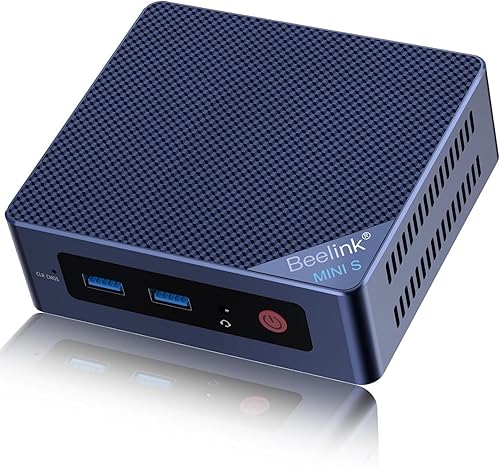
Beelink Mini PC: Best for wired networking
- Intel N95 processor
- 8GB DDR4 RAM
- 256GB M.2 SSD
- 2.5Gbps LAN
This Beelink pairs an N95 processor with 8GB DDR4 memory and a 256GB SSD. Its 2.5Gbps LAN port may suit a desk with compatible wired network equipment.
Pros
- 2.5Gbps LAN
- Four USB 3.2 Gen 2 ports
- Storage expansion options
Cons
- 8GB is modest for many open apps
- Bluetooth 4.2
The Beelink Mini PC uses an Intel N95 processor with 8GB DDR4 memory and a 256GB M.2 SSD. Its 2.5Gbps LAN port is a useful distinction if your router or network switch supports that speed.
Four USB 3.2 Gen 2 ports provide connections for peripherals and external drives. The two HDMI ports support dual 4K displays, and the system also includes Wi-Fi 5 and Bluetooth 4.2.
The 8GB configuration is aimed at everyday use, so heavy multitasking can call for a higher-memory system. Beelink describes storage expansion through a detachable base, including a 2.5-inch SATA drive option.
Consider this model when wired network speed and multiple USB ports matter to your desk. For a broader capacity comparison, see best mini PC with 16GB RAM.
Bmax Mini PC: Best for storage expansion
- Intel N4500 processor
- 8GB DDR4 RAM
- 256GB M.2 SSD
- Dual M.2 slots
The Bmax B3 Pro includes 8GB DDR4 memory and a 256GB SSD, with dual M.2 slots for storage expansion. Its N4500 processor has 2 cores and 2 threads.
Pros
- Dual M.2 slots
- Dual HDMI 4K@60Hz
- Gigabit Ethernet
Cons
- 2-core processor
- 8GB RAM is a basic starting configuration
The Bmax B3 Pro offers dual M.2 slots alongside 8GB DDR4 memory and a 256GB SSD. Its Intel N4500 processor has 2 cores and 2 threads, making it the most basic processor configuration among these first three picks.
Dual HDMI 2.0 outputs support two displays at up to 4K@60Hz. Wi-Fi 5, Bluetooth 5.0 and Gigabit Ethernet cover common network needs, while USB 3.0 ports connect accessories and storage.
The extra storage slots matter more if your files grow than if you need more memory for multitasking. The 8GB RAM remains the working capacity, while the maker describes storage expansion up to 4TB.
Pick the Bmax for a basic PC where adding storage is part of the plan. If you need a higher processor tier and a memory upgrade path, the BOSGAME E5 Plus is a stronger fit.
BOSGAME E5 Plus Mini PC Ryzen 5400U: Best for future RAM upgrades
- Ryzen 3 5400U processor
- 8GB DDR4 RAM
- Two SODIMM slots
- Up to 64GB RAM
The E5 Plus starts with 8GB memory but supports expansion up to 64GB through two SODIMM slots. Its Ryzen 3 processor and three video outputs give it room for a broader office setup.
Pros
- Memory upgrade path up to 64GB
- Three 4K@60Hz display outputs
- Dual 2.5GbE LAN
Cons
- 8GB may be restrictive until upgraded
- Included SSD is SATA
The BOSGAME E5 Plus stands out for memory expansion up to 64GB through two SODIMM slots. It starts with 8GB DDR4 memory, a Ryzen 3 5400U processor and a 256GB M.2 SATA SSD.
Three video outputs, HDMI, DisplayPort and USB-C, support up to 4K@60Hz each. The USB-C port also supports data transfer and PD 3.0, while dual 2.5GbE LAN ports make it useful for a wired network setup.
Starting with 8GB keeps this configuration in the modest-memory group, but the upgrade path is more flexible than fixed-capacity options. You can add memory if browser-heavy work or larger spreadsheets become part of your routine.
Choose it when you want a mini PC that can grow beyond 8GB. For a higher-capacity comparison, see best mini PC with 32GB RAM.
BOSGAME E2 Plus Mini PC AMD Ryzen: Best for three-screen work
- Ryzen 5 3501U processor
- 8GB DDR4 RAM
- 256GB SATA SSD
- Triple-display support
This BOSGAME model pairs 8GB DDR4 memory with a Ryzen 5 3501U and supports up to three displays. It can be upgraded to 32GB if your workload later grows.
Pros
- Triple-display support
- Memory upgrade up to 32GB
- Wi-Fi 5 and Bluetooth 5.0
Cons
- 8GB is limited for demanding multitasking
- Storage is SATA SSD
The BOSGAME E2 Plus combines a Ryzen 5 3501U processor with 8GB DDR4 memory and a 256GB SATA SSD. It supports memory upgrades up to 32GB, giving you a way to increase capacity if everyday use grows more demanding.
Its video connections include two HDMI 2.0 ports and USB-C display output, with support for up to three monitors. The HDMI ports support 4K@60Hz, and the system also has Gigabit Ethernet, Wi-Fi 5 and Bluetooth 5.0.
For light work, the starting memory can cover everyday browsing and office tasks. Before buying, consider whether you'll use the third display and whether you'll want the available memory upgrade later.
This BOSGAME fits a home office that needs multiple screens and a future RAM option. Its 256GB SATA SSD is smaller than the 480GB drive in the Beelink Mini S12 below.
GMKtec G5S Mini PC Intel N5095 8GB: Best for a tiny desk setup
- Intel Celeron N5095 processor
- 8GB LPDDR4 RAM
- 128GB M.2 SSD
- About 2.8 x 2.8 x 1.75 in
The G5S is a compact option for browsing, streaming and light spreadsheet work. Its 128GB SSD is smaller than the 256GB drives in several other picks.
Pros
- Very small footprint
- Dual HDMI 4K@60Hz
- MicroSD slot
Cons
- 128GB included storage
- LPDDR4 memory
The GMKtec G5S is the smallest-footprint pick, measuring about 2.8 x 2.8 x 1.75 in. Its 8GB LPDDR4 RAM and Intel Celeron N5095 processor are paired with a 128GB M.2 SSD.
The compact case can suit a tight desk or a setup mounted behind a monitor. Dual HDMI outputs support two 4K@60Hz displays, and the port selection includes USB 3.2, Gigabit Ethernet, a 3.5mm audio jack and a MicroSD slot.
Storage is the main tradeoff: 128GB leaves less room for apps and files than the 256GB and 480GB options here. The maker also describes SSD expansion and MicroSD support, which could help if you plan storage needs ahead.
Choose the G5S when physical size matters more than included drive space. For documents and a few everyday apps it may be enough, but a larger library calls for another drive or a higher-capacity model.
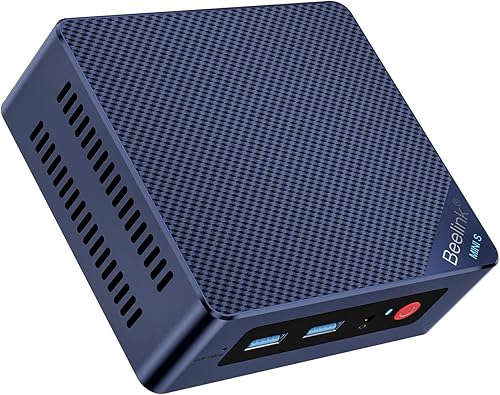
Beelink Mini S12 Mini PC: Best for larger included SSD
- Intel N95 processor
- 8GB DDR4 RAM
- 480GB SATA3 SSD
- Dual HDMI
This Mini S12 configuration combines 8GB DDR4 memory with a 480GB SATA3 SSD. That gives you more stated storage than the 256GB options, while keeping the same modest RAM capacity.
Pros
- 480GB SSD
- Dual HDMI display outputs
- 2.5G LAN
Cons
- Memory is limited to 8GB in the supplied configuration
- Storage is SATA3
The Beelink Mini S12 has the largest included SSD in this group, with 480GB SATA3 storage alongside 8GB DDR4 memory. Its Intel N95 processor supports everyday productivity, web browsing and streaming.
Two HDMI outputs support dual displays, and the system includes Wi-Fi 5, Bluetooth 4.2 and 2.5G LAN. The memory remains at 8GB in this configuration, so more storage does not make it a better choice for running many apps at once.
This model may suit you if you want room for more local files without starting with an external drive. The drive is SATA3, and the memory capacity is still a consideration for heavier work.
Pick the Mini S12 when storage space is the priority among these options. If you often use many browser tabs or several apps at once, compare a 16GB configuration before deciding.
ACEMAGIC Mini PC Windows 11 Pro Ryzen: Best for a newer Ryzen processor
- Ryzen 3 PRO 7330U
- 8GB RAM
- 256GB SSD
- Three-screen 4K display support
The Ryzen 3 PRO 7330U gives this model a different processor class from the entry-level N-series picks. It has dual memory slots and dual drive bays for future expansion.
Pros
- Dual memory slots
- Three-screen 4K support
- Dual M.2 storage options
Cons
- Memory type is not specified here
- 8GB may constrain multitasking
The ACEMAGIC Mini PC pairs a Ryzen 3 PRO 7330U with 8GB RAM and a 256GB SSD. Its dual memory slots and two drive bays offer expansion options, though the supplied configuration still starts at 8GB.
This model supports three-screen 4K display through USB-C, HDMI and DisplayPort. Wi-Fi 5, Bluetooth 4.2 and Gigabit Ethernet cover wireless and wired connections, while Windows 11 Pro is pre-installed.
The memory type is not specified here, so confirm compatibility before planning an upgrade. The dual drive bays support M.2 SATA and NVMe PCIe 3.0 x4 storage, with expansion described up to 4TB total.
Consider this pick if you want a Ryzen processor and room to expand both memory and storage. For a system that arrives with more memory, look at the 16GB options linked above.
Getorli Mini PC Ryzen 5 3500U 8GB: Best for Wi-Fi 6
- Ryzen 5 3500U processor
- 8GB DDR4 RAM
- 256GB M.2 SSD
- Wi-Fi 6
The Getorli combines 8GB DDR4 memory and a 256GB M.2 SSD with Wi-Fi 6 and Bluetooth 5.3. Its stated focus is everyday browsing, light office tasks and online learning.
Pros
- Wi-Fi 6
- Bluetooth 5.3
- 256GB M.2 SSD
Cons
- 8GB is suited to lighter workloads
- Fewer connectivity details are specified
The Getorli Mini PC combines 8GB DDR4 RAM with a Ryzen 5 3500U processor and 256GB M.2 SSD. Its stated uses include light office tasks, online learning and everyday browsing.
Wi-Fi 6 and Bluetooth 5.3 distinguish it from the Wi-Fi 5 options in this roundup. It also has Gigabit LAN and HDMI output for a basic desk or home media setup.
The product information describes 4K playback and dual-display use, but it doesn't specify the full output arrangement. Check connection needs against your monitor setup before choosing it, especially if you need a specific number of screens.
Choose the Getorli if Wi-Fi 6 is a priority and your workload is light. Its 8GB capacity can suit simple tasks, while the score reflects the limited configuration detail available for comparing expansion and display connections.
What can you do with 8GB of RAM?
A mini PC with 8GB RAM can handle basic browsing, email, document editing and light office work. It can also stream video while you use a few everyday apps, depending on the workload.
Memory is shared among the operating system, apps and browser tabs. Keeping many tabs open or running larger programs at the same time can use the available RAM quickly, which may make a 16GB system a better long-term fit.
How much storage should an 8GB mini PC have?
Choose SSD capacity based on the apps, documents and media you plan to keep on the computer. Several picks here start at 256GB, the G5S has 128GB, and the Beelink Mini S12 configuration has 480GB.
RAM and storage solve different needs. More SSD space stores more files, while more RAM gives active apps more working space; use our mini PC storage guide to estimate drive capacity.
Should you buy an 8GB mini PC or upgrade to more RAM?
Choose 8GB for a basic workload and a lower starting memory capacity, or consider more RAM if you keep many apps open or expect heavier tasks. Some models here offer a stated upgrade path, including the BOSGAME E5 Plus and E2 Plus.
Upgrade options vary by model, so check the exact memory design before buying. The E5 Plus supports up to 64GB, while the E2 Plus supports up to 32GB; a higher-memory configuration can also avoid an upgrade later.
Which mini PC with 8GB RAM should you choose?
Choose the GMKtec G3S for a balanced basic setup with an N95 processor and dual HDMI, or the Beelink Mini PC if 2.5Gbps LAN matters. Pick the BOSGAME E5 Plus if you want an upgrade path beyond 8GB.
For a smaller device, the GMKtec G5S has a compact footprint but less included storage. If your apps and browser tabs use more memory, compare best mini PC with DDR5 RAM and the best mini PC with 32GB RAM before choosing.
Our top 3 picks at a glance
-
1
-
2
-
3
Frequently asked questions
Is 8GB RAM enough for a mini PC?
8GB RAM can suit basic browsing, email, document editing and light office work. It leaves less room for many browser tabs, large spreadsheets or several demanding apps at once.
If your workload is likely to grow, consider a model with upgradeable memory or start with a larger configuration.
Can a mini PC with 8GB RAM run two monitors?
Some can. Several picks here have dual HDMI outputs, and the BOSGAME E5 Plus, BOSGAME E2 Plus and ACEMAGIC support three displays through their stated video connections.
Check the specific outputs and resolution support against your monitors before choosing.
Should I choose more RAM or a larger SSD?
Choose more RAM if you keep many apps or browser tabs open at once. Choose a larger SSD if you need space for files, apps and media.
For help estimating drive capacity, see How Much Storage Do I Need in a Mini PC?.
Can I upgrade RAM in an 8GB mini PC?
It depends on the model. The BOSGAME E5 Plus supports up to 64GB through two SODIMM slots, and the BOSGAME E2 Plus supports upgrades up to 32GB.
Check the exact model's memory design before buying if an upgrade path matters to you.
Is DDR5 worth it for a mini PC?
DDR5 may suit a buyer comparing newer memory configurations, but RAM capacity, processor and workload also matter. For basic browsing and office tasks, 8GB capacity may be the bigger limit.
Compare mini PCs with DDR5 RAM if memory type is a priority.


