Beelink Mini S12 Review: Worth It? (October 2026)
The Beelink Mini S12 suits basic home and office tasks such as web browsing, documents, video playback and online meetings. Compare the exact processor, memory and storage configuration before buying, since S12 versions differ.
On this page (6 sections)
The Beelink Mini S12 is a compact desktop for everyday home and office tasks, including browsing, documents, video playback and online meetings. The S12 name covers different configurations, so compare the processor, memory and storage instead of assuming every version is the same.
The 16GB memory and 500GB storage N100 models are the more comfortable choices for keeping several everyday apps open. The N95 version with 8GB and 256GB suits a simpler setup if those limits fit your workload.
Beelink Mini S12 review: what does it offer?
The Beelink Mini S12 offers basic desktop computing in a compact case, with dual HDMI on the configurations covered here.
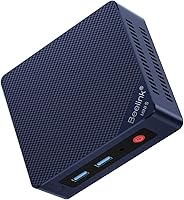
Beelink MINI S12 Pro Mini Desktop PC: Best for a basic two monitor desk

- Intel N100 processor
- 16GB DDR4 RAM
- 500GB M.2 SSD
- 2 HDMI outputs
A compact desktop configuration with an N100 processor, 16GB of memory, 500GB of storage and two HDMI outputs. It fits everyday computing needs when you don't need a larger desktop.
Pros
- 16GB memory and 500GB SSD
- Two HDMI outputs
- Wi-Fi 6, Bluetooth 5.2 and 2.5G LAN
- Four USB 3.2 Gen 2 ports
Cons
- Integrated graphics are aimed at basic desktop use
- Check the exact model and included operating system before buying
The S12 Pro configuration includes an Intel N100 processor, 16GB of DDR4 memory and a 500GB M.2 SSD. It also has two HDMI outputs, four USB 3.2 Gen 2 ports, Wi-Fi 6, Bluetooth 5.2 and 2.5G LAN.
The Beelink Mini S12 review decision comes down to whether those connections and everyday components match your desk. It is not a substitute for a desktop with dedicated graphics if you need demanding 3D work or modern games.
Who should consider the Mini S12?
Consider it if you want a small computer for a home office, family desk or media setup. For Linux-focused alternatives, see Beelink mini PCs for Linux.
The configuration gives you common connections and room for two HDMI displays without taking up the space of a full tower.
Look elsewhere if your main work needs a powerful graphics card, extensive upgrades or specialized software performance. Check the software's processor and memory requirements first, and compare those against the exact S12 configuration.
Which Mini S12 configuration makes the most sense?
The N100 models with 16GB of memory and 500GB storage offer the more flexible starting point for a general-purpose desktop. The N95 version costs less to equip only if its lower memory and storage are enough for your needs.
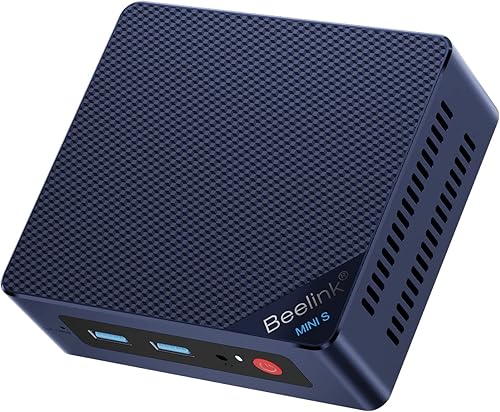
Beelink Mini PC: Best for a lower memory configuration
- Intel N95 processor
- 8GB DDR4 RAM
- 256GB SSD
- Dual HDMI
This S12 configuration pairs an N95 processor with 8GB of memory and a 256GB SSD. It may suit a simple browsing and document workstation, but confirm the processor speed and configuration before ordering.
Pros
- Dual HDMI outputs
- Wi-Fi 6 and 2.5G LAN are described in the bullets
- Compact 115 x 102 x 41 mm size
Cons
- 8GB memory and 256GB storage leave less room for multitasking and files
- Processor speed differs between title and description
This N95 configuration has 8GB of DDR4 memory and a 256GB SSD. That can be enough for a browser, documents and video streaming, but 8GB leaves less room for heavier multitasking.
There is a speed inconsistency in its details: the title says the N95 reaches 3.4GHz, while the description says up to 2.9GHz. Confirm the processor and configuration with the seller before you buy.
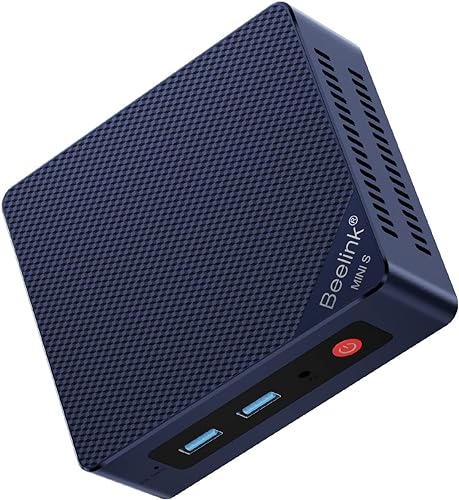
Beelink Mini PC: Best for an N100 S12 configuration
- Intel N100 processor
- 16GB DDR4 RAM
- 500GB SSD
- Dual HDMI
An N100 S12 configuration with 16GB of memory, 500GB of storage, dual HDMI and Wi-Fi 6. Check the exact model details, since Beelink uses similar names across different S12 versions.
Pros
- 16GB memory and 500GB SSD
- Dual HDMI outputs
- Wi-Fi 6, Bluetooth 5.2 and 2.5G LAN are described
- VESA mount and HDMI cable are included
Cons
- Integrated graphics suit everyday display tasks rather than demanding graphics work
- Exact configuration should be confirmed before buying
The N100 version combines 16GB of memory and a 500GB SSD with two HDMI outputs. It is a close alternative to the S12 Pro configuration, with similar everyday connections and capacity.
The model naming can be confusing because both products use S12 wording. Compare the full model name and configuration, and choose based on the exact memory, storage and included items rather than the name alone.
For a wider set of models, see our best Beelink mini PC guide. If you're deciding between nearby S12 versions, compare this model with the Beelink Mini S12 Pro Mini PC review.
How much can the Mini S12 handle?
The Mini S12 is suited to web, office and media tasks, not workloads that depend on high-end graphics. Beelink describes the N100 version for daily work, web browsing, learning and 4K video playback.
For a typical family computer, that can mean email, school portals, spreadsheets, document editing and video calls. Several browser tabs and office apps are easier to manage with 16GB of memory than with the 8GB N95 configuration.
Integrated Intel UHD graphics handle the display output, but they don't make this a gaming-focused computer. Compare Beelink gaming mini PCs if gaming matters to your setup.
Match demanding creative or gaming software to its stated requirements before you choose a mini PC.
Storage capacity also affects the fit. A 500GB SSD gives more space for apps and local files than a 256GB drive, but keep large photo or video libraries on external storage if you need more room.
Our guide to how much storage you need in a mini PC can help estimate your needs.
What display and connection options do you get?
The configurations described here include two HDMI outputs for dual display setups. They also provide USB ports, wired Ethernet and wireless connections, though port details can vary by configuration.
The S12 Pro specifies four USB 3.2 Gen 2 ports, Wi-Fi 6, Bluetooth 5.2 and 2.5G LAN. These connections can support peripherals such as a keyboard, mouse, printer and wired network connection.
Before you buy, check that your monitors accept HDMI or have suitable adapters. Also consider where the PC will sit, how long your cables are and whether you need additional ports for storage or other devices.
How does the Mini S12 compare with other Beelink models?
The Mini S12 is the basic desktop option in this comparison, while other Beelink models may suit different performance or feature needs. For a performance-focused alternative, read the Beelink SER9 Pro review.
Compare exact configurations and intended workloads before treating model names as a ranking.
The newer Beelink Mini S13 review can help if you're considering another compact option. For a different model line, the Beelink SER5 review gives you a point of comparison.
Use the step-by-step guide to choosing a mini PC to match processor, memory, storage, ports and display needs to the software you'll use. That checklist is more useful than choosing by brand or size alone.
Is the Beelink Mini S12 a good buy?
The Mini S12 is a reasonable fit for a basic desktop if your work centers on browsing, documents, streaming and online meetings. For a more flexible everyday setup, choose an N100 configuration with 16GB memory and 500GB storage.
Choose the N95 version if your tasks are light and 8GB memory with 256GB storage is enough. If you need demanding graphics performance, extensive local storage or more upgrade options, compare other mini PCs before deciding.
Pick the Mini S12 when its exact configuration and dual HDMI connections meet your needs. Compare the Beelink Mini S13 review and S12 Pro review when you want another option in the same brand family.
Frequently asked questions
Is the Beelink Mini S12 good for everyday use?
The Beelink Mini S12 is designed for common desktop tasks such as web browsing, office documents, video playback and online meetings. The N100 configurations pair the processor with 16GB of memory and 500GB of storage, while the N95 option here has 8GB and 256GB; choose based on how many apps and files you expect to keep open.
Can the Beelink Mini S12 run two monitors?
The configurations covered here have two HDMI outputs and describe dual display support. Check the monitor inputs and resolution you plan to use, then confirm the exact S12 model supports that setup; two available ports alone don't guarantee identical display features across every configuration.
Should I choose an N95 or N100 Beelink Mini S12?
Choose by the full configuration, not the processor name alone. The N95 option in this comparison has 8GB of memory and a 256GB SSD, while the N100 versions have 16GB and 500GB; the smaller setup may be enough for light tasks, while extra memory and storage offer more room.
Is the Beelink Mini S12 suitable for gaming?
The Mini S12 uses integrated Intel UHD graphics, and the described uses focus on everyday work, browsing and video playback. It may handle light or older games, but don't choose it for demanding games or graphics work without checking requirements for the specific titles you want to run.