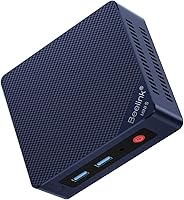
Beelink SER8 Mini PC Review: Worth It? (October 2026)
The Beelink SER8 is a compact desktop line with Ryzen 7 processors and Radeon 780M integrated graphics. Choose a 32GB configuration for more memory out of the box, a 1TB version for more storage, or the 16GB model if you want to start with less memory.
On this page (9 sections)
- Beelink SER8 mini PC review: which configuration fits?
- How do the three Beelink SER8 configurations compare?
- Is the 1TB Beelink SER8 worth choosing?
- Should you get the 16GB or 32GB SER8?
- What can you connect to the Beelink SER8?
- Is the SER8 suitable for family use?
- What are the Beelink SER8's limits?
- How does the SER8 compare with other Beelink mini PCs?
- Which Beelink SER8 should you choose?
The Beelink SER8 is a Ryzen 7 mini PC line with Radeon 780M integrated graphics, offered here with 16GB, 24GB or 32GB of memory and 500GB or 1TB of SSD storage. Compare the MINISFORUM UM870 Slim review for another compact Ryzen option.
The best fit depends on whether you want more memory now, more room for files or a lower starting memory configuration.
These are three configurations, not three different SER8 designs.
Beelink SER8 mini PC review: which configuration fits?
The 32GB Ryzen 7 8745HS configuration is the most balanced choice here if you want more memory ready from the start. The 1TB Ryzen 7 8845HS model makes more sense when storage space matters more than having 32GB of memory.
Beelink SER8 Mini PC: Best for 32GB memory out of the box

- Ryzen 7 8745HS
- 32GB DDR5 memory
- 500GB NVMe SSD
- Radeon 780M graphics
A ready-to-use memory configuration for multitasking, creative work and everyday desktop use. Its 500GB SSD may call for external or expanded storage if you keep large files locally.
Pros
- 32GB DDR5 memory included
- Ryzen 7 8745HS with Radeon 780M graphics
- USB4 port supports data, power delivery and DisplayPort 1.4
- Supports up to 3 displays
Cons
- 500GB SSD gives less space than the 1TB option
- The 65W TDP and low fan speed are Beelink claims, not independent measurements
This version combines an 8-core, 16-thread Ryzen 7 8745HS with 32GB of DDR5 memory and a 500GB NVMe SSD. It also includes a USB-C port with USB4, power delivery and DisplayPort 1.4, which can be useful when your desk setup uses compatible USB-C equipment.
What does the SER8 8745HS offer?
The Ryzen 7 8745HS has a stated maximum frequency of 4.9GHz and is paired with Radeon 780M integrated graphics. Beelink says its airflow design draws air from below and is designed to keep the system cool at 65W TDP with low fan speed.
That cooling description is a manufacturer claim, not a measured noise or temperature result. Leave airflow space around the mini PC and keep its intake area clear.
The 32GB memory is the largest starting amount among these options. If you tend to keep many browser tabs, office apps and creative tools open at once, that gives you more memory headroom before considering an upgrade.
How do the three Beelink SER8 configurations compare?
The main differences are processor model, included memory and SSD capacity. All three list Radeon 780M graphics and support for up to three displays, while their connection details and stated display refresh rates vary.
| Configuration | Processor | Memory | Storage | Display and connection notes |
|---|---|---|---|---|
| B0H3NSVZTJ | Ryzen 7 8745HS | 32GB DDR5 | 500GB NVMe SSD | HDMI, DP, USB4 with PD and DP 1.4, USB-C 10Gbps |
| B0H14FNDTP | Ryzen 7 8845HS | 24GB DDR5 at 5600MHz | 1TB NVMe SSD | HDMI, DP, USB4, USB-C 10Gbps |
| B0DKF15XQJ | Ryzen 7 8745HS | 16GB DDR5 at 5600MHz | 500GB PCIe 4.0 SSD | HDMI 2.1, DP 1.4 and USB4; 4K 144Hz support stated |
Check the exact configuration before ordering. The same SER8 name covers different amounts of memory, storage and distinct processor models.
Is the 1TB Beelink SER8 worth choosing?
Choose the 1TB configuration if you want more internal space for work files, media or installed software. Its Ryzen 7 8845HS is a different processor from the two 8745HS options, and it includes 24GB of DDR5 memory.
Beelink SER8 Mini PC: Best for a larger SSD
- Ryzen 7 8845HS
- 24GB DDR5 memory
- 1TB NVMe SSD
- Radeon 780M graphics
A good fit if you want twice the included SSD capacity of the 500GB options and a Ryzen 7 8845HS. Its 24GB of memory sits between the 16GB and 32GB configurations.
Pros
- 1TB SSD included
- Ryzen 7 8845HS with Radeon 780M graphics
- Supports up to 3 displays
- USB4 and 2.5Gbps Ethernet
Cons
- Includes 24GB rather than 32GB memory
- 144Hz display capability depends on the display and connection
The 1TB SSD doubles the included storage of either 500GB version. That can reduce the need to move files to an external drive, though your actual space needs depend on the size of your apps, projects and media.
Beelink lists the 8845HS at up to 5.1GHz and pairs it with Radeon 780M graphics. It also states support for up to three displays and a 4K 144Hz capability; confirm that the particular port, cable and monitor combination supports your desired refresh rate.
If you mainly use a browser, office apps and cloud storage, 500GB may be enough. Our mini PC storage guide can help you estimate how much local capacity your files need.
Should you get the 16GB or 32GB SER8?
Pick the 16GB model to start with less memory, or the 32GB model if you already know you'll run memory-heavy workloads. The 16GB SER8 also has a 500GB PCIe 4.0 SSD and the Ryzen 7 8745HS.
Beelink SER8 Mini PC: Best for a 16GB starting setup

- Ryzen 7 8745HS
- 16GB DDR5 memory
- 500GB PCIe 4.0 SSD
- Radeon 780M graphics
This configuration gives you the same stated processor family and SSD capacity as the 32GB choice, with less memory included. It may suit buyers who prefer to add memory later.
Pros
- Ryzen 7 8745HS with Radeon 780M graphics
- Memory can be expanded up to 256GB
- SSD expansion is stated up to 8TB
- Supports 3 displays
Cons
- 16GB memory is the lowest starting amount in this comparison
- The expansion limits and upgrade steps should be confirmed before buying
The 16GB version is described as having one 16GB memory module and supporting expansion up to 256GB. It also states SSD expansion up to 8TB, but check the upgrade requirements and compatibility before planning a specific capacity.
The 32GB version starts with twice as much memory and the same stated processor model. If you don't expect to upgrade, that makes it the simpler choice for a busy multitasking setup.
Neither amount is automatically right for every family. Consider the programs you plan to run together and whether you want to open the case for upgrades later.
What can you connect to the Beelink SER8?
The SER8 configurations offer wired and wireless networking, USB ports and multiple display outputs. Their exact port combinations vary, so match the model's ports to the monitors and accessories you already own.
The 32GB version lists 2.5Gbps Ethernet, Wi-Fi 6, Bluetooth 5.2, HDMI, DisplayPort, USB-C and USB-A ports. Its USB4 port is described as supporting up to 40Gbps, power delivery and DisplayPort 1.4.
The 24GB version also lists 2.5Gbps Ethernet, Wi-Fi 6, Bluetooth 5.2, HDMI, DisplayPort and USB-C, including a USB4 port. Its audio connection and USB-C features differ from the 32GB version.
The 16GB model lists HDMI 2.1, DisplayPort 1.4 and USB4 for three-display support, along with Wi-Fi 6 and Bluetooth 5.2. Beelink describes 4K 144Hz support for this configuration, but display output depends on the connection and monitor.
Before buying, count the ports your setup needs. Include a webcam, keyboard, mouse, external storage and any USB hub, then compare your options with our guide to choosing a mini PC.
Is the SER8 suitable for family use?
The SER8 can serve as a shared home desktop for schoolwork, office tasks, media and video calls. Its small-computer format may suit a desk where a larger tower would take up too much room.
The 32GB model's USB4 port and three-display support may help if you plan a multi-screen workstation with compatible monitors. The 1TB model suits a household that keeps more files on the computer, while the 16GB version gives you a lower-memory starting point.
A mini PC still needs a monitor, keyboard, mouse and speakers or headphones. Check the connection types for each accessory, and choose a placement that keeps cables manageable and the intake clear.
For less demanding browsing and school tasks, compare smaller options such as the Beelink Mini S12 review and Beelink Mini S13 review. If you want another Ryzen-based choice, see our Beelink SER5 mini PC review.
What are the Beelink SER8's limits?
The SER8's integrated graphics are not a dedicated graphics card, and the configurations differ in ways that matter for upgrades and displays. Compare Beelink mini PCs for gaming against the games and settings you need.
Don't choose it based on broad gaming or video-editing claims alone; check that the specific apps and games you use support this class of hardware.
Beelink describes the systems as suitable for light gaming and creative work. Those descriptions don't tell you how a particular game, editing project or design tool will perform at your preferred settings.
Memory expansion limits are stated as up to 256GB, while the 16GB configuration also states SSD expansion up to 8TB. Upgrades involve checking module, drive and installation compatibility, so confirm details before budgeting around those maximums.
The 500GB models may fill quickly if you save large video projects or game libraries locally. You can plan for external storage, or choose the 1TB model if you want more internal capacity from the start.
How does the SER8 compare with other Beelink mini PCs?
The SER8 is the Ryzen 7 option among these Beelink choices, while the SER5 and Mini S models give you alternatives to compare by processor, memory and intended workload. For another performance-focused option, read the Beelink SER9 Pro review.
Compare exact configurations, since product families can also include different memory and storage setups.
Our best Beelink mini PC guide helps you compare the range. For a less demanding home computer, read the Beelink Mini S12 review and Beelink Mini S13 review.
If your needs involve several demanding apps open at once, consider the 32GB SER8. If storage is your main concern, the 1TB version is the clearest fit; for a lighter setup with planned upgrades, consider the 16GB configuration.
Which Beelink SER8 should you choose?
Choose the 32GB Ryzen 7 8745HS model for more memory out of the box, the 24GB Ryzen 7 8845HS model for a 1TB SSD, or the 16GB 8745HS model if you want a smaller starting memory setup and may upgrade later. Your priorities should decide the configuration, since the shared SER8 name doesn't mean each option has the same specifications.
Our score weighs specs, features and buyer feedback against what you're shopping for. For a broader comparison of Beelink's lineup, start with the best Beelink mini PC guide.
Frequently asked questions
Is the Beelink SER8 good for everyday use?
The SER8 configurations here pair Ryzen 7 processors with Radeon 780M integrated graphics, making them options for everyday desktop work, browsing, video playback and multitasking. Your results depend on the apps you use, memory needs and display setup; this review doesn't include manual performance tests.
Which Beelink SER8 configuration has the most memory?
The 8745HS version with 32GB DDR5 memory has the most memory included among these three configurations. The 8845HS option includes 24GB, while the other 8745HS version starts with 16GB and may appeal if you plan to upgrade later.
Can the Beelink SER8 connect to three displays?
Each of these configurations is described as supporting up to 3 displays. Available connections include HDMI, DisplayPort and USB-C, but the exact ports and refresh rate support differ by configuration, so match the computer's connections with your monitors before buying.
How much storage does the Beelink SER8 have?
These SER8 options include either a 500GB or 1TB SSD. The 1TB version gives you more built-in space for apps and files, while the 500GB models may suit lighter local storage needs; see our guide to how much storage you need in a mini PC before deciding.