Beelink SER5 Review: Worth It? (November 2026)
The Beelink SER5 is a strong affordable mini PC for office work, home entertainment and light gaming. The three versions here share a Ryzen 5 5500U and 16GB memory, but their ports, storage details and included connectivity differ.
On this page (10 sections)
- Beelink SER5 Review: Worth It?
- Which Beelink SER5 mini PC is best?
- What does the Ryzen 5 5500U mean in daily use?
- How do the three SER5 versions compare?
- Is the Beelink SER5 good for dual monitors?
- Can the Beelink SER5 handle light gaming?
- What can you connect to a Beelink SER5?
- How should you set up a Beelink SER5?
- What are the main SER5 trade-offs?
- Beelink SER5 review verdict
Beelink SER5 Review: Worth It?
The Beelink SER5 is a capable affordable mini PC for work, media and light gaming. Its Ryzen 5 5500U has 6 cores and 12 threads, while the 16GB memory and 480GB solid-state storage give each version a practical starting point for everyday computing.
The three products are closely related, but they are not identical in every detail. The B0963SGJH3 stands out for its 2.5G LAN and USB-C video support, the B0CH7XHM7M offers the clearest expansion and port list, and the B0B82C6BFB keeps the setup simple with integrated Radeon graphics and dual-band wireless.
Which Beelink SER5 mini PC is best?
The B0963SGJH3 is the best overall Beelink SER5 choice in this comparison because it combines the Ryzen 5 5500U, 16GB DDR4, 480GB NVMe storage, dual-display support and a useful port mix.
Our score weighs specs, features and buyer feedback against what you're shopping for. The scores are not a promise of performance in every setup, so use the ports and expansion details to make the final choice.
Best Beelink SER5 mini PC for everyday work
The B0963SGJH3 is the easiest starting point for a compact family or home office desktop. Its 6-core/12-thread processor can handle several ordinary applications, while the 16GB memory gives you room for browser tabs, documents and media tasks.
Its 480GB M.2 2280 NVMe SSD provides solid-state storage for Windows, applications and personal files. The memory can be upgraded to 64GB using 2 x 32GB modules, according to the product information.
Beelink SER5 Mini PC: Best for balanced everyday use
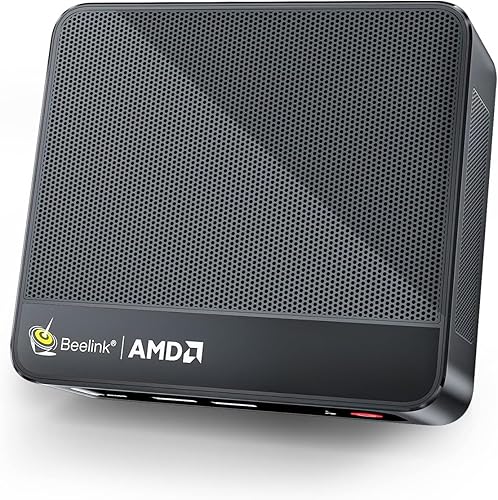
- AMD Ryzen 5 5500U
- 16GB DDR4 memory
- 480GB M.2 2280 NVMe SSD
- Dual-display support
This version combines a 6-core/12-thread Ryzen 5 5500U with 16GB DDR4 memory, a 480GB NVMe SSD and support for 2 screens.
Pros
- 2.5G LAN
- USB-C supports data and video
- 4K at 60Hz support
- 100-240V power support
Cons
- Only 1 HDMI port
- The exact storage upgrade path needs checking before you buy
The B0963SGJH3 also supports 2 screens, with a maximum display resolution of 3840 x 2160 pixels. Its HDMI port and Type-C port support the display setup described for this model, so check whether your monitors use the matching connections.
It has 3 USB 3.2 ports, 1 USB 2.0 port, an audio jack, a DC jack and 2.5G LAN. The product information also describes dual-band 2.4G and 5G Wi-Fi and built-in Bluetooth.
What does the Ryzen 5 5500U mean in daily use?
The Ryzen 5 5500U gives the Beelink SER5 a useful base for multitasking because it has 6 cores and 12 threads, with a maximum speed of up to 4.0GHz. That makes this class of mini PC a reasonable match for office work, online courses, browsing and home entertainment.
The processor is the common point across all three products here. It does not turn the SER5 into a high-end workstation, but it gives the system more room than a basic low-power desktop for switching among several active tasks.
The B0963SGJH3 and B0B82C6BFB describe the chip as a 7nm processor. The B0CH7XHM7M adds a stated 16MB smart cache and describes support for office software, photo work, CAD and other applications.
Those use cases still depend on the software and the files you open. A compact computer with integrated graphics is better matched to light gaming and everyday creative work than to demanding 3D workloads.
How do the three SER5 versions compare?
The main buying difference is the connection and expansion layout, not the processor. All three use the Ryzen 5 5500U, 16GB memory and about 480GB of storage, but the information gives the B0CH7XHM7M the clearest upgrade and port details.
| Feature | B0963SGJH3 | B0CH7XHM7M | B0B82C6BFB |
|---|---|---|---|
| Processor | Ryzen 5 5500U, 6C/12T, up to 4.0GHz | Ryzen 5 5500U, 6C/12T, up to 4.0GHz | Ryzen 5 5500U, 7nm, 6C/12T, up to 4.0GHz |
| Memory | 16GB DDR4, up to 64GB | 16GB DDR4, up to 64GB | 16GB DDR4 |
| Storage | 480GB M.2 2280 NVMe SSD | 480GB M.2 2280 NVMe SSD | 480GB SSD |
| Display | 2 screens, 4K at 60Hz support | HDMI and DisplayPort, 2 screens, 4K at 60Hz | 4K UHD support |
| Network | 2.5G LAN, dual-band Wi-Fi, Bluetooth | 2.5G RJ45 | 2.5G LAN, dual-band Wi-Fi, Bluetooth |
| Notable ports | 3 USB 3.2, USB 2.0, HDMI, USB-C data and video | 3 USB 3.2 Gen2, USB 2.0, 2 USB-C, HDMI, DisplayPort | HDMI, USB and USB-C details supplied |
The B0CH7XHM7M is the most interesting option if you plan to expand storage or connect several types of display. It supports up to 64GB of memory, an NVMe drive up to 2TB and a 500GB to 2TB 2.5-inch SATA HDD or SSD.
Beelink SER5 Mini PC: Best for ports and expansion
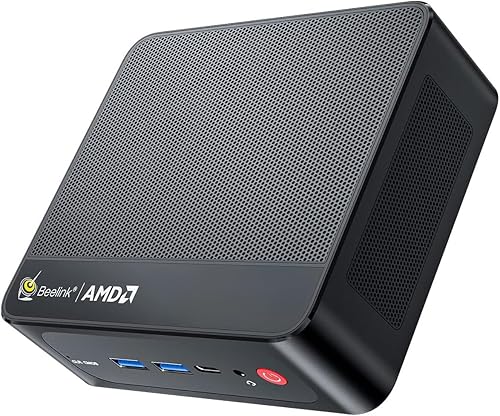
- AMD Ryzen 5 5500U
- 16GB DDR4 memory
- 480GB NVMe SSD
- HDMI and DisplayPort
Choose this SER5 when its HDMI, DisplayPort, USB-C and stated memory and storage expansion options match your desk.
Pros
- HDMI and DisplayPort
- 2.5G RJ45 port
- Supports a 2.5-inch SATA drive
- Two USB-C ports
Cons
- The product information describes graphics differently from the other versions
- Wireless details vary across the information
The B0CH7XHM7M's HDMI and DisplayPort layout may be simpler for a two-monitor desk than relying on USB-C video. Its additional USB-C port options can also help if your accessories use newer connectors.
The B0B82C6BFB is a sensible choice when the core setup matters more than a long port list. It combines the Ryzen 5 5500U, 16GB DDR4 RAM, 480GB SSD and integrated AMD Radeon Graphics in a grey chassis.
Beelink SER5 Mini PC Ryzen 5 5500U: Best for a simple 4K desktop
- AMD Ryzen 5 5500U
- 16GB DDR4 RAM
- 480GB SSD
- Integrated Radeon Graphics
This grey SER5 keeps the core Ryzen 5 and 16GB setup while offering integrated Radeon graphics and 4K UHD support.
Pros
- Integrated Radeon Graphics
- 2.5G LAN
- Dual-band Wi-Fi and Bluetooth
- 100-240V power support
Cons
- The storage interface is described as Serial ATA
- The supplied port details are less complete than the other versions
Its product information describes 2.5G LAN, dual-band Wi-Fi and built-in Bluetooth. It also supports 4K UHD output and up to 60 frames per second in the supplied description, which fits a general media and light-gaming setup.
Is the Beelink SER5 good for dual monitors?
The Beelink SER5 is a good dual-monitor option when the exact video ports fit your displays. Two screens can help you keep documents on one display and a browser, spreadsheet or media window on the other.
The B0963SGJH3 lists HDMI and a Type-C port that supports data and video. The B0CH7XHM7M lists HDMI and DisplayPort, which may be the easier match for monitors that already use DisplayPort cables.
The B0B82C6BFB also describes support for 2 screens, but its supplied port details are less complete. Before ordering, compare the ports on your monitors with the exact SER5 version and plan any required adapter around the connection type.
This is one reason a general Best Beelink Mini PCs guide can help when the SER5 is only one of several models you are considering.
Can the Beelink SER5 handle light gaming?
The Beelink SER5 is best for light gaming and everyday graphics work, not for buyers seeking a dedicated high-performance gaming desktop. The information connects the Ryzen 5 5500U and AMD Radeon graphics with light games, 4K video playback and general design work.
The B0CH7XHM7M specifically names Dota 2, CS: GO, League of Legends and other online games. The B0963SGJH3 and B0B82C6BFB describe integrated Radeon graphics with 7 cores, with the B0963SGJH3 giving a 1800MHz graphics figure.
Your result will depend on game settings, resolution and the rest of your setup. Integrated graphics share the limits of a small desktop platform, so buyers who want demanding modern games should look for a system with stronger dedicated graphics.
For a different Beelink configuration, compare this review with the Beelink SER5 Max review and the Beelink SER5 Pro review.
What can you connect to a Beelink SER5?
The SER5 can serve as the center of a compact desk setup with a monitor, keyboard, mouse, speakers, external storage and network connection. The exact mix of USB, display and audio ports changes by version.
The B0963SGJH3 includes 3 USB 3.2 ports, 1 USB 2.0 port, HDMI, USB-C data and video, an audio jack and 2.5G LAN. Its listed compatible devices include an external storage drive, keyboard, monitor, mouse and speaker.
The B0CH7XHM7M includes 3 USB 3.2 Gen2 ports, a USB 2.0 port, 2 USB-C ports, HDMI, DisplayPort, an audio jack and 2.5G RJ45. It also names monitors, keyboards, mice, speakers, headphones, printers, smartphones and projectors among compatible devices.
The B0B82C6BFB supplies fewer port details, but its connection information includes Ethernet, HDMI, USB and USB-C. Count your existing accessories before choosing, especially if you want wired networking and several USB devices at the same time.
How should you set up a Beelink SER5?
Start with the monitor, keyboard, mouse and power adapter, then finish the operating system setup before adding the network connection. The supplied setup guidance for the B0963SGJH3 and B0B82C6BFB says not to connect network or Wi-Fi until Windows is running.
Place the mini PC where its air cooling can work without blocked vents. Connect the display cable that matches your SER5 version, then attach the keyboard and mouse so you can complete setup.
The B0963SGJH3 and B0B82C6BFB support a 100-240V power range. If you plan to use one in another country, confirm the correct power arrangement for the destination and follow the power adapter guidance.
If you need BIOS settings, press Delete immediately after startup to enter BIOS. Press F7 immediately after startup for the boot options menu, according to the supplied instructions.
Use a simple storage plan before moving files onto the computer. Our guide to How Much Storage Do I Need in a Mini PC? can help you estimate room for applications, documents and media.
What are the main SER5 trade-offs?
The SER5's biggest strength is its balance of processor, memory and compact desktop use. The Ryzen 5 5500U, 16GB DDR4 and solid-state storage give all three versions a clear everyday purpose without requiring a large tower.
The trade-off is that the versions need careful comparison. For a different Beelink configuration, read the Beelink EQR6 mini PC review.
The port layouts are not identical, the storage interfaces are described differently, and the B0CH7XHM7M has the clearest expansion information.
The integrated Radeon graphics are suitable for light gaming, 4K playback and some design tasks, but they are not a substitute for a dedicated graphics card. Choose a larger or more powerful system if your main work depends on demanding 3D software or modern high-end games.
The compact format also means your accessories matter more. A crowded desk may need a hub, external storage or a different monitor connection, so count the devices you plan to use before choosing the model.
For a wider step-by-step checklist, see How to Choose a Mini PC: A Step-by-Step Guide.
Beelink SER5 review verdict
The B0963SGJH3 is the best Beelink SER5 pick for most everyday buyers because it pairs the Ryzen 5 5500U with 16GB DDR4, 480GB NVMe storage, 2.5G LAN and dual-display support. Choose the B0CH7XHM7M if its HDMI, DisplayPort and stated storage expansion options matter most.
Pick the B0B82C6BFB when you want the same general Ryzen 5 and 16GB foundation with integrated Radeon graphics, dual-band wireless and a simple 4K desktop role. If you need a different size or generation, compare it with the Beelink Mini S12 review before deciding.
The right Beelink SER5 mini PC review conclusion is simple: match the exact port layout and expansion path to your desk, then choose the version that gives you enough memory and storage for the work you actually do.
Frequently asked questions
Is the Beelink SER5 a good mini PC?
The Beelink SER5 is a good fit for office work, home entertainment, online courses and light gaming when you want a Ryzen 5 5500U system in a small desktop format. The versions here include 16GB DDR4 memory and 480GB storage, while the right choice depends on ports, expansion and display needs.
Can the Beelink SER5 run two monitors?
Yes, the Beelink SER5 versions in this review support two displays. The B0963SGJH3 uses HDMI and USB-C for data and video, while the B0CH7XHM7M provides HDMI and DisplayPort.
Check your monitor inputs and the exact version before choosing cables.
How much storage does the Beelink SER5 have?
Each Beelink SER5 version covered here has about 480GB of stated solid-state storage. The B0CH7XHM7M also states support for an NVMe drive up to 2TB and a 500GB to 2TB 2.5-inch SATA drive.
Keep space for Windows, apps and personal files.
Is the Beelink SER5 suitable for gaming?
The Beelink SER5 is suited to light gaming rather than a desktop gaming replacement. Its Ryzen 5 5500U and integrated AMD Radeon graphics support the type of everyday graphics work and lighter games described for these versions, but demanding games need more graphics power.


