How to Choose a Large Print Bluetooth Keyboard
Choose a large print Bluetooth keyboard only after confirming the connection type, readable legends, key spacing and device support. A USB keyboard or 2.4G wireless model may look similar but does not provide Bluetooth pairing.
On this page (7 sections)
- Does the keyboard use Bluetooth or a USB connection?
- How large should the letters and keys be?
- Is backlighting useful for large print typing?
- Which large print keyboards are worth comparing?
- What should you check before buying?
- How do you set up and care for a large print keyboard?
- Is a large print keyboard Bluetooth model right for you?
A large print keyboard Bluetooth buyer should first confirm that the keyboard actually uses Bluetooth. Then compare legend size, key spacing, layout, backlighting and device support, because a USB wireless receiver is not the same as Bluetooth pairing.
Large print legends can make keys easier to find, especially for users who have trouble seeing standard characters. A full-size layout can also reduce relearning, while backlighting helps when the room is dim.
If you are open to a cable, our wired keyboard buying guide explains when USB is simpler. For more large-print choices, see the best large print keyboard guide.
Does the keyboard use Bluetooth or a USB connection?
The connection type is the first check for a large print keyboard Bluetooth search. For a direct comparison, see Bluetooth vs USB receiver keyboards.
Bluetooth pairs directly with a compatible device, while USB wired and 2.4G wireless keyboards use a physical USB connection.
The products in this guide illustrate the difference:
| Product | Connection shown in the data | What that means |
|---|---|---|
| KOPJIPPOM Large Print Backlit Keyboard | USB and USB-A wired | It uses a cable and does not require battery charging |
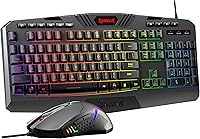
| SABLUTE Wireless Keyboard and Mouse Combo | 2.4G USB wireless | It uses a USB wireless receiver rather than Bluetooth |
| KOPJIPPOM Large Print Wireless Keyboard and Mouse | USB wireless | It uses a shared USB receiver for the keyboard and mouse |
Check the connection before considering other features. A keyboard can be described as wireless and still require a USB port.
If your computer, tablet or television has limited USB ports, Bluetooth may be more convenient. If you want simple plug-and-play use with a desktop, a wired USB keyboard may be easier to manage.
How large should the letters and keys be?
Choose large legends that you can identify without leaning toward the keyboard, then check whether the key spacing and layout feel familiar. Bigger characters help visibility, but they do not replace a comfortable arrangement.
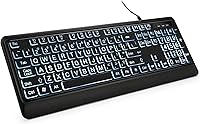
All 3 products here use large print as a central feature. The KOPJIPPOM wired keyboard and the KOPJIPPOM wireless combo describe letters as 4 times larger than standard keyboard fonts.
The SABLUTE combo also describes its characters as 4 times larger.
A full-size layout is useful if you rely on the number pad or standard key positions. The KOPJIPPOM wired keyboard has 104 keys, the KOPJIPPOM wireless combo has 104 keys, and the SABLUTE combo has 111 keys.
Look at the distance between the main letter keys, number row and navigation keys. If you often miss neighboring keys, readable legends alone may not solve the problem.
For a more comfort-focused layout, compare our guide to an ergonomic large print keyboard. It covers wrist support, hand position and the angle of the keyboard.
Is backlighting useful for large print typing?
Backlighting helps when room lighting is low, but the best lighting system is the one you can control without making the legends harder to read. Look for adjustable brightness or an off switch if you use the keyboard in several rooms.
The KOPJIPPOM wired keyboard has a single-color white LED backlight with adjustable brightness and an on/off control. Its large print and illuminated keys suit a desk where lighting changes during the day.
The SABLUTE keyboard has 7 solid-color lights and 1 rainbow backlight. Its lighting controls use keyboard shortcuts, and the backlight can be turned off.
The KOPJIPPOM wireless combo has 7 color options and 3 brightness levels. It also has a separate backlight switch and an energy-saving feature that turns the backlight off after 120 seconds of non-use.
Color effects are not automatically better for readability. Choose the lighting that gives you clear contrast and does not distract you while typing.
Which large print keyboards are worth comparing?
These 3 models cover different connection and setup needs. None is a Bluetooth keyboard, so use them only if a cable or USB receiver works for your device.
KOPJIPPOM Large Print Backlit Keyboard
The KOPJIPPOM wired keyboard suits buyers who want large legends, a full-size 104-key layout and adjustable white backlighting without charging a keyboard. It connects through USB-A and has a 4.9 ft wired connection.
Its USB connection is a clear trade-off. You do not need to manage a rechargeable battery, but the cable must reach the computer and uses a USB port.
The keyboard has a membrane design, QWERTY layout, numeric keypad and adjustable feet. It is described as compatible with Windows and MacOS, with a note that multimedia keys may not fully work with MacOS.
Choose this model when fixed desk placement and simple USB setup matter more than wireless use. It is not the right match if Bluetooth pairing is a firm requirement.
SABLUTE Wireless Keyboard and Mouse Combo
The SABLUTE combo suits buyers who want large legends, a wrist rest, a phone and tablet holder, and a keyboard-and-mouse set. It uses 2.4G USB wireless connectivity, not Bluetooth.
The keyboard has 111 keys, RGB backlighting, shortcut keys and a low-profile keycap design. Its backlight offers 7 solid colors and 1 rainbow effect, with controls to change or turn off the lighting.
The built-in rechargeable battery and smart sleep mode reduce the need for constant operation. The keyboard and mouse enter sleep mode after 90 seconds of inactivity and wake when you press a key or button.
SABLUTE identifies the combo as compatible with Windows, with Windows 10 as the minimum required operating system version in the specifications. The product information also warns that the combo cannot connect to a tablet or phone and that a USB-C dongle is not included.
Choose it when wrist support and included mouse controls matter. Skip it for a Bluetooth-only setup or a device without a suitable USB connection.
KOPJIPPOM Large Print Wireless Keyboard and Mouse
The KOPJIPPOM wireless combo suits buyers who want 4 times larger legends, 7-color backlighting and a rechargeable keyboard-and-mouse set. It uses a shared USB receiver and 2.4GHz wireless connection.
The keyboard has 104 keys and a QWERTY layout. Its 7 backlight colors have 3 brightness levels, and the backlight turns off after 120 seconds without use as part of the energy-saving design.
The rechargeable keyboard and mouse include a Type-C charging cable. The USB receiver is shared by both devices and is stored in the mouse.
KOPJIPPOM describes compatibility with Windows systems from Windows 2000 through Windows 11, plus MacOS, with a note that multimedia keys may not fully work with MacOS. The specifications identify Windows as the operating system family and list a 2-year warranty description.
Choose this model when you want a wireless USB set with colorful lighting and a mouse. It does not replace a Bluetooth keyboard for devices that cannot accept its USB receiver.
What should you check before buying?
Check connection, layout, visibility and power needs in that order. This prevents a readable keyboard from becoming unusable because it cannot connect to your computer.
Use this checklist:
- Confirm that the product says Bluetooth if direct Bluetooth pairing is required.
- Check whether your device supports the stated connection type.
- Compare the number of keys and decide if you need a numeric keypad.
- Look for large legends with clear contrast.
- Choose adjustable backlighting if you type in dim spaces.
- Check whether the keyboard is wired, rechargeable or battery powered.
- Confirm whether a mouse, receiver or charging cable is included.
- Check Mac compatibility carefully if you need media keys or shortcuts.
- Measure your desk if a wrist rest or full-size layout could affect available space.
- Keep the receiver, cable or charging port accessible after setup.
A full-size keyboard can be easier to learn but takes more desk space. A wireless model reduces cable clutter but still needs a USB receiver and charging or battery planning.
For a smaller setup, compare a best mini keyboard with touchpad guide. If you need lighting and a pointing surface together, see the best backlit keyboard with touchpad guide.
How do you set up and care for a large print keyboard?
Set up the keyboard by connecting the correct cable or receiver, then place it where the legends are easy to see. Keep the keys clean and avoid covering the backlight or receiver area during normal use.
For a wired keyboard, connect the USB cable to a compatible USB port and place the cable so it does not pull against the keyboard. The KOPJIPPOM wired model is described as plug and play with no drivers required.
For a wireless USB model, connect the receiver before typing and keep track of where it is stored when the keyboard is not in use. The KOPJIPPOM wireless combo stores its shared receiver in the mouse.
Rechargeable models need a charging routine that fits your use. The SABLUTE combo uses a built-in rechargeable battery, while the KOPJIPPOM wireless combo includes a Type-C charging cable.
Use a soft, dry cloth for routine cleaning and avoid allowing liquid to enter the keys or connection area. If you need a wireless model with more layout options, compare our best large print wireless keyboard guide.
Is a large print keyboard Bluetooth model right for you?
A large print keyboard Bluetooth model is right when you need direct pairing and can confirm Bluetooth support on both devices. Choose a USB wired model when you want a simple fixed setup, or choose a 2.4G USB combo when you want wireless keyboard and mouse use through a receiver.
The KOPJIPPOM wired keyboard is the clearest fit for adjustable white lighting, 104 keys and no battery charging. The SABLUTE combo is better suited to a rechargeable set with wrist support and a device holder.
The KOPJIPPOM wireless combo fits buyers who want 7-color lighting and a shared USB receiver.
If you use a Mac, compare the best large print keyboard for Mac guide and check the media-key limitations before choosing. The connection type should remain your first filter for any large print keyboard Bluetooth search.
Frequently asked questions
Are large print keyboards available with Bluetooth?
Some large print keyboards may use Bluetooth, but connection type varies by model. Check for Bluetooth in the product title or specifications before buying.
The 3 examples in this guide use USB wired or 2.4G USB wireless connections, so they are not Bluetooth keyboards.
What makes a large print keyboard easier to read?
Look for letters that are much larger than standard keyboard fonts, strong contrast between the legends and keycaps, and backlighting if you type in dim rooms. Large legends help you find keys, but spacing and a familiar full-size layout also affect how quickly you can type.
Is a wireless USB keyboard the same as a Bluetooth keyboard?
No. A wireless USB keyboard uses a receiver connected to a USB port, while a Bluetooth keyboard pairs directly with a device that supports Bluetooth.
They can both reduce cable clutter, but their setup, port needs and compatibility are different.
Should I choose a full-size large print keyboard?
Choose a full-size layout if you use a numeric keypad, dedicated function keys or a familiar 104-key arrangement. A smaller keyboard saves desk space but may move or remove keys.
Measure your desk and consider how much reaching matters during daily typing.