Wired vs Wireless Keyboards: Which Suits Your Desk? (November 2026)
Choose a wired keyboard for simple, steady USB use, or a wireless keyboard for flexible placement and fewer cables. Your desk layout, charging habits and need for a number pad should decide the connection.
On this page (11 sections)
- Wired keyboard vs wireless keyboard: which is more reliable?
- Which connection needs more maintenance?
- Which keyboard gives you more desk placement freedom?
- Which option is better for a full-size layout?
- Which product suits each desk?
- How should you set up a wired keyboard?
- How should you set up a wireless keyboard?
- Should you choose a wired or wireless mouse too?
- Wired keyboard vs wireless keyboard: which should you buy?
- Frequently asked questions
- Spill resistance reduces risk in limited conditions but does not make a keyboard waterproof.
Choose a wired keyboard for simple, steady USB use, or a wireless keyboard for flexible placement and fewer cables. The wired keyboard vs wireless keyboard decision depends on where you type, how many USB ports you have and whether battery care bothers you.
A wired model draws its connection through a cable, so there is no keyboard battery or wireless receiver to manage. If you plan to connect one to a laptop, read wired keyboard with a laptop.
A wireless model frees the keyboard from the computer, but it adds a receiver or wireless setup and a power routine.
This comparison looks at reliability, placement, batteries, desk space and the 4 Logitech options listed here.
Our score weighs specs, features and buyer feedback against what you're shopping for.
 Best for simple desk typing
Logitech K120 Full Size Wired Keyboard USB
 Best for PC-connected TVs
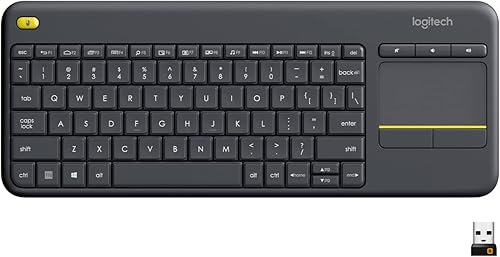
Logitech K400 Plus Wireless Touch TV Keyboard
Wired keyboard vs wireless keyboard: which is more reliable?
A wired keyboard gives you the simplest connection path, while a wireless keyboard adds a receiver and radio link. For a fixed desk, USB can reduce the number of connection variables you need to manage.
The Logitech K120 and MK120 connect through USB and are ready after you plug them into the computer. The K120 needs no software installation for setup, and the MK120 connects its keyboard and mouse through USB ports.
Wireless does not automatically mean unreliable. The K400 Plus uses a Unifying receiver, while the MK270 uses a USB receiver and states a wireless range of up to 33 ft.
Wireless range can vary with the environment and computer setup.
If the keyboard sits beside a mini PC, either connection can work. If the computer is hidden behind a monitor or mounted under a desk, check whether the receiver has a clear position and whether the cable can reach comfortably.
Wired keyboard or wireless keyboard for daily typing?
Pick wired for a permanently placed work area and wireless for a desk that changes often. A wired keyboard removes battery checks, while a wireless keyboard makes it easier to move the controls out of the way.
A fixed family computer may benefit from the K120's full-size layout and USB setup. If you want to clear the keyboard after homework or move it between seats, a wireless option gives you more placement freedom.
Our keyboards and mice buying guide covers the wider choice between keyboard layouts, pointing devices and connection types.
Which connection needs more maintenance?
Wired keyboards need cable and port care; wireless keyboards need receiver and battery care. Neither type is maintenance-free, but the tasks are different.
Keep a wired cable from sharp bends and avoid pulling the keyboard by its cord. Leave enough slack for normal movement, but don't create a loop where chair wheels or desk drawers can catch it.
For wireless models, store the receiver where it won't be lost. Check the keyboard's power switch when you put it away, and replace batteries when the keyboard stops responding consistently.
The K400 Plus uses 2 AA batteries and states up to 18 months of battery life. The MK270 states up to 36 months for its keyboard and 12 months for its mouse, with on/off switches on the combo.
These are stated battery periods, not guarantees for every desk. Use, settings and environmental conditions affect actual battery life.
Can you use a Bluetooth adapter with a wired keyboard?
A wired keyboard normally connects by USB, while a Bluetooth adapter is a separate compatibility question. Don't assume any adapter will convert any wired keyboard without checking how the adapter accepts input and how it pairs.
If you are considering a wireless-style setup for an existing wired model, read our guide on choosing a Bluetooth adapter for a wired keyboard. It explains the connection issue before you spend money on an adapter.
Which keyboard gives you more desk placement freedom?
Wireless wins for placement flexibility because the keyboard isn't tied to the computer by a cable. That matters when you type from a sofa, move between seats or want the keyboard out of the way after use.
The K400 Plus is designed for a PC-connected TV and includes a built-in touchpad. Its stated wireless range is up to 33 ft, so you can control compatible devices from farther away than a typical desk position.
The MK270 is more suited to a normal computer desk where you want a full-size keyboard and mouse without keyboard and mouse cables. Its included USB receiver keeps both devices on one wireless connection.
A wired keyboard works best when the computer stays close. The K120 has a 59.06 in cable, so measure the path from the computer to your typing position instead of assuming every desk will suit it.
Use the Logitech K400 dongle replacement guide if the K400 Plus receiver is lost or needs replacement. A wireless keyboard is only useful if its receiver remains available and compatible.
Which option is better for a full-size layout?
Choose the K120 or MK120 when you want F-keys, arrow keys and a number pad in a familiar full-size layout. Choose the K400 Plus when a smaller keyboard with a built-in touchpad matters more than dedicated number-pad space.
The K120 has a standard full-size layout with F-keys and a number pad. Its deep-profile keys, curved space bar and adjustable tilt legs suit long stretches of normal desktop typing.
The MK120 also has a full-size layout with F-keys and a number pad. It adds an optical wired mouse, so it fits a computer that needs both controls and has enough USB ports.
The MK270 keeps the full-size layout while removing the keyboard and mouse cables. It also adds 8 multimedia hotkeys for internet, email, play or pause and volume controls.
The K400 Plus has 84 buttons and a built-in touchpad. Its design is more useful for media control and PC-to-TV use than for heavy number-pad work.
If a wired model is your preferred layout, compare our picks for the best Logitech wired keyboard. For a broader wired shortlist, see the best wired keyboards for PC.
Which product suits each desk?
The Logitech K120 is the clearest choice for a basic wired keyboard, while the K400 Plus suits PC-connected TV use. The MK270 fits a cable-free keyboard and mouse desk, and the MK120 fits a wired keyboard and mouse setup.
Logitech K120 Full Size Wired Keyboard USB
The K120 measures 17.7 x 6.1 x 0.9 in and weighs 16 oz in the listed specifications. Its standard layout includes F-keys and a number pad, so it suits spreadsheets, forms and regular desktop typing.
The keyboard uses a wired USB connection and works with Windows 7, 8, 10 or later. It has adjustable tilt legs, anti-fade keys and a spill-resistant design tested under limited conditions.
Its fixed cable is the main trade-off. Choose it when the keyboard can stay near the computer and you don't want batteries, receiver storage or wireless troubleshooting.
Logitech K400 Plus Wireless Touch TV Keyboard
The K400 Plus measures 13.95 x 5.5 x 0.93 in and weighs 13.76 oz. It includes a wireless touch keyboard, built-in touchpad, Unifying receiver, USB range extender, user documentation and 2 pre-installed AA batteries.
Its wireless connection uses RF through the Unifying receiver. Logitech lists compatibility with Windows 7, Windows 8, Windows 10 and later, Android 7 or later and Chrome OS.
The touchpad removes the need for a separate mouse when you are controlling a PC-connected TV. The trade-off is that it does not give you the full-size number-pad layout of the K120 or MK270.
Logitech MK270 Full Size Wireless Keyboard
The MK270 includes a full-size wireless keyboard, a compact ambidextrous mouse, a USB receiver, a mouse with 1 AA battery and user documentation. Its keyboard has low-profile quiet keys, F-keys, arrow keys and a number pad.
The keyboard's stated battery life is up to 36 months, and the mouse's stated battery life is up to 12 months. The combo also has 8 multimedia hotkeys and on/off switches.
This is a practical middle ground for a home or office desk that needs full-size controls but no keyboard or mouse cables. It is designed for Windows and requires an available USB connection for the receiver.
Logitech MK120 Full Size Wired Keyboard
The MK120 includes a full-size wired keyboard, an optical wired mouse and user documentation. The keyboard has deep-profile keys, F-keys, a number pad, a curved space bar and adjustable tilt legs.
Its spill-resistant design and durable keys rated for up to 10 million keystrokes support a fixed desk where the keyboard and mouse stay connected. The set works with Windows 7, 8, 10 or later.
The main cost of that simple setup is cable management. Make sure the computer has enough USB ports and that both cables can reach without crossing the main typing or mouse area.
How should you set up a wired keyboard?
Plug the keyboard into a reachable USB port, then position the cable so it does not pull against the keyboard. A wired setup works best when the computer, monitor and keyboard positions are planned together.
Place the keyboard so your wrists and elbows can stay in a relaxed position. Use the tilt legs only if that angle feels comfortable for your desk, since a raised rear edge is not right for every typing position.
Keep drinks away from the keyboard even when the design is spill-resistant. The K120 and MK120 are described as spill-resistant, but that does not mean they can be immersed or exposed to unlimited liquid.
For the MK120, connect both the keyboard and mouse to suitable USB ports. If your mini PC has limited ports, check your available connections before choosing a wired combo.
How should you set up a wireless keyboard?
Insert the receiver into a suitable USB port, place the keyboard within a practical range and keep the receiver with the keyboard. Wireless setup is simple when the receiver has a clear connection path and the batteries are ready.
The K400 Plus uses a Unifying receiver and includes a USB range extender. The MK270 uses a single USB receiver for its wireless keyboard and mouse combo.
Don't hide the receiver inside a crowded metal cabinet without checking the connection. Distance, nearby devices and the computer's position can affect wireless performance.
For a TV setup, place the keyboard where you can reach the touchpad without needing a separate mouse. For a desk, keep the receiver installed and store the keyboard in the same area when not in use.
If a compact cable-free setup matters more than a fixed connection, compare the best compact wireless keyboard and mouse combos. If bright key legends matter, see the best large print backlit keyboards, though backlighting is a separate feature from wireless connectivity.
Should you choose a wired or wireless mouse too?
Choose the mouse connection as part of the same desk decision. A wired keyboard paired with a wireless mouse can still leave you managing one cable, while a combo reduces the number of separate receivers or ports.
The MK120 includes an optical wired mouse, so both controls stay connected by USB. The MK270 includes a wireless keyboard and compact ambidextrous mouse using one USB receiver.
If you prefer wired pointing control, our guide to the best wired mice with side buttons covers a different mouse feature choice. Pick the mouse by grip, controls and cable tolerance after deciding how flexible the desk needs to be.
Wired keyboard vs wireless keyboard: which should you buy?
Pick the Logitech K120 for a simple full-size wired keyboard, the K400 Plus for PC-connected TV control, the MK270 for a full-size wireless keyboard and mouse, or the MK120 for a wired keyboard and mouse set.
Choose wired if the keyboard stays beside the computer, you want no battery routine and your USB ports can handle the setup. Choose wireless if you move the keyboard, want fewer desk cables or need control from a seat away from the computer.
For the wired keyboard vs wireless keyboard choice, desk placement is the deciding rule. Reliability and maintenance matter too, but the best connection is the one that fits how you actually use the desk.
Keep the wired keyboard buying guide nearby if you still need to compare layouts, mouse choices and connection details before ordering.
Frequently asked questions
Is a wireless keyboard better for a mini PC?
A wireless keyboard can suit a mini PC when the computer is mounted out of reach or when you want a clean desk. A wired keyboard works well when the mini PC sits close and has an open USB port.
Check the computer's position, available ports and the distance to your normal typing seat.
Is a wired keyboard or wireless keyboard better for gaming?
A wired keyboard is the simpler choice when you want a direct USB connection and no battery interruption. This comparison does not guarantee gaming performance for these models.
Choose based on the exact features you need, such as layout, key feel, lighting and connection type.
Do wireless keyboards stop working when batteries are low?
A wireless keyboard can become inconsistent or stop responding when its batteries are depleted. Keep replacement batteries available and use the power switch when the keyboard is stored.
The K400 Plus uses 2 AA batteries, while the MK270 combo includes a mouse with 1 AA battery.
Can I use a wired keyboard with a laptop?
Yes, a wired keyboard can work with a laptop that has a suitable USB port and compatible operating system. The K120 and MK120 are designed for USB use with Windows systems.
Check your laptop's ports before choosing a keyboard with a full-size layout and a fixed cable.
Which wired keyboard is easiest to keep clean?
The K120 and MK120 both have spill-resistant designs, but careful cleaning is still needed. Disconnect a wired keyboard before cleaning, follow the manufacturer's care directions and keep liquid away from the inside.
Spill resistance reduces risk in limited conditions but does not make a keyboard waterproof.
Frequently asked questions
Is a wired keyboard better than a wireless keyboard?
A wired keyboard is better when you want a direct USB connection with no batteries or wireless receiver. A wireless keyboard is better when you need to move it around the desk, sit farther from the computer or reduce cable clutter.
Choose based on placement and maintenance, not connection type alone.
Does a wired keyboard have less input delay?
A wired keyboard avoids wireless signal conditions because it connects directly by USB. That can make it a sensible choice for a fixed desk where connection consistency matters.
For normal typing, wireless performance also depends on the receiver, distance, interference and computer setup.
Do wireless keyboards need charging?
Wireless keyboards need a power source, but that may be replaceable batteries rather than charging. The Logitech K400 Plus uses 2 AA batteries and states up to 18 months of battery life, while the MK270 states up to 36 months for its keyboard.
Actual battery life varies with use.
Can a wireless keyboard work without Bluetooth?
Yes. A wireless keyboard can use a USB receiver instead of Bluetooth.
The K400 Plus uses a Unifying receiver, and the MK270 uses a USB receiver.
Check your computer for an available USB port and keep the receiver with the keyboard when you move it.
Which is better for a small desk, wired or wireless?
A wireless keyboard usually suits a small desk better because its cable does not need a fixed path to the computer. A wired keyboard can still work well if the computer is close and the cable reaches without crossing your work area.
Measure the desk and device position first.