9 Best Mini PCs for NAS (October 2026)
The best mini PCs for NAS include the Beelink Mini S12 Pro Mini PC for a simple starter NAS, the GMKtec G3S Mini PC Intel N95 Processor for a basic network file share, and the JONSBO N3 Mini-ITX NAS PC Chassis for multiple 3.5-inch drives.
On this page (4 sections)
The best mini PC for NAS use depends on how many drives you need and how quickly your network can move files. The Beelink ME Mini stands out for six internal NVMe slots, while the JONSBO N3 case is a better fit for a build centered on 3.5-inch hard drives.
A mini PC can handle shared folders, backups and media files, but compact size often limits drive expansion. Before you choose, decide whether you want internal M.2 SSDs, larger 3.5-inch HDDs, or a mix connected through a separate enclosure.
If you're also comparing a broader server setup, see our guide to the best mini PC for a home server. For other low-power server uses, explore our picks for a best mini PC for Linux server tasks, best mini PC for a Plex server and best mini PC for Home Assistant.
Our picks at a glance
-
1

-
2
 Best for a basic network file share
GMKtec G3S Mini PC Intel N95 Processor
9.6/10 our score
See it on Amazon -
3
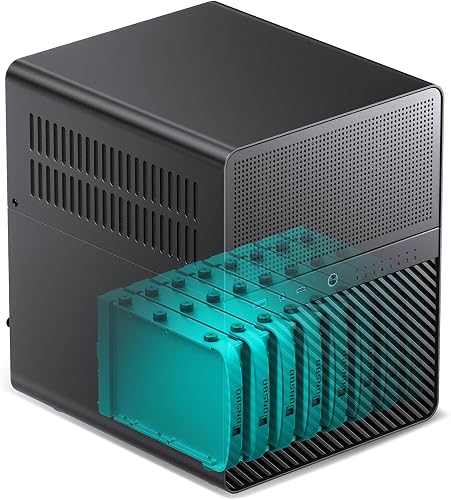 Best for multiple 3.5-inch drives
JONSBO N3 Mini-ITX NAS PC Chassis
9.5/10 our score
See it on Amazon
- 4
 Check it
BOSGAME E5 Plus Mini PC Ryzen 5400U
Best for dual-network connections - 5
 Best for fast wired file transfersCheck it
 - 6
 Best for many internal NVMe drivesCheck it
 - 7
 Best for a higher-core all-SSD serverCheck it
 - 8
 Check it
GMKtec Mini PC Ryzen 5 3500U 16GB
Best for a compact 2.5GbE server - 9
 Check it
MINISFORUM MS-02 Ultra Workstation Mini PC
Best for high-speed network workloads
How we chose the best mini PC for NAS use
The best mini PC for NAS use gives you enough drive connections, wired networking and memory for the file-sharing job you have in mind. We compared the storage expansion and network ports described for each system, then considered whether it can support a simple file share or a larger multi-drive setup.
Drive type matters as much as drive count. M.2 slots are suited to compact SSD builds, while 3.5-inch bays make a case more practical for several hard drives; those are different storage plans, so the number of slots alone doesn't settle the choice.
We also considered how much of a complete system each option provides. A barebone workstation or a Mini-ITX case needs additional parts before it can run, while a mini PC with memory and storage included is a more direct starting point.
| Product | Best for | Processor | Storage expansion | Networking | Our score |
|---|---|---|---|---|---|
| Beelink Mini S12 Pro Mini PC | a simple starter NAS | Intel N100, up to 3.4GHz | M.2 SATA up to 2TB plus 2.5-inch SATA up to 2TB | 1 x Gigabit Ethernet | 9.7 |
| GMKtec G3S Mini PC Intel N95 Processor | a basic network file share | Intel N95, up to 3.4GHz | 1 x Gigabit Ethernet | 9.6 | |
| JONSBO N3 Mini-ITX NAS PC Chassis | multiple 3.5-inch drives | 9.5 | |||
| BOSGAME E5 Plus Mini PC Ryzen 5400U | dual-network connections | AMD Ryzen 3 5400U, 4 cores and 8 threads | M.2 SATA plus an additional M.2 NVMe slot | 2 x 2.5GbE LAN | 9.2 |
| BOSGAME E5 11 Pro Mini PC | fast wired file transfers | AMD Ryzen 3 5300U, 4 cores and 8 threads | Two M.2 2280 SSD slots | 2 x 2.5GbE LAN | 9.1 |
| Beelink ME Mini PC | many internal NVMe drives | 6 x M.2 NVMe slots, up to 4TB each | Dual 2.5G LAN | 9.0 | |
| Glorlin Mini PC Ryzen 7 6800H | a higher-core all-SSD server | AMD Ryzen 7 6800H, 8 cores and 16 threads | Dual M.2 | Dual LAN | 8.9 |
| GMKtec Mini PC Ryzen 5 3500U 16GB | a compact 2.5GbE server | AMD Ryzen 5 3500U, 4 cores and 8 threads | Two M.2 2280 PCIe slots, up to 8TB each | 1 x 2.5GbE LAN | 8.5 |
| MINISFORUM MS-02 Ultra Workstation Mini PC | high-speed network workloads | 2 x M.2 PCIe 4.0 slots, up to 16TB total | 1 x 10GbE and 1 x 2.5GbE | 7.8 |
Best mini PCs for NAS, by storage and network needs
The right NAS mini PC is the one that matches your drive plan and network, not simply the one with the most computing power. These picks cover a small two-drive start, multi-SSD storage, high-speed networking and a custom HDD build.
Beelink Mini S12 Pro Mini PC: Best for a simple starter NAS
- Intel N100, 4 cores and 4 threads
- M.2 SATA slot up to 2TB
- 2.5-inch SATA drive interface up to 2TB
- Gigabit Ethernet
The S12 Pro combines an M.2 SATA slot and a 2.5-inch SATA interface in a compact desktop. Its single Gigabit Ethernet port suits a basic home file share.
Pros
- Two internal storage connections
- Gigabit Ethernet
- Auto Power On and Wake on LAN
Cons
- One LAN port
- The listed M.2 slot is SATA, not NVMe
The Beelink Mini S12 Pro is a practical starting point for a compact NAS with two internal storage connections. Its M.2 slot accepts a SATA SSD up to 2TB, and the SATA interface supports a 2.5-inch HDD or SSD up to 2TB.
One Gigabit Ethernet port connects it to a home router or switch. That is a straightforward fit for shared documents, photos and backups when your network is also Gigabit, though it does not offer the faster wired ports on some options below.
The Intel N100 processor has 4 cores and 4 threads, and the PC includes 16GB of DDR4 memory. Beelink also includes Auto Power On and Wake on LAN, features that can help a server resume or start without reaching for its power button.
This is a small desktop, not a multi-bay NAS chassis. Choose it when two internal drives cover your plan, and look at a dedicated enclosure if your library will need more disks.
GMKtec G3S Mini PC Intel N95 Processor: Best for a basic network file share
- Intel N95, 4 cores and 4 threads
- 8GB RAM
- 256GB M.2 SSD
- Gigabit Ethernet
The G3S gives you a compact base for a small network file share. Its 256GB SSD is modest, so plan to connect additional storage if your files will grow.
Pros
- Gigabit Ethernet
- Compact system for routine tasks
- Dual HDMI outputs
Cons
- 8GB RAM
- No stated multi-drive internal expansion
The GMKtec G3S works for a simple network file share where the computer's own 256GB M.2 SSD holds the operating system and applications. Its Gigabit Ethernet port gives you a wired connection, and the Intel N95 has 4 cores and 4 threads.
The main limit for NAS use is its stated internal storage setup. The system comes with a 256GB M.2 SSD, but the available details don't describe a multi-drive internal layout, so plan on a separate USB storage enclosure if one drive won't be enough.
It has 8GB of RAM. That can keep a small setup simple, but buyers running extra services should check the memory needs of their chosen operating system and applications before settling on this configuration.
Choose the G3S if your needs are modest and you want a compact computer that can serve files over Gigabit Ethernet. For a larger library, prioritize more internal drive connections.
JONSBO N3 Mini-ITX NAS PC Chassis: Best for multiple 3.5-inch drives
- 8 x 3.5-inch HDD bays
- 1 x 2.5-inch SSD bay
- Mini-ITX motherboard support
- Two 10cm fans
The N3 is a case for a custom NAS build, with room for eight hard drives and one 2.5-inch SSD. You supply a compatible Mini-ITX motherboard, processor, memory and power supply.
Pros
- Eight 3.5-inch drive bays
- Separate drive compartment
- Two built-in 10cm fans
Cons
- Requires a separate computer build
- SFX power supply and CPU cooler height limits
The JONSBO N3 is a case for a multi-drive NAS build, with eight 3.5-inch HDD bays and one 2.5-inch SSD bay. Its Mini-ITX motherboard support lets you choose the core system around the storage layout.
Two built-in 10cm fans sit in the HDD compartment. The case also has a removable top cover and a multi-disc pull-out structure, which are useful design details when arranging several drives.
This is a chassis, so you still need a compatible Mini-ITX motherboard, CPU, RAM, storage drives and an SFX power supply no longer than 105mm. The CPU cooler height limit is 130mm, and the case dimensions are 9.17 x 10.31 x 11.73 inches.
Pick the N3 if your priority is several 3.5-inch drives and you're comfortable assembling a PC. For a small, ready-made SSD system, a compact mini PC is simpler.
BOSGAME E5 Plus Mini PC Ryzen 5400U: Best for dual-network connections
- Dual 2.5GbE LAN
- Two SODIMM slots, up to 64GB RAM
- M.2 SATA plus M.2 NVMe slots
- Ubuntu support
Two 2.5GbE ports and two M.2 storage slots make the E5 Plus flexible for a NAS or small server. Its included 256GB SATA SSD leaves the second slot available for added storage.
Pros
- Two 2.5GbE ports
- Separate SATA and NVMe M.2 slots
- RAM can be upgraded to 64GB
Cons
- No 3.5-inch drive bays
- Included memory is 8GB
The BOSGAME E5 Plus is a good match for a NAS that needs two wired network connections and two M.2 storage slots. It has dual 2.5GbE LAN ports, an M.2 SATA SSD slot and a second M.2 NVMe PCIe 3.0 x4 slot.
Its included 256GB SATA SSD can hold the system, leaving the additional NVMe slot open for more storage. The two SODIMM slots support up to 64GB of RAM, so there is room to increase memory if you add services or other server tasks.
BOSGAME identifies support for Ubuntu and describes the system for private NAS projects. It uses an AMD Ryzen 3 5400U processor with 4 cores and 8 threads, providing more headroom than a basic file-sharing box may need.
The E5 Plus has no stated 3.5-inch drive bays. Consider it for an all-SSD build or pair it with suitable external storage if you need more capacity.
BOSGAME E5 11 Pro Mini PC: Best for fast wired file transfers
- Dual 2.5GbE LAN
- Two M.2 2280 SSD slots
- RAM expandable up to 64GB
- Ubuntu support
The E5 11 Pro pairs dual 2.5GbE networking with two M.2 SSD slots. It fits a compact all-SSD file server, with room to expand memory for heavier services.
Pros
- Dual 2.5GbE LAN
- Second M.2 NVMe slot
- RAM expandable up to 64GB
Cons
- No stated 3.5-inch drive support
- Included RAM is 8GB
The BOSGAME E5 11 Pro pairs dual 2.5GbE LAN with two M.2 SSD slots, making it a flexible base for a compact file server. It comes with a 256GB M.2 drive and has an additional empty M.2 2280 NVMe PCIe 3.0 slot.
Its AMD Ryzen 3 5300U has 4 cores and 8 threads. The system includes 8GB of memory, with two SODIMM slots that can support up to 64GB, according to the product details.
BOSGAME says the E5 supports Ubuntu and can be used for home NAS and homelab projects. That operating system support gives you more options than a Windows-only setup, but you should still confirm compatibility with the NAS software and drives you plan to use.
Choose this model when two internal SSDs and faster-than-Gigabit wired networking fit your plan. It doesn't provide the large 3.5-inch bays of a dedicated NAS case.
Beelink ME Mini PC: Best for many internal NVMe drives
- 6 M.2 NVMe slots
- Up to 4TB per slot
- Dual 2.5G LAN
- 12GB LPDDR5 and 64GB eMMC
The ME Mini is purpose-built for dense internal SSD storage, with six M.2 NVMe slots and dual 2.5G LAN. It supports systems including FNOS, Unraid and TrueNAS.
Pros
- Six internal M.2 NVMe slots
- Dual 2.5G LAN
- Supports several NAS operating systems
Cons
- Uses M.2 drives rather than 3.5-inch HDDs
- Memory is 12GB LPDDR5
The Beelink ME Mini is the clearest fit here for several internal NVMe drives. It has six M.2 NVMe slots, with each supporting up to 4TB, and dual 2.5G LAN for wired networking.
Beelink includes an Intel N95 processor, 12GB of LPDDR5 memory and 64GB of eMMC storage. The system supports FNOS, Unraid and TrueNAS, as well as media software such as Jellyfin, Kodi and Plex.
This design favors compact SSD storage rather than 3.5-inch hard drives. If you want lower-cost HDD capacity, compare the cost and space of an external enclosure or choose a case built around larger drive bays.
Beelink also includes Wake on LAN, RTC Wake and Auto Power On. Choose it when you want many internal M.2 drives in a small system and don't need 3.5-inch bays.
Glorlin Mini PC Ryzen 7 6800H: Best for a higher-core all-SSD server
- Ryzen 7 6800H, 8 cores and 16 threads
- Dual M.2 expansion
- Dual LAN
- 16GB LPDDR5
The Glorlin pairs an 8-core processor with dual M.2 expansion and dual LAN. It suits a NAS that will also run other services, though the exact LAN speeds are not specified.
Pros
- 8 cores and 16 threads
- Dual M.2 expansion
- 16GB LPDDR5
Cons
- No stated 3.5-inch drive support
- LAN speed is not specified
The Glorlin Mini PC combines an 8-core, 16-thread Ryzen 7 6800H with 16GB of LPDDR5 memory and dual M.2 expansion. Its dual LAN ports can suit a compact server that will run more than file sharing.
The available product information doesn't state the LAN port speeds or the maximum capacity of the added M.2 storage. Confirm those details for your planned network and drive size before choosing it as a NAS.
The system includes a 512GB NVMe SSD and has integrated Radeon 680M graphics. That processor may be more than a basic file server needs, but it can be useful if the same machine will also handle other computing tasks.
Choose the Glorlin when you value its processor and dual M.2 expansion. For a storage-first build, the Beelink ME Mini gives a clearer multi-drive capacity, while the N3 provides explicit 3.5-inch bays.
GMKtec Mini PC Ryzen 5 3500U 16GB: Best for a compact 2.5GbE server
- 2.5GbE LAN
- Dual M.2 2280 PCIe slots
- Up to 32GB RAM
- 16GB DDR4
The GMKtec G10 has a 2.5GbE port and two M.2 slots, making it a useful compact server base for SSD storage. Its stated expansion supports two drives up to 8TB each.
Pros
- 2.5GbE wired networking
- Dual M.2 storage slots
- 16GB RAM included
Cons
- One LAN port
- No stated 3.5-inch drive bays
The GMKtec Ryzen 5 3500U mini PC offers 2.5GbE networking and two M.2 2280 PCIe slots. The stated storage expansion supports two drives up to 8TB each, giving it room for an all-SSD NAS.
It comes with 16GB of dual-channel DDR4 memory and a 512GB SSD. The Ryzen 5 3500U has 4 cores and 8 threads, and the memory can be upgraded to 32GB.
There is one 2.5GbE LAN port, rather than the dual ports found on the BOSGAME models. That may be enough for a direct connection to a suitable network, but check every part of your network path if you expect faster file transfers.
Choose this G10 for a compact SSD server with more storage expansion than a basic mini PC. It has no stated 3.5-inch bays, so large HDDs would need an external solution.
MINISFORUM MS-02 Ultra Workstation Mini PC: Best for high-speed network workloads
- 10GbE plus 2.5GbE LAN
- Two M.2 PCIe 4.0 slots
- Four DDR5 SODIMM slots
- Barebone configuration
The MS-02 Ultra offers 10GbE networking, a second 2.5GbE port and two M.2 slots. It arrives without RAM, SSD or operating system, so budget for a complete setup.
Pros
- 10GbE plus 2.5GbE networking
- Two M.2 PCIe 4.0 slots
- Four memory slots
Cons
- Barebone system needs RAM and storage
- No stated 3.5-inch drive bays
The MINISFORUM MS-02 Ultra suits a high-speed network or compute-heavy NAS, with one 10GbE port and one 2.5GbE port. It also has two M.2 PCIe 4.0 slots with up to 16TB total storage support.
This system arrives barebone without RAM, SSD or an operating system. Its four DDR5 SODIMM slots support up to 256GB, so you can select memory and storage, but those parts are required to complete the setup.
The Intel Core Ultra 5 235HX has 14 cores and 14 threads. That is substantial capacity for virtual machines and other demanding services, but it may be unnecessary for a file server that mainly stores and shares files.
Choose the MS-02 Ultra if you need 10GbE and plan to build around its memory and M.2 expansion. It does not include 3.5-inch drive bays, and the final system cost includes the parts you supply.
What should you check before buying a mini PC for NAS?
Before buying a mini PC for NAS use, match the internal drive type, network speed and memory to the files and services you plan to run. Those three choices affect capacity, transfer rates and how easily you can expand later.
How many drives can the mini PC hold?
Count the internal connections and confirm the drive format each one accepts. The Beelink ME Mini has six M.2 NVMe slots, while the JONSBO N3 case has eight 3.5-inch HDD bays and one 2.5-inch SSD bay.
A single internal drive may be enough for a small share, but it leaves fewer options for separating system files from shared data. If you want a specific capacity target, use our guide to how much storage a mini PC needs as a starting point.
Is faster Ethernet worth choosing?
A 2.5GbE or 10GbE port can support faster transfers when the NAS, switch or router, and client device also support the same speed. If one part only supports Gigabit Ethernet, that can limit the connection.
The Beelink Mini S12 Pro and GMKtec G3S have Gigabit Ethernet. For dual 2.5GbE, compare the BOSGAME E5 Plus and E5 11 Pro, and for 10GbE consider the barebone MINISFORUM MS-02 Ultra.
Do you need an operating system already installed?
Some systems provide a ready-to-use desktop environment, while NAS software may require installing or configuring a different operating system. Check compatibility and installation steps for your preferred software before ordering.
Beelink says the ME Mini supports FNOS, Unraid and TrueNAS, and BOSGAME identifies Ubuntu support for both E5 models. The MS-02 Ultra arrives without an operating system, RAM or SSD, so it needs a more complete setup.
Should the NAS use SSDs or hard drives?
M.2 SSDs save space inside a compact computer, while 3.5-inch HDD bays suit builds that need several larger drives. The better layout depends on your capacity target, drive budget and case size.
The ME Mini is designed around six internal M.2 NVMe drives. The JONSBO N3 is the direct fit for eight 3.5-inch drives, but it requires you to build the rest of the computer.
Is a mini PC suitable for a Plex server too?
A NAS can also store and serve media, but streaming needs depend on your video formats, number of streams and whether the system must convert video for a device. Choose hardware and software that support those needs, not just storage capacity.
For a closer look at media-server needs, read our guide to the best mini PC for a Plex server. If your plans extend to other always-on services, see our best mini PC for Linux server use.
Which mini PC should you choose for NAS?
Choose the Beelink ME Mini when six internal NVMe slots and dual 2.5G LAN match your storage plan. Pick the JONSBO N3 for a custom build with multiple 3.5-inch drives, or the Beelink Mini S12 Pro for a basic two-drive setup.
If you need dual 2.5GbE with M.2 expansion, compare the BOSGAME E5 Plus and E5 11 Pro. To see how NAS fits into a broader home setup, read what a mini PC is good for.
Our top 3 picks at a glance
-
1
-
2
Best for a basic network file share
GMKtec G3S Mini PC Intel N95 Processor
9.6/10 our score
See it on Amazon -
3
Best for multiple 3.5-inch drives
JONSBO N3 Mini-ITX NAS PC Chassis
9.5/10 our score
See it on Amazon
Frequently asked questions
Can a mini PC work as a NAS?
Yes. A mini PC can serve files across your home network if it has suitable storage, a wired network connection and software that supports file sharing.
Check the number and type of internal drive connections first.
A compact PC with one SSD may need external storage, while a NAS case or multi-slot mini PC can hold more drives.
How many drives should a mini PC NAS have?
Choose the number of drives based on how much data you need and how you plan to protect it. A single drive is simple, while multiple drives can support more capacity or a redundancy setup when paired with suitable NAS software.
Redundancy is not a backup, so keep a separate copy of important files.
Is 2.5GbE useful for a home NAS?
2.5GbE can help move files faster than Gigabit Ethernet when the NAS, network switch or router, and client device all support that speed.
A faster port alone does not make every transfer faster. Drive speed, network equipment and the connection on your computer also affect the result.
Should I choose a mini PC or a NAS case?
Choose a mini PC for a compact, ready-to-use system with a few SSD connections. Choose a NAS case such as the JONSBO N3 if you want multiple 3.5-inch drive bays and are comfortable selecting compatible PC parts.
Account for the case, motherboard, processor, memory, power supply and drives in a custom build.
How much storage does a home NAS need?
Estimate your current files, then allow room for new photos, videos and backups. Also decide whether you want mirrored or parity storage, since those setups use some drive capacity for redundancy.
Our guide to how much storage a mini PC needs can help you size the system drive separately from shared storage.


