7 Best Mini PCs for Home Servers (October 2026)
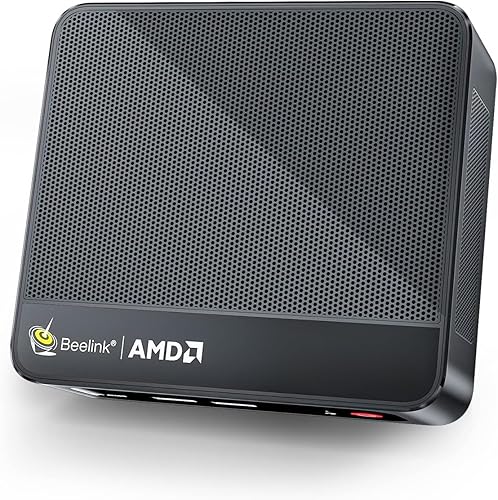
The best mini PCs for home servers include the Beelink SER5 Mini PC for everyday household services, the GMKtec G3S Mini PC Intel N95 Processor for basic always-on services, and the Beelink SER5 Mini PC for growing file shares.
On this page (3 sections)
The Beelink SER5 Mini PC is a practical starting point for a home server, with a 6-core processor, 16GB memory, a 480GB NVMe SSD and 2.5G LAN. Choose the GMKtec G11 Plus or a BOSGAME E5 model if you need dual Ethernet ports for a home lab or network storage.
A mini PC can keep shared files, media and household services available without taking up the space of a full desktop. The right setup depends on what you plan to run, how much data you keep and whether you need one or several wired network connections.
This roundup compares compact hardware by processor, memory, storage and Ethernet. For a broader look at the roles these small systems can fill, see what a good use case for a mini PC looks like.
Our picks at a glance
-
1
-
2
 Best for basic always-on services
GMKtec G3S Mini PC Intel N95 Processor
9.6/10 our score
See it on Amazon -
3
- 4
 Best for network lab projectsCheck it
 - 5
 Check it
BOSGAME E5 Plus Mini PC Ryzen 5400U
Best for dual-network storage - 6
 Best for expandable home lab storageCheck it
 - 7
 Check it
MINISFORUM MS-01-S1260 Mini PC Barebone with Intel
Best for a high-capacity lab build
Which mini PCs work best as home servers?
The best mini PC for a home server balances workload, network connections and storage expansion. The picks below range from a simple always-on services box to a barebone system for a more involved lab.
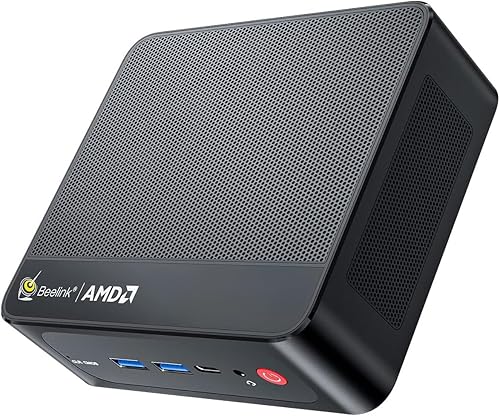
Beelink SER5 Mini PC: Best for everyday household services
- AMD Ryzen 5 5500U, 6 cores and 12 threads
- 16GB DDR4 memory
- 480GB M.2 NVMe SSD
- 2.5G LAN
A 6-core processor, 16GB memory and 2.5G LAN suit a home server running several light services. Its 480GB SSD is a starting point for applications and shared files.
Pros
- 2.5G LAN
- 16GB memory
- Memory can be upgraded
Cons
- One built-in Ethernet port
- 480GB may be limited for a large media library
The Beelink SER5 is the best all-around fit here for a household server running a few services alongside file sharing. Its Ryzen 5 5500U has 6 cores and 12 threads, paired with 16GB DDR4 memory and a 480GB NVMe SSD.
The built-in 2.5G LAN is useful when your router or switch supports faster wired networking. One Ethernet port is enough for a typical server connection, but it does not provide the dual-port layout that can simplify some lab or firewall projects.
Beelink says the memory can be upgraded to 64GB. That gives you an option to expand if you later add more services, though the included 16GB may already fit a modest household setup.
Choose this model for a general-purpose home server with a fast wired link and a useful amount of included memory. For a media-focused setup, see our mini PCs for 4K streaming.
If your main goal is media streaming, compare the requirements in our best mini PC for Plex server guide.
GMKtec G3S Mini PC Intel N95 Processor: Best for basic always-on services
- Intel N95, 4 cores and 4 threads
- 8GB DDR4 memory
- 256GB M.2 SSD
- Gigabit Ethernet
The G3S pairs a 4-core Intel N95 with 8GB memory and a 256GB SSD. It can suit a small set of basic services when you do not need extensive storage or many network ports.
Pros
- Compact configuration for light duties
- Gigabit Ethernet
- Dual HDMI outputs
Cons
- 8GB memory
- 256GB included storage
The GMKtec G3S is a reasonable match for basic services with modest storage needs. Its Intel N95 processor has 4 cores and 4 threads, with 8GB DDR4 memory and a 256GB M.2 SSD.
Gigabit Ethernet is suitable for a straightforward wired connection to a home router. The system also has dual HDMI outputs, but those displays matter more during setup than they do once the mini PC is tucked away and managed remotely.
This is the simplest hardware tier in the roundup. Keep the number of concurrent services and the size of local files in mind before choosing a 256GB drive and 8GB of memory.
Pick the G3S if low-complexity home services are the goal and you do not expect a large local media library. If you want a Linux-based setup, first check our guide to whether a mini PC can run Linux.
Beelink SER5 Mini PC: Best for growing file shares
- AMD Ryzen 5 5500U, 6 cores and 12 threads
- 16GB DDR4 memory
- 480GB M.2 NVMe SSD
- 2.5G LAN
This SER5 configuration has the same 6-core processor, 16GB memory and 2.5G LAN as the first pick. It also supports a 2.5-inch SATA drive, giving you an internal storage expansion path.
Pros
- 2.5G LAN
- Supports an added 2.5-inch SATA drive
- Memory can be upgraded
Cons
- One built-in Ethernet port
- Extra storage drive is not included
This second Beelink SER5 configuration suits a home server that may need more local file space over time. It has the same Ryzen 5 5500U, 16GB memory, 480GB NVMe SSD and 2.5G LAN combination as the first SER5.
Its useful distinction is the stated support for an added 2.5-inch SATA HDD or SSD. The extra drive is not included, so count its cost and installation needs separately when planning a file server.
The two SER5 choices have overlapping core hardware. Choose this one when that internal SATA expansion path is more useful to you; choose the first when you want the straightforward option without focusing on an added drive.
A mini PC can host files, but it is not a substitute for a backup. Keep another copy of important files on a separate device or in a backup service.
GMKtec Mini PC: Best for network lab projects
- AMD Ryzen 5 3500U
- 16GB DDR4 memory
- Dual 2.5GbE ports
- Triple display support
The GMKtec G11 Plus stands out for its dual 2.5GbE ports, which can help separate network roles in a home lab. Its 16GB memory and 512GB SSD offer room for a moderate setup.
Pros
- Two 2.5GbE ports
- 16GB memory
- 512GB SSD
Cons
- More network capability than a simple file server may need
- Storage capacity may not suit a large media collection
The GMKtec G11 Plus is the pick for dual-network home lab projects. It pairs an AMD Ryzen 5 3500U with 16GB DDR4, a 512GB SSD and two 2.5GbE Ethernet ports.
Two wired ports can be useful when software assigns separate network roles, such as a lab setup or firewall. That flexibility adds little for a basic file server that only needs to connect to the home network, so match the port count to your plan.
The product information also describes triple display support. That can help during initial setup if you want several screens, but it is not a key server feature once the system runs without a monitor.
Choose the G11 Plus when you have a reason to use both network ports and want 16GB memory included. For a more focused Linux server comparison, see best mini PCs for Linux servers.
BOSGAME E5 Plus Mini PC Ryzen 5400U: Best for dual-network storage
- AMD Ryzen 3 5400U, 4 cores and 8 threads
- 8GB DDR4 memory
- Dual 2.5GbE LAN
- Additional M.2 NVMe slot
Dual 2.5GbE ports and an additional M.2 NVMe slot give this E5 Plus useful options for a networked storage project. It starts with 8GB memory and a 256GB SATA SSD.
Pros
- Two 2.5GbE ports
- Extra M.2 NVMe slot
- Memory can be upgraded
Cons
- 8GB included memory
- Additional drive is not included
The BOSGAME E5 Plus offers dual 2.5GbE LAN and an extra M.2 NVMe slot in a compact system. It starts with an AMD Ryzen 3 5400U, 8GB DDR4 memory and a 256GB SATA SSD.
That storage expansion slot gives you a way to add a second drive internally. Its two Ethernet ports also fit projects that need separate wired connections, although the included 8GB memory may be a limiting factor for several services or virtual machines.
BOSGAME says the memory can be expanded up to 64GB through two SODIMM slots. If you plan to upgrade, include the added memory and drive in your build plan.
Choose the E5 Plus if internal drive expansion and dual network ports are priorities. For a storage-first comparison, read our guide to the best mini PC for NAS.
BOSGAME E5 11 Pro Mini PC: Best for expandable home lab storage
- AMD Ryzen 3 5300U, 4 cores and 8 threads
- 8GB DDR4 memory
- Dual 2.5GbE LAN
- Extra M.2 NVMe slot
The E5 11 Pro combines dual 2.5GbE with an extra M.2 NVMe slot for a small home lab or storage service. Its memory can be expanded if your workload grows.
Pros
- Two 2.5GbE ports
- Extra M.2 NVMe slot
- Memory can be upgraded
Cons
- 8GB included memory
- Additional storage is not included
The BOSGAME E5 11 Pro targets a home lab or network storage setup with dual 2.5GbE ports and an extra M.2 NVMe slot. Its Ryzen 3 5300U has 4 cores and 8 threads, with 8GB memory and a 256GB SSD included.
The second M.2 slot lets you add storage without replacing the system drive. The two Ethernet ports may help with a dual-network configuration, but most simple home servers will use only one connection.
BOSGAME says the memory can be expanded to 64GB. That gives more headroom if you move beyond a small file share, but the memory upgrade is separate from the included configuration.
This is a good fit when dual Ethernet and internal expansion matter more than having higher memory out of the box. If your server will also handle media, compare the role-specific options in our Plex server mini PC guide.
MINISFORUM MS-01-S1260 Mini PC Barebone with Intel: Best for a high-capacity lab build
- Intel Core i5-12600H, 12 cores and 16 threads
- Dual 10Gbps SFP+ and dual 2.5Gbps RJ45
- Supports up to 96GB DDR5
- Barebone, no OS, memory or SSD
The MS-01 offers extensive networking and storage expansion for a planned home lab build. It is a barebone system, so you must supply memory, storage and an operating system.
Pros
- Two 10Gbps SFP+ ports and two 2.5Gbps RJ45 ports
- Supports up to 96GB DDR5
- Multiple M.2 NVMe slots
Cons
- No operating system, memory or SSD included
- More setup than a ready-to-use mini PC
The MINISFORUM MS-01 is for a planned, higher-capacity home lab build. Its Intel Core i5-12600H has 12 cores and 16 threads, and its network options include dual 10Gbps SFP+ plus dual 2.5Gbps RJ45.
This is a barebone computer, so it does not include an operating system, memory or SSD. It supports up to 96GB DDR5 and multiple M.2 NVMe drives, which offers substantial room to configure the system around a particular workload.
The extra flexibility comes with more setup work and additional components to select. Make sure you are comfortable choosing compatible memory, storage and software before treating it as a ready-to-run home server.
Choose the MS-01 when you need its networking and expansion options and already have a build plan. For a basic household server, the other picks require less configuration.
What should you check before choosing a mini PC server?
Start with the services you intend to run, then match memory, storage and networking to that workload. A simple file share has different needs from a media server or a lab with multiple virtual machines.
| Product | Best for | Processor | Memory and storage | Wired network | Our score |
|---|---|---|---|---|---|
| Beelink SER5 Mini PC | everyday household services | AMD Ryzen 5 5500U, 6 cores and 12 threads | 16GB DDR4, 480GB M.2 NVMe SSD | 2.5G LAN | 9.7 |
| GMKtec G3S Mini PC Intel N95 Processor | basic always-on services | Intel N95, 4 cores and 4 threads | 8GB DDR4, 256GB M.2 SSD | Gigabit Ethernet | 9.6 |
| Beelink SER5 Mini PC | growing file shares | AMD Ryzen 5 5500U, 6 cores and 12 threads | 16GB DDR4, 480GB M.2 NVMe SSD | 2.5G LAN | 9.5 |
| GMKtec Mini PC | network lab projects | AMD Ryzen 5 3500U, 4 cores | 16GB DDR4, 512GB SSD | Dual 2.5GbE ports | 9.4 |
| BOSGAME E5 Plus Mini PC Ryzen 5400U | dual-network storage | AMD Ryzen 3 5400U, 4 cores and 8 threads | 8GB DDR4, 256GB SATA SSD | Dual 2.5GbE LAN | 9.2 |
| BOSGAME E5 11 Pro Mini PC | expandable home lab storage | AMD Ryzen 3 5300U, 4 cores and 8 threads | 8GB DDR4, 256GB SSD | Dual 2.5GbE LAN | 9.1 |
| MINISFORUM MS-01-S1260 Mini PC Barebone with Intel | a high-capacity lab build | Intel Core i5-12600H, 12 cores and 16 threads | Barebone; memory and SSD sold separately | Dual 10Gbps SFP+ and dual 2.5Gbps RJ45 | 8.4 |
How much memory should a mini PC home server have?
A home server running a few light services can start with 8GB, while several services, containers or virtual machines can benefit from more. The SER5 and G11 Plus include 16GB; the smaller GMKtec and BOSGAME configurations start at 8GB.
Check upgrade support if you expect your setup to grow. Memory capacity does not tell you how many services will run well, so use the requirements for your chosen software as the guide.
How much storage does a home server need?
Storage depends on the files and services you keep locally. A 256GB drive may suit the operating system and a small set of services, while shared files or media can call for more capacity.
Look at whether a mini PC supports a second internal drive or a larger replacement. For important data, plan a separate backup instead of relying on a single system drive.
Is Ethernet important for a mini PC server?
A wired Ethernet connection gives a home server a direct path to your router or switch. Gigabit Ethernet can suit basic household use, while 2.5GbE can be useful when the rest of your network supports it and file transfers are a priority.
Dual Ethernet matters for specific network layouts, such as a lab or software firewall. It is not automatically faster or better for a server that only needs one connection.
Can a mini PC run Linux as a server?
Yes, many mini PCs can run Linux, but support depends on the hardware and distribution you choose. Check compatibility for networking, storage and any devices or software the server needs.
Our Can a Mini PC Run Linux? The Simple Answer explains the basic checks.
If Linux is central to your plans, use the Linux server mini PC guide to compare options for that workload.
Which mini PC should you choose for a home server?
Choose the Beelink SER5 for a balanced household server with 16GB memory, a 480GB NVMe SSD and 2.5G LAN. Pick the GMKtec G11 Plus or BOSGAME E5 models when dual Ethernet is useful, and choose the MINISFORUM MS-01 only if you want to assemble a more expandable barebone lab.
For a basic file share, prioritize enough storage and a reliable backup plan. For a home automation hub, see our best mini PCs for Home Assistant.
Our top 3 picks at a glance
-
1
-
2
Best for basic always-on services
GMKtec G3S Mini PC Intel N95 Processor
9.6/10 our score
See it on Amazon -
3
Frequently asked questions
Can a mini PC run as a home server all day?
Yes, a mini PC can host services continuously if its operating system, cooling, power and network setup suit the workload. Choose a location with airflow and a wired Ethernet connection where possible.
Plan for power recovery and backups, since a compact PC alone does not protect files from drive failure or outages.
How much memory does a mini PC home server need?
A simple file share or a few light services can start with 8GB, while multiple services or virtual machines can benefit from more memory. Check whether the model supports upgrades before buying.
The workload and software determine the real need, so leave room to grow if you plan to add services.
Is a mini PC a good NAS?
A mini PC can host network storage, but check drive connections, network ports and the storage software before choosing one. Many mini PCs have limited room for internal drives, so external storage may be needed.
For a dedicated storage comparison, see our guide to the best mini PC for NAS.
Can I use a mini PC for Plex?
Yes, a mini PC can run a Plex server, though the right choice depends on your media format, number of streams and whether transcoding is needed. Check the processor and network connection against how your household watches.
Our best mini PC for Plex server guide focuses on that use.
Should I choose Linux for a mini PC server?
Linux is a common option for home servers, but hardware support and your comfort with setup matter. Confirm that the mini PC supports the distribution and software you plan to run.
Our [Can a Mini PC Run Linux?
The Simple Answer](/can-a-mini-pc-run-linux/) covers the basics.