8 Best Compact Keyboard and Mouse Combos (November 2026)
The best compact keyboard and mouse combos include the Logitech MK470 Slim Wireless Combo Compact Keyboard for a tidy small desk, the Logitech MK270 Full Size Wireless Keyboard for familiar full-size typing, and the RECCAZR Wireless Keyboard and Mouse Combo Silent for quiet shared rooms.
On this page (4 sections)
The best compact keyboard and mouse combo for most small desks is the Logitech MK470 Slim Wireless Combo Compact Keyboard, with a slim, quiet keyboard and an ambidextrous mouse. For a smaller key layout, compare the Macally 78-key set; for more connection choices, consider TECKNET's rechargeable compact combo.
A compact setup can free space for a notebook, papers or a mini PC without giving up a separate mouse. If gaming is your main use, compare our gaming keyboard and mouse combos.
The right choice depends on how much of the keyboard you want to keep, whether you need Bluetooth, and how quiet the keys and clicks should be.
For a trackball option, see the Kensington Expert Mouse.
Our picks at a glance
-
1
 Best for a tidy small desk
Logitech MK470 Slim Wireless Combo Compact Keyboard
9.7/10 our score
See it on Amazon -
2
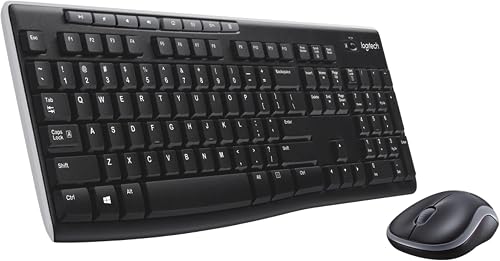 Best for familiar full-size typing
Logitech MK270 Full Size Wireless Keyboard
9.6/10 our score
See it on Amazon -
3
 Best for quiet shared rooms
RECCAZR Wireless Keyboard and Mouse Combo Silent
9.5/10 our score
See it on Amazon
- 4
 Check it
Macally Small Wireless Keyboard and Mouse Combo
Best for a 78-key layout - 5
 Check it
TECKNET Wireless Keyboard and Mouse Combo
Best for portable 78-key typing - 6
 Check it
TECKNET Compact Wireless Keyboard and Mouse Combo
Best for flexible connections - 7
 Check it
SABLUTE Wireless Keyboard and Mouse Combo
Best for backlit compact typing - 8
 Check it
seenda Bluetooth Compact Keyboard and Mouse Combo
Best for switching between devices
How we chose compact keyboard and mouse combos
The best compact keyboard and mouse combo should save desk space while keeping the keys and connection features you need. We compared keyboard layouts, stated dimensions, connection types, noise features and mouse design.
A smaller keyboard can mean fewer keys or a tighter layout. If you use a number pad each day, a slim full-size board may be a better fit than a mini model.
Our score weighs specs, features and buyer feedback against what you're shopping for. For the wider category, see our keyboards and mice buying guide.
| Product | Best for | Keyboard size | Connection | Layout | Our score |
|---|---|---|---|---|---|
| Logitech MK470 Slim Wireless Combo Compact Keyboard | a tidy small desk | 14.7 x 5.6 x 0.76 in | 2.4 GHz USB receiver | Windows optimized, with number pad | 9.7 |
| Logitech MK270 Full Size Wireless Keyboard | familiar full-size typing | Wireless USB receiver | Full size with number pad, F-keys and arrow keys | 9.6 | |
| RECCAZR Wireless Keyboard and Mouse Combo Silent | quiet shared rooms | 2.4 GHz shared USB receiver | Full size with numeric keypad | 9.5 | |
| Macally Small Wireless Keyboard and Mouse Combo | a 78-key layout | 2.4 GHz USB receiver | 9.3 | ||
| TECKNET Wireless Keyboard and Mouse Combo | portable 78-key typing | 2.4 GHz USB receiver, not Bluetooth | 9.1 | ||
| TECKNET Compact Wireless Keyboard and Mouse Combo | flexible connections | 12.4 x 5.3 x 0.6 in | 9.0 | ||
| SABLUTE Wireless Keyboard and Mouse Combo | backlit compact typing | 14.8 x 5.4 x 0.78 in | Wireless USB receiver | 8.6 | |
| seenda Bluetooth Compact Keyboard and Mouse Combo | switching between devices | 8.2 |
The best compact keyboard and mouse combos
The Logitech MK470 leads for its slim full-size layout and quiet operation, while the other picks suit narrower layouts, device switching or backlit typing. Match each combo to your desk measurements and computer ports.
Logitech MK470 Slim Wireless Combo Compact Keyboard: Best for a tidy small desk
- Slim keyboard with number pad
- Quiet keys and noise-reduced mouse
- Ambidextrous 3-button mouse
- 2.4 GHz USB nano receiver
A low-profile keyboard and quiet ambidextrous mouse suit a desk where both noise and footprint matter. The keyboard keeps a number pad while staying slim.
Pros
- Slim profile
- Quiet keyboard and mouse
- Ambidextrous mouse
Cons
- Windows-focused layout
- Uses a USB receiver rather than Bluetooth
The MK470 keeps a number pad and 104-key layout in a slim keyboard measuring 14.7 x 5.6 x 0.76 in. Its low-profile scissor keys are described as whisper quiet, and the 3-button mouse is ambidextrous with optical tracking.
A shared 2.4 GHz USB nano receiver connects the keyboard and mouse, with a stated range of up to 33 ft. Auto-sleep helps conserve power; Logitech gives expected battery life of up to 36 months for the keyboard and 18 months for the mouse.
This is a strong fit when your desk is limited but you still want familiar full-size keys. It works with Windows, and the mouse suits either hand.
Choose it for a quiet, slim setup with a number pad. If Bluetooth is essential, look at the best compact wireless keyboard and mouse combo options and check their connection modes.
Logitech MK270 Full Size Wireless Keyboard: Best for familiar full-size typing
- Full-size layout with number pad and arrow keys
- Spill-resistant design
- 8 multimedia hotkeys
- 2.4 GHz USB receiver
This set keeps a standard full-size layout and adds a compact mouse. It needs more keyboard space than the smaller picks, but retains familiar keys and a number pad.
Pros
- Full-size familiar layout
- Spill-resistant keyboard design
- Multimedia hotkeys
Cons
- Takes more desk space than mini layouts
- USB receiver connection
The MK270 is the most familiar layout in this group: a full-size keyboard with F-keys, arrows and a number pad. Its keyboard is spill-resistant, has adjustable tilt legs and includes 8 multimedia hotkeys for common controls.
The compact mouse is ambidextrous, so the set can work for left or right-handed use. If you are comparing mouse shapes for hand comfort, see our keyboard and vertical mouse combos guide.
A USB receiver provides a wireless connection, and the keyboard and mouse each have an on/off switch.
This combo is wider than the mini keyboards here, so measure the space in front of your monitor before choosing it. It makes sense if compact means a smaller mouse and a standard keyboard, not the smallest possible footprint.
Choose it for familiar typing and shortcut keys. If you want a keyboard that lights up for dim rooms, compare our best backlit keyboard and mouse combo guide.
RECCAZR Wireless Keyboard and Mouse Combo Silent: Best for quiet shared rooms
- Quiet membrane keyboard and mouse
- Full-size keyboard with number pad
- Single shared USB receiver
- Adjustable mouse DPI
Quiet typing and mouse clicks suit a shared room, and the single receiver connects both devices. The keyboard is full size, so check its footprint before choosing it for a very small desk.
Pros
- Quiet keyboard and mouse
- One receiver for both devices
- Tilt legs and numeric keypad
Cons
- Full-size keyboard takes more room
- Requires 2 AA batteries
RECCAZR pairs a full-size keyboard with a quiet mouse and one shared nano USB receiver. The soft membrane keys are described as quiet, and the mouse has three DPI settings: 800, 1200 and 1600.
The keyboard includes a number pad, 12 multimedia shortcuts and adjustable tilt legs. Its full-size layout may be easier to use than a mini board, but it needs more desk width than the compact 78-key picks.
The combo is compatible with Windows, Mac OS and Linux according to the stated compatibility information. Some function combinations may not work on every system, and a Type-C adapter may be needed for a Mac without a compatible port.
Choose it for quiet typing and a full-size layout in a shared room. If you'd rather avoid a receiver, look at the connection options in our best wireless keyboard and mouse combo guide.
Macally Small Wireless Keyboard and Mouse Combo: Best for a 78-key layout
- Compact 78-key keyboard
- 12 shortcut keys
- Slim scissor keys
- Single 2.4 GHz USB receiver
The smaller keyboard trims keys while keeping 12 shortcuts, and the mouse has a slim body with quiet clicks. It's designed for PC, so check compatibility and key needs before choosing it for another setup.
Pros
- Compact 78-key layout
- Slim scissor keys
- Quiet-click mouse
Cons
- Fewer keys than a full-size keyboard
- Uses a USB receiver
Macally's keyboard has 78 slim scissor keys and 12 shortcuts, making it a more space-saving option than a full-size board. The accompanying mouse has a slim body, quiet clicks and three DPI options: 800, 1200 and 1600.
A single 2.4 GHz receiver connects the pair, with a stated range of 30 ft. This is a practical choice when you want fewer keys and a compact keyboard for a PC workspace.
The reduced key count means you should check whether you rely on dedicated navigation keys or a number pad. Macally describes the set as designed for PC, so confirm compatibility with your own operating system and port setup.
Choose it when a smaller layout matters more than full-size keys. For Apple-specific layout needs, compare our best keyboard and mouse combo for Mac guide.
TECKNET Wireless Keyboard and Mouse Combo: Best for portable 78-key typing
- Compact 78-key keyboard
- Scissor-switch keys
- Quiet keyboard and mouse
- One 2.4 GHz USB receiver
This mini set is made for travel and compact workspaces, with quiet scissor keys and one shared receiver. Its smaller layout may not suit you if you prefer full-size keys.
Pros
- Portable mini layout
- Quiet scissor keys
- One shared receiver
Cons
- Does not support Bluetooth
- Batteries are not included
TECKNET's 78-key mini keyboard uses scissor-switch keys and a quiet mouse, with 12 multimedia hotkeys for tasks such as volume and playback. One shared 2.4 GHz nano receiver connects both devices.
The combo is built for travel and small work areas. It does not support Bluetooth, so check that your computer has a USB-A port before choosing it.
The compact layout can take adjustment if you usually type on a full-size board. TECKNET says the keyboard and mouse need 4 AAA batteries in total, which are not included.
Choose it for a portable set with quiet keys and clicks, as long as a receiver connection works for your computer. If you need a cable connection, see our best wired keyboard and mouse combo picks.
TECKNET Compact Wireless Keyboard and Mouse Combo: Best for flexible connections
- Bluetooth, 2.4 GHz and USB-C wired keyboard modes
- Compact 12.4 x 5.3 x 0.6 in keyboard
- Connects with up to 5 devices
- Rechargeable
Multiple connection modes help when a computer lacks USB-A or you switch between devices. USB-C wired mode lets you type while the keyboard charges.
Pros
- Three connection modes
- Up to 5 devices
- Rechargeable keyboard and mouse
Cons
- Confirm the connection mode you need
- Keyboard and mouse weigh 1.1 lb together
This TECKNET set offers Bluetooth, 2.4 GHz receiver and USB-C wired keyboard modes. The 12.4 x 5.3 x 0.6 in keyboard can connect with up to 5 devices across the available modes, and USB-C wired mode lets you type while charging.
Low-profile scissor keys are described as quiet, and the mouse offers 800, 1200 and 1600 DPI settings. The set weighs 1.1 lb together, which is useful to know if you plan to carry it in a laptop bag.
The multi-mode design suits a desk where you switch between computers or need Bluetooth for a device without a compatible USB port. Check which mode you plan to use, since the receiver, Bluetooth and wired options have different connection needs.
Choose it for compact dimensions and connection flexibility. If your mini PC lacks a built-in keyboard and mouse, our guide answers does a Mini PC come with a keyboard and mouse?.
SABLUTE Wireless Keyboard and Mouse Combo: Best for backlit compact typing
- 102-key slim keyboard with number pad
- 7 switchable backlight colors
- Rechargeable keyboard and mouse
- Windows and Mac layouts
Backlighting and a number pad make this a useful option if you want a slim keyboard with more keys. Its 14.8 in width may need more room than a mini layout.
Pros
- Switchable keyboard backlight
- Rechargeable
- Windows and Mac layouts
Cons
- Uses a shared USB receiver
- Wider than the mini keyboard options
SABLUTE combines a 102-key layout and number pad with a slim keyboard measuring 14.8 x 5.4 x 0.78 in. The keyboard has 7 switchable backlight colors and 4 brightness levels, while the mouse changes color automatically.
The rechargeable set uses a shared wireless USB receiver. For more rechargeable choices, see our rechargeable keyboard and mouse combos.
It offers Windows and Mac layouts, which you can switch with a keyboard shortcut.
Its dimensions are closer to a slim full-size keyboard than a mini board, so measure your available depth and width. Choose it if lighting and a number pad matter more than having the smallest footprint.
For more lit keyboard options, compare this set with the best Logitech keyboard and mouse combo roundup and check which layout suits your system.
seenda Bluetooth Compact Keyboard and Mouse Combo: Best for switching between devices
- Bluetooth and 2.4 GHz receiver connections
- 3-device connection channels
- 84-key compact keyboard
- Round keycaps and silent mouse clicks
Three connection channels let you move between devices, while the compact round-key layout keeps the set portable. Expect an adjustment period if you're used to standard key spacing.
Pros
- Can switch between 3 devices
- Bluetooth and receiver options
- Silent mouse clicks
Cons
- Compact layout may take time to learn
- Batteries are not included
The seenda combo can connect to 3 devices using Bluetooth or its shared USB receiver. Both the keyboard and mouse have 2.4G, BT1 and BT2 channels, and the 84-key keyboard uses round keycaps.
The mouse has silent clicks and three DPI settings of 1000, 1600 and 2400. Both devices have separate power switches and auto-sleep; the keyboard uses 2 AAA batteries and the mouse uses 1 AA battery, which are not included.
Round keycaps and a compact layout can feel different from standard keyboard spacing. Give yourself time to adjust if you type quickly or move between this and a full-size keyboard.
Choose it if you switch between devices and want a compact set with Bluetooth. Before deciding, compare connection options and layouts across the best compact wireless keyboard and mouse combo guide.
How do you choose a compact keyboard and mouse combo?
Choose by measuring your desk, checking the keyboard layout and confirming how the set connects to your computer. A slim keyboard with a number pad saves some height while keeping familiar keys; a 78-key board cuts more width but removes keys.
Does your compact keyboard need a number pad?
A number pad helps with frequent data entry, but it adds width. The Logitech MK470 and SABLUTE keep one, while the Macally and TECKNET mini keyboards use 78 keys.
If you rarely enter long number sequences, a mini layout can free more room for the mouse. If you do, measure the full keyboard width before giving up the pad.
Should you choose Bluetooth or a USB receiver?
Bluetooth avoids using a USB port, while a receiver can make setup simple on a compatible computer. Some combos offer both, such as the seenda and TECKNET rechargeable set.
Check the ports on your mini PC before buying. A USB-A receiver won't fit a USB-C-only computer without a compatible adapter, and not every combo includes Bluetooth.
How quiet should the keyboard and mouse be?
Look for a stated quiet or silent design if you work near other people or use the computer late at night. Logitech describes the MK470 keyboard as whisper quiet and its mouse as noise-reduced; RECCAZR describes both devices as quiet.
Noise descriptions are not a substitute for trying a keyboard if sound is a major concern. The shape and key feel also matter for regular typing.
Is a compact keyboard comfortable for long sessions?
A compact keyboard can work for long sessions if its layout fits your typing habits and the mouse has enough room to move. Compare key count, key type, keyboard height and whether you need tilt legs.
A mini keyboard reduces the reach to the mouse, but you may need to learn where less common keys sit. If you frequently switch between devices, a consistent layout can make that adjustment easier.
Which compact keyboard and mouse combo should you choose?
Choose the Logitech MK470 if you want a slim, quiet keyboard with a number pad, or the Macally if you prefer a smaller 78-key layout. Pick the TECKNET rechargeable combo for multiple connection modes, and compare the best Logitech keyboard and mouse combo if brand-specific options matter.
Our top 3 picks at a glance
-
1
Best for a tidy small desk
Logitech MK470 Slim Wireless Combo Compact Keyboard
9.7/10 our score
See it on Amazon -
2
Best for familiar full-size typing
Logitech MK270 Full Size Wireless Keyboard
9.6/10 our score
See it on Amazon -
3
Best for quiet shared rooms
RECCAZR Wireless Keyboard and Mouse Combo Silent
9.5/10 our score
See it on Amazon
Frequently asked questions
What makes a keyboard and mouse combo compact?
A compact combo uses a smaller keyboard footprint, a smaller mouse, or both. Some keep a number pad, while mini layouts reduce the key count to save more room.
Measure the desk space available for the keyboard and mouse together, including room to move the mouse.
Are compact keyboard and mouse combos good for everyday work?
Yes, if the layout includes the keys you use often and feels comfortable for your typing habits. A 78-key keyboard saves space, while a slim full-size model can keep a number pad and familiar navigation keys.
Check the key layout before you decide.
Do compact wireless combos use Bluetooth?
Some do, but many compact sets connect through a shared USB receiver. The TECKNET TK-KM061 uses a USB receiver and does not support Bluetooth, while the TECKNET TK-KM061 compact rechargeable set offers Bluetooth, receiver and USB-C wired keyboard modes.
Confirm the connection type your computer supports.
How much desk space should I leave for a compact combo?
Start with the keyboard's width and depth, then add room beside it for mouse movement. The TECKNET compact rechargeable keyboard measures 12.4 x 5.3 x 0.6 in, while the Logitech MK470 measures 14.7 x 5.6 x 0.76 in.
Allow extra space for your preferred mouse reach.
Can I use a compact combo with a Mac?
Some combos support Mac layouts or Mac connections, but shortcut keys may differ by model. The SABLUTE has Windows and Mac layouts, and the TECKNET compact rechargeable set supports macOS.
Check the stated compatibility and whether the connection method works with your Mac's available ports.


