6 Best Silent Wireless Mouse (November 2026)
The best silent wireless mice include the Logitech M330 Silent Plus Full Size 2.4 for quiet everyday office work, the Logitech G305 Lightspeed Wireless Gaming Mouse for quiet wireless gaming, and the TECKNET Wireless Mouse for two-device flexibility.
On this page (7 sections)
- The best silent wireless mouse picks for quiet work
- Which silent wireless mouse connection is best?
- How quiet should a silent mouse be?
- Which silent mouse shape fits your hand?
- Do silent wireless mice need special care?
- Is a silent wireless mouse better than a silent wired mouse?
- Best silent wireless mouse verdict
The best silent wireless mouse for most shared workspaces is the Logitech M330 Silent Plus, with over 90% click-sound reduction, an 18-month battery and a USB receiver. Choose the TECKNET for Bluetooth and USB flexibility, or the hunart H9 for a rechargeable compact design.
Quiet mice make sense in shared offices, libraries, bedrooms and late evening workspaces. The right choice depends on more than click volume.
Connection type, hand shape, button layout, battery style and tracking range all affect daily use.
If you also need a keyboard, our guide to Keyboards & Mice: The Complete Buying Guide covers how the two devices fit together.
Our picks at a glance
-
1
 Best for quiet everyday office work
Logitech M330 Silent Plus Full Size 2.4
9.7/10 our score
See it on Amazon -
2
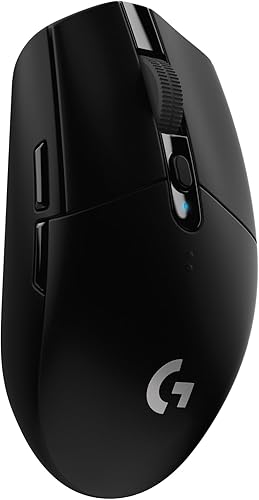 Best for quiet wireless gaming
Logitech G305 Lightspeed Wireless Gaming Mouse
9.5/10 our score
See it on Amazon -
3

- 4
 Best for simple right-handed controlCheck it
- 5
 Check it
wegear Bluetooth Mouse Silent Wireless Mice
Best for quiet Bluetooth browsing - 6
 Best for lightweight rechargeable travelCheck it
The best silent wireless mouse picks for quiet work
The Logitech M330 is the strongest all-around choice because it combines quiet main clicks, long battery life and broad operating system support. The other picks are better when you need gaming speed, Bluetooth switching, a silent scroll wheel or rechargeable portability.
Our score weighs specs, features and buyer feedback against what you're shopping for. We compared the stated noise features, connection choices, controls, power needs and fit for shared or late-night use.
Logitech M330 Silent Plus Full Size 2.4: Best for quiet everyday office work
- Over 90% quieter clicks
- 18-month battery life
- USB-A receiver
- Right-handed contoured grip
The M330 combines quiet clicks, a right-handed contoured shape and long battery life for regular desk work. Its USB receiver supports Windows, macOS, ChromeOS and Linux.
Pros
- Over 90% click-sound reduction
- 18-month battery life
- USB receiver included
Cons
- Right-handed shape
- Uses a disposable AA battery
The Logitech M330 Silent Plus is the best silent wireless mouse for routine desk work. Logitech says its SilentTouch Technology reduces more than 90% of clicking sounds compared with classic mice, while keeping the same general click feel.
Its right-handed contoured plastic grips are aimed at longer work sessions. The 4.13 x 2.68 in shape is full size, so it may feel more natural than a compact travel mouse if your hand prefers more support.
Battery changes should be infrequent. The M330 uses 1 AA battery, includes that battery, and has a stated battery life of up to 18 months with auto-sleep power saving.
The USB-A receiver gives the mouse a simple plug-and-play setup. It works with Windows, macOS, ChromeOS and Linux, and its wireless range is up to 33 ft, or 10 m, depending on use and surroundings.
Choose it for quiet office work, a shared desk or a home computer. The main trade-off is that it uses a right-handed shape and a USB receiver rather than Bluetooth.
Logitech G305 Lightspeed Wireless Gaming Mouse: Best for quiet wireless gaming
- Up to 12,000 DPI
- 1 ms report rate
- 250-hour battery life
- 6 programmable buttons
The G305 is the performance pick for buyers who need wireless gaming speed and high sensor sensitivity. Its six buttons and ambidextrous design also suit fast desktop work.
Pros
- 1 ms report rate
- Up to 12,000 DPI
- Built-in receiver storage
Cons
- Designed for gaming rather than the quietest office use
- Shorter stated battery life than office-focused picks
The Logitech G305 is the best silent wireless mouse here for gaming performance, though it is not the office-focused choice. Its LIGHTSPEED connection has a stated 1 ms report rate, and its HERO sensor reaches up to 12,000 DPI.
The G305 has 6 buttons and an ambidextrous design. That combination gives left- or right-handed users more control for games and shortcut-heavy computer work.
A single AA battery supports up to 250 hours of continuous gameplay. Logitech also states that Endurance mode can extend battery life up to 9 months through Logitech G HUB software.
At 3.36 oz, the mouse is light enough to carry with a laptop. The nano receiver stores inside the mouse, which helps prevent it from being separated during travel.
The G305 is a strong fit if wireless responsiveness matters more than the quietest possible office clicks. For a broader gaming comparison, see our guide to the best silent mouse for gaming, then compare it with the best wired gaming mouse.
TECKNET Wireless Mouse: Best for two-device flexibility
- Bluetooth 5.0/3.0 and USB-A
- 6 DPI levels up to 4800 DPI
- 6 buttons
- Quiet main clicks
The TECKNET fits users who move between 2 devices and want both Bluetooth and USB-A connection options. Its main clicks are quiet, while the side buttons and scroll wheel are not silent.
Pros
- Two connection methods
- Six adjustable DPI levels
- Can connect to 2 devices
Cons
- AAA batteries are not included
- Side buttons are not compatible with macOS
The TECKNET Wireless Mouse is the best choice for switching between 2 devices and choosing either Bluetooth or USB-A. A slide switch lets you move between the two connection methods, which can help when you use a laptop and desktop.
Its 6 DPI settings run from 800 to 4800 DPI. Lower settings can suit detailed cursor work, while higher settings reduce the hand movement needed to cross a wide screen.
The main clicks are designed for quiet use in offices and libraries. The side buttons and scroll wheel are not silent, so consider the whole control set if every mouse sound matters.
The mouse uses 2 AAA batteries, which aren't included. Automatic sleep helps extend use, and the mouse supports Windows, macOS, Chrome and Linux, though its side buttons are not compatible with macOS.
The TECKNET suits small to medium hands and users who want connection flexibility. Its compact shape may also work for larger hands if you prefer a smaller mouse.
HP 280 Silent Wireless Mouse: Best for simple right-handed control
- Up to 90% quieter left and right buttons
- 1600 DPI optical sensor
- 3-button layout
- Multi-surface tracking
The HP 280 keeps the controls simple with 3 buttons, a right-handed shape and a USB nano receiver. It suits desk users who want quiet main clicks without extra controls.
Pros
- 18-month battery life
- Receiver stores inside the mouse
- Tracks on virtually any surface
Cons
- Right-handed design
- Only 3 buttons
The HP 280 is the best silent wireless mouse for simple right-handed control. Its left and right buttons reduce noise by up to 90%, while the 3-button layout keeps the controls easy to understand.
The 2.4 GHz USB connection reaches up to 32.8 ft, or 10 m. Its nano receiver stores inside the mouse, so you can remove it for travel without needing a separate storage case.
HP gives the mouse a 1600 DPI optical sensor and multi-surface tracking. That makes it suitable for ordinary desk work without requiring a dedicated mouse pad.
The mouse uses 1 AA battery and has a stated battery life of up to 18 months. It works with Windows 10 and higher, Chrome and Mac OS.
Choose the HP 280 if you want a quiet, uncomplicated mouse for documents, browsing and general computer use. Choose the M330 instead if you prefer a more contoured full-size shape and wider operating system support.
wegear Bluetooth Mouse Silent Wireless Mice: Best for quiet Bluetooth browsing
- Bluetooth 5.0
- Silent left, right and scroll buttons
- 3 DPI levels
- Up to 24-month battery life
The wegear is a Bluetooth choice for quiet browsing and office work. Its silent scroll wheel and side buttons add useful control, although the side buttons are not recognized on Mac.
Pros
- Silent scroll wheel
- 24-month battery life
- 800/1200/1600 DPI settings
Cons
- Bluetooth only
- AA battery is not included
The wegear Bluetooth Mouse is the best silent wireless mouse for users who want quiet main buttons and a quiet scroll wheel. Its left, right and scroll buttons are designed for silent use, which gives it an advantage over mice that quiet only the main clicks.
Bluetooth 5.0 pairing supports compatible Windows, macOS and Chrome OS devices. The mouse has 6 buttons, including forward and backward buttons for moving between web pages and folders.
Its 3 DPI levels are 800, 1200 and 1600. Those settings cover common browsing, document and detailed cursor tasks without adding a long list of adjustments.
A single AA battery can last up to 24 months, and sleep mode starts after 30 seconds of inactivity. The battery is not included.
The side buttons are not recognized on Mac, so Mac users should treat those controls as an extra rather than a guaranteed feature.
The wegear is a good fit for Bluetooth-first office work. If you want to compare this type of design with a Logitech model, read our guide to the best Logitech silent mouse.
hunart H9 40g Wireless Mouse: Best for lightweight rechargeable travel
- About 40 g
- Bluetooth 5.2 and 2.4 GHz
- USB-C rechargeable
- Ambidextrous 4-button design
The hunart H9 is the portable pick for buyers who want a compact, rechargeable mouse with 2 connection modes. Its 40 g weight and ambidextrous shape suit travel, class and shared workspaces.
Pros
- Rechargeable through USB-C
- About 40 g
- Bluetooth and USB receiver
Cons
- Compact shape may not suit users who prefer a full-size mouse
- Only 3 DPI levels
The hunart H9 is the best silent wireless mouse for lightweight rechargeable travel. It weighs about 40 g, measures 3.68 x 2.24 x 1.43 in and supports both Bluetooth 5.2 and 2.4 GHz wireless through its included USB receiver.
The built-in 500 mAh battery charges through USB-C in about 2 hours. That removes the need to keep disposable AA or AAA batteries available, although it adds a charging step to your routine.
Its low-noise click switches suit shared offices, classrooms, libraries and late-night desks. The ambidextrous 4-button shape works for left- or right-hand control, and the receiver stores inside the bottom of the mouse.
Three DPI levels, 800, 1200 and 1600, cover everyday browsing, documents, spreadsheets and creative work. The mouse works with compatible Windows, Mac, Android and iPad devices within an operating range of about 8 to 10 m.
Choose it when weight, rechargeability and portability matter most. The compact body may be less comfortable than a full-size mouse if you prefer a larger grip.
Which silent wireless mouse connection is best?
A USB receiver is the simplest choice for a desktop or laptop with an available USB-A port. Bluetooth is better when you want to avoid a receiver, while dual-mode models give you a fallback when one connection is inconvenient.
The M330, G305 and HP 280 use USB receivers. The TECKNET and hunart H9 offer two connection methods, while the wegear uses Bluetooth.
Check your computer before choosing. A mouse that depends on USB-A may need an adapter on a device without that port.
A Bluetooth mouse needs a compatible Bluetooth connection and may require pairing before use.
For a mouse that stays at one desk, the receiver may be all you need. For a mouse that moves between a tablet and computer, dual-mode models offer more flexibility.
How quiet should a silent mouse be?
A silent mouse reduces the sound of some controls, but not every model makes every movement silent. The M330 reduces more than 90% of clicking sounds, the HP 280 reduces the left and right button noise by up to 90%, and the TECKNET notes that its side buttons and scroll wheel are not silent.
The wegear specifically includes a silent scroll wheel as well as silent left and right buttons. The hunart H9 uses low-noise click switches, but its data does not describe every control as silent.
Think about the sound that bothers people around you. If the main click is the issue, the M330 or HP 280 may be enough.
If scroll noise also matters, the wegear is the clearest fit from this group.
A quiet mouse can still make some sound when it moves across a hard surface. A desk mat may change that noise, but choose one based on your desk and cleaning needs rather than assuming it will remove every sound.
Which silent mouse shape fits your hand?
A full-size right-handed mouse usually makes more sense when you want a stable desk shape. A compact or ambidextrous mouse is easier to carry or share between left- and right-handed users.
The M330 and HP 280 are right-handed designs. The wegear is also right-handed, while the G305 and hunart H9 use ambidextrous designs.
The TECKNET is aimed at small to medium hands, though it may suit larger hands that prefer a compact body. The hunart H9 is the smallest and lightest option here, so it is particularly suited to travel and classroom use.
Before buying, compare the listed dimensions with your current mouse. A change in length or width can affect how far your fingers reach the buttons and whether your palm rests on the shell.
Do silent wireless mice need special care?
Silent wireless mice need ordinary care: keep the sensor area clear, store the receiver safely and replace or recharge the power source before work is interrupted. Avoid forcing buttons or using liquids directly on the mouse.
For battery models, keep track of whether the mouse uses AA or AAA batteries. The M330, G305, HP 280 and wegear use AA batteries, while the TECKNET uses 2 AAA batteries.
The hunart H9 has a built-in rechargeable battery.
Receiver storage helps with travel. The G305 stores its nano receiver inside the mouse, the HP 280 stores its receiver inside the mouse, and the hunart H9 stores its receiver on the bottom.
If you want to avoid batteries altogether, the rechargeable H9 is the only choice here with a built-in battery. If you prefer long intervals between battery changes, the wegear has the longest stated battery life at up to 24 months.
Is a silent wireless mouse better than a silent wired mouse?
A silent wireless mouse is better when you need a clear desk, flexible seating or easy laptop travel. A silent wired mouse is better when you want continuous power without batteries or charging.
Wireless models can add battery checks and receiver management. Wired models add a cable across the desk, but they don't need a wireless connection or battery.
For another connection comparison, see our guide to the best silent wired mouse. You can also read about whether a Logitech MX Master works for gaming if you are choosing one mouse for both office tasks and play.
Best silent wireless mouse verdict
The Logitech M330 Silent Plus is the best silent wireless mouse for most quiet office and home desks because it combines over 90% click-sound reduction, an 18-month AA battery and a right-handed contoured shape.
Pick the Logitech G305 if gaming speed and programmable controls matter more than office-focused quiet. Choose the TECKNET for 2-device switching, the HP 280 for simple 3-button control, or the wegear for a silent scroll wheel.
Choose the hunart H9 when you want the lightest compact design, rechargeable USB-C power and both Bluetooth and USB receiver connections. If scroll behavior matters in your decision, our guide on a vertical mouse with infinite scroll explains why scrolling features deserve their own check.
Our top 3 picks at a glance
-
1
Best for quiet everyday office work
Logitech M330 Silent Plus Full Size 2.4
9.7/10 our score
See it on Amazon -
2
Best for quiet wireless gaming
Logitech G305 Lightspeed Wireless Gaming Mouse
9.5/10 our score
See it on Amazon -
3


