7 Best Ryzen 9 Mini PCs (October 2026)
The best Ryzen 9 mini PCs include the BOSGAME P6 Ryzen 9 6900HX Mini PC for everyday demanding work, the GEEKOM A9 Max Top AI Mini PC for AI workloads, and the MINISFORUM UM890 Pro Mini PC for RAM and SSD upgrades.
On this page (3 sections)
The best Ryzen 9 mini PC for most demanding everyday work is the BOSGAME P6, with 24GB of onboard memory, a 1TB SSD and support for three 4K displays. For a newer Ryzen AI processor, consider GEEKOM or Reatan; for memory and storage upgrades, compare the MINISFORUM UM890 Pro options.
These systems suit compact workstations, development setups and multi-screen desks. Choose by the actual workload: a home lab may need multiple Ethernet ports, while large creative projects can benefit from more memory and SSD capacity.
For a wider look at processor tiers, compare our best AMD mini PC picks and best Ryzen mini PCs. If you are deciding between Ryzen generations, our best Ryzen 7 mini PC options and best mini PC with Ryzen 5 help set expectations for less demanding workloads.
Our picks at a glance
-
1
 Best for everyday demanding work
BOSGAME P6 Ryzen 9 6900HX Mini PC
9.7/10 our score
See it on Amazon -
2

-
3

- 4
 Check it
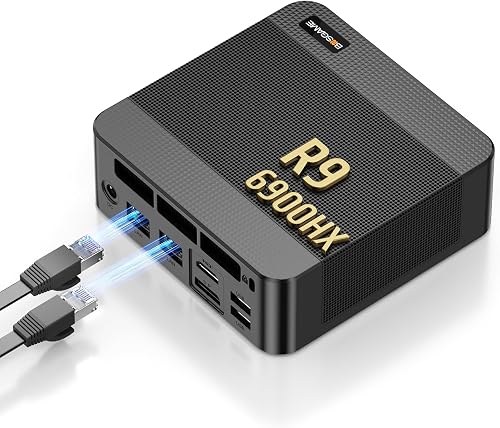
BOSGAME P3 Ryzen 9 6900HX Mini PC
Best for a home lab - 5
 Check it
MINISFORUM UM890 Pro Mini PC AMD Ryzen
Best for a custom configuration - 6
 Check it
GMKtec K11 Mini Gaming PC AMD Ryzen
Best for eGPU expansion - 7
 Best for high-memory AI projectsCheck it
Which Ryzen 9 mini PCs stand out for demanding work?
The BOSGAME P6 leads this group for its included memory, SSD and three-screen support, while the other options add features for AI work, upgrades or networking. We compared processor families, memory, storage, display connections and expansion options against common workstation needs.
Our score weighs specs and features against what you’re shopping for.
| Product | Best for | Processor | Memory | Storage | Our score |
|---|---|---|---|---|---|
| BOSGAME P6 Ryzen 9 6900HX Mini PC | everyday demanding work | Ryzen 9 6900HX | 24GB LPDDR5X | 1TB PCIe 4.0 SSD | 9.7 |
| GEEKOM A9 Max Top AI Mini PC | AI workloads | Ryzen AI 9 HX 470 | 32GB DDR5 | 2TB SSD | 9.4 |
| MINISFORUM UM890 Pro Mini PC | RAM and SSD upgrades | Ryzen 9 8945HS | 32GB DDR5 | 1TB PCIe 4.0 SSD | 9.3 |
| BOSGAME P3 Ryzen 9 6900HX Mini PC | a home lab | Ryzen 9 6900HX | 32GB DDR5 | 1TB PCIe 4.0 SSD | 9.2 |
| MINISFORUM UM890 Pro Mini PC AMD Ryzen | a custom configuration | Ryzen 9 8945HS | Barebone | Barebone | 8.9 |
| GMKtec K11 Mini Gaming PC AMD Ryzen | eGPU expansion | Ryzen 9 8945HS | 32GB DDR5 | 512GB PCIe 4.0 SSD | 8.8 |
| Reatan X8 Mini PC | high-memory AI projects | Ryzen AI 9 HX 470 | 48GB DDR5 | 1TB PCIe 4.0 SSD | 8.4 |
Which best Ryzen 9 mini PC should you choose for your workload?
The P6 is the most balanced starting point for general work, while the GEEKOM A9 Max puts more emphasis on Ryzen AI and memory capacity. Compare those priorities before choosing a processor based on its name alone.
BOSGAME P6 Ryzen 9 6900HX Mini PC: Best for everyday demanding work
- Ryzen 9 6900HX, 8 cores and 16 threads
- 24GB LPDDR5X memory
- 1TB PCIe 4.0 SSD
- Three 4K displays at 60Hz
A balanced choice for multitasking and content creation, with triple display output, dual Ethernet and a second M.2 slot for storage expansion.
Pros
- 24GB memory and 1TB SSD included
- Three 4K display outputs
- Dual 1Gbps Ethernet
Cons
- Memory is onboard
- Bluetooth 5.3 needs a driver download to activate
The BOSGAME P6 pairs a Ryzen 9 6900HX with 24GB of onboard LPDDR5X memory and a 1TB PCIe 4.0 SSD. That setup fits heavy browser use, office work, light photo editing and content creation where you want a ready-to-use configuration.
It can drive three 4K displays at 60Hz through HDMI, DisplayPort and USB-C. That gives you room for a main work screen plus separate reference material or communication windows.
A second M.2 slot can add storage, with BOSGAME describing expansion up to 8TB. The dual 1Gbps Ethernet ports also make it a possible base for a home server or network setup.
The main tradeoff is memory: it is onboard, so the P6 is not the choice if you expect to upgrade RAM later. Choose it when the included 24GB is enough and a compact triple-display workstation is the priority.
GEEKOM A9 Max Top AI Mini PC: Best for AI workloads
- Ryzen AI 9 HX 470
- 32GB DDR5 memory
- 2TB SSD
- Up to four displays and 8K output
The Ryzen AI processor, dedicated NPU and 32GB memory suit compatible local AI tasks and professional workloads. It also offers four-display support and dual 2.5GbE.
Pros
- 32GB memory and 2TB SSD included
- Memory expandable to 128GB
- Wi-Fi 7 and dual 2.5GbE
Cons
- Confirm software support for AI features you plan to use
- Larger storage expansion claims depend on the chosen drives
The GEEKOM A9 Max uses a Ryzen AI 9 HX 470 processor, Radeon 890M graphics and a dedicated NPU. Its 32GB of DDR5 memory and 2TB SSD provide the largest included storage capacity among these seven picks.
GEEKOM describes the NPU as supporting up to 55 TOPS and the system as supporting up to four displays and 8K output. Those features may matter for compatible AI tools, media work or a multi-screen desk, but confirm that your chosen software uses the NPU.
Memory can be expanded to 128GB, and the system has two PCIe Gen4 NVMe slots. It also includes dual 2.5GbE, USB4 and Wi-Fi 7 for a range of wired and wireless connections.
This is a strong fit if your work calls for Ryzen AI features and you want more memory and storage included. For a simpler workload that does not use AI acceleration, compare its setup with the more direct P6 or UM890 Pro choices.
MINISFORUM UM890 Pro Mini PC: Best for RAM and SSD upgrades
- Ryzen 9 8945HS
- 32GB DDR5 memory
- 1TB PCIe 4.0 SSD
- Two M.2 2280 SSD slots
This UM890 Pro configuration combines 32GB memory with a 1TB SSD and two M.2 slots. It supports quad displays and RAM expansion up to 96GB.
Pros
- 32GB memory included
- Two M.2 SSD slots
- HDMI, DisplayPort and two USB4 outputs
Cons
- OCuLink uses an M.2 slot
- Performance mode noise is stated at 43 dB
This MINISFORUM UM890 Pro configuration includes a Ryzen 9 8945HS, 32GB of DDR5 memory and a 1TB SSD. Its two M.2 2280 slots and SODIMM memory slot make it a sensible choice if you expect to expand the system over time.
The ports support a quad-screen setup, with HDMI 2.1, DisplayPort 1.4 and two USB4 connections. MINISFORUM states support for up to 8K at 60Hz or 4K at 144Hz, giving you options for high-resolution displays.
The system supports up to 96GB of memory and up to 8TB of storage across its two SSD slots. Keep in mind that OCuLink is not built in on this configuration, and the other UM890 Pro version in this guide uses an M.2 slot for OCuLink.
Pick this version if you want memory and an SSD included while retaining room to upgrade. If you prefer choosing every component yourself, the barebone UM890 Pro later in this list may suit you better.
BOSGAME P3 Ryzen 9 6900HX Mini PC: Best for a home lab
- Ryzen 9 6900HX
- 32GB DDR5 memory
- 1TB PCIe 4.0 SSD
- Dual 2.5GbE and USB4
Dual 2.5GbE ports and an open second M.2 slot make the P3 a fit for a home server or network lab, as well as demanding desktop work.
Pros
- 32GB memory can expand to 64GB
- Dual 2.5GbE
- Secondary M.2 slot is empty
Cons
- Memory starts at 32GB
- Confirm the exact display setup you need
The BOSGAME P3 is a Ryzen 9 6900HX system with 32GB of DDR5 memory, a 1TB SSD and dual 2.5GbE ports. Those Ethernet ports make it especially relevant for a home lab, soft router or server project.
It includes a secondary empty M.2 PCIe 4.0 slot for additional storage. HDMI, DisplayPort and USB4 provide display options, with the USB4 port specified for 8K at 60Hz.
The P3's memory can be upgraded to 64GB. That gives it more flexibility than the P6 if your work may need additional RAM later, though its included storage is less than the GEEKOM A9 Max.
Choose the P3 if wired networking and future memory or storage changes matter more than Ryzen AI features. For routine creative tasks without a home lab plan, the P6 offers a similar processor with a different memory and display mix.
MINISFORUM UM890 Pro Mini PC AMD Ryzen: Best for a custom configuration
- Barebone Ryzen 9 8945HS system
- Two DDR5 SODIMM slots
- Two M.2 PCIe 4.0 SSD slots
- OCuLink support
The barebone UM890 Pro lets you choose the memory and storage configuration. Plan for compatible RAM and SSDs, and note that OCuLink occupies an M.2 slot.
Pros
- Two memory slots
- Two M.2 SSD slots
- OCuLink for external GPU setups
Cons
- Memory and storage are not included
- OCuLink uses one M.2 slot
This barebone MINISFORUM UM890 Pro uses the Ryzen 9 8945HS and Radeon 780M graphics, but memory and storage are not included. It is aimed at buyers who already know which compatible components they want to install.
Two DDR5 SODIMM slots and two M.2 PCIe 4.0 slots give you room to configure RAM and storage. It also has two USB4 ports, HDMI, DisplayPort, dual 2.5GbE and OCuLink support.
The tradeoff is planning and setup. The OCuLink connection uses one M.2 slot, so you have fewer internal SSD slots available if you install it.
Choose this barebone model when component choice matters more than a ready-to-use system. If you want to start working without sourcing parts, compare it with the preconfigured UM890 Pro above.
GMKtec K11 Mini Gaming PC AMD Ryzen: Best for eGPU expansion
- Ryzen 9 8945HS
- 32GB DDR5 memory
- 512GB PCIe 4.0 SSD
- OCuLink and dual 2.5GbE
The K11 pairs a Ryzen 9 processor with OCuLink for an external GPU setup. Its 512GB SSD is smaller than the storage included with several other picks.
Pros
- OCuLink for eGPU setups
- Four-display support
- Memory expandable to 128GB
Cons
- 512GB SSD included
- Check configuration details before buying
The GMKtec K11 combines a Ryzen 9 8945HS with 32GB of DDR5 memory, a 512GB SSD and OCuLink. The OCuLink port is useful if you plan to connect an external GPU and are comfortable adding that hardware separately.
It supports up to four displays, with HDMI 2.1, DisplayPort 2.1 and USB4 connections. Dual 2.5GbE ports and Wi-Fi 6E also suit a desk that needs fast wired networking alongside wireless access.
Memory can expand to 128GB, and the two M.2 slots support SSD upgrades. Its included 512GB SSD is relatively limited for large video libraries or project files, so check your storage needs before you decide.
Choose the K11 for eGPU plans, multiple displays and a system you can upgrade. If you do not expect to add external graphics, a model with more included storage may be easier to live with.
Reatan X8 Mini PC: Best for high-memory AI projects
- Ryzen AI 9 HX 470
- 48GB DDR5 memory
- 1TB PCIe 4.0 SSD
- OCuLink and Wi-Fi 7
The X8 comes with 48GB of removable memory and supports up to 96GB. Its Ryzen AI processor, OCuLink and dual M.2 slots fit projects that may grow.
Pros
- 48GB memory included
- Memory and storage are removable
- Wi-Fi 7 and OCuLink
Cons
- Confirm the exact configuration before buying
- OCuLink eGPU setup requires additional hardware
The Reatan X8 combines a Ryzen AI 9 HX 470 processor with 48GB of DDR5 memory and a 1TB SSD. That memory capacity gives it room for larger multitasking sessions, virtual machines or compatible AI and creative workloads.
Its memory is removable and can expand to 96GB. Two M.2 SSD slots support up to 8TB total, while OCuLink provides an option for an external GPU setup.
Reatan also specifies four-display output, Wi-Fi 7 and a 2.5GbE wired port. The Ryzen AI processor includes an NPU, so check that your applications support the AI tasks you want to run locally.
Pick the X8 if its included memory and expansion options fit your workload. The GEEKOM A9 Max is another Ryzen AI option, with a larger included SSD and dual 2.5GbE ports.
What should you compare in a Ryzen 9 mini PC?
Start with the application you need to run, then compare memory, storage and ports. Ryzen 9 names cover different processor generations and system designs, so the label alone does not tell you which mini PC fits your setup.
The 6900HX options here use Radeon 680M graphics, while the 8945HS models use Radeon 780M. The Ryzen AI 9 HX 470 options add Radeon 890M graphics and an NPU; compatible software determines whether those AI features help.
How much memory and storage do you need?
Choose memory based on the number and size of the applications you run together. For a 32GB setup with a Ryzen 7 processor, compare Ryzen 7 mini PCs with 32GB RAM.
These picks start at 24GB, while several offer 32GB or 48GB and have upgrade paths.
Storage needs depend on project files, games and media you keep on the computer. For a gaming-focused setup, compare Ryzen 9 mini PCs for gaming.
The P6, UM890 Pro and P3 include 1TB SSDs, while the A9 Max includes 2TB and the K11 includes 512GB.
Our guide to how much storage you need in a mini PC can help you estimate capacity before buying.
Which ports matter for your desk or home lab?
Count the displays and network connections you plan to use, then check the port types on the exact system. For a home lab, dual Ethernet may matter; for a multi-screen workstation, count the supported outputs and their resolution limits.
The BOSGAME P6 supports three 4K displays at 60Hz, while several other picks advertise up to four displays. If you're comparing AMD systems beyond Ryzen 9, our best AMD mini PC guide covers more processor options.
Is a Ryzen 9 mini PC right for you?
A Ryzen 9 mini PC makes sense when your work can use its processor, memory and expansion options. For everyday browsing, documents or media playback, a lower-tier model may cover your needs with less capacity than these systems offer.
See mini PCs with 8GB RAM if those are your main tasks.
Use our step-by-step mini PC choosing guide to weigh the processor against memory, ports, cooling and upgrade plans. If you want more options around the same processor family, compare this guide with our Ryzen 7 and Ryzen 5 roundups.
Which Ryzen 9 mini PC should you pick?
Choose the BOSGAME P6 for a ready-to-use workstation with three-display support, or the GEEKOM A9 Max if Ryzen AI features, memory and included storage are priorities. For a home lab, consider the BOSGAME P3; for a custom build, choose the barebone MINISFORUM UM890 Pro.
If your applications do not need Ryzen 9 performance, compare the best Ryzen 7 mini PCs and best Ryzen 5 mini PCs before deciding. The right tier is the one that meets your workload without paying for capacity you will not use.
Our top 3 picks at a glance
-
1
Best for everyday demanding work
BOSGAME P6 Ryzen 9 6900HX Mini PC
9.7/10 our score
See it on Amazon -
2
-
3
Frequently asked questions
What makes a Ryzen 9 mini PC a good fit?
A Ryzen 9 mini PC can suit demanding multitasking, content creation and development work in a compact desktop. Match the processor to your apps, then check memory, storage, display outputs and network ports.
A powerful processor alone does not guarantee that every app or game will run well.
Is Ryzen AI the same as Ryzen 9?
Ryzen AI is a processor family that includes models with a dedicated NPU for compatible AI tasks. The GEEKOM A9 Max and Reatan X8 use Ryzen AI 9 HX 470 processors, while other picks here use Ryzen 9 6900HX or 8945HS chips.
Check that your software supports the AI features you want.
How much memory should a Ryzen 9 mini PC have?
For demanding multitasking, start by checking the memory needs of your applications and the number of projects you keep open. These picks range from 24GB to 48GB installed, and some let you add or replace memory.
The BOSGAME P6 has onboard memory, so it is less suited to later RAM upgrades.
Can a Ryzen 9 mini PC run multiple monitors?
Yes, several picks support three or four displays, but the ports and resolution limits differ. Check the outputs on the exact model and confirm that they match your monitors and refresh-rate needs.
The BOSGAME P6 supports three 4K displays at 60Hz; other models here advertise quad-display output.
Should I choose a barebone mini PC?
Choose a barebone system if you want to select and install compatible memory and storage yourself. The MINISFORUM UM890 Pro barebone configuration includes neither, so factor those parts and setup into your plan.
A preconfigured model is simpler if you want memory and an SSD included.


